 Busirank Team
Introduction
If you’re managing a local business online, you’ve likely faced this question: should I spend my time creating Google Posts or social media posts? Both appear to serve the same purpose—sharing updates, promotions, and news with your audience. Both can include images, text, and calls to action. Both are free. So what’s the difference, and why should you care?
The answer matters more than you might think. Google Posts and social media posts operate in completely different environments, reach different audiences, and serve different purposes in your marketing strategy. Treating them as interchangeable is a mistake that can lead to wasted effort and missed opportunities.
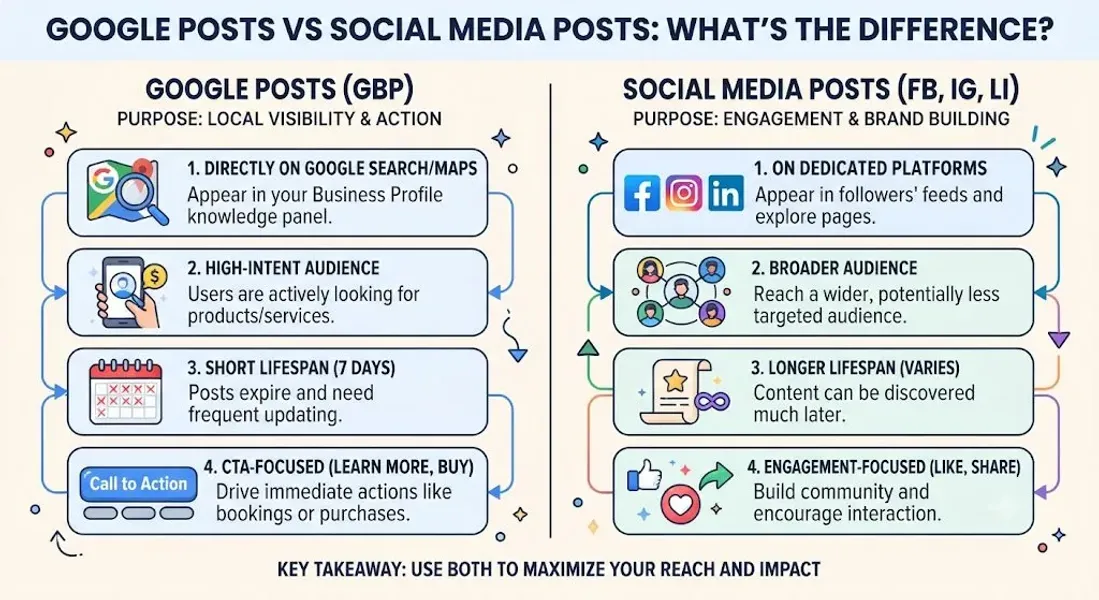
Here’s the core distinction: Google Posts appear on your Google Business Profile, where people are actively searching for local businesses like yours. Social media posts appear on platforms like Facebook, Instagram, and LinkedIn, where people are scrolling, engaging, and connecting—but not necessarily looking to buy. That difference in user intent changes everything.
Google Posts are designed for discovery and conversion. They reach high-intent searchers who are often ready to take action. Social media posts are designed for engagement and relationship-building. They reach a broader audience that may or may not be ready to buy, but can become loyal customers over time.
In this comprehensive guide, we’ll break down the differences between Google Posts and social media posts. We’ll explain how each platform works, the types of content that perform best on each, when to use one versus the other, and how to combine them into a cohesive local marketing strategy. By the end, you’ll understand exactly how to allocate
your time and effort—and why both deserve a place in your plan.
What Are Google Posts?
Google Posts are short updates you publish directly to your Google Business Profile. They appear on your listing in Google Search and Google Maps, typically in a dedicated section below your photos and reviews.
Each Google Post can include:
- Text: Up to 1,500 characters
- Image or video: A visual element to grab attention
- Call to action: Buttons like “Call now,” “Book,” “Learn more,” or “Get offer”
- Link: A URL to a specific page on your website Posts typically expire after seven days (event and offer posts can run longer), which means consistent posting is essential to keep your profile active.
Where Google Posts Appear
Google Posts appear in several places:
- On your Google Business Profile when viewed on Google Search
- On your Google Maps listing
- When customers click “Updates” or “Posts” on your profile
- In some local search results
The Purpose of Google Posts
Google Posts are designed to:
- Drive immediate action (calls, bookings, visits)
- Showcase offers, events, and new products
- Signal activity to Google (which can support local SEO)
- Engage customers who are already searching for your business For more on Google Posts, see our guide on Google Business Profile post ideas.
What Are Social Media Posts?
Social media posts are updates you publish on platforms like Facebook, Instagram, Twitter, LinkedIn, TikTok, and Pinterest. They appear in your followers’ feeds and can be seen by anyone who visits your page.
Each social media post can include:
- Text: Varies by platform (from 280 characters on Twitter to much longer on Facebook)
- Image or video: Visual content is central to most platforms
- Links: Most platforms allow links, though some limit them
- Hashtags: Used for discovery on Instagram, Twitter, and TikTok
- Engagement features: Likes, comments, shares, and saves
Where Social Media Posts Appear
Social media posts appear:
- In your followers’ feeds
- On your business page
- In search results on the platform
- In Explore or Discover sections (on some platforms)
- When shared by others
The Purpose of Social Media Posts
Social media posts are designed to:
- Build brand awareness
- Engage your audience
- Foster community
- Drive traffic to your website
- Support customer service
- Entertain, inform, or inspire For more on social media strategy, see our guide on Google Posts vs social media (this article).
The Key Differences Between Google Posts and Social Media Posts
Now let’s break down the differences that matter most.
1. Audience Intent
Google Posts: Reach people who are actively searching for a business like yours. They have high intent—they’re looking for information, directions, or a way to contact you.
Social Media Posts: Reach people who are scrolling, browsing, or connecting with friends. They may not be looking for your business at all. Intent is lower, but the potential for discovery and relationship-building is higher.
2. Platform Purpose
Google Posts: Designed for local discovery and conversion. They appear when someone searches for your business or a service you offer.
Social Media Posts: Designed for engagement and community. They appear in feeds where users are consuming content, not necessarily looking to buy.
3. Lifespan
Google Posts: Most expire after seven days. Event and offer posts can run longer. This means you need to post consistently to stay visible.
Social Media Posts: Remain on your page indefinitely, though their visibility in feeds decreases over time. Evergreen content can continue to drive engagement for months.
4. Reach and Visibility
Google Posts: Visible to anyone who searches for your business or related services. They’re not dependent on followers—you can reach new customers who’ve never heard of you.
Social Media Posts: Visible primarily to your followers, though algorithms can extend reach through shares and engagement. Building an audience takes time.
5. Algorithm and Ranking Factors
Google Posts: Influenced by Google’s local search algorithm. Engagement (clicks, calls, direction requests) signals relevance. Posting regularly supports local SEO.
Social Media Posts: Influenced by platform algorithms that prioritize engagement, recency, and relevance. Each platform has its own rules.
6. Content Types
Google Posts: Update, offer, event, and product posts. Text, images, and CTAs.
Social Media Posts: Photos, videos, stories, reels, live streams, polls, questions, and more. Each platform has its own formats.
7. Call to Action
Google Posts: Built-in CTA buttons like “Call now,” “Book,” “Learn more,” “Get offer,” and “Buy.” These make it easy for customers to take action immediately.
Social Media Posts: CTAs are usually in the caption or bio link. Some platforms offer CTA buttons for ads, but organic posts rely on text-based CTAs.
8. SEO Impact
Google Posts: Directly support local SEO. They signal activity to Google and can improve your local ranking.
Social Media Posts: Indirectly support SEO. They build brand awareness and can drive traffic to your website, but they don’t directly impact Google rankings.
9. Target Audience
Google Posts: Local customers who are ready to take action.
Social Media Posts: Broader audience—local, national, or global—depending on your strategy.
10. Cost
Google Posts: Free.
Social Media Posts: Free (organic), though paid ads are available on most platforms.
Comparison Table
| Feature | Google Posts | Social Media Posts |
|---|---|---|
| Audience intent | High (actively searching) | Low to medium (browsing) |
| Lifespan | 7 days (most) | Indefinite |
| Reach | Anyone searching | Followers + algorithm |
| SEO impact | Direct | Indirect |
| Best for | Conversions, local discovery | Engagement, community |
| CTA buttons | Yes | Limited |
| Content types | Updates, offers, events, products | Photos, videos, stories, reels |
| Frequency | Weekly | Daily or more |
When to Use Google Posts
Google Posts are best for situations where you want to reach high-intent local customers and drive immediate action.
Use Google Posts When You Want To:
- Promote a time-sensitive offer: Limited-time discounts, flash sales, or seasonal promotions.
- Announce an event: Workshops, open houses, or community events.
- Showcase a new product or service: New menu items, treatments, or offerings.
- Share important updates: Holiday hours, closures, or changes to your business.
- Drive calls or bookings: Posts with “Call now” or “Book” buttons make it easy.
- Improve local SEO: Regular posting signals activity to Google.
- Reach new customers: Google Posts are visible to anyone searching, not just followers.
Examples of Effective Google Posts
- “This week only: 20% off all haircuts. Book now!”
- “Join us for our holiday open house this Saturday—free samples and giveaways!”
- “New on the menu: Spicy Korean fried chicken sandwich. Come try it!”
- “We’ll be closed on Thanksgiving. Regular hours resume Friday.” For more ideas, see our guide on Google Post ideas.
When to Use Social Media Posts
Social media posts are best for building relationships, engaging your audience, and growing your brand over time.
Use Social Media Posts When You Want To:
- Build brand awareness: Reach a broader audience and introduce your business to new people.
- Engage your community: Respond to comments, ask questions, and foster conversation.
- Share behind-the-scenes content: Show your team, workspace, or process.
- Entertain or inspire: Share memes, quotes, or stories that resonate with your audience.
- Drive traffic to your website: Share blog posts, articles, or landing pages.
- Provide customer service: Answer questions and resolve issues publicly.
- Run paid ads: Social platforms offer sophisticated targeting for ads.
Examples of Effective Social Media Posts
- A behind-the-scenes video of your team preparing for the day.
- A customer testimonial with a photo.
- A poll asking followers to choose your next flavor.
- A carousel post highlighting five ways to use your product.
- A live Q&A session with your founder.
How Google Posts and Social Media Posts Work Together
Google Posts and social media posts aren’t competitors—they’re complementary. Used together, they create a comprehensive local marketing strategy.
Google Posts for Conversion, Social Media for Connection
Google Posts capture high-intent searchers and drive immediate action. Social media builds relationships and keeps your brand top-of-mind. Together, they cover the full customer journey—from awareness to conversion.
Cross-Promote Your Content
Share your Google Posts on social media. Share your social media content on Google Posts (when appropriate). Cross-promotion extends your reach and reinforces your message.
Example: If you’re running a promotion, create an Offer post on Google and a promotional post on Instagram. Link to the same landing page.
Use Social Media to Drive Google Reviews
Ask for reviews on social media. Link to your Google review page. This supports your customer reviews local SEO and builds your reputation.
Use Google Posts to Promote Social Media
If you’re hosting a live stream or social media event, promote it with a Google Post. This reaches local searchers who might not follow you on social media.
Track Both
Use Google Business Profile insights to track Google Post performance. Use platform analytics to track social media performance. Compare and adjust.
Best Practices for Google Posts
Follow these best practices to get the most from Google Posts.
Post Consistently
Aim for at least one post per week. Consistency matters more than frequency.
Use High-Quality Images
Posts with images get more engagement. Use clear, relevant visuals.
Include a Call to Action
Every post should tell customers what to do next—call, book, learn more, or visit.
Keep Text Concise
Aim for 150-300 characters for most posts. Get to the point.
Use Keywords Naturally
Incorporate local keywords and service terms to support your local SEO. Don’t stuff them.
Track Performance
Use Google Business Profile insights to see how your posts perform.
Create a Content Calendar
Plan your posts in advance with a Google Business Profile content calendar.
For more, see our guide on how often to update Google Business Profile.
Best Practices for Social Media Posts
Follow these best practices to get the most from social media.
Know Your Platform
Each platform has its own culture, formats, and best practices. Tailor your content accordingly.
Post Consistently
Aim for daily or near-daily posting on most platforms. Consistency builds audience and engagement.
Use Visuals
Images and videos outperform text-only posts on almost every platform.
Engage With Your Audience
Respond to comments, answer questions, and participate in conversations.
Use Hashtags Strategically
Hashtags help with discovery on Instagram, Twitter, and TikTok. Use relevant, targeted hashtags—not too many.
Track Analytics
Use platform analytics to see what’s working. Double down on high-performing content.
Don’t Over-Promote
Mix promotional content with value-driven, entertaining, or educational posts.
Common Mistakes to Avoid
Avoid these mistakes when using Google Posts and social media.
Treating Them as Interchangeable
Google Posts and social media posts serve different purposes. Don’t copy-paste the same content across both without adapting it.
Ignoring Google Posts
Many businesses focus only on social media and neglect Google Posts. This is a missed opportunity for local SEO and conversion.
Posting Inconsistently
Sporadic posting on either platform signals neglect. Stay consistent.
Using the Wrong Format
Don’t use a platform in a way that doesn’t fit its culture. A formal press release doesn’t work on TikTok. A meme doesn’t work on LinkedIn.
Forgetting the CTA
Every post should have a purpose. Include a clear call to action.
Not Tracking Results
If you’re not tracking performance, you don’t know what’s working. Monitor and adjust.
Violating Platform Guidelines
Each platform has its own rules. Violating them can get your account restricted or suspended. For Google, see our guide on Google Business Profile suspended.
Conclusion
Google Posts and social media posts are both valuable tools for local businesses—but they’re not the same. Google Posts reach high-intent searchers and drive immediate action. Social media posts build relationships and grow your brand over time.
The key is to use each platform for its strengths. Use Google Posts for offers, events, updates, and conversion-focused content. Use social media for engagement, community, and brand-building. Then cross-promote where it makes sense and track your results.
Don’t neglect one for the other. A comprehensive local marketing strategy includes both. When you use them together, you cover the full customer journey—from discovery to conversion to loyalty.
Call to Action
Not sure how to balance Google Posts and social media for your business? Let our local SEO experts help. We’ll create a strategy that leverages both platforms, builds your local presence, and drives real results.
Contact Us Today for a Free Local SEO Audit!
FAQs
Q1: What’s the main difference between Google Posts and social media posts? A: Google Posts appear on your Google Business Profile and reach high-intent local searchers. Social media posts appear on platforms like Facebook and Instagram and reach a broader audience for engagement and brand-building.
Q2: Do Google Posts expire? A: Yes. Most Google Posts expire after seven days. Event and offer posts can run longer. Social media posts remain on your page indefinitely.
Q3: Which is better for local SEO? A: Google Posts directly support local SEO by signaling activity to Google. Social media posts indirectly support SEO by building brand awareness. Both are valuable, but Google Posts have a more direct impact on local rankings. For more, see our guide on local pack SEO.
Q4: Can I use the same content for Google Posts and social media? A: You can adapt the same core message, but don’t copy-paste. Tailor the format, tone, and CTA for each platform.
Q5: How often should I post on Google Business Profile? A: Aim for at least once a week. For a schedule, see our guide on how often to update Google Business Profile.
Q6: How often should I post on social media? A: It depends on the platform. Most businesses should aim for daily or near-daily posting on Instagram, Facebook, and Twitter. LinkedIn may be less frequent.
Q7: Can Google Posts drive website traffic? A: Yes. You can include a link in your Google Post and a “Learn more” CTA to drive traffic to your website.
Q8: Should I use hashtags in Google Posts? A: No. Hashtags don’t work the same way on Google Posts. Focus on keywords and natural language instead.
Q9: What types of Google Posts perform best? A: Offer posts, event posts, and posts with high-quality images tend to perform well. For ideas, see our guide on Google Business Profile post ideas.
Q10: How do I track the performance of my Google Posts? A: Use Google Business Profile insights to see views, clicks, calls, and direction requests.
Q11: How do I automate Google Business Profile posts? A: Some reputation management tools allow scheduling. For more, see our guide on how to automate Google Business Profile posts.
Q12: What should I do if my Google Business Profile is suspended? A: If your profile is Google Business Profile suspended, review Google’s guidelines, fix any violations, and submit an appeal. Our guide on suspended profiles covers this in depth.
Q13: What should I do if my business is not showing on Google Maps? A: Check for verification issues, suspensions, incorrect information, or ranking problems. See our guide on business not showing on Google Maps.
Q14: How do I fix incorrect information on my Google Business Profile? A: If your profile shows incorrect information, you can edit it directly from your dashboard. For persistent issues, see our guide on how to fix Google Business Profile errors.
Internal Links
-
What Is Google Business Profile and How Does It Work? A Complete Guide
-
Google Business Profile vs Google Maps: What’s the Difference?
-
Google Business Profile Verification: Complete Step-by-Step Guide
-
How to Write the Perfect Google Business Profile Description
-
Google Business Profile Photos: Best Practices for Local SEO
-
Google Business Profile Services: How to Add and Optimize Them
-
Google Business Profile Attributes: What Are They and Why Do They Matter?
-
Google Business Profile Suspended? Common Causes and What to Do
-
What Are Local Citations and Why Are They Important for SEO?
-
Local Keywords: How to Find the Right Keywords for Your Business
-
[How to Find ](/blog/near-me-keywords)
-
Local Pack SEO: How Businesses Appear in Google’s Local Results
-
Positive vs Negative Google Reviews: How Businesses Should Respond
-
Google Review Response Templates for Different Business Situations
-
Google Business Profile Posts: 20 Content Ideas for Local Businesses
-
Google Post Ideas for Restaurants, Clinics, Salons and Service Businesses
-
Google Business Profile Insights: 10 Metrics Every Business Should Track
-
Contact Busirank## External Links
-
Google’s Guidelines for Representing Your Business on Google
Keep reading
Grow Your Google Maps Ranking on Autopilot
Stop spending hours every week manually replying to customer reviews and writing Google posts. Busirank automates your Google Business Profile to boost your local SEO rankings and turn searchers into paying clients.

 Busirank Team