 Busirank Team
Introduction
Your Google Business Profile is often the first impression potential customers have of your business. Before they visit your website, before they call your phone, and before they walk through your doors, they see your profile. And one of the most important elements they’ll read is your business description.
Think about it. When someone searches for a business like yours, they’re presented with dozens of options. They scan through names, ratings, and those few precious lines of text that tell them what you’re all about. That text—your Google Business Profile description—can be the difference between a customer clicking on your listing or scrolling past to a competitor.
Here’s the frustrating part: many business owners treat their description as an afterthought. They write something generic, stuff it with keywords, or leave it blank entirely. This is a massive missed opportunity. Your description is prime real estate on one of the most visited platforms in the world. When written well, it can attract more clicks, build trust, and convince customers to choose you over the competition.
In this comprehensive guide, we’ll walk you through exactly how to write the perfect Google Business Profile description. We’ll cover what to include, what to avoid, how to optimize for search, and provide practical examples you can adapt for your own business. By the end, you’ll have everything you need to craft a description that works as hard as you do.
What Is a Google Business Profile Description?
Your Google Business Profile description is a short block of text that appears on your profile, typically below your business name, category, and contact information. It’s your opportunity to tell potential customers who you are, what you do, and why they should choose you.
The description appears on both Google Search and Google Maps. When someone clicks on your listing to see more details, your description is one of the first things they’ll read.
Description Length Limits
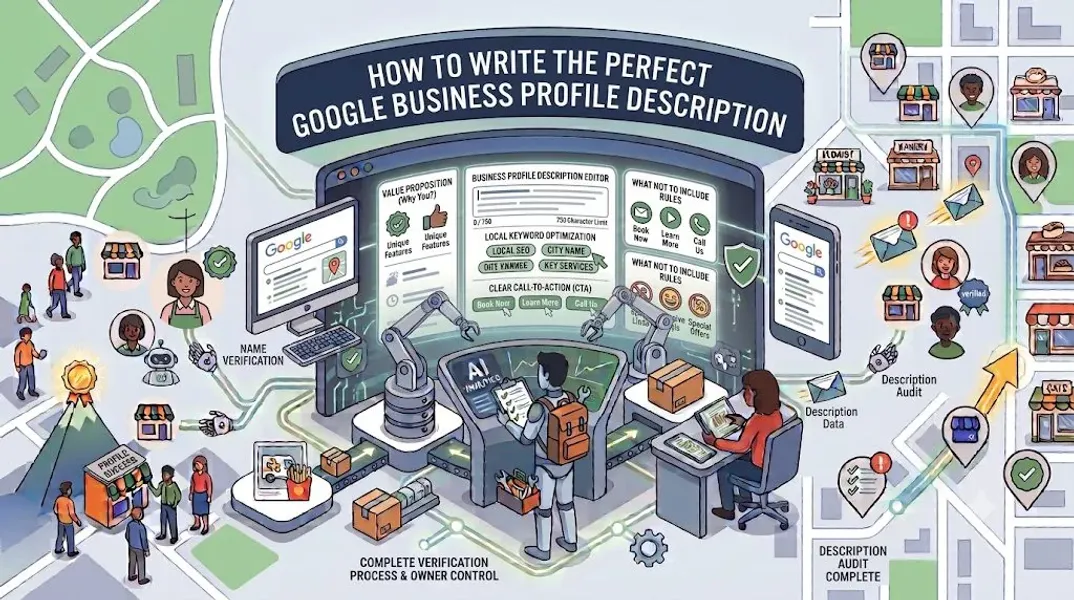
Google allows up to 750 characters for your business description. That’s roughly 100-150 words. While it might not seem like much, it’s enough to make a strong impression if you use the space wisely.
It’s worth noting that Google only displays the first 250 characters or so before truncating the rest with a “Read more” link. This means your most important information should come first.
Where Your Description Appears
Your description can appear in several places:
- On your Google Business Profile when viewed on Search
- On your Google Maps listing
- In some local pack results (though this is less common)
- When users click “About” on your profile
Why Your Google Business Profile Description Matters
You might be tempted to skip your description or fill it with generic filler. Don’t. Here’s why your description matters more than you might think.
It’s a First Impression
Your description is often the first substantial text a potential customer reads about your business. It sets the tone for their entire experience with your brand.
It Builds Trust and Credibility
A well-written, informative description signals that your business is professional and legitimate. It shows customers that you take your online presence seriously.
It Attracts the Right Customers
Your description helps potential customers determine if you’re the right fit for their needs. By clearly stating what you do and who you serve, you attract qualified leads and reduce wasted time.
It Supports Your Local SEO
While your description isn’t a direct ranking factor, it supports your overall profile optimization. Keywords in your description help Google understand your business and can improve your relevance for certain searches.
It Differentiates You From Competitors
Most businesses write bland, forgettable descriptions. A compelling, well-crafted description helps you stand out in a crowded local market.
What to Include in Your Google Business Profile Description
So what should you actually write in those 750 characters? Here are the key elements to include.
Your Core Services or Products
Start by clearly stating what your business offers. Don’t be vague. If you’re a plumber, say you offer plumbing repair, installation, and maintenance. If you’re a bakery, list your specialties like artisan breads, custom cakes, and pastries.
What Makes You Unique
What sets you apart from competitors? Maybe you’ve been in business for 25 years. Maybe you use organic ingredients. Maybe you offer same-day service. Whatever your differentiator is, highlight it.
Your Target Audience
Who do you serve? Are you a family-friendly restaurant? A boutique law firm serving small businesses? A fitness studio for seniors? Being specific helps the right customers identify with your business.
Your Location or Service Area
If you’re a local business, mention your location or the areas you serve. This reinforces your local relevance and helps customers know if you’re convenient for them.
A Trust Signal
Include something that builds credibility—years in business, certifications, awards, or a mention of your satisfied customers.
A Call to Action
End with a gentle call to action. Encourage customers to call, visit, book online, or learn more on your website.
What to Avoid in Your Google Business Profile Description
Just as important as what you include is what you leave out. Avoid these common mistakes.
Keyword Stuffing
Cramming keywords into your description doesn’t help your rankings and makes your business sound robotic. Write naturally and incorporate keywords organically.
Promotional Language
Google prohibits promotional content in descriptions. Don’t use phrases like “best in town,” “lowest prices,” or “guaranteed satisfaction.” These can get your profile flagged or suspended.
Special Offers or Pricing
You can’t include special offers, discounts, or pricing in your description. Use Google Posts for promotions instead.
Links and URLs
You can’t include links in your description. If you want to drive traffic to a specific page, use the website field or Google Posts.
Misleading Information
Don’t exaggerate or make claims you can’t back up. Your description should accurately represent your business.
ALL CAPS or Excessive Punctuation
Writing in all caps or using excessive exclamation points looks unprofessional and spammy. Write in a professional, conversational tone.
How to Write Your Google Business Profile Description: Step-by-Step
Now let’s walk through the process of writing your description, step by step.
Step 1: Research Your Keywords
Before you write, identify the keywords you want to target. These should be terms your customers are searching for. Use local keyword research tools to find relevant terms.
For example, if you’re a dentist in Austin, Texas, your keywords might include:
- Dentist in Austin
- Family dentist Austin
- Cosmetic dentistry Austin
- Emergency dental care
Step 2: Identify Your Key Messages
What are the three to five most important things you want customers to know about your business? These become the core of your description.
Step 3: Write Your First Draft
Don’t worry about character limits or perfection yet. Just write. Start with your most important message and build from there.
Step 4: Incorporate Keywords Naturally
Go back through your draft and weave in your target keywords. They should fit naturally—not feel forced.
Step 5: Edit for Clarity and Concision
Cut unnecessary words. Make every sentence count. Your description should be clear, concise, and easy to read.
Step 6: Check Your Character Count
Make sure your description is within Google’s 750-character limit. Use a character counter to check.
Step 7: Get Feedback
Ask a colleague, friend, or family member to read your description. Does it accurately represent your business? Is it compelling?
Step 8: Add It to Your Profile
Log in to your Google Business Profile, navigate to the “Edit profile” section, and add your description.
Best Practices for an Optimized Description
Follow these best practices to maximize the impact of your description.
Front-Load Important Information
Google truncates descriptions after about 250 characters. Put your most important information—what you do, who you serve, what makes you unique—at the beginning.
Write in the Third Person
Google recommends writing in the third person. Instead of “We offer…” write “ABC Plumbing offers…” This aligns with Google’s guidelines and reads more professionally.
Use Natural Language
Write as if you’re explaining your business to a customer. Avoid jargon and technical language that might confuse readers.
Be Specific
Specificity is more compelling than generality. Instead of “We offer quality services,” say “We provide emergency plumbing repair, water heater installation, and drain cleaning.”
Include Your Location
Mention your city or service area to reinforce your local relevance.
End with a Call to Action
Encourage customers to take the next step. “Call us today to schedule your appointment” or “Visit our showroom to see our full selection.”
Update Regularly
Your business evolves, and your description should too. Review and update your description at least once a year.
Google Business Profile Description Examples
Here are some examples to inspire your own description.
Example 1: Restaurant
“Family-owned Italian restaurant serving authentic recipes passed down through three generations. Located in the heart of downtown Chicago, we offer handmade pasta, wood-fired pizzas, and an extensive wine list. Our warm, inviting atmosphere is perfect for date nights, family dinners, and special celebrations. Private dining available for groups. Join us for lunch, dinner, or weekend brunch.”
Why it works: It includes the business type, location, specialty, atmosphere, and use cases—all in a natural, engaging tone.
Example 2: Plumbing Service
“Licensed and insured plumbing company serving the greater Denver area for over 20 years. We specialize in emergency plumbing repair, water heater installation, drain cleaning, and bathroom remodeling. Our certified technicians are available 24/7 for urgent issues. We pride ourselves on transparent pricing, prompt service, and workmanship guaranteed for one year. Call today for a free estimate.”
Why it works: It establishes credibility (20 years, licensed, insured), lists services, highlights availability, and includes a clear call to action.
Example 3: Boutique
“Curated women’s boutique featuring contemporary fashion, accessories, and gifts from independent designers. Located in Portland’s Pearl District, we offer a thoughtfully selected collection of clothing, jewelry, and home goods. Our knowledgeable stylists provide personalized shopping experiences. Whether you’re looking for a special occasion outfit or everyday essentials, you’ll find something unique at [Business Name].”
Why it works: It describes the business, location, product range, and unique value (curated, independent designers, personalized service).
Example 4: Dental Practice
“Comprehensive dental care for patients of all ages in the Austin community. Our practice offers preventive dentistry, cosmetic treatments, restorative procedures, and emergency dental services. Dr. [Name] and our team are committed to providing gentle, personalized care in a comfortable environment. We accept most insurance plans and offer flexible scheduling. New patients welcome.”
Why it works: It covers services, target audience, location, and trust signals (insurance accepted, new patients welcome).
Common Mistakes to Avoid
Learn from these common mistakes so you don’t make them yourself.
Writing a Generic Description
A description that could apply to any business in your industry isn’t doing its job. Make it specific to your business.
Making It All About You
Your description should focus on what you offer and how it benefits customers—not just your history or accomplishments.
Forgetting to Update It
Your business changes over time. If you’ve added new services, moved locations, or rebranded, update your description.
Ignoring the Character Limit
If your description exceeds 750 characters, it won’t be fully visible. Keep it concise and within the limit.
Using Prohibited Content
Promotional language, links, and special offers are prohibited. Violating these guidelines can get your profile suspended.
How to Update Your Google Business Profile Description
If you need to update your description, here’s how.
Step 1: Sign In to Your Google Business Profile
Go to google.com/business and sign in.
Step 2: Navigate to Your Profile
Click on your business name to open your profile.
Step 3: Edit Your Description
Click “Edit profile,” then find the description field. Make your changes.
Step 4: Save Your Changes
Click “Save” to apply your updates.
Step 5: Monitor the Impact
After updating, monitor your Google Business Profile insights to see if the changes affect your visibility or engagement.
Conclusion
Your Google Business Profile description is one of the most valuable pieces of real estate on your local listing. It’s your chance to tell potential customers who you are, what you do, and why they should choose you. A well-written description builds trust, attracts the right customers, and supports your local SEO.
The key is to be specific, natural, and customer-focused. Include your core services, what makes you unique, who you serve, and a call to action. Avoid keyword stuffing, promotional language, and generic filler. And remember: your description isn’t set in stone. As your business evolves, your description should too.
With the tips and examples in this guide, you have everything you need to write a description that works. Take the time to get it right, and you’ll see the difference in your local visibility.
Call to Action
Not sure if your Google Business Profile description is doing its job? Let our local SEO experts review and optimize it for you. We’ll craft a compelling description that attracts customers and boosts your local rankings.
Contact Us Today for a Free Local SEO Audit!
FAQs
Q1: How long should my Google Business Profile description be? A: Google allows up to 750 characters. Aim for 500-750 characters to provide enough information while staying within the limit. Remember that only the first 250 characters show before “Read more.”
Q2: Can I include links in my description? A: No, links are not allowed in your Google Business Profile description. Use the website field on your profile or Google Posts to drive traffic to specific pages.
Q3: Can I include promotions or special offers in my description? A: No, promotional content is prohibited in your description. Use Google Posts to share offers, events, and updates.
Q4: How often should I update my description? A: Review your description at least once a year, or whenever your business offerings, location, or key messages change.
Q5: Will my description help my local SEO? A: While your description isn’t a direct ranking factor, it supports your overall profile optimization. Keywords in your description help Google understand your business and can improve your relevance for certain searches.
Q6: What should I do if my Google Business Profile is suspended? A: If your profile is Google Business Profile suspended after adding your description, review Google’s guidelines. Common causes include promotional language or keyword stuffing. Fix the issue and submit an appeal. Our guide on suspended profiles covers this in depth.
Q7: Can I write my description in first person? A: Google recommends writing in the third person. Instead of “We offer,” write “[Business Name] offers.” This aligns with Google’s guidelines and reads more professionally.
Internal Links
-
What Is Google Business Profile and How Does It Work? A Complete Guide
-
Google Business Profile vs Google Maps: What’s the Difference?
-
Google Business Profile Verification: Complete Step-by-Step Guide## External Links
-
Google’s Guidelines for Representing Your Business on Google
Keep reading
Grow Your Google Maps Ranking on Autopilot
Stop spending hours every week manually replying to customer reviews and writing Google posts. Busirank automates your Google Business Profile to boost your local SEO rankings and turn searchers into paying clients.

 Busirank Team