 Busirank Team
Introduction
Is your business invisible to local customers searching on Google? Every day, millions of people search for products and services near them, and the businesses that appear at the top of those results capture the lion’s share of customers. If you’re not showing up, you’re losing business to competitors who are.
The good news? There’s a powerful, completely free tool that can put your business in front of those exact customers: Google Business Profile. Formerly known as Google My Business, this tool is the single most important asset for any business that serves a local audience. Whether you run a restaurant, a dental clinic, a law firm, a salon, or a plumbing service, your Google Business Profile determines whether customers find you or your competition.
In this comprehensive guide, we’ll explain exactly what Google Business Profile is, how it works behind the scenes, why it matters for your bottom line, and how to set it up and optimize it for maximum visibility. By the end, you’ll have a clear roadmap to turning Google searches into paying customers.
What Is Google Business Profile?
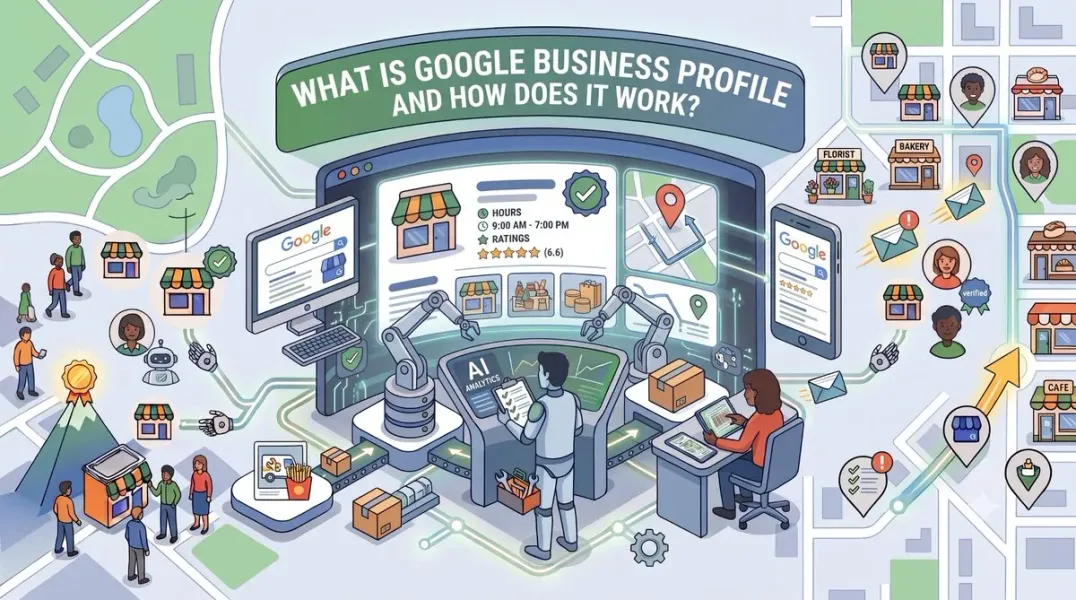
Google Business Profile is a free tool from Google that allows business owners to create, manage, and optimize how their business appears across Google Search and Google Maps. When someone searches for your business name directly, or for a service you offer in your area, your Google Business Profile is what generates the information they see.
Think of it as your digital storefront. It displays your business name, address, phone number, website, hours of operation, photos, customer reviews, and much more. It’s the first impression most potential customers will have of your business, and it often appears before your actual website in search results.
The profile is the foundation of local pack SEO—the prominent block of three map-based results that appears at the top of Google for local searches. Appearing in this local pack is the goal for most local businesses, as it captures the highest-intent traffic.
Importantly, Google Business Profile is not just for businesses with a physical storefront. Service-area businesses like plumbers, electricians, mobile therapists, and delivery services can also create profiles and specify the geographic areas they serve.
Why Google Business Profile Matters for Your Business
Your Google Business Profile is far more than a simple directory listing. It’s a dynamic marketing asset that directly influences whether customers choose you over a competitor. Here’s why it matters so much:
It Drives Local Visibility
When someone searches for “coffee shop near me” or “emergency dentist in [city],” Google prioritizes businesses with complete, active, and well-reviewed profiles. Without one, you simply won’t appear in these high-intent searches.
It Builds Trust and Credibility
A complete profile with positive reviews, professional photos, and accurate information signals to both Google and potential customers that your business is legitimate, active, and trustworthy. Studies consistently show that consumers read reviews before making purchasing decisions, and a strong profile directly influences that choice.
It Attracts More Customers at the Moment of Intent
Your profile provides all the information a customer needs to take action: call you, get directions, visit your website, or book an appointment. This removes friction from the customer journey and increases the likelihood of conversion.
It Provides Free, Actionable Insights
The Google Business Profile insights feature shows you exactly how customers are finding you. You can see how many people viewed your profile, how many called you, how many requested directions, and what search terms triggered your listing. This data is invaluable for refining your local marketing strategy.
It Levels the Playing Field
Unlike paid advertising, where budgets often determine winners, Google Business Profile rewards businesses that are thorough, responsive, and consistent. A small local shop can outrank a large chain if its profile is better optimized.
How Does Google Business Profile Work?
Understanding the mechanics of Google Business Profile helps you use it more effectively. Think of it as a continuous cycle involving you, Google, and your customers.
Step 1: You Provide Information
You create and manage your profile by adding details about your business. This includes your business name, address, phone number, website, category, hours, description, photos, services, products, and attributes. The accuracy and completeness of this information directly affect your visibility.
Step 2: Google Verifies Your Business
To maintain trust and prevent spam, Google requires verification before your profile becomes publicly visible. Verification methods include postcard by mail, phone call, email, video recording, or instant verification for eligible businesses. The Google Business Profile verification process ensures that only legitimate businesses are listed.
Step 3: Google Displays Your Profile
Once verified, Google’s algorithm determines when and where to show your profile. It considers relevance (how well your business matches the search), distance (how close you are to the searcher), and prominence (how well-known and well-reviewed your business is).
Step 4: Customers Interact
Customers can interact with your profile in multiple ways: calling you directly, getting directions, visiting your website, reading and leaving reviews, asking questions in the Q&A section, and viewing your posts and photos.
Step 5: You Respond and Optimize
You can respond to reviews, answer questions, publish new posts, add photos, and update information. This ongoing activity signals to Google that your business is active and engaged, which can improve your ranking over time.
Key Features of Your Google Business Profile
To get the most out of your profile, you need to understand and utilize all its features. Here’s a breakdown of the most important ones.
Business Information
This includes your name, address, phone number, website, hours, and category. NAP consistency—making sure your Name, Address, and Phone Number are identical across all online platforms—is critical for local SEO. Inconsistent information confuses Google and can hurt your ranking.
Reviews and Q&A
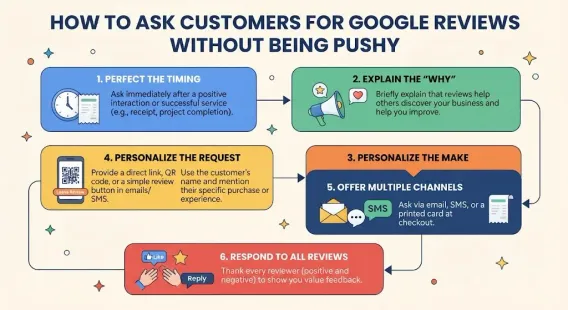
The impact of customer reviews local SEO cannot be overstated. Reviews are one of the strongest ranking factors for local search, and they heavily influence customer decisions. You should actively ask for Google reviews from satisfied customers and respond to every review, positive or negative. The Q&A section allows customers to ask questions publicly, and you can provide answers that benefit future visitors.
Posts
Google Business Profile Posts allow you to share updates, offers, events, and news directly on your profile. Regular posting keeps your profile fresh and gives customers a reason to engage. For inspiration, see our guide on Google Business Profile post ideas.
Products and Services
You can list the specific products you sell or services you offer, complete with descriptions and prices. This helps potential customers understand exactly what you provide and improves your relevance for specific searches. Optimizing your Google Business Profile services is essential for service-based businesses.
Photos and Videos
Visual content is powerful. Photos of your storefront, interior, team, and products help customers recognize and trust your business. Following Google Business Profile photos best practices, such as adding geotagged images and updating regularly, can significantly boost engagement.
Attributes
Attributes are tags like “Wheelchair accessible,” “Free Wi-Fi,” “Outdoor seating,” or “Women-led.” They provide extra detail that helps customers find businesses that meet their specific needs. Understanding Google Business Profile attributes and using them correctly improves both visibility and customer experience.
Messaging
You can enable messaging to allow customers to contact you directly through your profile. This is especially useful for businesses that want to answer quick questions or book appointments.
How to Set Up Your Google Business Profile for Success
If you’re starting from scratch, here’s a step-by-step guide to create Google Business Profile and set it up correctly.
Step 1: Go to the Official Google Business Profile Website
Visit google.com/business and click “Manage now.” Sign in with your Google account.
Step 2: Add Your Business Name
Enter your real-world business name exactly as it appears on your storefront, website, and legal documents. Avoid adding keywords, locations, or promotional phrases—this violates Google’s guidelines and can lead to suspension.
Step 3: Choose the Right Category
Selecting the correct Google Business Profile category is one of the most important steps. Your primary category has a major influence on which searches your business appears for. Choose the most specific category that accurately describes your core business. You can add secondary categories later.
Step 4: Add Your Location
If you have a physical location where customers visit, enter your address. If you’re a service-area business, you can specify the regions you serve. You can also choose to hide your address if you operate from home.
Step 5: Add Contact Information
Provide a phone number and a link to your website. Make sure this information matches what’s on your website and other online listings.
Step 6: Verify Your Business
Follow Google’s Google Business Profile verification process. This may involve receiving a postcard, answering a phone call, recording a video, or verifying by email, depending on your business type and location.
Step 7: Complete Every Section
Once verified, fill out every section of your profile. Write a compelling Google Business Profile description that explains what you do, who you serve, and what makes you unique. Add high-quality photos, list your services and products, set your hours, and select relevant attributes.
Step 8: Start Collecting Reviews
Reach out to your existing customers and ask them to leave a review. The more positive reviews you have, the stronger your profile becomes.
Common Mistakes to Avoid
Even well-intentioned business owners make mistakes that can hurt their visibility or even get their profile suspended. Here are the most common pitfalls:
Keyword Stuffing Your Business Name
Adding keywords like “Best Plumber NYC” to your business name is a violation of Google’s guidelines. It may give you a short-term boost, but it almost always results in your profile being Google Business Profile suspended.
Inconsistent NAP Information
If your name, address, or phone number differs across your website, social media, and local citations, Google may lose trust in your listing and reduce your visibility.
Ignoring Reviews
Failing to respond to reviews—especially negative ones—damages your reputation and signals to Google that you’re not engaged. Learning how to respond to negative Google reviews professionally is a critical skill.
Not Posting Regularly
A dormant profile looks abandoned. Posting at least once a week keeps your profile active and gives customers reasons to engage.
Using Low-Quality Photos
Blurry, poorly lit, or irrelevant photos hurt your credibility. Invest in professional photography or at least use a good smartphone camera in natural light.
Neglecting the Q&A Section
Customers can ask questions on your profile, and anyone can answer them—including competitors or trolls. Monitor this section and provide authoritative answers yourself.
Conclusion
Your Google Business Profile is the cornerstone of your local marketing strategy. It’s a free, powerful tool that directly connects you with customers who are already searching for what you offer. By understanding what it is, how it works, and the importance of consistent optimization, you can significantly improve your local visibility and drive real business growth.
From choosing the right category and writing a compelling description to managing reviews and posting regularly, every action you take on your profile contributes to your success in local search. The businesses that invest time and effort into their profiles will consistently outperform those that don’t.
Call to Action
Ready to dominate local search but don’t have the time to manage your profile daily? Let our local SEO experts handle it for you. We’ll optimize your profile, manage your reviews, create engaging posts, and track your performance so you can focus on running your business.
Contact Us Today for a Free Local SEO Audit!
FAQs
Q1: Is Google Business Profile free? A: Yes, Google Business Profile is completely free to create, verify, and manage. There are no subscription fees, and you don’t need to pay to appear in local search results.
Q2: How long does it take for a Google Business Profile to go live? A: You can set up the profile in minutes, but it won’t be publicly visible until it’s verified. Verification (often by postcard) can take up to 14 days. Some businesses may be eligible for instant verification by phone or email.
Q3: What is the difference between Google Business Profile and Google Maps? A: Your Google Business Profile is the dashboard where you manage your information. Google Maps is where your information is displayed to users. The two are intrinsically linked. For a deeper dive, see our guide on Google Business Profile vs Google Maps.
Q4: Can I have a Google Business Profile without a physical address? A: Yes, if you are a service-area business (like a plumber or a mobile hairdresser) that travels to customers. You can set your profile to hide your address and specify the areas you serve.
Q5: How often should I update my Google Business Profile? A: You should post at least once a week, update photos monthly, and review your information quarterly to ensure accuracy. For a full schedule, see our guide on how often to update Google Business Profile.
Q6: What should I do if my Google Business Profile is suspended? A: If your profile is Google Business Profile suspended, you can appeal the decision through Google’s reinstatement process. Identify the likely cause, fix it, and submit a detailed appeal. Our guide on suspended profiles covers this in depth.
Internal Links
-
Google Business Profile vs Google Maps: What’s the Difference?
-
Google Business Profile Verification: Complete Step-by-Step Guide## External Links
-
Google’s Guidelines for Representing Your Business on Google
Keep reading
Grow Your Google Maps Ranking on Autopilot
Stop spending hours every week manually replying to customer reviews and writing Google posts. Busirank automates your Google Business Profile to boost your local SEO rankings and turn searchers into paying clients.

 Busirank Team