 Busirank Team
Introduction
Responding to Google reviews is one of those tasks that sounds simple—until you’re staring at a one-star review at 9 PM, trying to figure out what to say without making things worse. Or a five-star review that just says “great!” and you’re not sure how to reply without sounding robotic.
Here’s the truth: most business owners don’t struggle with the concept of responding to reviews. They struggle with the words. They worry about saying the wrong thing, sounding defensive, or coming across as insincere. And that hesitation often leads to the worst outcome of all—no response at all.
Google review response templates solve this problem. They give you a starting point—a proven structure you can adapt to your brand voice and the specific situation. Instead of starting from a blank page every time, you have a library of responses you can pull from and personalize.
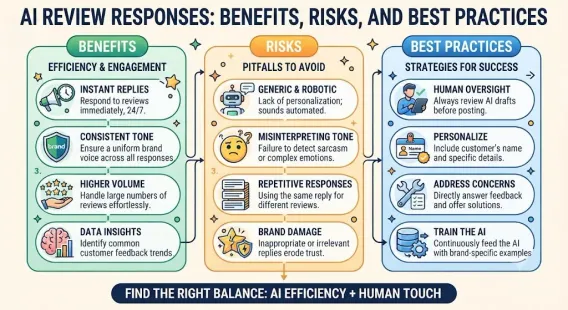
But templates only work if they feel genuine. A copy-pasted, one-size-fits-all reply to every review looks lazy and can hurt your reputation more than saying nothing. The goal is to use templates as a framework, then personalize them so each customer feels heard.
In this comprehensive guide, we’ll share Google review response templates for dozens of situations—positive reviews, negative reviews, neutral reviews, fake reviews, and everything in between. We’ll also explain the principles behind effective responses, common mistakes to avoid, and how to adapt templates for different industries. By the end, you’ll have a complete response toolkit you can use immediately.
Why Responding to Google Reviews Matters
Before we dive into templates, let’s briefly cover why responses matter so much.
Responses Improve Local SEO
Google has confirmed that responding to reviews can improve your local ranking. Engagement signals prominence, one of the three pillars of local search ranking. For more, see our guide on customer reviews local SEO.
Responses Build Trust
Customers read review responses to see how a business handles feedback. A thoughtful response to a negative review can reassure potential customers more than the negative review itself.
Responses Encourage More Reviews
When customers see that you respond to reviews, they’re more likely to leave one. They know their feedback will be acknowledged.
Responses Protect Your Reputation
Ignoring negative reviews makes you look indifferent. Responding professionally shows accountability.
The Principles Behind Effective Review Responses
Before using any template, understand the principles that make responses work.
Respond Quickly
Aim to respond within 24-48 hours. Timely responses show you’re engaged.
Personalize Every Response
Use the reviewer’s name. Reference specific details from their review. Generic responses feel hollow.
Stay Professional
Never argue, get defensive, or use sarcasm—no matter how unfair the review feels.
Keep It Concise
A few sentences are enough. Long responses can come across as defensive or rambling.
Offer to Take It Offline
For negative reviews, invite the customer to contact you directly. Don’t try to resolve complex issues publicly.
Avoid Promotional Language
Don’t turn responses into ads. Keep the focus on the customer.
Never Share Private Information
Don’t mention order numbers, appointment details, or anything that could identify the customer.
For more on handling difficult reviews, see our guide on how to respond to negative Google reviews.
Positive Review Response Templates
Positive reviews are easier to handle, but they still deserve a personalized response.
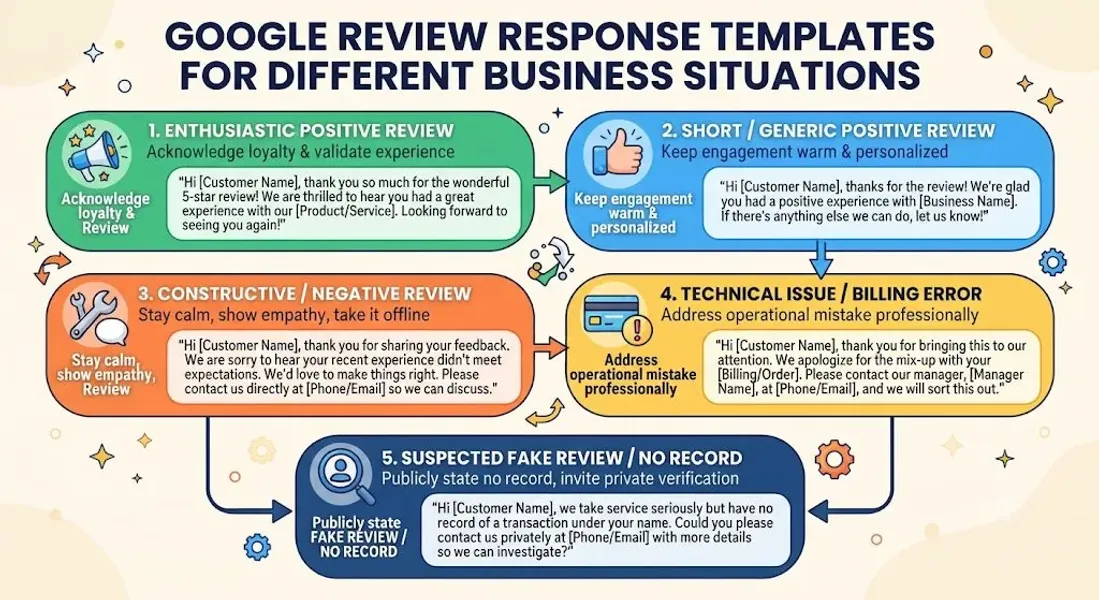
Template 1: Simple Five-Star Review
“Thank you so much, [Name]! We’re thrilled you had a great experience. We appreciate you taking the time to leave a review and hope to see you again soon!”
Template 2: Review Mentioning a Specific Staff Member
“Thank you, [Name]! We’re so glad [Staff Member] took great care of you. We’ll be sure to share your kind words with them—it’ll make their day!”
Template 3: Review Mentioning a Specific Product or Service
“Thanks for the wonderful review, [Name]! We’re delighted you loved the [product/service]. It’s one of our favorites too. We hope to welcome you back soon!”
Template 4: Review From a First-Time Customer
“Welcome to the [Business Name] family, [Name]! We’re so happy your first visit was a great one. Thank you for choosing us—we can’t wait to serve you again.”
Template 5: Review From a Long-Time Customer
“Thank you for your continued support, [Name]! Loyal customers like you are the reason we do what we do. We’re grateful for your trust and look forward to many more years together.”
Template 6: Short Review (e.g., “Great!”)
“Thanks so much, [Name]! We’re glad you enjoyed your visit. Hope to see you again soon!”
Template 7: Review Mentioning the Atmosphere or Experience
“Thank you, [Name]! We work hard to create a [cozy/friendly/welcoming] atmosphere, so it means a lot to hear you enjoyed it. Come back anytime!”
Template 8: Review From a Referral or Word-of-Mouth Customer
“Thank you, [Name]! We’re so glad you found us. Thanks for trusting the recommendation—we hope to become your go-to for [service/product].”
Template 9: Review Praising Speed or Convenience
“Thanks, [Name]! We know your time is valuable, so we’re thrilled we could help you quickly. We appreciate the kind words!”
Template 10: Review With Photos
“Thank you, [Name]! We love the photos—thanks for sharing them! We’re so glad you had a great experience and hope to see you again soon.”
Negative Review Response Templates
Negative reviews require more care. Here are templates for common situations.
Template 1: General Negative Review
“Hi [Name], I’m sorry to hear about your experience. That’s not the standard we aim for, and we’d like to make it right. Please contact us at [email/phone] so we can discuss further. Thank you for your feedback.”
Template 2: Service Quality Complaint
“Hi [Name], thank you for letting us know. I’m sorry the service didn’t meet your expectations. We take this seriously and would like to resolve it. Please reach out to [email/phone] so we can make it right.”
Template 3: Wait Time Complaint
“Hi [Name], I’m sorry about the wait you experienced. We know your time is valuable, and we’re working on improving our processes. We’d love the chance to serve you better—please contact us at [email/phone].”
Template 4: Rude or Unhelpful Staff Complaint
“Hi [Name], I’m sorry to hear you felt our team wasn’t helpful. That’s not the experience we want for our customers. We’d like to learn more—please contact us at [email/phone].”
Template 5: Pricing Complaint
“Hi [Name], thank you for your feedback. I’m sorry our pricing didn’t meet your expectations. We strive to offer fair value, and we’d be happy to discuss your concerns directly. Please contact us at [email/phone].”
Template 6: Product Quality Complaint
“Hi [Name], I’m sorry the product didn’t meet your expectations. We stand behind what we sell and would like to make this right. Please contact us at [email/phone] so we can help.”
Template 7: Billing or Payment Issue
“Hi [Name], I’m sorry for the confusion with your billing. We’d like to look into this and resolve it. Please contact us at [email/phone] so we can review your account.”
Template 8: Cleanliness Complaint
“Hi [Name], thank you for bringing this to our attention. Cleanliness is a top priority for us, and I’m sorry we fell short. We’re addressing this immediately. Please contact us at [email/phone] so we can make it right.”
Template 9: Complaint About a Specific Employee
“Hi [Name], I’m sorry to hear about your experience with our team member. This doesn’t reflect our standards, and we’d like to learn more. Please contact us at [email/phone] so we can address this properly.”
Template 10: Review From a Customer Who Didn’t Get a Response
“Hi [Name], I’m sorry we didn’t get back to you promptly. That’s not the service we aim to provide. We’d like to resolve your issue—please contact us at [email/phone].”
Template 11: Review With Inaccurate Details
“Hi [Name], thank you for your feedback. I’d like to clarify a few details and resolve any concerns. Please contact us at [email/phone] so we can discuss this directly.”
Template 12: Review Where You Genuinely Made a Mistake
“Hi [Name], you’re right—we missed the mark, and we’re sorry. We take full responsibility and would like to make it right. Please contact us at [email/phone].”
Template 13: Review With Legal or Safety Concerns
“Hi [Name], thank you for bringing this to our attention. We take safety seriously and would like to investigate. Please contact us directly at [email/phone] so we can address your concerns.”
Template 14: One-Star Review With No Comment
“Hi [Name], I’m sorry to see your one-star rating. We’d like to understand what went wrong and make it right. Please contact us at [email/phone] so we can learn more.”
Template 15: Negative Review From a Non-Customer
“Hi [Name], we take feedback seriously, but we don’t have a record of your visit. If this is a mistake, please contact us at [email/phone] so we can look into it.”
Neutral Review Response Templates
Neutral reviews (three stars) are often the trickiest. They’re not glowing, but they’re not angry either. Here’s how to respond.
Template 1: General Three-Star Review
“Thank you for your feedback, [Name]. We’re always looking to improve, and we’d love to know how we can make your next experience a five-star one. Please contact us at [email/phone] with any suggestions.”
Template 2: Review Saying “It Was OK”
“Thanks for taking the time to review us, [Name]. We’d love to know what would have made your experience better. Feel free to reach out at [email/phone]—we’re always listening.”
Template 3: Review With Mixed Feedback
“Thank you, [Name]. We appreciate the honest feedback—both the positives and the areas where we can improve. We’d love to hear more. Please contact us at [email/phone].”
Template 4: Review Mentioning Both Good and Bad
“Thanks, [Name]. We’re glad you enjoyed [positive aspect], and we’re sorry [negative aspect] fell short. We’d like to make it right—please contact us at [email/phone].”
Template 5: Review With No Comment
“Thank you for the rating, [Name]. We’d love to know how we can earn that fifth star. Please reach out at [email/phone] with any feedback.”
Templates for Specific Business Situations
Different situations call for different approaches. Here are templates for common scenarios.
Template 1: Responding to a Fake Review
“Hi [Name], we take feedback seriously, but we don’t have a record of your visit. If this is a mistake, please contact us at [email/phone] so we can look into it. If this review is fraudulent, we will report it to Google.”
For more, see our guide on fake Google reviews.
Template 2: Responding to a Competitor’s Fake Review
“Hi [Name], we don’t have a record of your visit and believe this review may be inaccurate. We’re committed to serving our customers honestly and would welcome the chance to discuss any concerns. Please contact us at [email/phone].”
Template 3: Responding to a Review After Resolving the Issue
“Hi [Name], thank you for giving us the opportunity to resolve your issue. We’re glad we could make things right. If there’s anything else we can do, please don’t hesitate to reach out. We appreciate your patience!”
Template 4: Responding to a Review Where Customer Is Right
“Hi [Name], you’re absolutely right, and we apologize. This isn’t the experience we want for our customers. We’re taking steps to ensure it doesn’t happen again. Thank you for holding us accountable.”
Template 5: Responding to a Review Where Customer Is Mistaken
“Hi [Name], thank you for your feedback. We’d like to clarify—[brief correction]. We’d be happy to discuss this further. Please contact us at [email/phone].”
Template 6: Responding to an Overly Harsh Review
“Hi [Name], I’m sorry you feel this way. We take all feedback seriously and would like to understand what happened. Please contact us at [email/phone] so we can address your concerns.”
Template 7: Responding to a Review With Profanity
“Hi [Name], we’re sorry to hear about your frustration. We’d like to resolve your concerns privately. Please contact us at [email/phone].”
Template 8: Responding to a Review About a Policy You Can’t Change
“Hi [Name], thank you for your feedback. We understand your frustration about [policy]. This policy is in place for [reason], but we appreciate your perspective and will take it into consideration.”
Template 9: Responding to a Review From an Ex-Employee
“Hi [Name], thank you for your feedback. We wish you the best in your future endeavors and hope you’ll reach out if you’d like to discuss anything further.”
Template 10: Responding to a Review About a Third-Party Issue
“Hi [Name], we’re sorry you had this experience. This issue was outside our control, but we understand your frustration. Please contact us at [email/phone] so we can help however we can.”
Industry-Specific Review Response Templates
Different industries face different review scenarios. Here are templates tailored to common business types.
Restaurants
Positive: “Thank you, [Name]! We’re so glad you enjoyed the [dish]. Our team loves hearing feedback like this. Hope to see you again soon!”
Negative: “Hi [Name], I’m sorry your meal didn’t meet expectations. We take food quality seriously and would like to make this right. Please contact us at [email/phone].”
Salons and Spas
Positive: “Thank you, [Name]! We’re thrilled you love your [service]. [Stylist/Therapist] will be so happy to hear this. See you next time!”
Negative: “Hi [Name], I’m sorry your experience didn’t meet expectations. We’d like to understand what happened and make it right. Please contact us at [email/phone].”
Medical and Dental Practices
Positive: “Thank you, [Name]! We’re glad your visit was comfortable and that our team took good care of you. We appreciate your trust.”
Negative: “Hi [Name], thank you for your feedback. We take patient experience seriously and would like to address your concerns. Please contact our office at [phone].”
Home Services (Plumbing, HVAC, Electrical)
Positive: “Thanks, [Name]! We’re glad we could help with your [service]. We appreciate your business and hope to work with you again.”
Negative: “Hi [Name], I’m sorry the service didn’t meet expectations. We’d like to resolve this. Please contact us at [email/phone] so we can make it right.”
Retail Stores
Positive: “Thank you, [Name]! We’re so glad you found what you were looking for. Thanks for shopping with us—see you next time!”
Negative: “Hi [Name], I’m sorry your experience wasn’t great. We’d like to learn more and make it right. Please contact us at [email/phone].”
Professional Services (Legal, Accounting, Consulting)
Positive: “Thank you, [Name]! We’re glad we could assist with [service]. We appreciate your trust and look forward to working with you again.”
Negative: “Hi [Name], thank you for your feedback. We take client concerns seriously and would like to discuss this directly. Please contact us at [email/phone].”
Fitness and Wellness
Positive: “Thanks, [Name]! We’re thrilled you’re enjoying your [class/program]. Keep up the great work—we’re here to support you!”
Negative: “Hi [Name], I’m sorry your experience wasn’t what you expected. We’d love to hear more and make it right. Please contact us at [email/phone].”
How to Adapt Templates for Your Brand Voice
Templates are starting points—not final scripts. Here’s how to make them your own.
Match Your Tone
If your brand is casual and friendly, use warmer language. If your brand is formal and professional, keep it polished.
Add Personal Details
Reference specifics from the review whenever possible. It shows you read it.
Use Your Own Sign-Off
Whether it’s “Thanks,” “Warmly,” or “Best,” use a sign-off that feels authentic to your brand.
Keep It Human
Avoid corporate jargon. Write like a person, not a press release.
Review Before Posting
Read your response aloud. If it sounds stiff or robotic, revise it.
Common Mistakes to Avoid When Using Templates
Templates can help—but they can also hurt if used poorly.
Copy-Pasting the Same Response
Every review deserves a personalized reply. Identical responses look lazy and can damage trust.
Sounding Robotic
If your response reads like a form letter, customers will notice. Personalize it.
Getting Defensive
Never argue with a reviewer. Stay calm and professional.
Ignoring the Reviewer’s Name
Using the customer’s name makes your response feel personal.
Overpromising
Don’t promise things you can’t deliver. Be honest about what you can do.
Including Promotional Content
Keep responses focused on the customer, not your marketing.
Waiting Too Long
Respond within 24-48 hours. Delayed responses seem indifferent.
Sharing Private Information
Never mention order details, appointment times, or anything that could identify the customer.
Conclusion
Responding to Google reviews doesn’t have to be difficult. With the right templates and a personalized approach, you can handle any review that comes your way—positive, negative, neutral, or fake.
The key is to use templates as a starting point, then adapt them to your brand voice and the specific situation. Personalize every response. Stay professional. Respond quickly. And never argue.
Remember: how you respond to reviews matters as much as the reviews themselves. A thoughtful response can turn a frustrated customer into a loyal one—and show everyone else that your business cares.
Call to Action
Want help managing your Google reviews? Let our local SEO experts help. We’ll craft personalized responses, monitor your profile, and build a strategy that improves your reputation and local rankings.
Contact Us Today for a Free Local SEO Audit!
FAQs
Q1: How do I respond to a positive Google review? A: Thank the customer genuinely, personalize your response, mention specific details, and invite them back. Use the templates in this guide as a starting point.
Q2: How do I respond to a negative Google review? A: Acknowledge the experience, apologize without admitting legal fault, offer to resolve the issue offline, and keep it concise and professional. For more, see our guide on respond to negative Google reviews.
Q3: Should I respond to every Google review? A: Yes. Respond to all reviews—positive and negative. It shows engagement and can improve your local ranking.
Q4: How quickly should I respond to a review? A: Aim to respond within 24-48 hours. Timely responses show you care.
Q5: Can I use the same response for every review? A: No. Copy-pasting the same response looks lazy and insincere. Personalize every reply.
Q6: What if the review is fake? A: Report it to Google. If it stays up, respond professionally. For more, see our guide on fake Google reviews and how to report fake Google review.
Q7: Can I include keywords in my responses? A: Yes, but do it naturally. Don’t stuff keywords. Use terms that fit the context of the review.
Q8: How do review responses affect local SEO? A: Responses improve prominence, engagement, and trust—all of which can improve your local ranking. For more, see our guide on customer reviews local SEO.
Q9: What should I do if my business is not showing on Google Maps? A: Check for verification issues, suspensions, incorrect information, or ranking problems. See our guide on business not showing on Google Maps.
Q10: What should I do if my Google Business Profile is suspended? A: If your profile is Google Business Profile suspended, review Google’s guidelines, fix any violations, and submit an appeal. Our guide on suspended profiles covers this in depth.
Q11: How do I fix incorrect information on my Google Business Profile? A: If your profile shows incorrect information, you can edit it directly from your dashboard. For persistent issues, see our guide on how to fix Google Business Profile errors.
Internal Links
-
What Is Google Business Profile and How Does It Work? A Complete Guide
-
Google Business Profile vs Google Maps: What’s the Difference?
-
Google Business Profile Verification: Complete Step-by-Step Guide
-
How to Write the Perfect Google Business Profile Description
-
Google Business Profile Photos: Best Practices for Local SEO
-
Google Business Profile Services: How to Add and Optimize Them
-
Google Business Profile Attributes: What Are They and Why Do They Matter?
-
Google Business Profile Suspended? Common Causes and What to Do
-
What Are Local Citations and Why Are They Important for SEO?
-
Local Keywords: How to Find the Right Keywords for Your Business## External Links
-
Google’s Guidelines for Representing Your Business on Google
Keep reading
Grow Your Google Maps Ranking on Autopilot
Stop spending hours every week manually replying to customer reviews and writing Google posts. Busirank automates your Google Business Profile to boost your local SEO rankings and turn searchers into paying clients.

 Busirank Team