 Busirank Team
Introduction
Every day, millions of people open Google Maps to find local businesses. They search for “coffee shop near me,” “emergency plumber,” or “best dentist in [city].” The businesses that appear at the top of those results get the calls, the visits, and the sales. The ones buried below—or worse, not showing at all—get nothing.
Here’s what makes this frustrating for small business owners: it can feel like the only way to get noticed on Google Maps is to pay for ads. You see sponsored listings at the top of search results and assume that’s the price of admission. But that’s not true. While Google Ads can certainly help, some of the most successful local businesses grow their visibility entirely through organic strategies—no ad spend required.
The key is understanding how Google Maps ranking actually works. Google doesn’t just reward businesses that pay. It rewards businesses that are relevant, prominent, and well-optimized. That means with the right approach, you can outrank competitors who are spending money on ads—simply by doing the fundamentals better than they do.
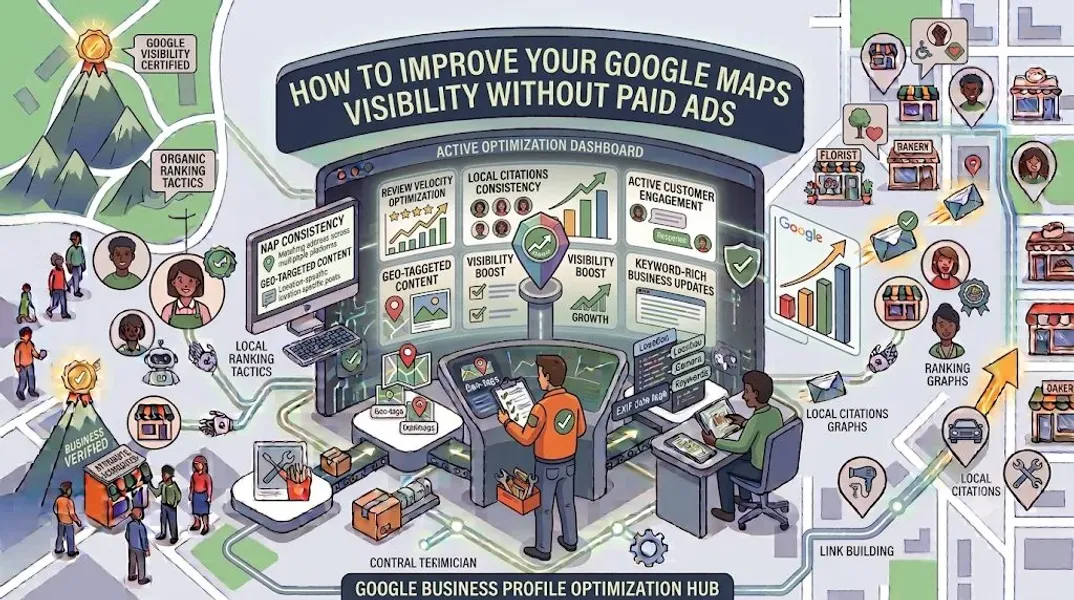
In this comprehensive guide, we’ll walk you through exactly how to improve Google Maps visibility without spending a rupee (or dollar) on paid advertising. We’ll cover profile optimization, reviews, citations, local content, engagement strategies, and the metrics you should track. By the end, you’ll have a complete organic playbook for dominating local search.
How Google Maps Ranking Works
Before you can improve your visibility, you need to understand what Google is actually looking for. Google’s local ranking algorithm considers three primary factors.
Relevance
How well does your business match what the searcher is looking for? Google looks at your business category, description, services, products, and other profile information to determine relevance.
What this means for you: Your profile needs to clearly and accurately describe what you offer. The more specific and complete your information, the better Google can match you to relevant searches.
Distance
How close is your business to the searcher or the location they’ve specified? Proximity is a major factor—especially for searches with “near me” intent.
What this means for you: You can’t change your location, but you can optimize for searches within your service area. Focusing on your actual neighborhood and surrounding areas is more effective than trying to rank across an entire city.
Prominence
How well-known and well-regarded is your business? Google considers reviews, ratings, citations, backlinks, and overall online presence to determine prominence.
What this means for you: Building your reputation online—through reviews, citations, and local content—directly improves your prominence and, therefore, your ranking.
Understanding these three factors is the foundation of everything that follows. Every strategy in this guide is designed to strengthen one or more of them.
Optimize Your Google Business Profile Completely
Your Google Business Profile is the foundation of your Google Maps visibility. If it’s incomplete or poorly optimized, nothing else you do will matter. Here’s how to get it right.
Choose the Right Primary Category
Your primary category is the single most important field on your profile. It tells Google what your business is and determines which searches you appear for. Choose the most specific Google Business Profile category that accurately describes your core business.
Example: “Italian restaurant” is better than “Restaurant.” “Emergency plumber” is better than “Plumber.”
Write a Keyword-Rich Description
Your Google Business Profile description should clearly explain what you do, who you serve, and where you’re located. Incorporate local keywords naturally—don’t stuff them in.
Example: “Family-owned Italian restaurant serving authentic pasta and wood-fired pizza in downtown Austin. Dine-in, takeout, and catering available.”
Add Your Services and Products
Use the Services and Products sections to list everything you offer. Each service and product is an opportunity to include relevant keywords and appear for more specific searches. See our guides on Google Business Profile services and Google Business Profile products.
Select Relevant Attributes
Attributes like “Wheelchair accessible,” “Free Wi-Fi,” and “Outdoor seating” help you appear in filtered searches. Review all available Google Business Profile attributes and add everything that applies.
Upload High-Quality Photos
Profiles with photos get significantly more engagement. Follow Google Business Profile photos best practices: use natural lighting, capture real people and places, and update regularly.
Set Accurate Hours
Inaccurate hours frustrate customers and hurt trust. Update your hours for holidays, seasonal changes, and any temporary closures.
Post Regularly
Google Posts keep your profile active and give customers reasons to engage. Aim to post at least once a week using fresh Google Business Profile post ideas.
Build a Review Generation Engine
Reviews are one of the most powerful ranking factors for Google Maps. They also influence customer decisions more than almost anything else. Here’s how to build a steady stream of reviews—without being pushy.
Ask at the Right Moment
The best time to ask for a review is immediately after a positive interaction. Whether a customer just completed a purchase, finished an appointment, or expressed satisfaction, that’s your moment.
Make It Easy
Send a direct link to your Google review page. The fewer steps a customer has to take, the more likely they are to leave a review. You can generate a review link from your Google Business Profile dashboard.
Use Multiple Channels
Ask for reviews through email, text message, receipts, in-person requests, and signage. Different customers prefer different methods.
Train Your Team
If you have employees, train them to ask for reviews consistently. A simple script like “If you enjoyed your experience, we’d love a Google review—it really helps us” goes a long way.
Respond to Every Review
Respond to all reviews—positive and negative. Thank customers for positive feedback and address concerns professionally in negative reviews. Learning how to respond to negative Google reviews protects your reputation.
Never Buy Reviews
Buying reviews violates Google’s guidelines and can result in your profile being Google Business Profile suspended. Earn reviews the honest way.
Build and Maintain Local Citations
Local citations are mentions of your business name, address, and phone number on other websites. They help Google verify your business and improve your prominence. Here’s how to build them.
Ensure NAP Consistency
Your Name, Address, and Phone Number must be identical across every platform. NAP consistency is a fundamental ranking factor for local SEO.
Claim Core Directories
Start with the most important directories:
- Google Business Profile
- Bing Places
- Apple Maps
- Yelp
- Yellow Pages
Target Niche Directories
Find directories specific to your industry. A restaurant should be on OpenTable and TripAdvisor. A lawyer should be on Avvo and Justia. A doctor should be on Healthgrades.
Build Local Citations
Focus on local citation building in your area. Local newspapers, chambers of commerce, community organizations, and local blogs are all valuable citation sources.
Monitor and Update
Regularly audit your citations to ensure they’re accurate. Incorrect citations can hurt your ranking.
Create Local Content
Content isn’t just for your website—it can improve your Google Maps visibility too. Here’s how.
Create Location-Specific Landing Pages
If you serve multiple areas, create a dedicated page for each location. Include local keywords, testimonials from customers in that area, and information specific to that location.
Write Local Blog Posts
Publish blog posts about local events, news, or topics relevant to your community. This builds your local relevance and creates opportunities for backlinks.
Get Mentioned in Local Media
Reach out to local newspapers, blogs, and radio stations. A mention or feature in local media is a powerful signal to Google.
Partner With Other Local Businesses
Collaborate with complementary local businesses on events, promotions, or content. Cross-promotion builds your local prominence.
Encourage User-Generated Content
Ask customers to mention your business on social media. User-generated content builds authenticity and local relevance.
Leverage Google Business Profile Insights
Google Business Profile insights show you how customers find and interact with your business. Use this data to improve your visibility.
Track Key Metrics
Monitor:
- How customers find your profile (search vs. Maps)
- What search queries trigger your listing
- How many calls you receive
- How many direction requests you get
- How many website clicks you get
Identify Trends
Look for patterns in your data. Which searches bring the most engagement? Which photos get the most views? Double down on what’s working.
Adjust Your Strategy
Use insights to refine your category, description, services, and posts. If you’re not appearing for the searches you want, adjust your keywords.
Compare Over Time
Track your metrics month over month to see if your efforts are paying off. Improvement takes time—look for gradual gains.
Engage With Your Community
Google considers offline signals too. Being active in your community builds prominence that translates to better Maps visibility.
Sponsor Local Events
Sponsoring a local sports team, charity event, or community festival builds goodwill and generates local mentions.
Attend Networking Events
Chamber of commerce meetings, business networking groups, and industry events connect you with potential customers and partners.
Host Events at Your Business
Workshops, tastings, or open houses give people a reason to visit and mention your business online.
Support Local Causes
Partner with local charities or nonprofits. These partnerships often result in mentions on their websites—valuable local citations.
Encourage Check-Ins
Ask customers to check in on Google Maps or social media when they visit. Check-ins are engagement signals.
Technical Optimization Tips
A few technical improvements can make a big difference in your Maps visibility.
Use a Local Phone Number
A local phone number (with your area code) performs better than a toll-free number for local SEO.
Ensure Mobile Optimization
Most local searches happen on mobile devices. Make sure your website loads quickly and is mobile-friendly.
Add Schema Markup
LocalBusiness schema markup on your website helps Google understand your business and connect it to your Google Business Profile.
Optimize Your Website for Local SEO
Include your city and service areas on your website. Create location-specific pages. Embed a Google Map on your contact page.
Speed Up Your Website
Page speed affects rankings and user experience. Compress images, use caching, and minimize code.
Common Mistakes That Hurt Google Maps Visibility
Avoid these mistakes to protect your visibility.
Keyword Stuffing Your Business Name
Adding keywords to your business name violates Google’s guidelines and can get your profile Google Business Profile suspended.
Ignoring Reviews
Failing to respond to reviews—especially negative ones—damages your reputation and hurts your ranking.
Using Inconsistent NAP Information
Inconsistent citations confuse Google and reduce your prominence.
Neglecting Your Profile
A stale, incomplete profile ranks poorly. Update regularly.
Buying Reviews or Citations
This violates Google’s guidelines and can result in suspension.
Focusing Only on Your Website
Google Maps visibility requires a complete profile, reviews, citations, and local engagement—not just a good website.
Giving Up Too Soon
Local SEO takes time. Results may take weeks or months to materialize. Stay consistent.
How to Track Your Progress
To know if your efforts are working, track these metrics.
Use Google Business Profile Insights
Monitor views, calls, direction requests, and website clicks.
Track Local Rankings
Use local SEO tools to track your ranking for target keywords in specific locations.
Monitor Review Growth
Track how many new reviews you receive each month.
Check Citation Consistency
Regularly audit your citations to ensure accuracy.
Analyze Website Traffic
Use Google Analytics to see how much traffic comes from Google Maps and local searches.
Compare to Competitors
See how your visibility compares to top competitors in your area.
Conclusion
Improving your Google Maps visibility without paid ads isn’t just possible—it’s the most sustainable way to grow your local presence. By focusing on relevance, distance, and prominence, you can outrank competitors who are spending money on ads.
The strategies in this guide—optimizing your profile, building reviews, creating citations, publishing local content, and engaging with your community—all work together to strengthen your local SEO. They take time and consistent effort, but the results compound over months and years.
Start with the fundamentals: complete your profile, ask for reviews, and build citations. Then layer on content, community engagement, and technical optimization. Track your progress using Google Business Profile insights, and adjust your strategy based on what’s working.
Remember: Google Maps visibility isn’t about gaming the system. It’s about being the most relevant, trustworthy, and prominent business in your area. Do that, and the rankings will follow.
Call to Action
Want to improve your Google Maps visibility but don’t have the time or expertise? Let our local SEO experts help. We’ll optimize your profile, build citations, manage reviews, and implement a local content strategy that drives real results—without paid ads.
Contact Us Today for a Free Local SEO Audit!
FAQs
Q1: Can I improve my Google Maps visibility without paying for ads? A: Yes, absolutely. Organic strategies like profile optimization, review generation, citation building, and local content creation can significantly improve your Google Maps visibility without any ad spend.
Q2: How long does it take to see results from organic Google Maps optimization? A: Results vary, but most businesses see improvements within 4-12 weeks. Building reviews and citations takes time, so consistency is key.
Q3: How many reviews do I need to rank well on Google Maps? A: There’s no magic number. What matters is having more positive reviews than your competitors, with a consistent flow of new reviews over time. Focus on quality and consistency.
Q4: What are local citations, and why do they matter? A: Local citations are mentions of your business name, address, and phone number on other websites. They help Google verify your business and improve your prominence in local search.
Q5: Can I rank on Google Maps if I don’t have a physical storefront? A: Yes, if you’re a service-area business. You can hide your address and specify your service areas. Focus on building citations and reviews in your service areas.
Q6: How often should I post on my Google Business Profile? A: Aim to post at least once a week. Consistent posting signals to Google that your business is active and engaged. For a detailed schedule, see our guide on how often to update Google Business Profile.
Q7: What should I do if my business is not showing on Google Maps? A: Check for verification issues, suspensions, incorrect information, or ranking problems. See our guide on business not showing on Google Maps for a complete diagnostic checklist.
Q8: What should I do if my Google Business Profile is suspended? A: If your profile is Google Business Profile suspended, review Google’s guidelines, fix any violations, and submit an appeal. Our guide on suspended profiles covers this in depth.
Q9: How do I fix incorrect information on my Google Business Profile? A: If your profile shows incorrect information, you can edit it directly from your dashboard. For persistent issues, see our guide on how to fix Google Business Profile errors.
Internal Links
-
What Is Google Business Profile and How Does It Work? A Complete Guide
-
Google Business Profile vs Google Maps: What’s the Difference?
-
Google Business Profile Verification: Complete Step-by-Step Guide
-
How to Write the Perfect Google Business Profile Description
-
Google Business Profile Photos: Best Practices for Local SEO
-
Google Business Profile Services: How to Add and Optimize Them
-
Google Business Profile Attributes: What Are They and Why Do They Matter?
-
Google Business Profile Suspended? Common Causes and What to Do
-
What Are Local Citations and Why Are They Important for SEO?
-
How to Build Local Citations for Your Business## External Links
-
Google’s Guidelines for Representing Your Business on Google
Keep reading
Grow Your Google Maps Ranking on Autopilot
Stop spending hours every week manually replying to customer reviews and writing Google posts. Busirank automates your Google Business Profile to boost your local SEO rankings and turn searchers into paying clients.
 Busirank Team