 Busirank Team
Introduction
A new review appears on your Google Business Profile at 7:43 AM. It’s a one-star complaint about a service issue. By 7:44 AM, you could have a draft response ready to go—thanks to AI. But should you hit publish?
This is the question thousands of business owners are asking right now. AI tools like ChatGPT, Google’s own AI features, and specialized reputation platforms can now generate review responses in seconds. They can analyze sentiment, match your brand voice, and produce polished replies that sound like they came from a professional writer. On the surface, it looks like a dream come true for busy business owners drowning in review management.
But here’s the catch: AI-generated responses can also backfire spectacularly. A generic reply that misses the point of a review can make you look tone-deaf. A response that sounds robotic can erode customer trust. And in some cases, AI can say things that violate Google’s guidelines—or worse, escalate a situation that needed a human touch.
The truth is that AI review responses are neither a magic bullet nor a disaster waiting to happen. They’re a tool. Used well, they save time, improve consistency, and help you respond faster than ever. Used poorly, they can damage your reputation and alienate the very customers you’re trying to win back.
In this comprehensive guide, we’ll break down everything you need to know about AI review responses. We’ll explain what they are, how they work, the real benefits they deliver, the risks they carry, and the best practices that separate successful AI adoption from costly mistakes. By the end, you’ll know exactly how to use AI to respond to reviews—without losing the human touch that makes your business special.
What Are AI Review Responses?
AI review responses are replies to online reviews that are generated or assisted by artificial intelligence. These tools use natural language processing (NLP) and machine learning to understand the content and tone of a review, then produce a response that matches the situation.
The technology behind AI review responses includes:
- Sentiment analysis: AI determines whether a review is positive, negative, or neutral
- Intent recognition: AI identifies what the customer is complaining about or praising
- Language generation: AI produces human-like text that addresses the review
- Brand voice matching: Advanced tools learn your tone and style to keep responses consistent
- Personalization: AI pulls details from the review—names, services, specifics—to make responses feel individual AI review responses can be fully automated (the AI writes and publishes without human input), semi-automated (the AI drafts and a human approves), or assistive (the AI suggests options and a human writes the final version).
Most experts recommend the semi-automated approach. It combines AI’s speed with human judgment—the best of both worlds.
Why AI Review Responses Are Growing in Popularity
Several factors are driving the rise of AI review responses.
Review Volume Is Exploding
The average local business now receives far more reviews than it did five years ago. Popular businesses can receive dozens per week. Manually responding to all of them is impractical.
Customer Expectations Are Higher
Customers expect fast responses—ideally within 24 hours. AI makes that possible even at scale.
Review Platforms Are Multiplying
It’s not just Google anymore. Businesses manage reviews on Yelp, Facebook, TripAdvisor, industry directories, and more. AI helps consolidate the workload.
AI Technology Has Improved Dramatically
Early AI responses were clunky and obvious. Modern AI tools produce text that’s nearly indistinguishable from human writing—if used correctly.
Labor Costs Are Rising
Hiring staff to manage reviews is expensive. AI offers a cost-effective alternative.
Google Rewards Engagement
Google has confirmed that responding to reviews can improve local rankings. AI helps businesses respond more consistently, which supports their local SEO.
For more on why reviews matter, see our guide on customer reviews local SEO.
The Benefits of AI Review Responses
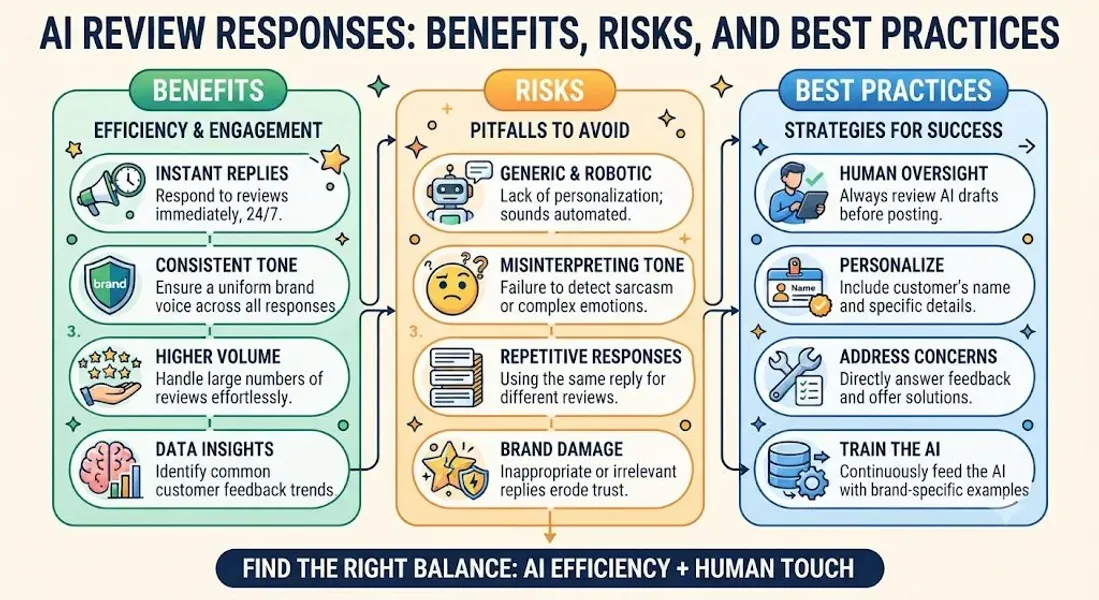
When used properly, AI review responses deliver real, measurable benefits. Here are the most significant ones.
1. Massive Time Savings
Writing a thoughtful review response takes 5-10 minutes. Responding to 100 reviews per month is 8-16 hours of work. AI can draft those responses in seconds, reducing the time to minutes.
Real impact: A business owner who spent 10 hours per month on reviews can now spend 1-2 hours reviewing and personalizing AI drafts.
2. Faster Response Times
Speed matters. Customers appreciate quick responses, and Google rewards engagement. AI enables responses within hours—or even minutes—of a review being posted.
Real impact: Faster responses improve customer satisfaction and can prevent negative reviews from escalating.
3. Consistent Quality
When different team members respond to reviews, quality varies. AI ensures every response follows your brand guidelines and maintains a consistent tone.
Real impact: Consistency builds trust and reinforces your brand identity.
4. Scalability Across Locations
For businesses with multiple locations, AI makes it possible to manage reviews across all of them without adding staff.
Real impact: A franchise with 20 locations can maintain consistent review management across all of them.
5. Improved Sentiment Analysis
AI can analyze hundreds of reviews to identify patterns—what customers love, what they complain about, and how sentiment changes over time.
Real impact: These insights help you improve operations, not just responses.
6. Better Prioritization
AI can flag urgent reviews—like those involving safety, legal issues, or escalating frustration—so you can respond to them first.
Real impact: Critical issues get attention faster, reducing the risk of escalation.
7. Reduced Emotional Toll
Responding to negative reviews is emotionally draining. AI handles the first draft, so you’re editing rather than starting from scratch.
Real impact: Less burnout, more resilience.
8. Language Support
AI can generate responses in multiple languages, making it easier to serve diverse customer bases.
Real impact: Businesses in multilingual markets can respond to every customer in their language.
For more on AI review management broadly, see our guide on AI review management.
The Risks of AI Review Responses
AI isn’t without risks. Here are the ones you need to understand.
1. Sounding Robotic or Generic
AI-generated responses can feel impersonal—especially if not customized. Customers can often tell when a response wasn’t written by a human.
The risk: Generic responses can make customers feel unheard and damage trust.
2. Misreading the Review
AI doesn’t always understand nuance, sarcasm, or context. It might misread a positive review as negative—or vice versa.
The risk: An inappropriate response to a review can look careless or offensive.
3. Missing Emotional Nuance
Some reviews involve complex emotions—grief, anger, disappointment. AI may not respond with the empathy those situations require.
The risk: Insensitive responses can escalate conflicts and damage your reputation.
4. Violating Google’s Guidelines
AI might generate responses that include promotional language, private information, or other content that violates Google’s policies.
The risk: Your profile could be flagged or suspended. For more, see our guide on Google Business Profile suspended.
5. Hallucination and Inaccuracy
AI can generate false information—apologizing for things that didn’t happen or mentioning details that aren’t true.
The risk: Inaccurate responses confuse customers and undermine trust.
6. Over-Reliance and Skill Atrophy
Businesses that rely entirely on AI may lose the ability to respond thoughtfully when human judgment is needed.
The risk: When a crisis hits, no one knows how to handle it.
7. Privacy and Data Concerns
Some AI tools collect and store customer data. This can raise privacy concerns and compliance issues.
The risk: Data breaches or regulatory violations.
8. Cost
While some AI tools are affordable, comprehensive solutions can be expensive—especially for small businesses.
The risk: The investment doesn’t pay off if not used effectively.
9. Loss of Authentic Voice
Your brand voice is part of what makes you unique. Over-reliance on AI can erode that distinctiveness.
The risk: Your responses sound like everyone else’s.
AI Review Responses vs. Human Responses
Understanding the difference helps you decide when to use AI and when to respond personally.
| Factor | AI Responses | Human Responses |
|---|---|---|
| Speed | Seconds | Minutes to hours |
| Cost | Low per response | Higher (labor) |
| Consistency | High | Variable |
| Emotional intelligence | Limited | High |
| Nuance | Limited | High |
| Scalability | Excellent | Limited |
| Personalization | Good if customized | Excellent |
| Compliance | Risky without review | Controlled |
| Authenticity | Can feel robotic | Genuine |
The verdict: AI is best for high-volume, routine responses. Humans are best for complex, emotional, or sensitive reviews. The ideal approach combines both.
Best Practices for AI Review Responses
Now let’s get to the practical part. Here are the best practices for using AI to respond to reviews.
1. Use AI to Draft, Not to Publish
Never publish AI-generated responses without human review. AI drafts; humans approve.
Why it matters: Human review catches errors, adds empathy, and ensures compliance.
2. Personalize Every Response
AI can pull details from the review, but you should add a human touch. Mention the customer’s name, reference specifics, and make it feel individual.
Example:
- AI draft: “Thank you for your feedback. We’re glad you enjoyed your visit.”
- Human edit: “Thank you, Sarah! We’re so glad you loved the pasta and our patio. Hope to see you again soon!“
3. Train AI on Your Brand Voice
Provide AI tools with examples of your best responses. The more they learn your voice, the better their drafts will be.
Tip: Create a style guide with your tone, preferred phrases, and sign-offs.
4. Create Response Templates
Use AI to generate templates for common scenarios. Then customize each response.
Examples: Positive review, negative review, neutral review, fake review.
For more, see our guide on Google review response templates.
5. Flag Sensitive Reviews for Human Response
Not every review should get an AI response. Reviews involving legal issues, safety concerns, or emotional distress should be handled by a human.
Why it matters: AI can’t provide the empathy these situations require.
6. Respond Within 24-48 Hours
Speed matters. AI makes it easier to respond quickly—use that advantage.
Why it matters: Fast responses improve satisfaction and signal engagement to Google.
7. Never Include Private Information
AI should never include order numbers, appointment details, or personal information in responses. Review every draft to ensure compliance.
Why it matters: Privacy violations can damage trust and create legal risk.
8. Avoid Promotional Language
Google prohibits promotional content in review responses. Ensure AI drafts don’t include sales pitches.
Why it matters: Violations can lead to penalties or suspension.
9. Monitor Sentiment Trends
Use AI analytics to track how customer sentiment changes over time. Address negative trends before they escalate.
Why it matters: Proactive responses prevent small issues from becoming big ones.
10. Stay Compliant With Google’s Policies
Review Google’s guidelines regularly. Ensure your AI tool and your responses comply.
Why it matters: Non-compliance can get your profile suspended. For more, see our guide on Google Business Profile suspended.
11. Never Argue or Get Defensive
AI won’t argue—but humans might. Ensure your team stays professional, even when reviews are unfair.
Why it matters: Arguments make you look unprofessional and can escalate conflicts.
12. Test and Refine
AI improves with feedback. Test different response styles and refine based on results.
Why it matters: Continuous improvement leads to better outcomes.
13. Maintain the Human Touch
For every response, ask: Does this sound like us? Would a customer feel heard? If not, revise it.
Why it matters: Authenticity builds trust. AI should enhance—not replace—your human voice.
How to Choose the Right AI Tool for Review Responses
Not all AI tools are created equal. Here’s what to look for.
Key Features to Look For
- Multi-platform support: Can it monitor and respond to reviews on Google, Yelp, Facebook, and other platforms?
- Brand voice customization: Can it learn your tone and style?
- Sentiment analysis: Can it accurately categorize reviews?
- Personalization: Can it pull details from reviews?
- Approval workflow: Can you review drafts before publishing?
- Reporting: Does it provide insights and analytics?
- Integrations: Does it connect with your CRM, POS, or other tools?
- Compliance: Does it follow Google’s guidelines?
Popular AI Review Response Tools
- Birdeye: Comprehensive reputation management with AI responses
- Podium: AI-driven review management and messaging
- Reputation.com: Enterprise-level AI review management
- Chatmeter: Multi-location AI review management
- GatherUp: Review generation and AI-assisted responses
- ReviewTrackers: AI monitoring and sentiment analysis
- Google Business Profile (native): Basic AI response suggestions For more, see our guide on AI review management.
Common Mistakes to Avoid With AI Review Responses
Avoid these mistakes to protect your reputation.
Publishing AI Responses Without Review
Never publish AI-generated responses without human review. This is the fastest way to damage your reputation.
Using the Same Response for Every Review
Copy-pasting the same response looks lazy and insincere. Personalize every reply.
Ignoring Emotional Nuance
AI can’t replace human empathy. For sensitive reviews, respond personally.
Including Private Information
Never share order details, appointment times, or personal information in responses.
Using Promotional Language
Google prohibits promotional content in responses. Keep responses focused on the customer.
Over-Reliance on AI
AI is a tool, not a replacement. Humans should always be in the loop.
Not Training the AI
AI improves with feedback. Train it on your brand voice and best responses.
Ignoring Compliance
Ensure your AI tool and responses comply with Google’s guidelines.
Waiting Too Long to Respond
AI makes fast responses possible—use that advantage. Respond within 24-48 hours.
Conclusion
AI review responses are transforming how businesses manage their online reputation. They offer speed, scalability, consistency, and insights that were previously impossible. But they also carry risks—sounding robotic, missing emotional nuance, violating guidelines, and eroding the human touch.
The key is to use AI as a tool, not a replacement. Let AI draft responses, then review and personalize them before publishing. Flag sensitive reviews for human attention. Train AI on your brand voice. Stay compliant with Google’s policies. And never lose sight of what matters most: making customers feel heard.
The businesses that master this balance will respond faster, learn more, and build stronger reputations. They’ll use AI to handle the volume—and human judgment to handle the moments that matter.
Call to Action
Ready to streamline your review responses with AI? Let our local SEO experts help. We’ll recommend the right tools, set up your workflow, and help you build a response strategy that’s fast, effective, and authentically human.
Contact Us Today for a Free Local SEO Audit!
FAQs
Q1: What are AI review responses? A: AI review responses are replies to online reviews generated or assisted by artificial intelligence. They use natural language processing to understand reviews and produce human-like responses.
Q2: Should I use AI to respond to Google reviews? A: Yes, AI can help you respond faster and more consistently. But always review and personalize AI-generated responses before publishing. For sensitive reviews, respond personally.
Q3: Can AI fully replace human review responses? A: No. AI can draft responses, but humans should always review and personalize them. For complex or emotional reviews, human responses are essential.
Q4: What are the risks of AI review responses? A: Risks include sounding robotic, misreading reviews, missing emotional nuance, violating Google’s guidelines, and over-reliance on AI.
Q5: How do I choose the right AI tool for review responses? A: Look for multi-platform support, brand voice customization, sentiment analysis, personalization, approval workflows, reporting, and compliance with Google’s guidelines.
Q6: Can AI review responses hurt my local SEO? A: Poorly used AI can hurt your local SEO by generating low-quality or non-compliant responses. Used correctly, AI improves response frequency and engagement, which supports local SEO. For more, see our guide on customer reviews local SEO.
Q7: How do I ensure AI responses comply with Google’s guidelines? A: Review Google’s policies, avoid promotional language, never share private information, and always review AI drafts before publishing. For more, see our guide on Google Business Profile suspended.
Q8: What should I do if my Google Business Profile is suspended? A: If your profile is Google Business Profile suspended, review Google’s guidelines, fix any violations, and submit an appeal. Our guide on suspended profiles covers this in depth.
Q9: What should I do if my business is not showing on Google Maps? A: Check for verification issues, suspensions, incorrect information, or ranking problems. See our guide on business not showing on Google Maps.
Q10: How do I fix incorrect information on my Google Business Profile? A: If your profile shows incorrect information, you can edit it directly from your dashboard. For persistent issues, see our guide on how to fix Google Business Profile errors.
Internal Links
-
What Is Google Business Profile and How Does It Work? A Complete Guide
-
Google Business Profile vs Google Maps: What’s the Difference?
-
Google Business Profile Verification: Complete Step-by-Step Guide
-
How to Write the Perfect Google Business Profile Description
-
Google Business Profile Photos: Best Practices for Local SEO
-
Google Business Profile Services: How to Add and Optimize Them
-
Google Business Profile Attributes: What Are They and Why Do They Matter?
-
Google Business Profile Suspended? Common Causes and What to Do
-
What Are Local Citations and Why Are They Important for SEO?
-
Local Keywords: How to Find the Right Keywords for Your Business## External Links
-
Google’s Guidelines for Representing Your Business on Google
Keep reading
Grow Your Google Maps Ranking on Autopilot
Stop spending hours every week manually replying to customer reviews and writing Google posts. Busirank automates your Google Business Profile to boost your local SEO rankings and turn searchers into paying clients.

 Busirank Team