 Busirank Team
Introduction
When customers search for a business like yours, they’re not just looking for a name and address. They’re looking for a place that fits their specific needs. A wheelchair user needs to know if your entrance is accessible. A parent wants to confirm you have a changing table. A remote worker is searching for a café with free Wi-Fi. A health-conscious diner wants to know if you offer vegan options.
These details matter. And on your Google Business Profile, they’re communicated through attributes.
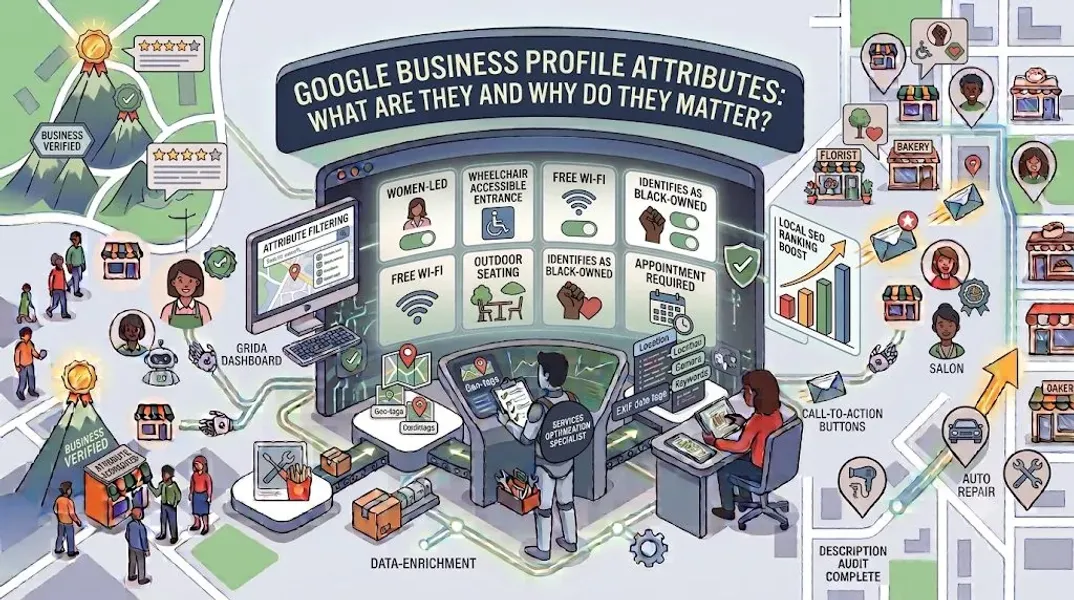
Google Business Profile attributes are those small but mighty tags that tell customers exactly what to expect when they visit your business. They appear as icons and labels on your profile, providing at-a-glance information about accessibility, amenities, payments, service options, and more. They help customers filter search results to find businesses that meet their specific requirements. And they can be the deciding factor between a customer choosing you or clicking away to a competitor.
Here’s the problem: many business owners either ignore attributes entirely or add them haphazardly without understanding their impact. This is a missed opportunity. Attributes improve your visibility in filtered searches, enhance the customer experience, and support your overall local SEO strategy.
In this comprehensive guide, we’ll explain exactly what Google Business Profile attributes are, why they matter for your business, the different types available, how to add them, and best practices for optimization. By the end, you’ll have a clear understanding of how to use attributes to attract more of the right customers.
What Are Google Business Profile Attributes?
Google Business Profile attributes are descriptive tags that provide additional information about your business. They appear on your profile as icons or labels, helping customers quickly understand what your business offers, how it operates, and what to expect.
Think of attributes as quick answers to common customer questions:
- Is this business wheelchair accessible?
- Do they accept credit cards?
- Is there outdoor seating?
- Are they LGBTQ+ friendly?
- Do they offer free Wi-Fi?
- Is this a women-led business? Instead of customers having to dig through your website or call to ask, attributes provide these answers instantly. They make your profile more informative, more useful, and more likely to convert.
Attributes are optional, but adding them is strongly recommended. They help differentiate your business from competitors, improve your visibility in filtered searches, and demonstrate that you pay attention to customer needs.
Why Google Business Profile Attributes Matter
Attributes might seem like a minor detail, but they have a significant impact on your local SEO and customer experience. Here’s why they matter.
They Improve Your Visibility in Filtered Searches
Google allows users to filter search results by specific attributes. For example, someone searching for “restaurants near me” can apply filters for “Outdoor seating,” “Vegan options,” or “Wheelchair accessible.” If your business has these attributes, you’ll appear in those filtered results. If you don’t, you won’t—even if you actually offer those things.
They Attract the Right Customers
Attributes help customers self-qualify. A customer who needs wheelchair access will only consider businesses with that attribute. By accurately listing your attributes, you attract customers who are a good fit and avoid disappointing those whose needs you can’t meet.
They Build Trust and Transparency
A profile with complete attributes feels more trustworthy. It shows that you’re transparent about what you offer and that you’ve taken the time to provide useful information.
They Enhance the Customer Experience
Attributes answer common questions before customers even ask. This reduces friction, saves time, and creates a smoother experience from search to visit.
They Support Your Local SEO
While attributes aren’t a direct ranking factor, they support your overall profile optimization. A complete, informative profile with relevant attributes is more likely to rank well in local search results.
They Differentiate You From Competitors
If your competitors haven’t added attributes, you gain an immediate advantage. Your profile will appear more complete, more professional, and more useful.
Types of Google Business Profile Attributes
Google offers a wide range of attributes across several categories. The exact attributes available to you depend on your business type. Here are the main categories.
Accessibility Attributes
These attributes tell customers about the accessibility features of your business.
Examples:
- Wheelchair accessible entrance
- Wheelchair accessible elevator
- Wheelchair accessible parking lot
- Wheelchair accessible restroom
- Wheelchair accessible seating
- Assistive hearing loop
- Braille menu Who should use these: All businesses with physical locations, especially those in hospitality, healthcare, retail, and public services.
Amenities Attributes
These attributes describe the amenities and features available at your business.
Examples:
- Free Wi-Fi
- Restroom
- Gender-neutral restroom
- Wi-Fi
- Dogs allowed
- Good for kids
- Changing table
- High chairs Who should use these: Restaurants, cafés, hotels, retail stores, and family-friendly businesses.
Service Options Attributes
These attributes describe how customers can interact with your business.
Examples:
- Dine-in
- Takeout
- Delivery
- Curbside pickup
- No-contact delivery
- Online appointments
- Onsite services
- Delivery Who should use these: Restaurants, retail stores, and service-based businesses.
Payments Attributes
These attributes describe the payment methods your business accepts.
Examples:
- Credit cards
- Debit cards
- NFC mobile payments
- Cash
- Checks
- Google Pay Who should use these: All businesses that accept payments.
Parking Attributes
These attributes describe parking options available to customers.
Examples:
- Free parking lot
- Paid parking lot
- Free street parking
- Paid street parking
- Valet parking
- Parking garage Who should use these: Businesses with physical locations, especially in urban areas where parking is a concern.
Planning Attributes
These attributes help customers plan their visit.
Examples:
- Appointment required
- Accepts reservations
- Usually not crowded
- Usually crowded Who should use these: Restaurants, salons, medical offices, and service-based businesses.
Health and Safety Attributes
These attributes describe health and safety measures in place.
Examples:
- Mask required
- Temperature check required
- Staff wear masks
- Staff get temperature checks
- Staff required to disinfect surfaces between visits Who should use these: Healthcare providers, personal services, and businesses that want to communicate safety protocols.
Identity Attributes
These attributes describe the identity and ownership of your business.
Examples:
- Women-led
- Veteran-led
- LGBTQ+ friendly
- Transgender safespace
- Black-owned
- Latino-owned
- Asian-owned Who should use these: Any business that wants to highlight its ownership or inclusive values.
Highlights Attributes
These attributes highlight specific features or offerings.
Examples:
- Great coffee
- Great dessert
- Live music
- Sports
- Karaoke
- Quiz night Who should use these: Restaurants, bars, cafés, and entertainment venues.
Popular For Attributes
These attributes describe what your business is popular for.
Examples:
- Breakfast
- Lunch
- Dinner
- Solo dining
- Groups Who should use these: Restaurants and food service businesses.
How to Add Attributes to Your Google Business Profile
Adding attributes to your profile is simple. Here’s how to do it.
Step 1: Sign In to Your Google Business Profile
Go to google.com/business and sign in with your Google account.
Step 2: Navigate to the Attributes Section
In the left-hand menu, click on “Edit profile,” then scroll down to find the “Attributes” section. Depending on your business type, this may be labeled differently or located in a different area.
Step 3: Review Available Attributes
Google will show you the attributes available for your business type. These are organized by category (accessibility, amenities, etc.).
Step 4: Select Applicable Attributes
Check the boxes next to the attributes that apply to your business. Only select attributes that are accurate—don’t check boxes for features you don’t offer.
Step 5: Save Your Changes
Click “Save” to publish your attributes. They’ll appear on your profile shortly.
Step 6: Verify Your Changes
Check your profile on Google Search and Google Maps to confirm your attributes appear correctly.
Best Practices for Google Business Profile Attributes
Follow these best practices to maximize the impact of your attributes.
Only Add Accurate Attributes
Accuracy is critical. If you claim to be wheelchair accessible but you’re not, you’ll disappoint customers and damage your reputation. Only add attributes that genuinely apply to your business.
Add as Many Relevant Attributes as Possible
The more relevant attributes you add, the more search filters your business can appear in. Review all available attributes and add everything that applies.
Prioritize Accessibility Attributes
Accessibility attributes are particularly important. They help people with disabilities find businesses that meet their needs. If your business is accessible, make sure to highlight it.
Update Attributes Regularly
As your business changes, your attributes may need to change too. If you add new amenities or change your payment options, update your attributes accordingly.
Use Identity Attributes to Showcase Your Values
Identity attributes like “Women-led” or “LGBTQ+ friendly” help customers find businesses that align with their values. If these apply to you, add them.
Don’t Use Attributes for Promotions
Attributes aren’t the place for promotional language. They’re factual descriptors. Keep them accurate and straightforward.
Monitor for Changes
Google occasionally updates its attribute options. Review your attributes periodically to ensure they’re still accurate and complete.
Encourage Customer Feedback
If customers mention features in reviews that aren’t in your attributes, consider adding them. Customer feedback can reveal attributes you may have overlooked.
Common Mistakes to Avoid
Avoid these common mistakes when using Google Business Profile attributes.
Ignoring Attributes Entirely
The biggest mistake is not using attributes at all. This leaves valuable information off your profile and reduces your visibility in filtered searches.
Adding Inaccurate Attributes
Claiming features you don’t have is misleading and can hurt your reputation. Only add accurate attributes.
Adding Irrelevant Attributes
Don’t add attributes that don’t apply to your business just to appear in more searches. This can confuse customers and hurt trust.
Not Updating Attributes
If your business changes—new amenities, different payment options—update your attributes. Outdated attributes can mislead customers.
Overlooking Identity Attributes
Identity attributes help customers find businesses that align with their values. If they apply to you, add them.
Forgetting Accessibility Attributes
Accessibility attributes are crucial for customers with disabilities. Don’t overlook them.
Using Attributes for Keywords
Attributes are selected from Google’s predefined list—you can’t create custom attributes. Don’t try to game the system.
How Attributes Impact Your Local SEO
Attributes play a supporting role in your local SEO strategy. Here’s how they help.
Improved Visibility in Filtered Searches
When customers filter search results by attributes, your business appears if you have those attributes. This increases your visibility for specific, high-intent searches.
Enhanced Profile Completeness
Profiles with complete attributes are more likely to rank well. Google favors profiles that provide comprehensive information.
Increased Engagement
Profiles with useful attributes receive more clicks, calls, and direction requests. This engagement signals to Google that your business is relevant.
Better Customer Experience
Attributes help customers find what they need quickly. A positive experience can lead to more reviews and higher ratings, which support your local SEO.
Competitive Advantage
If your competitors haven’t added attributes, you gain an edge. Your profile will appear more complete and more useful.
Support for Local Pack SEO
Attributes support your local pack SEO efforts by making your profile more informative and relevant.
Conclusion
Google Business Profile attributes are a small but powerful tool for attracting local customers and improving your local SEO. They provide at-a-glance information about your business, help customers find you in filtered searches, and differentiate you from competitors.
The key is to be accurate, thorough, and strategic. Add every attribute that applies to your business. Prioritize accessibility and identity attributes. Update regularly as your business evolves. And don’t neglect this section—it’s a simple way to improve your profile’s effectiveness.
Remember: attributes aren’t just about SEO. They’re about helping customers find the right business for their needs. When you get them right, everyone wins.
Call to Action
Not sure if your Google Business Profile attributes are complete and optimized? Let our local SEO experts help. We’ll review your attributes, identify missing opportunities, and optimize your profile to attract more of the right customers.
Contact Us Today for a Free Local SEO Audit!
FAQs
Q1: What are Google Business Profile attributes? A: Attributes are descriptive tags that provide additional information about your business, such as accessibility features, amenities, payment options, and identity. They appear on your profile as icons or labels.
Q2: Are attributes required? A: No, attributes are optional. However, adding them is strongly recommended because they improve your visibility in filtered searches and help customers find the right business for their needs.
Q3: How many attributes can I add? A: The number of attributes available to you depends on your business type. You can add as many as apply to your business. More relevant attributes mean more search visibility.
Q4: Can I create custom attributes? A: No, attributes are selected from Google’s predefined list. You cannot create custom attributes. Choose from the available options that apply to your business.
Q5: Do attributes help with local SEO? A: Yes, attributes support your local SEO by improving your visibility in filtered searches, enhancing profile completeness, and increasing engagement.
Q6: How often should I update my attributes? A: Review your attributes quarterly and update immediately when your business changes—new amenities, different payment options, or updated accessibility features.
Q7: What if Google doesn’t offer attributes for my business type? A: The available attributes depend on your business category. If you don’t see relevant attributes, it may be because Google hasn’t created them for your category yet. Check back periodically for updates.
Q8: What should I do if my Google Business Profile is suspended? A: If your profile is Google Business Profile suspended, it may be due to a guideline violation. Review Google’s guidelines, fix any issues, and submit an appeal. Our guide on suspended profiles covers this in depth.
Q9: How do I fix incorrect information on my Google Business Profile? A: If your profile shows incorrect information, you can edit it directly from your dashboard. For persistent issues, see our guide on how to fix Google Business Profile errors.
Internal Links
-
What Is Google Business Profile and How Does It Work? A Complete Guide
-
Google Business Profile vs Google Maps: What’s the Difference?
-
Google Business Profile Verification: Complete Step-by-Step Guide
-
How to Choose the Right Google Business Profile Category## External Links
-
Google’s Guidelines for Representing Your Business on Google
Keep reading
Grow Your Google Maps Ranking on Autopilot
Stop spending hours every week manually replying to customer reviews and writing Google posts. Busirank automates your Google Business Profile to boost your local SEO rankings and turn searchers into paying clients.

 Busirank Team