 Busirank Team
Introduction
Your Google Business Profile is more than a listing—it’s a living, breathing storefront that customers see before they ever visit your website or step through your doors. And one of the most powerful features on that profile is Google Posts.
Google Posts let you share updates, offers, events, and news directly on your profile. They appear in your listing when customers search for your business, and they can be a powerful driver of engagement—calls, website clicks, and direction requests. They also signal to Google that your business is active, which can support your local SEO.
But here’s the problem: most businesses post once, see no immediate results, and give up. Or they stare at a blank post editor wondering what to write. Over time, their profile goes stale, and their competitors—who post consistently—outrank them in local search.
The fix is simple: you need a content bank. A list of post ideas you can draw from whenever it’s time to publish. That’s what this guide gives you.
In this comprehensive guide, we’ll share 20 proven Google Business Profile post ideas for local businesses. We’ll explain what Google Posts are, why they matter, the different types you can create, and how to make each post effective. We’ll also cover best practices, common mistakes, and how to build a posting routine you can stick with. By the end, you’ll never run out of ideas again.
What Are Google Business Profile Posts?
Google Business Profile Posts are short updates you publish directly to your profile. They appear on your listing in Google Search and Google Maps, usually in a dedicated section below your reviews and photos.
Each post can include:
- Text: Up to 1,500 characters
- Image or video: A visual element to grab attention
- Call to action: A button like “Learn more,” “Call now,” “Book,” “Sign up,” or “Buy”
- Link: A URL that sends users to a specific page Posts typically expire after seven days (unless they’re event or offer posts, which can run longer). This means consistent posting is essential—a single post won’t stay visible for long.
Types of Google Posts
Google offers several post types:
- Update posts: General news, tips, or announcements
- Offer posts: Discounts, promotions, or special deals
- Event posts: Upcoming events with dates and times
- Product posts: Showcase specific products Each type serves a different purpose, and using a mix keeps your profile fresh and engaging.
For more on setting up your profile, see our guide on create Google Business Profile.
Why Google Business Profile Posts Matter
If you’re wondering whether posting is worth the effort, here’s why it matters.
They Improve Engagement
Profiles that post regularly receive more clicks, calls, and direction requests. Posts give customers a reason to interact with your listing.
They Signal Activity to Google
Google favors active profiles. When you post regularly, you signal that your business is alive, engaged, and relevant. This can support your local ranking.
They Support Local Pack Rankings
The local pack—the three map results at the top of Google—is influenced by engagement signals. Posts contribute to those signals. For more, see our guide on local pack SEO.
They Give You a Competitive Edge
Most local businesses don’t post regularly. If you do, you stand out immediately—even if your competitors have more reviews.
They Drive Direct Action
Posts can include calls to action that drive immediate results: “Call now,” “Book online,” “Get directions.” These buttons remove friction and make it easy for customers to act.
They Showcase What’s New
Posts are perfect for sharing news, updates, and seasonal offerings. They keep your profile fresh and give returning customers a reason to engage again.
They’re Free
Unlike paid ads, Google Posts cost nothing. They’re a free way to market your business to local searchers.
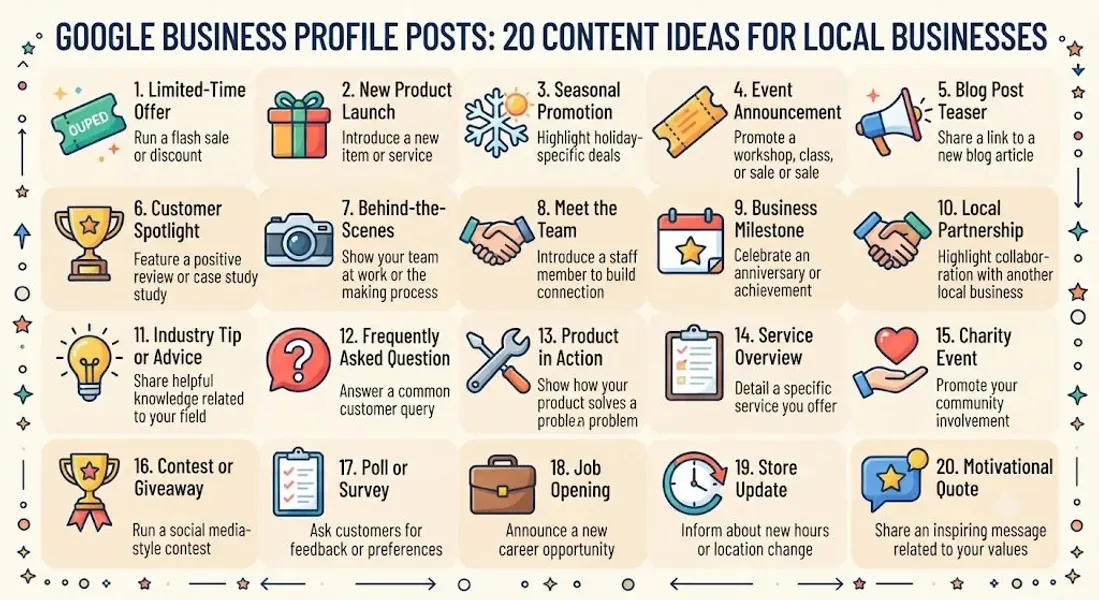
20 Google Business Profile Post Ideas for Local Businesses
Now let’s get to the ideas. Here are 20 proven post types you can use, adapt, and rotate.
1. Share a Special Offer or Discount
Everyone loves a deal. Promote a limited-time discount, bundle, or promotion.
Example: “This week only—20% off all haircuts. Book your appointment today!“
2. Announce a New Product or Service
New offerings deserve attention. Announce them with a post and a clear call to action.
Example: “Introducing our new vegan menu! Stop by and try it this week.”
3. Highlight a Bestseller
Showcase your most popular product or service. Social proof drives action.
Example: “Our signature latte is the most-ordered drink on our menu. Come see why!“
4. Share a Customer Review or Testimonial
Feature a positive review with a thank-you message. It’s social proof in action.
Example: “We love hearing from happy customers! Thanks, Sarah, for the kind words.”
5. Announce Upcoming Events
Hosting a workshop, sale, or grand opening? Let customers know.
Example: “Join us this Saturday for our holiday open house—free samples and giveaways!“
6. Share a Seasonal Greeting
Holidays and seasons are perfect opportunities to connect with customers.
Example: “Happy Thanksgiving from all of us at [Business Name]! We’re grateful for your support.”
7. Post Behind-the-Scenes Content
Show your team at work, your workspace, or a day in the life. Humanizes your brand.
Example: “Meet the team behind your favorite coffee! Say hi to James, our head barista.”
8. Highlight a Staff Member
Introduce a team member and what they do. Builds trust and connection.
Example: “Meet Dr. Patel, our newest dentist! She specializes in pediatric care.”
9. Share a Tip or Quick Advice
Position yourself as an expert by sharing a helpful tip.
Example: “Pro tip: Water your plants early in the morning to reduce evaporation.”
10. Announce New Hours or Holiday Closures
Keep customers informed with timely updates.
Example: “Heads up! We’ll be closed on July 4th. We’ll reopen on July 5th at 9 AM.”
11. Promote a Limited-Time Event
Create urgency with a time-sensitive promotion.
Example: “Only 3 days left to book your holiday photo session. Reserve your spot now!“
12. Answer a Frequently Asked Question
Address a common question directly in a post.
Example: “Do you accept walk-ins? Yes! We welcome walk-ins every day until 6 PM.”
13. Share Local Community News
Engage with your community by posting local news or events.
Example: “Excited to support the [Local Charity] fundraiser this weekend. Hope to see you there!“
14. Celebrate a Milestone or Anniversary
Anniversaries, milestones, and achievements are worth sharing.
Example: “We’re celebrating 10 years in business! Thank you for your support.”
15. Showcase a Before-and-After Transformation
For service businesses, before-and-after photos are powerful.
Example: “Check out this kitchen transformation! Book your consultation today.”
16. Highlight a Product in Action
Show your product being used by real customers.
Example: “Love seeing our candles in [Customer Name]‘s cozy reading nook. Tag us in your photos!“
17. Promote a Contest or Giveaway
Contests drive engagement and build excitement.
Example: “Enter to win a $50 gift card! Comment on this post to enter.”
18. Share a Quote or Motivation
Positive quotes resonate with audiences and add personality.
Example: “‘Success is the sum of small efforts repeated day in and day out.’ Have a great week!“
19. Announce a Partnership or Collaboration
Partnering with another local business? Announce it.
Example: “We’ve teamed up with [Local Business] to offer a special bundle. Learn more!“
20. Encourage Reviews
Ask customers to leave a review. Include a direct link.
Example: “Loved your experience? Leave us a Google review—it means the world to us!”
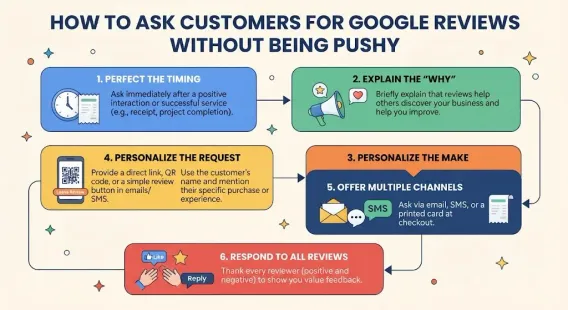
For more on this, see our guide on ask for Google reviews.
How to Create Effective Google Posts
Posting is one thing. Posting effectively is another. Here’s how to get the most from each post.
Use High-Quality Images
Posts with images get more engagement. Use clear, professional images that relate to your post.
Keep Text Concise
Aim for 150-300 characters for most posts. Get to the point quickly.
Include a Clear Call to Action
Every post should have a purpose. Use the CTA button to drive action—“Call now,” “Book,” “Learn more,” or “Get offer.”
Add a Link When Relevant
Link to your website, booking page, or a specific landing page to drive deeper engagement.
Use Keywords Naturally
Incorporate local keywords and service terms to support your local SEO. Don’t stuff them.
Post Regularly
Aim for at least one post per week. Consistency matters more than frequency.
Track Performance
Use Google Business Profile insights to see how your posts perform. Adjust your strategy based on what’s working.
Best Practices for Google Business Profile Posts
Follow these best practices to maximize the impact of your posts.
Post Consistently
Weekly posting is the sweet spot for most businesses. Create a Google Business Profile content calendar to stay on track.
Mix Up Post Types
Use a mix of updates, offers, events, and products to keep your profile fresh.
Use Seasonal and Timely Content
Holidays, seasons, and local events are perfect for timely posts.
Personalize Your Voice
Write like a human, not a brand. Be friendly, conversational, and authentic.
Add Visuals
Images and videos increase engagement. Invest in good visuals.
Include a Call to Action
Every post should tell customers what to do next.
Avoid Promotional Overload
Don’t make every post a sales pitch. Mix in tips, stories, and community content.
Respond to Engagement
If customers comment or message you about a post, respond promptly.
Common Mistakes to Avoid With Google Posts
Avoid these mistakes to protect your reach and reputation.
Posting Inconsistently
Sporadic posting signals a neglected profile. Post weekly.
Using Low-Quality Images
Blurry or irrelevant images hurt engagement. Use high-quality visuals.
Writing Walls of Text
Long posts get ignored. Keep it short and punchy.
Forgetting the CTA
Every post should include a call to action. Don’t miss the opportunity.
Keyword Stuffing
Don’t stuff keywords into posts. Use them naturally.
Promoting Too Much
Not every post should be an ad. Mix in value-driven content.
Ignoring Insights
If you don’t track performance, you don’t know what’s working. Monitor your posts.
Violating Google’s Guidelines
Promotional language, misleading claims, and prohibited content can get your profile flagged. For more, see our guide on Google Business Profile suspended.
How to Build a Google Post Content Calendar
Consistency is the key to success with Google Posts. A content calendar helps you stay on track.
Step 1: Decide Your Frequency
Aim for one post per week. If you can do more, great—but consistency matters more than frequency.
Step 2: Plan Your Themes
Assign a theme to each week: product spotlight, customer review, tip, event, seasonal content, etc.
Step 3: Prepare Content in Advance
Batch-create images and text. This makes posting faster and more consistent.
Step 4: Schedule Posts
Some tools allow you to schedule Google Posts in advance. If not, set reminders.
Step 5: Track Results
After each month, review your insights. What worked? What didn’t? Adjust.
For more, see our guide on Google Business Profile content calendar.
Conclusion
Google Business Profile Posts are one of the most underused tools in local SEO. They’re free, they drive engagement, and they signal activity to Google. But they only work if you use them consistently.
The key to consistency is having a bank of post ideas you can draw from. The 20 ideas in this guide give you a foundation. Rotate through them, adapt them to your business, and add your own. Post weekly, use high-quality images, include calls to action, and track your results.
Over time, those posts compound. They build engagement, strengthen your profile, and help you appear in more local searches. Don’t let your profile go stale—start posting today.
Call to Action
Want help creating and scheduling Google Posts for your business? Let our local SEO experts help. We’ll build a content calendar, create engaging posts, and optimize your profile to attract more local customers.
Contact Us Today for a Free Local SEO Audit!
FAQs
Q1: What are Google Business Profile Posts? A: Google Posts are short updates you publish directly to your Google Business Profile. They appear on your listing and can include text, images, and call-to-action buttons.
Q2: How often should I post on Google Business Profile? A: Aim to post at least once a week. Consistency matters more than frequency. For a schedule, see our guide on how often to update Google Business Profile.
Q3: Do Google Posts expire? A: Yes. Most Google Posts expire after seven days. Event and offer posts can run longer. Consistent posting keeps your profile fresh.
Q4: Do Google Posts help with local SEO? A: Yes. Posts signal activity and engagement, which can support your local ranking. They also give customers reasons to interact with your listing.
Q5: What’s the ideal length for a Google Post? A: Aim for 150-300 characters for most posts. Google allows up to 1,500, but shorter posts are more effective.
Q6: Can I include links in Google Posts? A: Yes. You can include a link to your website, booking page, or a specific landing page. Add a call-to-action button to drive clicks.
Q7: Should every Google Post include an image? A: Posts with images get more engagement. Use high-quality visuals whenever possible.
Q8: How do I track the performance of my Google Posts? A: Use Google Business Profile insights to see views, clicks, and engagement. Adjust your strategy based on what’s working.
Q9: What should I do if my Google Business Profile is suspended? A: If your profile is Google Business Profile suspended, review Google’s guidelines, fix any violations, and submit an appeal. Our guide on suspended profiles covers this in depth.
Q10: What should I do if my business is not showing on Google Maps? A: Check for verification issues, suspensions, incorrect information, or ranking problems. See our guide on business not showing on Google Maps.
Q11: How do I fix incorrect information on my Google Business Profile? A: If your profile shows incorrect information, you can edit it directly from your dashboard. For persistent issues, see our guide on how to fix Google Business Profile errors.
Internal Links
-
What Is Google Business Profile and How Does It Work? A Complete Guide
-
Google Business Profile vs Google Maps: What’s the Difference?
-
Google Business Profile Verification: Complete Step-by-Step Guide
-
How to Write the Perfect Google Business Profile Description
-
Google Business Profile Photos: Best Practices for Local SEO
-
Google Business Profile Services: How to Add and Optimize Them
-
Google Business Profile Attributes: What Are They and Why Do They Matter?
-
Google Business Profile Suspended? Common Causes and What to Do
-
What Are Local Citations and Why Are They Important for SEO?
-
Local Keywords: How to Find the Right Keywords for Your Business
-
[How to Find ](/blog/near-me-keywords)
-
Google Maps Keywords: How to Target Local Search Intent## External Links
-
Google’s Guidelines for Representing Your Business on Google
Keep reading
Grow Your Google Maps Ranking on Autopilot
Stop spending hours every week manually replying to customer reviews and writing Google posts. Busirank automates your Google Business Profile to boost your local SEO rankings and turn searchers into paying clients.

 Busirank Team