 Busirank Team
Introduction
If you run a local business, you know the drill. A new review pops up on your Google Business Profile. You read it, think about how to respond, draft something, second-guess yourself, and maybe—if you have time—hit publish. Then another review arrives. And another. Before long, you’re weeks behind, and your profile looks neglected.
Now multiply that by multiple locations, multiple platforms, and hundreds of reviews per month. For many businesses, review management has become a full-time job—one that never ends.
This is where AI comes in. Artificial intelligence has quietly transformed how businesses handle reviews, turning what was once a manual, time-consuming grind into a streamlined, data-driven process. AI can help you respond faster, spot trends you’d otherwise miss, and protect your reputation at scale—all while maintaining the human touch that customers expect.
But AI isn’t magic. It’s a tool, and like any tool, it works best when used correctly. Businesses that deploy AI thoughtfully see real gains in efficiency and reputation. Those that use it carelessly—or rely on it entirely—risk sounding robotic and alienating customers.
In this comprehensive guide, we’ll explain exactly how AI can help businesses manage Google reviews. We’ll cover the key use cases, the benefits, the limitations, the best tools, and the best practices for integrating AI into your review strategy. By the end, you’ll have a clear understanding of how to use AI to manage reviews more effectively—without losing the human touch.
What Is AI Review Management?
AI review management is the use of artificial intelligence tools to help businesses monitor, analyze, and respond to online reviews. These tools use natural language processing (NLP), machine learning, and sentiment analysis to understand review content and automate parts of the review management process.
AI review management can handle tasks like:
- Monitoring: Scanning review platforms for new reviews in real time
- Sentiment analysis: Determining whether a review is positive, negative, or neutral
- Response generation: Drafting responses to reviews based on tone and content
- Trend analysis: Identifying patterns in feedback across hundreds or thousands of reviews
- Alerts: Notifying you when a review requires urgent attention
- Reporting: Generating reports on review performance over time The goal isn’t to replace human judgment—it’s to augment it. AI handles the repetitive, time-consuming work so your team can focus on the interactions that need a human touch.
Why Review Management Is a Challenge for Businesses
Before we dive into how AI helps, let’s understand why review management is so difficult in the first place.
Volume
Popular businesses can receive dozens or even hundreds of reviews per month across multiple platforms. Keeping up with all of them manually is nearly impossible.
Time
Writing thoughtful, personalized responses takes time. A single response might take 5-10 minutes. Multiply that by 100 reviews, and you’re looking at 10-16 hours per month.
Consistency
Maintaining a consistent tone and quality across every response is hard, especially when different team members handle reviews.
Multi-Location Complexity
Businesses with multiple locations face an even bigger challenge. Each location has its own reviews, its own customers, and often its own manager. Coordinating responses across all of them is a logistical nightmare.
Emotional Toll
Negative reviews can be emotionally draining. Responding to them professionally—especially when they’re unfair or fake—requires composure that’s hard to maintain.
Missed Insights
Buried in hundreds of reviews are valuable insights about your business. But manually analyzing them is impractical.
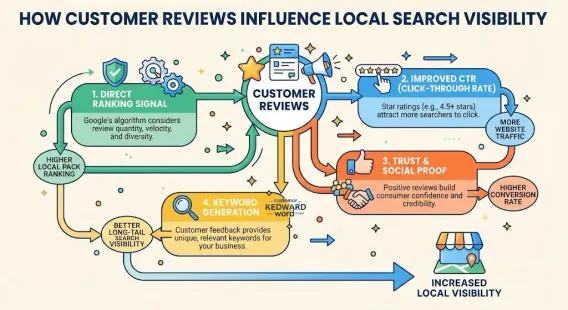
For more on why reviews matter, see our guide on customer reviews local SEO.
How AI Helps With Review Management
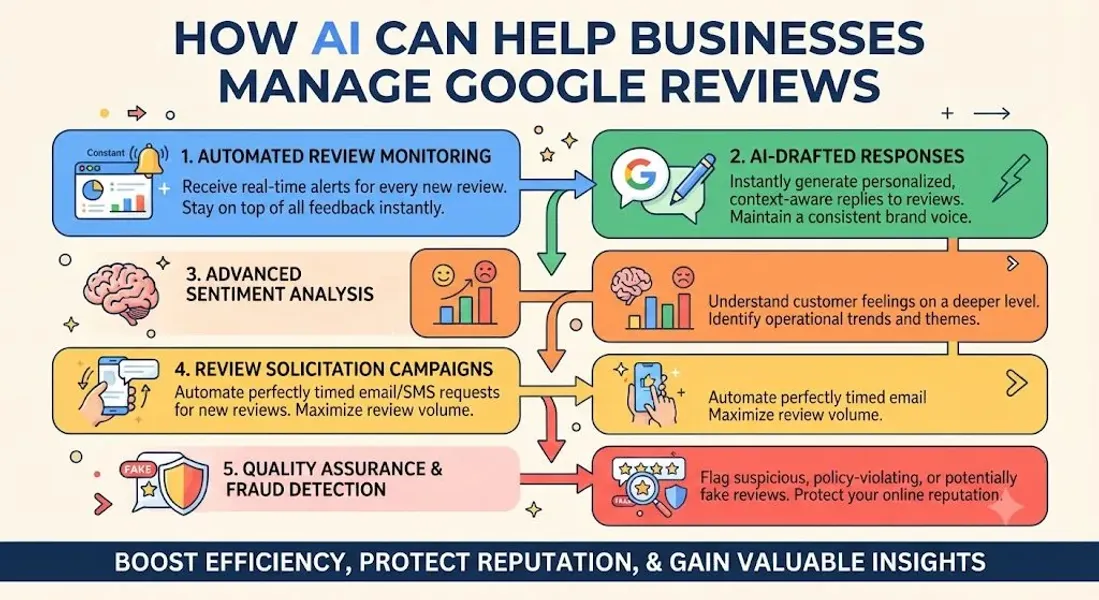
Now let’s get into the specifics. Here’s how AI can help your business manage Google reviews more effectively.
1. Real-Time Monitoring
AI tools monitor review platforms 24/7, alerting you the moment a new review appears. No more manually checking your profile multiple times a day.
Why it matters: Fast responses show customers you care—and can prevent negative reviews from escalating. For more, see our guide on respond to negative Google reviews.
2. Sentiment Analysis
AI analyzes the tone of each review, categorizing it as positive, negative, or neutral. It can also detect specific emotions—frustration, satisfaction, disappointment—and flag reviews that need urgent attention.
Why it matters: Not all negative reviews are equally urgent. Sentiment analysis helps you prioritize.
3. Response Drafting
AI can generate draft responses to reviews based on the content and tone. You can then review, edit, and publish—dramatically reducing the time it takes to respond.
Why it matters: Faster responses, consistent quality, less mental fatigue.
4. Personalization at Scale
AI can pull details from the review—the customer’s name, the service mentioned, the specific complaint—and incorporate them into the response, making it feel personal even when generated at scale.
Why it matters: Personalization builds trust. AI makes it possible without sacrificing efficiency.
5. Trend Analysis
AI analyzes hundreds or thousands of reviews to identify patterns. What are customers praising? What are they complaining about? Which locations have the best ratings? Which have the worst?
Why it matters: These insights help you improve operations, not just responses.
6. Competitor Analysis
Some AI tools also monitor competitors’ reviews, giving you insights into their strengths and weaknesses.
Why it matters: Understanding your competitive landscape helps you differentiate.
7. Automated Reporting
AI generates reports on review performance—ratings over time, response rates, sentiment trends—so you can track progress without manually compiling data.
Why it matters: Data-driven decisions are better decisions.
8. Fake Review Detection
AI can flag reviews that appear suspicious—accounts with no history, patterns of negative reviews, or content that doesn’t match your business.
Why it matters: Early detection lets you report fake reviews before they do damage. For more, see our guide on fake Google reviews.
Benefits of AI Review Management
AI review management offers several concrete benefits for local businesses.
Time Savings
AI can reduce the time spent on review management by 50-80%. Tasks that took hours now take minutes.
Faster Response Times
AI enables near-instant responses, which improves customer satisfaction and signals engagement to Google.
Consistent Quality
AI ensures every response follows your brand guidelines, maintaining a consistent tone across all reviews.
Improved Local SEO
Faster, more frequent responses can improve your local ranking. For more, see our guide on local pack SEO.
Better Insights
AI uncovers trends and patterns that would be invisible in manual review. These insights help you improve your business.
Scalability
AI makes it possible to manage reviews across multiple locations and platforms without adding headcount.
Reduced Stress
AI handles the repetitive, emotionally draining work so your team can focus on higher-value tasks.
Limitations and Risks of AI Review Management
AI isn’t perfect. Understanding its limitations helps you use it more effectively.
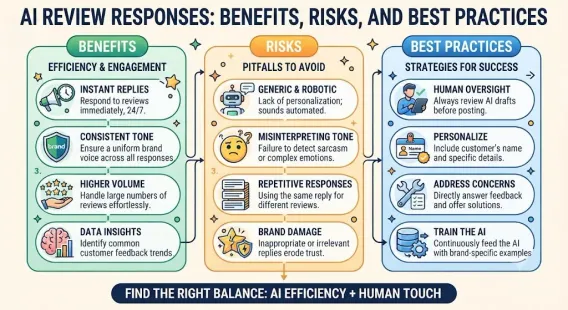
Risk of Sounding Robotic
AI-generated responses can sound generic or insincere if not properly customized. Customers can often tell when a response wasn’t written by a human.
Lack of Context
AI doesn’t know your business the way you do. It may miss nuances or respond inappropriately to sensitive situations.
Difficulty With Complex or Emotional Reviews
AI struggles with reviews that involve complex emotions, legal issues, or sensitive topics. These require human judgment.
Over-Reliance
Businesses that rely entirely on AI risk losing the human touch that customers value.
Accuracy Issues
AI can misinterpret tone or intent. A neutral review might be flagged as negative, or vice versa.
Privacy Concerns
Some AI tools collect and store customer data. Ensure you’re compliant with privacy regulations.
Cost
While some AI tools are affordable, comprehensive solutions can be expensive—especially for small businesses.
For more on the risks and best practices, see our guide on AI review responses.
Best AI Tools for Review Management
Several tools offer AI-powered review management. Here are some of the most popular.
Google Business Profile (Native AI Features)
Google has begun integrating AI features into its Business Profile platform, including response suggestions and insights. These are basic but free.
Birdeye
Birdeye is a comprehensive reputation management platform with AI-powered review responses, sentiment analysis, and multi-location support.
Podium
Podium offers AI-driven review management, messaging, and customer interaction tools. It’s popular with local businesses.
Reputation.com
Reputation.com provides AI-powered review monitoring, response generation, and analytics for businesses of all sizes.
Chatmeter
Chatmeter focuses on multi-location businesses, offering AI review management, local SEO, and competitive insights.
Sprout Social
Sprout Social includes review management features alongside its social media tools.
Yext
Yext offers review monitoring and response tools as part of its broader local presence management platform.
GatherUp
GatherUp focuses on review generation and management, with AI-assisted responses.
ReviewTrackers
ReviewTrackers offers AI-powered review monitoring, sentiment analysis, and reporting.
Local Falcon
Local Falcon specializes in local SEO and includes review analysis features.
How to Implement AI Review Management: Step-by-Step
Ready to integrate AI into your review strategy? Here’s how to do it.
Step 1: Assess Your Needs
Determine what you need AI to do. Are you overwhelmed by volume? Struggling with response quality? Looking for deeper insights? Your needs will determine which tools you choose.
Step 2: Choose the Right Tool
Evaluate tools based on features, pricing, scalability, and integrations. Consider whether you need multi-location support, competitor analysis, or other specialized features.
Step 3: Set Up Monitoring
Connect your Google Business Profile and any other review platforms to your AI tool. Ensure it’s monitoring all relevant sources.
Step 4: Define Your Brand Voice
Before AI drafts responses, define your brand voice. Are you formal? Friendly? Casual? Provide guidelines so AI-generated responses match your tone.
Step 5: Create Response Templates
Use AI to generate response templates for common scenarios. Then customize them to fit your brand.
Step 6: Review AI-Generated Responses
Never publish AI-generated responses without review. Read them, edit them, and personalize them as needed.
Step 7: Train Your Team
Ensure your team understands how to use AI tools and when human intervention is needed.
Step 8: Monitor Performance
Track response times, sentiment trends, and review ratings. Adjust your approach based on what’s working.
Step 9: Maintain the Human Touch
AI should augment—not replace—human interaction. For sensitive or complex reviews, always respond personally.
Step 10: Stay Compliant
Ensure your use of AI complies with Google’s policies and privacy regulations.
For more on compliance, see our guide on Google Business Profile suspended.
Best Practices for AI Review Management
Follow these best practices to get the most from AI.
Use AI as a Tool, Not a Replacement
AI handles the heavy lifting, but humans should always review and approve responses.
Personalize Every Response
Even AI-generated responses should feel personal. Reference specific details from the review.
Respond Quickly
Aim to respond within 24-48 hours. AI makes this easier—use it.
Prioritize Negative Reviews
Negative reviews need faster, more thoughtful responses. Use AI to flag them for urgent attention.
Monitor Sentiment Trends
Use AI insights to track how customers feel over time. Address negative trends before they escalate.
Never Argue
AI won’t argue—but humans might. Ensure your team stays professional.
Never Share Private Information
AI should never include order details, appointment times, or personal information in responses.
Test and Refine
AI improves with feedback. Test different response styles and refine based on results.
Stay Human
For complex, emotional, or sensitive reviews, respond personally. AI can’t replace empathy.
The Future of AI in Review Management
AI review management is still evolving. Here’s what to expect in the coming years.
More Sophisticated Sentiment Analysis
AI will get better at understanding nuance, sarcasm, and complex emotions.
Predictive Analytics
AI will predict which reviews are likely to go negative—or which customers are at risk—allowing proactive intervention.
Deeper Integration
AI will integrate more deeply with CRM systems, customer service platforms, and marketing tools.
Voice and Multimodal Analysis
AI will analyze not just text but also voice, images, and video reviews.
Hyper-Personalization
AI will generate responses that feel completely personalized—even at scale.
Ethical Considerations
As AI becomes more prevalent, expect more scrutiny around transparency, bias, and privacy.
Conclusion
AI is transforming how businesses manage Google reviews. It’s making it faster, easier, and more scalable to monitor, respond to, and learn from customer feedback. For businesses overwhelmed by review volume, AI offers a lifeline. For businesses looking to improve their reputation and local SEO, it offers a competitive advantage.
But AI isn’t a replacement for human judgment. It’s a tool—one that works best when used thoughtfully. Use AI to handle the repetitive work, but always review responses before publishing. Personalize every reply. Respond quickly. And never lose the human touch that customers value.
The businesses that master AI review management will be the ones that thrive in local search. They’ll respond faster, learn more, and build stronger reputations. And they’ll do it all without burning out their teams.
Call to Action
Ready to streamline your review management with AI? Let our local SEO experts help. We’ll recommend the right tools, set up your workflow, and help you build a review strategy that’s fast, effective, and human.
Contact Us Today for a Free Local SEO Audit!
FAQs
Q1: What is AI review management? A: AI review management is the use of artificial intelligence tools to monitor, analyze, and respond to online reviews. It uses natural language processing and machine learning to automate parts of the review management process.
Q2: Can AI fully replace human review responses? A: No. AI can draft responses, but humans should always review and personalize them. For sensitive or complex reviews, human responses are essential.
Q3: How does AI improve local SEO? A: AI enables faster, more frequent responses, which can improve your local ranking. It also provides insights that help you optimize your profile. For more, see our guide on customer reviews local SEO.
Q4: What are the best AI tools for review management? A: Popular tools include Birdeye, Podium, Reputation.com, Chatmeter, and Google’s native AI features. The best tool depends on your needs and budget.
Q5: Is AI review management expensive? A: Costs vary. Some tools are affordable for small businesses; others are priced for enterprises. Many offer free trials.
Q6: Can AI detect fake reviews? A: Yes. AI can flag suspicious reviews based on account history, patterns, and content. For more, see our guide on fake Google reviews.
Q7: Will AI-generated responses sound robotic? A: They can if not properly customized. Always review and personalize AI-generated responses before publishing.
Q8: How do I ensure AI responses comply with Google’s guidelines? A: Review Google’s policies, avoid promotional language, never share private information, and always personalize responses. For more, see our guide on Google Business Profile suspended.
Q9: What should I do if my business is not showing on Google Maps? A: Check for verification issues, suspensions, incorrect information, or ranking problems. See our guide on business not showing on Google Maps.
Q10: How do I fix incorrect information on my Google Business Profile? A: If your profile shows incorrect information, you can edit it directly from your dashboard. For persistent issues, see our guide on how to fix Google Business Profile errors.
Internal Links
-
What Is Google Business Profile and How Does It Work? A Complete Guide
-
Google Business Profile vs Google Maps: What’s the Difference?
-
Google Business Profile Verification: Complete Step-by-Step Guide
-
How to Write the Perfect Google Business Profile Description
-
Google Business Profile Photos: Best Practices for Local SEO
-
Google Business Profile Services: How to Add and Optimize Them
-
Google Business Profile Attributes: What Are They and Why Do They Matter?
-
Google Business Profile Suspended? Common Causes and What to Do
-
What Are Local Citations and Why Are They Important for SEO?## External Links
-
Google’s Guidelines for Representing Your Business on Google
Keep reading
Grow Your Google Maps Ranking on Autopilot
Stop spending hours every week manually replying to customer reviews and writing Google posts. Busirank automates your Google Business Profile to boost your local SEO rankings and turn searchers into paying clients.
 Busirank Team