 Busirank Team
Introduction
When someone opens Google Maps, they’re not browsing. They’re not comparing options for next month. They’re looking for something right now—a place to eat, a service to call, a store to visit. And the keywords they type determine which businesses they see.
Here’s what makes Google Maps different from regular Google Search: the intent is almost always local and immediate. Someone searching “coffee shops” on Google might be doing research. Someone searching “coffee shops near me” on Google Maps is probably already in their car. That distinction matters enormously for how you optimize your business.
Most business owners understand that keywords matter for SEO. But Google Maps keywords work differently than traditional website keywords. You’re not just optimizing a webpage—you’re optimizing a business listing that appears on a map, competing against other nearby businesses for a limited number of visible spots.
Google Maps uses a combination of relevance, distance, and prominence to decide which businesses to show. Your keywords influence relevance—they tell Google what your business is and what it offers. But they also need to work alongside your location data, your reviews, your categories, and your overall profile completeness.
In this comprehensive guide, we’ll walk you through exactly how to target Google Maps keywords effectively. We’ll explain what Maps keywords are, how they differ from regular local keywords, why they matter for local search intent, and a step-by-step process for finding and optimizing them. By the end, you’ll have a clear strategy for appearing in more Maps searches and attracting customers who are ready to act.
What Are Google Maps Keywords?
Google Maps keywords are the search terms people type into Google Maps when looking for local businesses. They’re the phrases that trigger map results—the pins, listings, and directions that appear when someone searches for something nearby.
Examples include:
- “Pizza near me”
- “Dentist open now”
- “Gas station”
- “Emergency plumber”
- “Coffee shop downtown”
- “Best sushi in Austin” These keywords differ from regular search keywords in a few important ways.
They’re Location-Dependent
Google Maps keywords are interpreted through the lens of the searcher’s location. If two people in different cities search “Italian restaurant,” they’ll see completely different results. Your business appears based on how close you are to the person searching.
They’re Often Implicitly Local
On Google Maps, you rarely need to type “near me.” The platform already knows you want something nearby. Typing “pizza” on Maps implies “pizza near me.” This means your business needs to rank for short, category-based keywords—not just long-tail phrases.
They’re Frequently Action-Oriented
Maps searches often happen in the moment. Someone needs directions, a phone number, or hours of operation. The intent is immediate and practical.
They Include Category Terms
Google Maps relies heavily on business categories to match searches. When someone searches “plumber,” Google shows businesses categorized as plumbers. Your Google Business Profile category is essentially the most important keyword on your listing.
Google Maps Keywords vs. Regular Local Keywords
You might be wondering: aren’t Google Maps keywords just local keywords? Not exactly. There’s overlap, but the two work differently.
Local Keywords Target Websites
Local keywords are used to optimize website content—landing pages, blog posts, service pages. You target these keywords to rank in Google’s organic search results and the local pack.
Google Maps Keywords Target Listings
Google Maps keywords are used to optimize your business listing. You’re not writing content—you’re choosing categories, filling out services, writing a description, and building reviews that mention relevant terms.
The Overlap
Both types of keywords share a goal: connecting you with local searchers. And both benefit from local keyword research. But the optimization tactics differ. For website keywords, you write content. For Maps keywords, you optimize your profile.
Why You Need Both
Ideally, you optimize for both. Your Google Business Profile handles Maps searches. Your website handles broader local searches. Together, they create a comprehensive local SEO strategy.
Why Google Maps Keywords Matter for Local Search Intent
Google Maps keywords are critical because they connect you with the highest-intent local traffic available. Here’s why they matter so much.
They Capture Immediate Intent
People searching on Google Maps are usually ready to act. They want directions, a phone number, or a place to visit. If your business appears, you have a chance to convert them right away.
They Drive Foot Traffic
Maps searches frequently lead to visits. Someone searching “coffee near me” on Maps is likely to walk into a café within minutes. Appearing in those results drives real foot traffic.
They Generate Calls
Many Maps listings include a “Call” button. When someone taps it, your phone rings. Optimizing for Maps keywords means more calls from ready-to-buy customers.
They Influence the Local Pack
The local pack in Google Search is powered by the same data as Google Maps. Optimizing for Maps keywords improves your visibility in both places.
They Support Voice Search
Voice assistants like Google Assistant rely on Maps data for local queries. “Hey Google, find a pharmacy near me” pulls from Maps listings. Optimizing for Maps keywords helps you appear in voice search.
They’re Highly Competitive—But Winnable
Because Maps results show only a few businesses at a time, competition is fierce. But the businesses that optimize properly consistently win. You don’t need a big budget—you need the right strategy.
Types of Google Maps Keywords
Understanding the different types of Maps keywords helps you target them effectively.
Category Keywords
These are broad terms that match your business category. Examples:
- “Restaurant”
- “Plumber”
- “Dentist”
- “Hotel”
- “Gym” These are the most common Maps searches. Your Google Business Profile category determines whether you appear for them.
Service Keywords
These describe specific services you offer. Examples:
- “Emergency plumbing”
- “Teeth whitening”
- “Oil change”
- “Hair coloring”
- “Tax preparation” These are often searched with a category term, like “emergency plumber” or “teeth whitening dentist.”
Product Keywords
These describe products you sell. Examples:
- “Organic dog food”
- “Running shoes”
- “Fresh flowers”
- “iPhone repair” Product keywords are valuable for retail businesses and any business selling physical goods.
Attribute Keywords
These describe specific features or amenities. Examples:
- “Wheelchair accessible restaurant”
- “Free Wi-Fi cafe”
- “Pet friendly hotel”
- “Outdoor seating” These keywords align with Google Business Profile attributes. If you have the attribute, you can appear for the search.
”Open Now” Keywords
These include time-based modifiers. Examples:
- “Restaurants open now”
- “Pharmacy open 24 hours”
- “Coffee shop open late” These capture urgent, immediate needs.
Brand Keywords
These include your business name. Examples:
- “Starbucks”
- “Joe’s Pizza Austin” Brand searches are valuable because they indicate a customer is specifically looking for you.
Neighborhood Keywords
These include specific neighborhoods or districts. Examples:
- “Restaurants in SoHo”
- “Plumber in North Austin”
- “Dentist downtown Chicago” These work well when your business is located in or serves a recognizable area.
How to Find Google Maps Keywords for Your Business
Now let’s get practical. Here’s how to find the Maps keywords your customers are actually using.
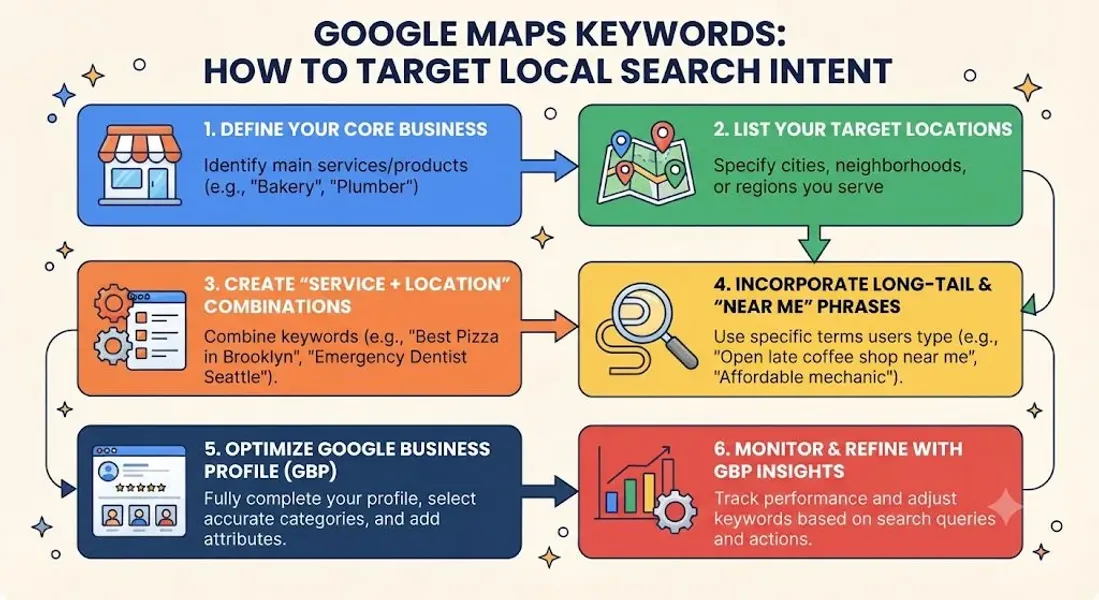
Step 1: Start With Your Business Category
Your Google Business Profile category is your most important Maps keyword. Start there. What category best describes your business? What related categories apply?
Step 2: List Your Services and Products
Write down everything you offer. Each service and product is a potential Maps keyword. For example, a hair salon might list:
- Haircut
- Hair coloring
- Balayage
- Blowout
- Bridal styling
Step 3: Use Google Maps Autocomplete
Open Google Maps and start typing your category or service. The autocomplete suggestions reveal what people search for.
Example: Type “plumber” in Maps and you might see:
- plumber near me
- plumber open now
- emergency plumber
- plumber free estimate These are real searches from real users.
Step 4: Check Google Search Autocomplete
Google Search autocomplete also reveals Maps-related keywords. Type your service followed by “near” or a location, and see what appears.
Step 5: Analyze Your Google Business Profile Insights
Your Google Business Profile insights show the exact search queries that triggered your listing. This is invaluable first-party data. Look for patterns—what terms are people using to find you?
Step 6: Review Your Competitors
Search for your main keywords on Google Maps. Look at which competitors appear. Then examine their profiles—what categories do they use? What services do they list? What keywords appear in their descriptions and reviews?
Step 7: Mine Your Reviews
Your reviews contain keywords customers naturally use. If multiple reviews mention “emergency service” or “same-day appointment,” those are keywords worth targeting.
Step 8: Use Keyword Research Tools
Tools like Google Keyword Planner, Ubersuggest, and BrightLocal can show search volume for Maps-related keywords. Filter by location to get local data.
Step 9: Check “People Also Search For”
When you view a business on Google Maps, you’ll often see a “People also search for” section. This reveals related businesses and categories—useful for identifying keyword opportunities.
Step 10: Consider Voice Search Variations
Voice searches often use natural language. Examples:
- “Where’s the nearest ATM?”
- “Find a coffee shop open now”
- “What’s the best pizza place around here?” These variations are worth targeting through FAQs, descriptions, and posts.
How to Optimize for Google Maps Keywords
Finding keywords is step one. Here’s how to optimize your profile to appear for them.
Choose the Right Primary Category
Your primary Google Business Profile category is the single most important keyword signal on your listing. Choose the most specific category that accurately describes your core business.
Example: “Italian restaurant” is better than “Restaurant.” “Emergency plumber” is better than “Plumber.”
Add Relevant Secondary Categories
Secondary categories expand your relevance for additional keywords. Add categories that reflect other services or products you offer—but only if they’re genuinely relevant.
Complete Your Services Section
Use the Google Business Profile services section to list everything you offer. Each service is a keyword opportunity. Write clear names and descriptions that include relevant terms.
Add Your Products
If you sell physical goods, use the Google Business Profile products section. Product names and descriptions are keyword-rich content that helps you appear for product searches.
Write a Keyword-Rich Description
Your Google Business Profile description should clearly explain what you do, who you serve, and where you’re located. Incorporate relevant keywords naturally—don’t stuff them in.
Select All Applicable Attributes
Google Business Profile attributes like “Wheelchair accessible,” “Free Wi-Fi,” and “Outdoor seating” help you appear for attribute-based searches. Add everything that applies.
Upload Keyword-Rich Photos
Photo file names matter. Instead of “IMG_1234.jpg,” use “downtown-austin-italian-restaurant-pasta.jpg.” Follow Google Business Profile photos best practices.
Build Reviews With Keywords
Encourage customers to mention specific services or products in their reviews. Reviews that mention “emergency plumbing” or “vegan options” reinforce your relevance for those keywords.
Post Regularly
Use Google Business Profile post ideas that incorporate your target keywords. Posts about specific services or products help you appear for related searches.
Maintain NAP Consistency
NAP consistency across all platforms helps Google verify your business and improves your Maps visibility.
Build Local Citations
Local citation building reinforces your geographic relevance. Citations on local directories and community sites support your Maps rankings.
Best Practices for Targeting Google Maps Keywords
Follow these best practices to maximize your Maps visibility.
Focus on Relevance First
Google prioritizes relevance when matching searches to businesses. Choose accurate categories, list real services, and describe your business clearly. Don’t chase keywords that don’t match what you actually offer.
Optimize for Proximity
Distance is a major factor in Maps rankings. You can’t change your location, but you can focus on your actual service area. Build prominence within your neighborhood and surrounding areas.
Build Prominence Through Reviews
Reviews are one of the strongest ranking signals for Maps. Build a steady stream of positive reviews and respond to all of them. For negative reviews, see our guide on how to respond to negative Google reviews.
Use Keywords Naturally
Don’t stuff keywords into your business name or description. Google penalizes keyword stuffing, and it can result in your profile being Google Business Profile suspended.
Target Long-Tail Keywords
Long-tail keywords like “emergency plumber open now” have less competition and higher intent. Target these variations alongside broader terms.
Update Regularly
Google favors active profiles. Post weekly, add photos monthly, and review your information quarterly. For a schedule, see our guide on how often to update Google Business Profile.
Monitor Your Insights
Use Google Business Profile insights to track which keywords trigger your listing. Adjust your strategy based on what’s working.
Check Competitors Regularly
Competitors change their categories, services, and descriptions. Monitor them to stay competitive.
Common Google Maps Keyword Mistakes to Avoid
Avoid these mistakes to protect your Maps visibility.
Keyword Stuffing Your Business Name
Adding keywords to your business name violates Google’s guidelines and can get your profile suspended. Use your real business name only.
Choosing a Broad Category
Broad categories put you up against more competitors. Choose the most specific category that accurately describes your business.
Ignoring Services and Products
The Services and Products sections are prime keyword real estate. Don’t leave them empty.
Neglecting Reviews
Reviews are a major ranking factor. Build them consistently and respond to all of them.
Using Inconsistent NAP Information
Inconsistent NAP data confuses Google and hurts your Maps rankings. Maintain NAP consistency everywhere.
Not Building Citations
Local citations reinforce your geographic relevance. Build them steadily.
Targeting Irrelevant Keywords
Don’t chase keywords that don’t match your business. Relevance matters more than volume.
Giving Up Too Soon
Maps rankings fluctuate and take time to improve. Stay consistent and track your progress.
Conclusion
Google Maps keywords are the bridge between your business and customers who are ready to act. Unlike traditional keyword research, Maps keywords require a different approach—one focused on categories, services, attributes, and reputation rather than website content.
The process is straightforward: find the keywords your customers use, optimize your Google Business Profile to match, build reviews and citations, and maintain consistency. Track your progress using Google Business Profile insights and adjust as needed.
Remember: Maps rankings depend on relevance, distance, and prominence. You can’t change your location, but you can absolutely improve your relevance and prominence. Do that consistently, and you’ll appear in more Maps searches—and attract more of the customers who matter most.
Call to Action
Want to rank higher on Google Maps but don’t know which keywords to target? Let our local SEO experts help. We’ll research the best Maps keywords for your business, optimize your profile, and build a strategy that drives real results.
Contact Us Today for a Free Local SEO Audit!
FAQs
Q1: What are Google Maps keywords? A: Google Maps keywords are the search terms people type into Google Maps when looking for local businesses. They’re typically short, category-based terms like “pizza,” “plumber,” or “dentist near me.”
Q2: How are Google Maps keywords different from regular local keywords? A: Google Maps keywords optimize your business listing, while regular local keywords optimize your website content. Maps keywords rely on categories, services, and attributes—not written content.
Q3: Do I need to include “near me” in my Google Business Profile to rank? A: No. Google Maps uses the searcher’s location to determine results. You don’t need “near me” on your profile—you need accurate location data, a relevant category, and strong prominence signals.
Q4: How do I find the best Google Maps keywords for my business? A: Start with your business category, list your services and products, use Google Maps autocomplete, check your Google Business Profile insights, and analyze competitor profiles.
Q5: How long does it take to rank for Google Maps keywords? A: It varies based on competition and your current optimization. Some businesses see improvements in weeks; others take months. Consistency is key.
Q6: Can I rank on Google Maps without a physical address? A: Yes, if you’re a service-area business. You can hide your address and specify your service areas. Focus on building citations and reviews in your target areas.
Q7: How do Google Maps keywords help with local pack SEO? A: The local pack is powered by the same data as Google Maps. Optimizing for Maps keywords improves your visibility in both places. For more, see our guide on local pack SEO.
Q8: What are “near me” keywords, and how do they relate to Google Maps? A: “Near me” keywords are searches that include phrases like “near me” or “nearby.” They’re closely tied to Google Maps because Maps uses the searcher’s location to deliver results. For more, see our guide on near me keywords.
Q9: What should I do if my business is not showing on Google Maps? A: Check for verification issues, suspensions, incorrect information, or ranking problems. See our guide on business not showing on Google Maps for a complete diagnostic checklist.
Q10: What should I do if my Google Business Profile is suspended? A: If your profile is Google Business Profile suspended, review Google’s guidelines, fix any violations, and submit an appeal. Our guide on suspended profiles covers this in depth.
Q11: How do I fix incorrect information on my Google Business Profile? A: If your profile shows incorrect information, you can edit it directly from your dashboard. For persistent issues, see our guide on how to fix Google Business Profile errors.
Internal Links
-
What Is Google Business Profile and How Does It Work? A Complete Guide
-
Google Business Profile vs Google Maps: What’s the Difference?
-
Google Business Profile Verification: Complete Step-by-Step Guide
-
How to Write the Perfect Google Business Profile Description
-
Google Business Profile Photos: Best Practices for Local SEO
-
Google Business Profile Services: How to Add and Optimize Them
-
Google Business Profile Attributes: What Are They and Why Do They Matter?
-
Google Business Profile Suspended? Common Causes and What to Do
-
Why Your Business Is Not Showing on Google Maps## External Links
-
Google’s Guidelines for Representing Your Business on Google
Keep reading
Grow Your Google Maps Ranking on Autopilot
Stop spending hours every week manually replying to customer reviews and writing Google posts. Busirank automates your Google Business Profile to boost your local SEO rankings and turn searchers into paying clients.
 Busirank Team