 Busirank Team
Introduction
Google reviews are one of the most powerful forces in local search. They influence whether customers choose you, how high you rank in Google Maps, and whether your business appears in the local pack. But getting reviews is only half the battle. How you respond to them—especially negative ones—can make or break your reputation.
Here’s the reality: every business gets negative reviews eventually. Even the best-run restaurant, clinic, salon, or plumbing company will encounter a customer who had a bad experience. What separates thriving businesses from struggling ones isn’t whether they get negative reviews. It’s how they respond.
Positive reviews deserve attention too. A thoughtful response to a five-star review shows appreciation, encourages loyalty, and signals to Google that your business is active and engaged. But negative reviews require a different strategy—one built on professionalism, empathy, and restraint.
In this guide, we’ll break down the difference between positive and negative Google reviews, explain why responses matter for local SEO, and give you practical templates and strategies to respond to negative Google reviews without damaging your brand. By the end, you’ll know exactly how to handle every type of review that comes your way.
Positive vs Negative Google Reviews: What’s the Difference?
At first glance, the difference seems obvious: one is good, one is bad. But from a business strategy perspective, the differences go deeper.
Positive Reviews
Positive reviews are ratings of four or five stars, often with comments praising your service, staff, product, or atmosphere. They build trust, improve your average rating, and boost your local search visibility.
Why they matter:
- They increase customer confidence.
- They improve your Google Maps ranking.
- They provide social proof.
- They give you content to share on social media and your website.
Negative Reviews
Negative reviews are ratings of one or two stars, often with complaints about service, quality, wait times, pricing, or staff behavior. A single negative review can lower your average rating and scare away potential customers—especially if it goes unanswered.
Why they matter:
- They can damage trust.
- They can lower your local ranking.
- They can discourage new customers.
- They can reveal operational problems you need to fix. The key difference in response strategy is this: positive reviews require gratitude and engagement. Negative reviews require empathy, accountability, and a path to resolution.
Why Responding to Reviews Matters for Local SEO
Responding to reviews isn’t just good customer service. It’s a ranking signal.
Google has confirmed that responding to reviews can improve your local ranking. When you respond, you show Google that your business is active, engaged, and attentive to customer feedback. That engagement signals prominence—one of the three pillars of local search ranking.
Beyond rankings, responses affect customer perception. A business that responds professionally to negative reviews appears more trustworthy than one that ignores them. In fact, many customers read review responses specifically to see how a business handles criticism.
Responses also give you a chance to include relevant keywords naturally. If a customer mentions “emergency plumbing” or “vegan options,” your response can reinforce those terms without sounding forced.
For more on how reviews impact visibility, see our guide on customer reviews local SEO.
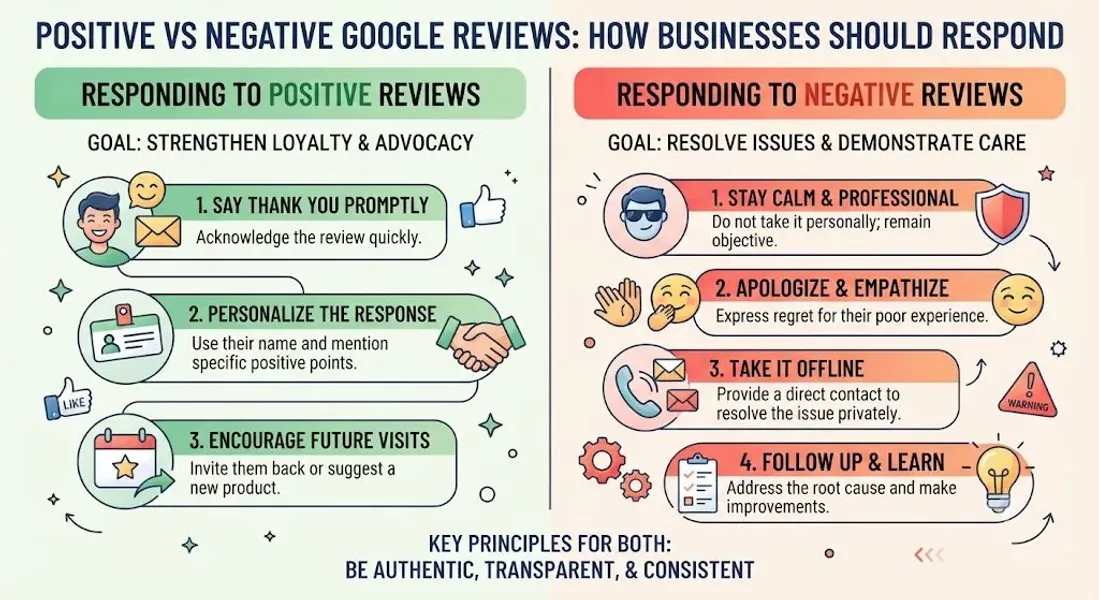
How to Respond to Positive Google Reviews
Positive reviews are easier to handle, but they still deserve a thoughtful response. Here’s how to do it right.
Thank the Customer Genuinely
Start with a sincere thank-you. Avoid generic replies like “Thanks for the review!” Personalize it when possible.
Example: “Thank you so much, Sarah! We’re thrilled you enjoyed the pasta and our patio. It means a lot that you took the time to share your experience.”
Mention Specific Details
If the customer mentioned a specific staff member, dish, service, or product, acknowledge it. This shows you actually read the review.
Example: “We’re so glad James took great care of you during your visit. He’ll be happy to hear your kind words!”
Keep It Brief
A few sentences are enough. You don’t need to write a paragraph. The goal is to show appreciation, not to sell.
Invite Them Back
A gentle invitation to return encourages repeat business.
Example:
“We can’t wait to welcome you back soon!”
Don’t Ask for a Review Update
If a customer left a positive review, don’t ask them to change it or add more. Just say thank you.
How to Respond to Negative Google Reviews
Negative reviews are where your reputation is truly tested. Here’s a step-by-step approach to handle them professionally.
Step 1: Pause Before Responding
Don’t reply in anger or defensiveness. Take a breath. Read the review carefully. Give yourself time to respond calmly.
Step 2: Acknowledge the Customer’s Experience
Even if you disagree with the review, acknowledge that the customer felt upset. Empathy goes a long way.
Example: “I’m sorry to hear about your experience. That’s not the standard we strive for.”
Step 3: Apologize Without Admitting Fault Blindly
You can apologize for the experience without admitting legal fault. Keep it simple.
Example:
“I’m sorry you were disappointed with your visit.”
Step 4: Take Responsibility Where Appropriate
If your business made a mistake, own it. Customers respect accountability.
Example: “You’re right—we missed the mark on your order, and we’re sorry.”
Step 5: Offer to Make It Right
Invite the customer to contact you offline so you can resolve the issue. Don’t try to solve a complex problem in public.
Example: “We’d like to make this right. Please contact me directly at [email/phone] so we can discuss this further.”
Step 6: Keep It Short and Professional
Don’t write a novel. Don’t argue. Don’t get defensive. A concise, professional response is best.
Step 7: Learn From the Feedback
If the same complaint appears multiple times, it’s a pattern. Fix the underlying issue.
Google Review Response Templates
Here are templates you can adapt for common situations.
Positive Review Response Template
“Thank you so much, [Name]! We’re thrilled you enjoyed [specific detail]. We appreciate you taking the time to leave a review and hope to see you again soon!”
Negative Review Response Template (General)
“Hi [Name], I’m sorry to hear about your experience. That’s not the standard we aim for. We’d like to make this right—please contact us at [email/phone] so we can discuss further. Thank you for your feedback.”
Negative Review Response Template (Service Issue)
“Hi [Name], thank you for letting us know. I’m sorry the service didn’t meet your expectations. We take this seriously and would like to resolve it. Please reach out to [email/phone] so we can make it right.”
Negative Review Response Template (Wait Time Complaint)
“Hi [Name], I’m sorry about the wait you experienced. We know your time is valuable, and we’re working on improving our processes. We’d love the chance to serve you better—please contact us at [email/phone].”
Negative Review Response Template (Rude Staff Complaint)
“Hi [Name], I’m sorry to hear you felt our team was not helpful. That’s not the experience we want for our customers. We’d like to learn more—please contact us at [email/phone].”
Fake Review Response Template
“Hi [Name], we take feedback seriously, but we don’t have a record of your visit. If this is a mistake, please contact us at [email/phone] so we can look into it. If this review is fraudulent, we will report it to Google.”
For more templates, see our guide on Google review response templates.
Common Mistakes to Avoid When Responding to Reviews
Avoid these mistakes to protect your reputation.
Getting Defensive
Arguing with a reviewer makes you look unprofessional. Stay calm and professional.
Ignoring Negative Reviews
Ignoring a negative review doesn’t make it go away. It makes you look like you don’t care.
Responding Emotionally
Never respond while angry. Wait, then respond professionally.
Offering Incentives for Review Removal
Offering discounts or refunds in exchange for removing a review violates Google’s policies. You can offer to resolve the issue, but don’t tie it to review removal.
Copy-Pasting the Same Response
Generic responses look lazy. Personalize each response.
Including Promotional Language
Don’t turn your response into an ad. Keep it focused on the customer.
Sharing Private Information
Never share customer details or order information in a public response.
Waiting Too Long
Respond within 24-48 hours. Timely responses show you care.
When to Report a Fake or Abusive Review
Not all negative reviews are legitimate. If a review violates Google’s policies, you can report it.
Report a review if it:
- Is fake or spam
- Contains offensive language
- Is from someone who was never a customer
- Includes personal information
- Is a competitor attack For more, see our guides on fake Google reviews and how to report fake Google review.
How Review Responses Impact Local SEO
Responses affect your local search visibility in several ways.
Improved Prominence
Google considers engagement as a prominence signal. Responding to reviews shows your business is active.
Better Click-Through Rates
A thoughtful response to a negative review can reassure potential customers and increase clicks.
More Keyword Relevance
Responses can include relevant keywords naturally, reinforcing what your business offers.
Stronger Local Pack Rankings
Businesses that respond to reviews tend to rank better in the local pack.
Enhanced Trust
Customers trust businesses that engage with reviews—even negative ones. That trust can lead to more reviews, more calls, and more customers.
Conclusion
Positive and negative Google reviews require different approaches, but both deserve a response. Positive reviews are opportunities to show gratitude and build loyalty. Negative reviews are opportunities to demonstrate professionalism, accountability, and a commitment to improvement.
The key is to respond promptly, personalize your replies, stay professional, and never argue. Use the templates in this guide as a starting point, but adapt them to your brand voice.
Remember: how you respond to negative Google reviews can matter more than the review itself. A thoughtful response can turn a frustrated customer into a loyal one—and show everyone else that your business cares.
Call to Action
Need help managing your Google reviews? Let our local SEO experts help. We’ll monitor your reviews, craft professional responses, and build a strategy to improve your reputation and local rankings.
Contact Us Today for a Free Local SEO Audit!
FAQs
Q1: Should I respond to every Google review? A: Yes. Respond to all reviews—positive and negative. It shows engagement and can improve your local ranking.
Q2: How quickly should I respond to a negative review? A: Aim to respond within 24-48 hours. Timely responses show you care and prevent the issue from escalating.
Q3: Can I ask a customer to remove a negative review? A: You can ask, but don’t pressure them or offer incentives. Google prohibits offering rewards for review removal. For more, see our guide on fake Google reviews.
Q4: What if the negative review is fake? A: Report it to Google. If it violates Google’s policies, it may be removed. For more, see our guide on how to report fake Google review.
Q5: Should I apologize in my response to a negative review? A: Yes, apologize for the experience without admitting legal fault. Empathy goes a long way.
Q6: Can I include keywords in my review responses? A: Yes, but do it naturally. Don’t stuff keywords. Use terms that fit the context of the review.
Q7: How do review responses affect local SEO? A: Responses improve prominence, engagement, and trust—all of which can improve your local ranking. For more, see our guide on customer reviews local SEO.
Q8: What should I do if my business is not showing on Google Maps? A: Check for verification issues, suspensions, incorrect information, or ranking problems. See our guide on business not showing on Google Maps.
Q9: What should I do if my Google Business Profile is suspended? A: If your profile is Google Business Profile suspended, review Google’s guidelines, fix any violations, and submit an appeal. Our guide on suspended profiles covers this in depth.
Q10: How do I fix incorrect information on my Google Business Profile? A: If your profile shows incorrect information, you can edit it directly from your dashboard. For persistent issues, see our guide on how to fix Google Business Profile errors.
Internal Links
-
What Is Google Business Profile and How Does It Work? A Complete Guide
-
Google Business Profile vs Google Maps: What’s the Difference?
-
Google Business Profile Verification: Complete Step-by-Step Guide
-
How to Write the Perfect Google Business Profile Description
-
Google Business Profile Photos: Best Practices for Local SEO
-
Google Business Profile Services: How to Add and Optimize Them
-
Google Business Profile Attributes: What Are They and Why Do They Matter?
-
Google Business Profile Suspended? Common Causes and What to Do
-
What Are Local Citations and Why Are They Important for SEO?
-
Local Keywords: How to Find the Right Keywords for Your Business
-
[How to Find ](/blog/near-me-keywords)
-
Local Pack SEO: How Businesses Appear in Google’s Local Results## External Links
-
Google’s Guidelines for Representing Your Business on Google
Keep reading
Grow Your Google Maps Ranking on Autopilot
Stop spending hours every week manually replying to customer reviews and writing Google posts. Busirank automates your Google Business Profile to boost your local SEO rankings and turn searchers into paying clients.

 Busirank Team