 Busirank Team
Introduction
You’ve probably seen it a hundred times without knowing what it’s called. You search for “pizza near me” or “dentist in Austin,” and at the top of the results, right below the ads, you see a map with three business listings. Each one shows a name, star rating, address, phone number, and a few quick action buttons like “Call” or “Directions.”
That block of three results is called the local pack. And if your business isn’t in it, you’re missing out on one of the most valuable sources of local customers on the internet.
Here’s why it matters so much: local pack results appear at the very top of Google’s search results for local queries—above organic website listings. They capture the highest-intent traffic because people searching for local services are usually ready to take action. They want to call, visit, or book something right now. If your business is one of the three shown, you get that opportunity. If you’re not, you’re invisible.
The good news is that appearing in the local pack isn’t random. It’s the result of a specific set of ranking factors that you can influence through a discipline called local pack SEO. It’s not about luck or ad spend—it’s about optimizing your Google Business Profile, building your reputation, and sending Google the right signals.
In this comprehensive guide, we’ll break down exactly how local pack SEO works, what factors determine who appears in those three spots, and the step-by-step strategies you can use to claim your place. By the end, you’ll have a clear roadmap to one of the most powerful positions in local search.
What Is the Local Pack?
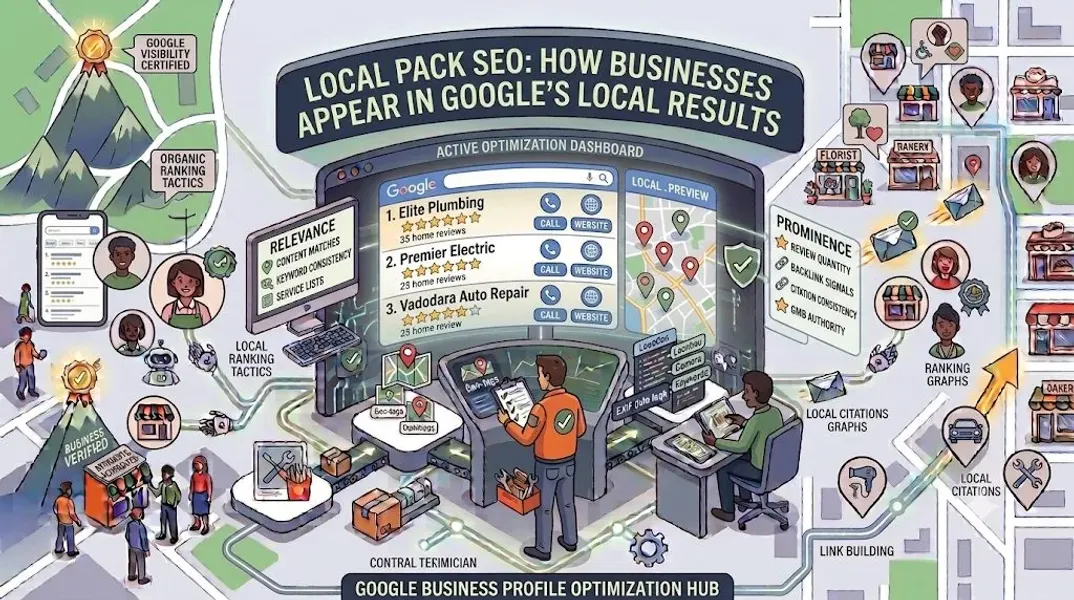
The local pack is the block of three business listings that appears in Google search results for queries with local intent. It’s sometimes called the “map pack,” “three-pack,” or “snack pack.”
The local pack typically includes:
- A map showing the three businesses’ locations
- Business names (linked to their Google Business Profiles)
- Star ratings and review counts
- Addresses or service areas
- Phone numbers
- Hours of operation
- Action buttons like “Call,” “Directions,” or “Website” It appears for both desktop and mobile searches, though its appearance varies slightly by device. On mobile, the local pack often takes up most of the first screen, making it the dominant element of the search results page.
Why the Local Pack Matters So Much
The local pack sits above traditional organic results for local searches. That means even if your website ranks #1 organically, you could still be below three local pack listings in terms of visibility.
Studies consistently show that the top three local pack results capture the majority of clicks for local searches. If you’re not in the pack, you’re competing for a much smaller share of attention.
How the Local Pack Differs From Other Google Results
It’s helpful to understand how the local pack fits into Google’s broader search ecosystem.
Local Pack vs. Organic Results
Organic results are the standard blue-link listings that appear below the local pack. They’re ranked primarily by website authority, content relevance, and backlinks. The local pack, by contrast, is ranked primarily by signals from your Google Business Profile and your local presence.
Local Pack vs. Google Maps Results
Google Maps shows a full-page map interface with many business listings. The local pack is a condensed version of this that appears within regular Google search results. Both are powered by Google Business Profile data, but they serve different user intents.
Local Pack vs. Paid Ads
Paid ads appear above the local pack (and sometimes within it). They’re pay-per-click placements that can deliver immediate visibility but stop the moment you stop paying. Local pack rankings are organic—they’re earned through optimization and reputation, not budget.
The Three Pillars of Local Pack SEO
Google’s local ranking algorithm—the system that determines who appears in the local pack—considers three primary factors. These are the foundation of all local pack SEO.
1. Relevance
How well does your business match what the searcher is looking for? Google evaluates your business category, description, services, products, attributes, and other profile information to determine relevance.
How to improve relevance:
- Choose the most specific Google Business Profile category for your primary category
- Write a detailed, keyword-rich Google Business Profile description
- List all your Google Business Profile services and Google Business Profile products
- Select all applicable Google Business Profile attributes
- Use your profile to clearly communicate what you do and who you serve
2. Distance
How close is your business to the searcher’s location or the location they’ve specified? Proximity is a major factor, especially for “near me” searches.
How to improve distance signals:
- Ensure your address is accurate and complete
- Set realistic service areas if you’re a service-area business
- Build citations in your target locations
- Create location-specific content on your website
- Target near me keywords and Google Maps keywords relevant to your area
3. Prominence
How well-known and well-regarded is your business? Google considers reviews, ratings, citations, backlinks, and overall online presence to determine prominence.
How to improve prominence:
- Build a steady stream of customer reviews local SEO
- Maintain consistent NAP consistency across all platforms
- Build local citations on relevant directories
- Earn local backlinks from newspapers, blogs, and organizations
- Engage with your community both online and offline
Ranking Factors for the Local Pack
While relevance, distance, and prominence are the three pillars, they’re made up of many specific ranking factors. Here are the ones that matter most.
Google Business Profile Signals
Your Google Business Profile is the single most important asset for local pack SEO. Key signals include:
- Primary category: The most important field on your profile
- Business name: Must match your real-world name exactly
- Address: Must be accurate and verified
- Phone number: Local numbers perform better than toll-free
- Hours: Must be accurate and updated regularly
- Description: Should include relevant keywords naturally
- Services and products: Expand your relevance for specific searches
- Attributes: Help you appear in filtered searches
- Photos: Profiles with photos get more engagement
- Posts: Regular posting signals an active business
Review Signals
Reviews are a major ranking factor and a major trust signal. Key elements include:
- Review quantity: More reviews generally rank better
- Review quality: Positive ratings matter
- Review velocity: A steady flow of new reviews is better than a one-time burst
- Review responses: Responding to reviews shows engagement
- Review keywords: Reviews that mention specific services help relevance
Citation Signals
Citations are mentions of your NAP information on other websites. Key elements include:
- NAP consistency: Identical information everywhere
- Citation volume: More citations generally help
- Citation quality: Authority directories matter more
- Citation diversity: A mix of general and niche directories
On-Page Website Signals
Your website also contributes to local pack rankings. Key elements include:
- Local keywords: Your city, neighborhood, and service terms
- Location pages: Dedicated pages for each service area
- LocalBusiness schema: Structured data that helps Google understand your business
- Embedded map: A Google Map on your contact page
- Mobile optimization: Most local searches happen on mobile
Link Signals
Backlinks from local and relevant sources boost your prominence. Key elements include:
- Local backlinks: Links from local newspapers, blogs, and organizations
- Industry backlinks: Links from relevant industry sites
- Anchor text: Local keywords in link text
- Link diversity: A natural mix of link sources
Behavioral Signals
Google also considers how users interact with your listing. Key elements include:
- Click-through rate: How often people click your listing
- Calls and direction requests: Actions taken from your profile
- Website clicks: Traffic from your profile to your site
- Dwell time: How long people stay on your site after clicking
How to Optimize for the Local Pack: Step-by-Step
Now let’s put it all together. Here’s a practical, step-by-step process for improving your local pack rankings.
Step 1: Claim and Verify Your Google Business Profile
If you haven’t already, create Google Business Profile and complete the Google Business Profile verification process. Without a verified profile, you can’t appear in the local pack at all.
Step 2: Choose the Right Primary Category
Select the most specific Google Business Profile category that describes your core business. This is the single most impactful optimization you can make.
Step 3: Complete Every Section of Your Profile
Fill out every field:
- Business name (exactly as it appears in the real world)
- Address and service areas
- Phone number and website
- Hours (including special hours)
- Google Business Profile description
- Google Business Profile services and Google Business Profile products
- Google Business Profile attributes
- Google Business Profile photos
Step 4: Build a Review Generation Strategy
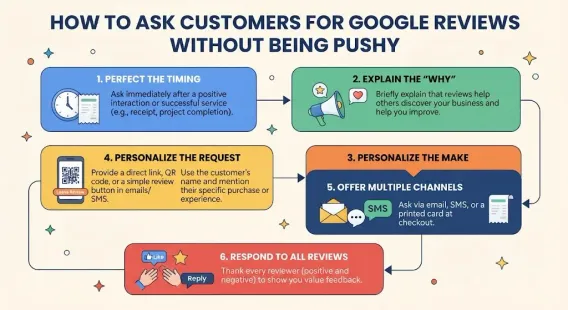
Actively ask for Google reviews from satisfied customers. Make it easy by sending a direct review link. Respond to every review professionally. For negative reviews, see our guide on how to respond to negative Google reviews.
Step 5: Build and Maintain Local Citations
Ensure NAP consistency across all platforms. Build citations on core directories (Google, Bing, Apple, Yelp, Facebook) and niche directories relevant to your industry. Focus on local citation building in your service areas.
Step 6: Optimize Your Website for Local SEO
Create location-specific pages. Add LocalBusiness schema markup. Include your city and service areas throughout your site. Embed a Google Map on your contact page.
Step 7: Create Local Content
Publish blog posts about local events, news, and topics. Create content that mentions your city and neighborhood. Reach out to local media for mentions and features.
Step 8: Post Regularly on Google Business Profile
Aim to post at least once a week. Use fresh Google Business Profile post ideas to keep your profile active and engaging.
Step 9: Build Local Backlinks
Earn links from local newspapers, blogs, chambers of commerce, and community organizations. Sponsor local events and partner with complementary businesses.
Step 10: Monitor and Adjust
Use Google Business Profile insights to track your performance. Monitor your local rankings and adjust your strategy based on what’s working.
Common Local Pack SEO Mistakes to Avoid
Avoid these mistakes to protect your local pack rankings.
Keyword Stuffing Your Business Name
Adding keywords to your business name violates Google’s guidelines and can get your profile Google Business Profile suspended. Use your real business name only.
Ignoring Reviews
Failing to respond to reviews—especially negative ones—damages your reputation and hurts your ranking.
Using Inconsistent NAP Information
Inconsistent citations confuse Google and reduce your prominence.
Neglecting Your Profile
A stale, incomplete profile ranks poorly. Update regularly. For a schedule, see our guide on how often to update Google Business Profile.
Choosing a Broad Category
Broad categories put you up against more competitors. Choose the most specific category that accurately describes your business.
Focusing Only on Your Website
Local pack rankings depend heavily on your Google Business Profile. Don’t neglect it.
Giving Up Too Soon
Local SEO takes time. Results may take weeks or months. Stay consistent.
How to Track Your Local Pack Rankings
To know if your efforts are working, track these metrics.
Monitor Your Position in the Local Pack
Search for your target keywords from different locations and devices. Are you appearing in the top three? What position?
Use Local SEO Tools
Tools like BrightLocal, Moz Local, and SEMrush offer local rank tracking that shows your position in the local pack over time.
Track Google Business Profile Insights
Monitor views, calls, direction requests, and website clicks. Rising engagement often precedes ranking improvements.
Monitor Review Growth
Track how many new reviews you receive each month and how your rating changes.
Check Citation Consistency
Regularly audit your citations to ensure accuracy.
Analyze Website Traffic
Use Google Analytics to see how much traffic comes from Google Maps and local searches.
Conclusion
The local pack is one of the most valuable pieces of real estate in local search. Appearing in those top three results means more visibility, more calls, more visits, and more customers. And unlike paid ads, local pack rankings are earned through optimization—not bought.
Local pack SEO comes down to three pillars: relevance, distance, and prominence. Strengthen all three by optimizing your Google Business Profile, building reviews, maintaining citations, creating local content, and engaging with your community.
It takes time and consistent effort. But the results compound. A business that consistently invests in local pack SEO will outrank competitors who don’t—month after month, year after year.
Start with the fundamentals: complete your profile, choose the right category, and ask for reviews. Then layer on citations, content, and community engagement. Track your progress using Google Business Profile insights, and adjust your strategy based on what’s working.
The local pack is waiting. Go claim your spot.
Call to Action
Want to appear in Google’s local pack but don’t know where to start? Let our local SEO experts help. We’ll optimize your Google Business Profile, build your citations, manage your reviews, and implement a local pack SEO strategy that drives real results.
Contact Us Today for a Free Local SEO Audit!
FAQs
Q1: What is the local pack in Google search results? A: The local pack is the block of three business listings that appears at the top of Google search results for local queries. It includes a map, business names, ratings, addresses, and action buttons.
Q2: How long does it take to appear in the local pack? A: It varies based on your market competitiveness. Some businesses see improvements in 4-8 weeks; others take 3-6 months. Consistency is key.
Q3: Can I pay to appear in the local pack? A: No, local pack rankings are organic. You can run Google Ads to appear above the local pack, but you can’t buy your way into the pack itself.
Q4: How many reviews do I need to rank in the local pack? A: There’s no fixed number. What matters is having more positive reviews than your competitors, with a steady flow of new reviews over time.
Q5: What’s the most important ranking factor for the local pack? A: Your Google Business Profile—especially your primary category—is the most important factor. Reviews and citations are also critical.
Q6: Can I appear in the local pack without a physical address? A: Yes, if you’re a service-area business. You can hide your address and specify your service areas. Focus on building citations and reviews in your target areas.
Q7: What should I do if my business is not showing on Google Maps? A: Check for verification issues, suspensions, incorrect information, or ranking problems. See our guide on business not showing on Google Maps for a complete diagnostic checklist.
Q8: How often should I update my Google Business Profile for local pack SEO? A: Post weekly, add photos monthly, and review your information quarterly. For a detailed schedule, see our guide on how often to update Google Business Profile.
Q9: What should I do if my Google Business Profile is suspended? A: If your profile is Google Business Profile suspended, review Google’s guidelines, fix any violations, and submit an appeal. Our guide on suspended profiles covers this in depth.
Q10: How do I fix incorrect information on my Google Business Profile? A: If your profile shows incorrect information, you can edit it directly from your dashboard. For persistent issues, see our guide on how to fix Google Business Profile errors.
Internal Links
-
What Is Google Business Profile and How Does It Work? A Complete Guide
-
Google Business Profile vs Google Maps: What’s the Difference?
-
Google Business Profile Verification: Complete Step-by-Step Guide
-
How to Write the Perfect Google Business Profile Description
-
Google Business Profile Photos: Best Practices for Local SEO
-
Google Business Profile Services: How to Add and Optimize Them
-
Google Business Profile Attributes: What Are They and Why Do They Matter?
-
Google Business Profile Suspended? Common Causes and What to Do
-
What Are Local Citations and Why Are They Important for SEO?## External Links
-
Google’s Guidelines for Representing Your Business on Google
Keep reading
Grow Your Google Maps Ranking on Autopilot
Stop spending hours every week manually replying to customer reviews and writing Google posts. Busirank automates your Google Business Profile to boost your local SEO rankings and turn searchers into paying clients.

 Busirank Team