 Busirank Team
Introduction
You’ve created your Google Business Profile. You’ve verified it, optimized your categories, written a compelling description, and uploaded beautiful photos. You’re done, right? Not even close.
Here’s the truth that many business owners learn the hard way: Google Business Profile isn’t a “set it and forget it” tool. It’s a living, breathing representation of your business that requires ongoing attention and updates. The businesses that consistently update their profiles outperform those that don’t—often by a significant margin.
But how often should you actually update your profile? Once a week? Once a month? Only when something changes? The answer isn’t as simple as a single number. Different elements of your profile require different update frequencies, and understanding this can mean the difference between a profile that ranks well and one that gets buried in search results.
Google’s algorithm favors active, engaged businesses. When you regularly update your profile, you’re sending signals to Google that your business is alive, relevant, and worth showing to searchers. On the flip side, a stale profile can hurt your local rankings and make your business appear neglected or even closed.
In this comprehensive guide, we’ll break down exactly how often you should update Google Business Profile elements, from posts and photos to hours and services. We’ll provide a practical schedule you can follow, explain why each update matters, and share tips for staying consistent. By the end, you’ll have a clear action plan for keeping your profile fresh and your local SEO strong.
Why Regular Updates Matter for Local SEO
Before we dive into the specifics, let’s understand why updating your profile is so important. It’s not just about keeping information accurate—though that’s certainly part of it. Regular updates impact your visibility, credibility, and customer engagement.
Google Favors Active Profiles
Google’s algorithm considers activity as a ranking signal. When you regularly update your profile, Google sees that your business is active and engaged. This can lead to higher rankings in local search results and the local pack.
Fresh Content Improves Visibility
Just like your website benefits from fresh content, so does your Google Business Profile. New posts, photos, and updates give Google more content to index and more reasons to show your business in search results.
Accurate Information Builds Trust
Nothing frustrates customers more than outdated information. If your hours are wrong or your menu is from last year, customers will lose trust. Regular updates ensure your information is always accurate.
Engagement Signals Boost Rankings
When you post regularly, customers engage with your content—they click, call, or request directions. These engagement signals tell Google that your business is relevant and valuable, which can improve your ranking.
You Stay Competitive
If your competitors are actively updating their profiles and you’re not, they’ll outrank you. Regular updates keep you competitive in the local search landscape.
The Ideal Update Schedule for Your Google Business Profile
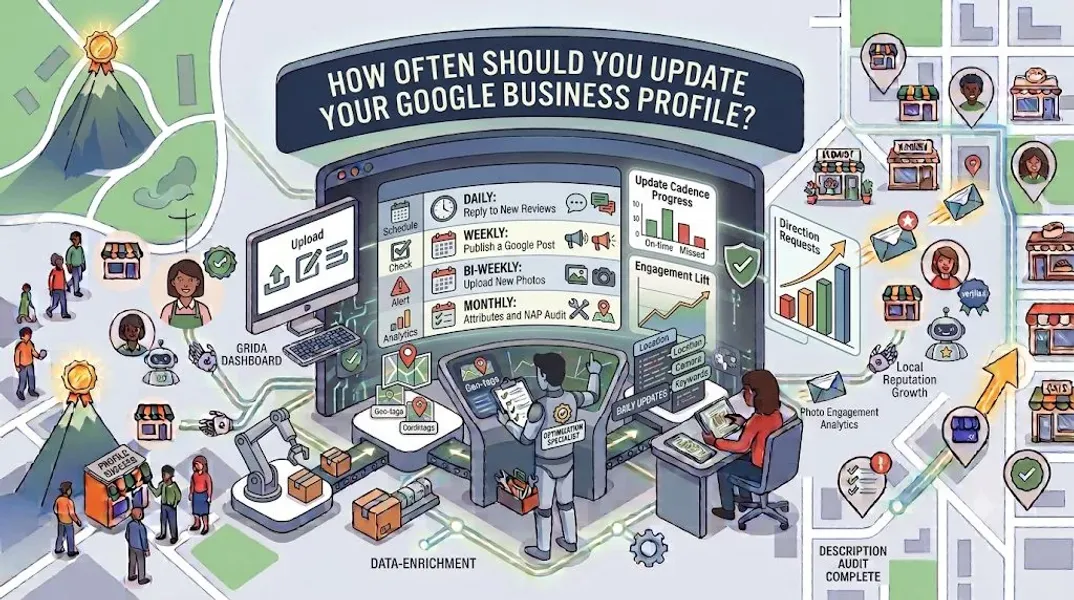
So how often should you update your profile? The answer depends on what you’re updating. Here’s a breakdown of the recommended frequency for each element.
Daily Updates (If Applicable)
Some elements may require daily attention, depending on your business type.
What to update daily:
- Respond to new reviews
- Answer new questions in the Q&A section
- Update hours for same-day changes (e.g., unexpected closures) Why it matters: Timely responses show customers you care and signal to Google that your business is actively managed.
Who should do this: Businesses with high review volume, such as restaurants, retail stores, and service providers.
Weekly Updates
Weekly updates keep your profile fresh and give customers a reason to engage regularly.
What to update weekly:
- Create a new Google Post
- Add new photos
- Respond to any unanswered reviews Why it matters: Weekly activity signals to Google that your business is active and engaged. Posts, in particular, are a strong engagement signal.
Who should do this: All businesses. Even if you don’t have new reviews or photos, a weekly post keeps your profile active.
Monthly Updates
Monthly updates allow you to review and refresh key elements of your profile.
What to update monthly:
- Review and update your business description if needed
- Add new photos (aim for at least 5-10 new images)
- Review your Q&A section for any unanswered questions
- Check your insights to see what’s working
- Update your services or products if you’ve added new offerings Why it matters: Monthly reviews ensure your profile stays accurate and optimized. New photos and updated services give customers fresh reasons to engage.
Who should do this: All businesses.
Quarterly Updates
Quarterly updates are your opportunity to do a deeper review of your profile’s performance and make strategic adjustments.
What to update quarterly:
- Review your categories and make changes if needed
- Update your business hours for seasonal changes
- Refresh your photo library with seasonal images
- Review your attributes and add new ones if applicable
- Analyze your insights for trends and opportunities
- Check your NAP consistency across all platforms Why it matters: Quarterly reviews help you stay ahead of changes and ensure your profile remains optimized for your business goals.
Who should do this: All businesses.
Annual Updates
Annual updates are your chance to do a comprehensive audit of your entire profile.
What to update annually:
- Complete profile audit
- Update your business description with any major changes
- Refresh all photo categories
- Review and update your services and products
- Verify your business information is still accurate
- Check for any new Google Business Profile features Why it matters: An annual audit ensures nothing has fallen through the cracks and your profile is fully optimized for the year ahead.
Who should do this: All businesses.
Update Immediately When Things Change
Some changes require immediate updates to your profile. Don’t wait for your next scheduled update.
Update immediately for:
- Changes to business hours (permanent or temporary)
- Changes to your address or phone number
- Changes to your website URL
- New services or products
- Permanent closures or relocations
- Special holiday hours
- Emergency closures (e.g., weather, maintenance) Why it matters: Accurate, up-to-date information is critical for customer trust and Google’s rankings.
What to Update: A Complete Checklist
Here’s a comprehensive checklist of everything you can update on your Google Business Profile, organized by element.
Business Information
- Business name: Update only if legally changed
- Address: Update immediately if changed
- Phone number: Update immediately if changed
- Website: Update immediately if changed
- Hours: Update for seasonal changes, holidays, and temporary closures
- Special hours: Update for holidays and events
- Description: Review quarterly and update as needed
- Opening date: Update if applicable
Categories
- Primary category: Review quarterly, change only if business focus changes
- Secondary categories: Review quarterly, add or remove as services change
Photos
- Exterior: Update seasonally or when changes occur
- Interior: Update when remodeling or redecorating
- Product: Update when new products are added
- Team: Update when staff changes
- Cover photo: Update seasonally or for special events
- Logo: Update only if rebranding
Services and Products
- Services: Update when offerings change
- Products: Update when inventory changes
- Prices: Update when pricing changes
- Descriptions: Review quarterly
Attributes
- Accessibility: Update if changes are made
- Amenities: Update if new amenities are added
- Payments: Update if payment options change
- Other attributes: Review quarterly
Posts
- Updates: Post weekly
- Offers: Post when running promotions
- Events: Post before and during events
- Products: Post when launching new products
Reviews
- Responses: Respond within 24-48 hours
- Review requests: Ongoing
Q&A
- Answers: Respond within 24-48 hours
- New questions: Monitor daily or weekly
How to Build a Google Business Profile Update Routine
Consistency is key to keeping your profile active. Here’s how to build a routine that works for you.
Step 1: Choose Your Frequency
Based on the guidelines above, decide how often you’ll update each element. Be realistic—it’s better to commit to weekly updates you can maintain than daily updates you’ll abandon.
Step 2: Set Reminders
Use a calendar app, project management tool, or reminder system to schedule your updates. Set recurring reminders for weekly, monthly, and quarterly tasks.
Step 3: Batch Your Tasks
Instead of updating your profile every day, batch similar tasks together. For example, spend 30 minutes every Monday creating your weekly post and responding to reviews.
Step 4: Create a Content Calendar
Plan your posts in advance. A Google Business Profile content calendar helps you stay consistent and ensures you always have something to post.
Step 5: Delegate if Needed
If you don’t have time to manage your profile, delegate the task to a team member or hire a professional. Consistency matters more than who does the work.
Step 6: Track Your Results
Use Google Business Profile insights to track how your updates affect your visibility and engagement. Adjust your strategy based on what’s working.
Signs Your Profile Needs an Update
Even with a regular schedule, certain signs indicate your profile needs immediate attention.
Your Insights Are Declining
If your views, calls, or direction requests are dropping, it’s a sign your profile needs refreshing. Update your photos, posts, and information to boost engagement.
Your Competitors Are Outranking You
If competitors are appearing above you in local search results, they may be updating their profiles more frequently. Step up your update frequency to compete.
Your Information Is Outdated
If your hours, services, or photos no longer reflect your business, it’s time for an update. Outdated information hurts trust and rankings.
You’ve Received Negative Reviews
If you’ve received negative reviews, respond promptly and consider posting content that showcases your strengths.
Your Business Has Changed
Any significant change—new location, new services, new team members—requires an immediate profile update.
It’s Been More Than a Month
If you can’t remember the last time you updated your profile, it’s been too long. Aim to update at least monthly.
Common Mistakes to Avoid
Avoid these common mistakes when updating your Google Business Profile.
Updating Too Infrequently
A stale profile hurts your rankings and credibility. Don’t let months go by without updates.
Updating Too Frequently With Low-Quality Content
Posting daily with irrelevant or low-quality content can hurt your profile. Focus on quality over quantity.
Forgetting to Update Hours
Nothing frustrates customers more than showing up to a closed business. Update your hours for holidays, seasonal changes, and unexpected closures.
Ignoring Reviews
Failing to respond to reviews—especially negative ones—damages your reputation. Respond promptly to every review.
Neglecting the Q&A Section
Customers can ask questions on your profile, and anyone can answer. Monitor this section and provide authoritative responses.
Not Tracking Results
If you’re not tracking your insights, you don’t know what’s working. Monitor your data and adjust your strategy accordingly.
Violating Google’s Guidelines
Certain updates—like keyword stuffing your business name—violate Google’s guidelines and can get your profile Google Business Profile suspended. Always follow the rules.
How to Update Your Google Business Profile
Updating your profile is simple. Here’s how to do it.
Step 1: Sign In
Go to google.com/business and sign in with your Google account.
Step 2: Navigate to the Section You Want to Update
Use the left-hand menu to find the section you want to update—photos, posts, hours, etc.
Step 3: Make Your Changes
Edit the information, upload new photos, or create a new post.
Step 4: Preview and Save
Review your changes, then click “Save” to publish them.
Step 5: Verify the Update
Check your profile on Google Search and Google Maps to confirm your updates appear correctly.
Conclusion
Keeping your Google Business Profile fresh and updated is essential for local SEO success. Google favors active, engaged businesses, and your customers rely on accurate, current information to make decisions.
The key is to establish a routine. Update your hours and respond to reviews daily. Post weekly. Refresh photos and review services monthly. Do a deeper audit quarterly. And always update immediately when something significant changes.
Consistency is more important than frequency. A business that updates its profile weekly will outperform one that does a massive update once a year and then goes dormant. Build a schedule you can maintain, use tools to stay organized, and track your results to see what’s working.
Remember: your Google Business Profile is often the first impression customers have of your business. Keep it fresh, keep it accurate, and keep it engaging. Your local rankings—and your customers—will thank you.
Call to Action
Too busy to keep your Google Business Profile updated? Let our local SEO experts handle it for you. We’ll manage your posts, photos, reviews, and information so your profile stays fresh and your rankings stay strong.
Contact Us Today for a Free Local SEO Audit!
FAQs
Q1: How often should I post on my Google Business Profile? A: Aim to post at least once a week. Consistent posting signals to Google that your business is active and gives customers reasons to engage.
Q2: How often should I update my business hours? A: Update your hours immediately for any changes, including holidays, seasonal adjustments, and unexpected closures. Review your regular hours quarterly.
Q3: How often should I add new photos? A: Add new photos at least monthly. Aim for 5-10 new images per month to keep your profile fresh and engaging.
Q4: Do I need to update my profile if nothing has changed? A: Yes, even if nothing has changed, regular activity—like posting and adding photos—signals to Google that your business is active. A stale profile can hurt your rankings.
Q5: How quickly should I respond to reviews? A: Respond to reviews within 24-48 hours. Prompt responses show customers you care and signal to Google that your business is actively managed.
Q6: What happens if I don’t update my Google Business Profile? A: An outdated profile can hurt your local rankings, erode customer trust, and make your business appear neglected or closed. Regular updates are essential for local SEO success.
Q7: What should I do if my Google Business Profile is suspended? A: If your profile is Google Business Profile suspended, it may be due to a guideline violation. Review Google’s guidelines, fix any issues, and submit an appeal. Our guide on suspended profiles covers this in depth.
Q8: How do I fix incorrect information on my Google Business Profile? A: If your profile shows incorrect information, you can edit it directly from your dashboard. For persistent issues, see our guide on how to fix Google Business Profile errors.
Internal Links
-
What Is Google Business Profile and How Does It Work? A Complete Guide
-
Google Business Profile vs Google Maps: What’s the Difference?
-
Google Business Profile Verification: Complete Step-by-Step Guide
-
How to Write the Perfect Google Business Profile Description
-
Google Business Profile Photos: Best Practices for Local SEO## External Links
-
Google’s Guidelines for Representing Your Business on Google
Keep reading
Grow Your Google Maps Ranking on Autopilot
Stop spending hours every week manually replying to customer reviews and writing Google posts. Busirank automates your Google Business Profile to boost your local SEO rankings and turn searchers into paying clients.

 Busirank Team