 Busirank Team
Introduction
Your Google Business Profile is often the first thing customers see when they search for a business like yours. Before they visit your website, before they call, and before they walk through your doors, they see your listing—complete with reviews, photos, hours, and posts.
Google Posts are one of the most underused features on that listing. They let you share updates, offers, events, and news directly with local searchers. They appear prominently on your profile, they can include calls to action, and they signal to Google that your business is active and engaged. Best of all, they’re completely free.
But here’s the problem: most businesses don’t know what to post. They publish once or twice, see no immediate results, and give up. Meanwhile, competitors who post consistently gain visibility, engagement, and customers.
The solution is having industry-specific post ideas you can draw from. Generic ideas don’t work—a restaurant needs different content than a dental clinic, and a salon needs different content than a plumbing company. That’s why this guide is organized by business type.
In this comprehensive guide, we’ll share proven Google Post ideas for restaurants, clinics, salons, and service businesses. We’ll explain why posts matter, the different post types available, and how to create posts that drive real results. By the end, you’ll have a content bank you can use immediately—no more staring at a blank post editor.
What Are Google Posts and Why Do They Matter?
Google Posts are short updates you publish directly to your Google Business Profile. They appear on your listing in Google Search and Google Maps, typically in a dedicated section below your photos and reviews.
Each post can include:
- Text: Up to 1,500 characters
- Image or video: A visual element to capture attention
- Call to action: Buttons like “Call now,” “Book,” “Learn more,” or “Get offer”
- Link: A URL to a specific page on your website Posts typically expire after seven days, which means consistent posting is essential. Event and offer posts can run longer.
Why Google Posts Matter
They drive engagement. Posts give customers reasons to click, call, or request directions.
They signal activity to Google. Active profiles tend to rank better in local search.
They support local pack rankings. Engagement signals from posts contribute to your local pack SEO.
They’re free. Unlike paid ads, posts cost nothing.
They give you a competitive edge. Most local businesses don’t post regularly—so if you do, you stand out.
For more on posts generally, see our guide on Google Business Profile post ideas.
Types of Google Posts
Google offers several post types, each suited to different goals.
Update Posts
General news, tips, announcements, or information. These are the most flexible and can cover almost any topic.
Best for: Sharing news, answering questions, or keeping your profile fresh.
Offer Posts
Discounts, promotions, or special deals. These include start and end dates.
Best for: Driving immediate action and attracting price-sensitive customers.
Event Posts
Upcoming events with dates, times, and locations. These can run for longer than seven days.
Best for: Promoting workshops, sales, grand openings, and community events.
Product Posts
Showcase specific products with images, prices, and descriptions.
Best for: Retail businesses and any business selling physical goods.
For more on posts, see our guide on how often to update Google Business Profile.
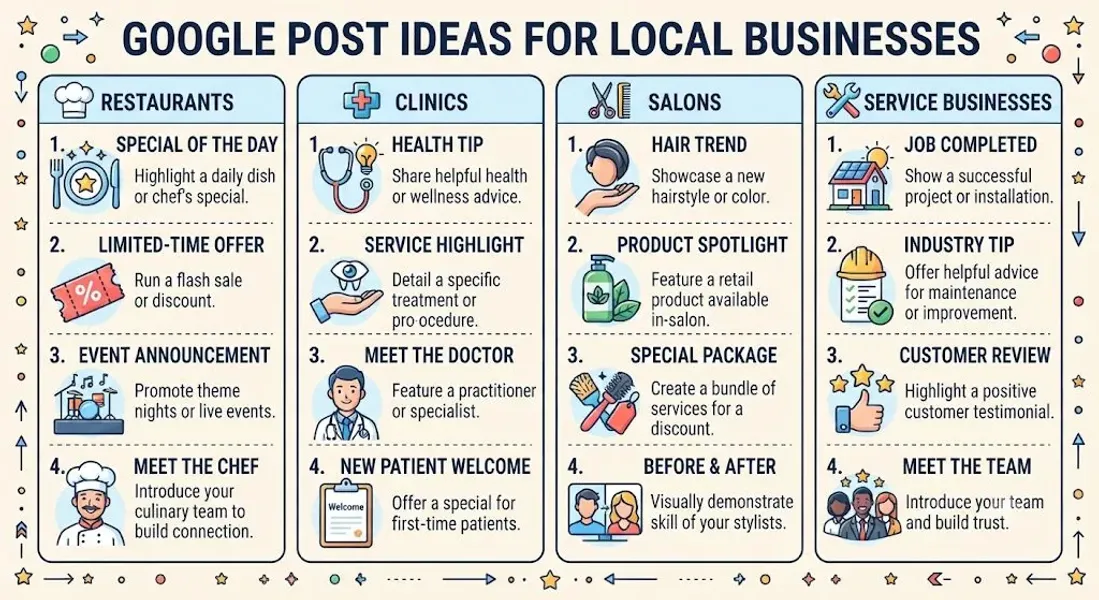
Google Post Ideas for Restaurants
Restaurants thrive on visual content and timely promotions. Here are proven post ideas for food businesses.
1. Daily Specials and Menu Features
Post your daily special, seasonal dish, or limited-time menu item. Include a mouth-watering photo.
Example: “Today’s special: Truffle mushroom risotto, made with locally sourced mushrooms. Available until 9 PM!“
2. New Menu Items
Announce new dishes, drinks, or menu changes.
Example: “New on the menu: Spicy Korean fried chicken sandwich. Come try it this week!“
3. Happy Hour Promotions
Promote happy hour deals with specific times and offers.
Example: “Happy hour every weekday from 4-6 PM: $5 drafts and half-price appetizers!“
4. Seasonal Menus
Highlight seasonal offerings—summer cocktails, fall flavors, holiday specials.
Example: “Our fall menu is here! Try our pumpkin spice latte and apple cinnamon muffins.”
5. Chef’s Specials
Feature a chef’s recommendation or signature dish.
Example: “Chef Maria’s pick this week: Our signature seafood paella. Made fresh daily!“
6. Behind-the-Scenes Kitchen Content
Show your kitchen, prep process, or team at work.
Example: “Fresh bread baked every morning at 5 AM. Come taste the difference!“
7. Customer Reviews and Testimonials
Share a positive review with a thank-you message.
Example: “We love hearing from happy customers! Thanks, James, for the kind words about our pizza.”
8. Reservation and Booking Reminders
Remind customers to book ahead for busy nights or holidays.
Example: “Valentine’s Day is filling up fast! Reserve your table now.”
9. Special Events and Live Music
Promote trivia nights, live music, wine tastings, or other events.
Example: “Live jazz this Friday from 7-10 PM. No cover charge—just great music and food!“
10. Holiday Hours and Closures
Keep customers informed about holiday schedules.
Example: “We’ll be closed on Thanksgiving Day. Regular hours resume Friday at 11 AM.”
11. Catering and Private Events
Promote catering services or private dining options.
Example: “Planning an event? We offer catering for groups of 10-200. Contact us for a quote!“
12. Delivery and Takeout Options
Remind customers about delivery, takeout, or curbside pickup.
Example: “Too busy to cook? Order online for delivery or pick up in 20 minutes!“
13. Ingredient Spotlights
Highlight locally sourced ingredients or signature components.
Example: “We use only locally sourced, organic produce from [Farm Name]. Taste the difference!“
14. Limited-Time Offers
Create urgency with time-sensitive promotions.
Example: “This weekend only: Buy one entrée, get one 50% off. Ends Sunday!“
15. Community Involvement
Share your involvement in local events or charities.
Example: “Proud to support the [Local Charity] fundraiser this month. Join us in giving back!”
Google Post Ideas for Clinics
Medical, dental, and wellness clinics need to build trust while staying compliant. Here are post ideas that work.
1. Health Tips and Advice
Share quick, actionable health tips related to your specialty.
Example: “Did you know? Brushing for two minutes, twice a day reduces cavity risk by 40%. Book your checkup today!“
2. New Services or Treatments
Announce new procedures, technologies, or treatment options.
Example: “Now offering teledentistry appointments! Get care from home—book online today.”
3. Seasonal Health Reminders
Post about seasonal health concerns—flu shots, allergy season, summer skin care.
Example: “Flu season is here. Schedule your flu shot today—walk-ins welcome.”
4. Patient Testimonials
Share positive patient feedback (with permission and without identifying details).
Example: “We love hearing from our patients! ‘The staff made me feel comfortable from start to finish.‘“
5. Staff Introductions
Introduce doctors, nurses, or specialists.
Example: “Meet Dr. Chen, our new pediatric dentist! She loves making kids smile.”
6. Appointment Reminders
Remind patients about regular checkups or seasonal appointments.
Example: “Due for your annual checkup? Book online in under a minute.”
7. Insurance and Payment Information
Share updates about insurance accepted or payment plans.
Example: “We now accept [Insurance Provider]. Call us to verify your coverage.”
8. Health Awareness Months
Participate in national health awareness campaigns.
Example: “October is Breast Cancer Awareness Month. Schedule your screening today.”
9. Office Updates
Share news about new equipment, extended hours, or renovations.
Example: “We’ve extended our hours! Now open until 7 PM on weekdays.”
10. COVID-19 or Safety Updates
Keep patients informed about safety protocols.
Example: “Your safety is our priority. We’re following all CDC guidelines for your protection.”
11. Patient Education
Share articles, videos, or resources about health topics.
Example: “Confused about dental implants? Read our latest blog post to learn more.”
12. Success Stories
Share anonymous success stories (with permission).
Example: “Another happy patient! After months of pain, they’re finally pain-free. Book your consultation today.”
13. Wellness Tips
Share tips for overall wellness—nutrition, exercise, sleep.
Example: “Sleep is essential for recovery. Aim for 7-9 hours per night for optimal health.”
14. Community Events
Promote health fairs, screenings, or community events.
Example: “Join us at the community health fair this Saturday—free blood pressure checks!“
15. Holiday Hours
Inform patients about holiday schedules.
Example: “We’ll be closed on Labor Day. For urgent matters, call our after-hours line.”
Google Post Ideas for Salons and Spas
Salons and spas thrive on visual content and promotions. Here are post ideas that drive bookings.
1. Before-and-After Transformations
Showcase dramatic transformations with before-and-after photos.
Example: “From dull to dazzling! Check out this hair transformation by our stylist, Mia.”
2. New Services or Treatments
Announce new services—facials, massages, hair treatments.
Example: “New service alert: 24K gold facial now available! Book your glow-up today.”
3. Seasonal Promotions
Promote seasonal specials—summer glow, holiday packages.
Example: “Summer special: 20% off all waxing services through August.”
4. Product Spotlights
Feature products you sell—hair care, skincare, cosmetics.
Example: “We now carry [Brand] organic hair care. Stop by to try it!“
5. Stylist and Therapist Introductions
Introduce your team and their specialties.
Example: “Meet Sarah, our senior colorist! She specializes in balayage and highlights.”
6. Booking Reminders
Remind clients to book ahead for busy seasons.
Example: “Holiday appointments are filling fast! Book now to secure your spot.”
7. Client Testimonials
Share positive feedback from happy clients.
Example: “We love hearing from our clients! ‘Best facial I’ve ever had—my skin feels amazing!‘“
8. Special Packages and Bundles
Promote bundled services at a discount.
Example: “Pamper package: Manicure, pedicure, and 30-minute massage for just $99!“
9. Tutorials and Tips
Share quick beauty tips or tutorials.
Example: “Pro tip: Apply mascara before curling your lashes for a more dramatic look.”
10. Behind-the-Scenes Content
Show your salon, spa, or team at work.
Example: “A peek inside our newly renovated spa lounge. Come relax with us!“
11. Holiday and Event Promotions
Promote specials for holidays, weddings, or events.
Example: “Getting married? Book our bridal package for the full glow-up experience.”
12. Loyalty Programs
Promote your loyalty or referral program.
Example: “Refer a friend and get 20% off your next visit. It’s our way of saying thanks!“
13. Gift Cards
Promote gift cards for holidays and special occasions.
Example: “Looking for the perfect gift? Give the gift of relaxation with our gift cards.”
14. Limited-Time Offers
Create urgency with flash sales or limited-time deals.
Example: “Flash sale! 30% off all services this weekend only. Book now!“
15. Client Appreciation
Thank your clients for their loyalty.
Example: “Thank you for 500 five-star reviews! We’re grateful for every one of you.”
Google Post Ideas for Service Businesses
Plumbers, electricians, cleaners, and other service businesses need to build trust and drive calls. Here are post ideas that work.
1. Service Spotlights
Highlight a specific service you offer.
Example: “Water heater not working? We offer same-day repair and installation. Call now!“
2. Seasonal Maintenance Tips
Share tips for seasonal maintenance.
Example: “Fall is here! Schedule your furnace tune-up before the cold hits.”
3. Emergency Service Reminders
Remind customers you’re available for emergencies.
Example: “24/7 emergency plumbing service. Call us anytime—we’re here to help.”
4. Before-and-After Project Photos
Showcase completed projects with before-and-after photos.
Example: “Check out this bathroom remodel we just finished! Book your consultation today.”
5. Customer Reviews and Testimonials
Share positive feedback from happy customers.
Example: “Thanks, Mike, for the kind words! We’re glad we could fix your leak quickly.”
6. Special Offers and Discounts
Promote seasonal discounts or bundled services.
Example: “Spring special: $50 off any HVAC service. Book before May 31st!“
7. Team Introductions
Introduce your technicians or team members.
Example: “Meet John, our lead electrician with 15 years of experience. He’s the one you want on your project.”
8. Maintenance Reminders
Remind customers about regular maintenance.
Example: “Don’t forget: Change your air filter every 3 months. Need help? Call us!“
9. New Equipment or Technology
Announce new tools, equipment, or techniques.
Example: “We’ve invested in new leak detection technology. Faster, more accurate repairs!“
10. Service Area Announcements
Remind customers of your service areas.
Example: “Now serving [New Area]! Call us for all your plumbing needs.”
11. Holiday and Weather-Related Tips
Share tips for weather events or holidays.
Example: “Freezing temps ahead! Protect your pipes with these simple steps.”
12. Community Involvement
Share your involvement in local events or charities.
Example: “Proud to sponsor the [Local Event] this year. See you there!“
13. FAQs
Answer common questions about your services.
Example: “How often should you service your AC? Once a year—book your appointment today!“
14. Limited-Time Offers
Create urgency with time-sensitive promotions.
Example: “Ends Friday: Free estimates on all remodeling projects. Call now!“
15. Project Spotlights
Feature a recent project and the results you delivered.
Example: “We just finished a full kitchen rewire for a happy customer in [Neighborhood]. Call us for your project!”
Best Practices for Google Posts
No matter your industry, these best practices apply.
Post Consistently
Aim for at least one post per week. Consistency matters more than frequency.
Use High-Quality Images
Posts with images get more engagement. Use clear, relevant visuals.
Include a Call to Action
Every post should tell customers what to do next—call, book, learn more, or visit.
Keep Text Concise
Aim for 150-300 characters for most posts. Get to the point.
Use Keywords Naturally
Incorporate local keywords and service terms to support your local SEO. Don’t stuff them.
Track Performance
Use Google Business Profile insights to see how your posts perform. Adjust based on what’s working.
Mix Up Post Types
Use a mix of updates, offers, events, and products to keep your profile fresh.
Create a Content Calendar
Plan your posts in advance with a Google Business Profile content calendar.
For more, see our guide on Google Posts vs social media.
Common Mistakes to Avoid
Avoid these mistakes to protect your reach.
Posting Inconsistently
Sporadic posting signals a neglected profile. Post weekly.
Using Low-Quality Images
Blurry or irrelevant images hurt engagement.
Writing Walls of Text
Long posts get ignored. Keep it short.
Forgetting the CTA
Every post should include a call to action.
Keyword Stuffing
Don’t stuff keywords. Use them naturally.
Promoting Too Much
Mix promotional content with value-driven posts.
Ignoring Insights
Track performance and adjust your strategy.
Violating Google’s Guidelines
Promotional language and prohibited content can get your profile suspended. For more, see our guide on Google Business Profile suspended.
Conclusion
Google Posts are one of the most powerful and underused tools in local SEO. They drive engagement, signal activity to Google, and give customers reasons to interact with your business. But they only work if you post consistently—and consistency requires having ideas.
The industry-specific post ideas in this guide give you a content bank you can draw from immediately. Whether you run a restaurant, clinic, salon, or service business, there’s a post idea here that fits. Rotate through them, adapt them to your brand, and create your own.
Post weekly, use high-quality images, include calls to action, and track your results. Over time, those posts compound—building engagement, strengthening your profile, and helping you appear in more local searches.
Call to Action
Want help creating and scheduling Google Posts for your business? Let our local SEO experts help. We’ll build a content calendar, create engaging posts tailored to your industry, and optimize your profile to attract more local customers.
Contact Us Today for a Free Local SEO Audit!
FAQs
Q1: What are Google Posts? A: Google Posts are short updates you publish directly to your Google Business Profile. They appear on your listing and can include text, images, and call-to-action buttons.
Q2: How often should I post on Google Business Profile? A: Aim for at least one post per week. Consistency matters more than frequency. For a schedule, see our guide on how often to update Google Business Profile.
Q3: Do Google Posts help with local SEO? A: Yes. Posts signal activity and engagement, which can support your local ranking. They also give customers reasons to interact with your listing.
Q4: What’s the ideal length for a Google Post? A: Aim for 150-300 characters for most posts. Google allows up to 1,500, but shorter posts are more effective.
Q5: Can I include links in Google Posts? A: Yes. You can include a link to your website, booking page, or a specific landing page. Add a call-to-action button to drive clicks.
Q6: Do Google Posts expire? A: Most Google Posts expire after seven days. Event and offer posts can run longer. Consistent posting keeps your profile fresh.
Q7: What’s the difference between Google Posts and social media posts? A: Google Posts appear on your Google Business Profile and are seen by people actively searching for local businesses. Social media posts appear on platforms like Facebook or Instagram. For more, see our guide on Google Posts vs social media.
Q8: How do I track the performance of my Google Posts? A: Use Google Business Profile insights to see views, clicks, and engagement. Adjust your strategy based on what’s working.
Q9: What should I do if my Google Business Profile is suspended? A: If your profile is Google Business Profile suspended, review Google’s guidelines, fix any violations, and submit an appeal. Our guide on suspended profiles covers this in depth.
Q10: What should I do if my business is not showing on Google Maps? A: Check for verification issues, suspensions, incorrect information, or ranking problems. See our guide on business not showing on Google Maps.
Q11: How do I fix incorrect information on my Google Business Profile? A: If your profile shows incorrect information, you can edit it directly from your dashboard. For persistent issues, see our guide on how to fix Google Business Profile errors.
Internal Links
-
What Is Google Business Profile and How Does It Work? A Complete Guide
-
Google Business Profile vs Google Maps: What’s the Difference?
-
Google Business Profile Verification: Complete Step-by-Step Guide
-
How to Write the Perfect Google Business Profile Description
-
Google Business Profile Photos: Best Practices for Local SEO
-
Google Business Profile Services: How to Add and Optimize Them
-
Google Business Profile Attributes: What Are They and Why Do They Matter?## External Links
-
Google’s Guidelines for Representing Your Business on Google
Keep reading
Grow Your Google Maps Ranking on Autopilot
Stop spending hours every week manually replying to customer reviews and writing Google posts. Busirank automates your Google Business Profile to boost your local SEO rankings and turn searchers into paying clients.
 Busirank Team