 Busirank Team
Introduction
You know reviews matter. They build trust with customers, improve your local search visibility, and help you stand out from competitors. You also know you need more of them—especially on Google. But here’s the part nobody talks about: asking feels awkward.
You don’t want to seem desperate. You don’t want to annoy customers. You don’t want to come across as pushy or salesy. So you don’t ask—and your review count stays flat while competitors keep growing theirs.
Here’s the truth: asking for reviews isn’t pushy if you do it right. It’s a normal, expected part of running a business. Most customers are happy to leave a review when they’ve had a good experience—they just need a gentle nudge and an easy way to do it. The problem isn’t that asking is pushy. The problem is that most businesses ask poorly, at the wrong time, or not at all.
In this comprehensive guide, we’ll show you exactly how to ask for Google reviews in a way that feels natural, respectful, and effective. We’ll cover when to ask, how to ask, what to say, and how to make it easy for customers to follow through. We’ll also share templates you can adapt for your business, common mistakes to avoid, and how reviews connect to your broader local SEO strategy. By the end, you’ll have everything you need to build a steady stream of reviews without feeling pushy.
Why Asking for Google Reviews Matters
Before we get into the how, let’s talk about why this matters so much. Reviews aren’t just nice to have—they’re essential for local business success.
Reviews Build Trust
The vast majority of consumers read online reviews before choosing a local business. A strong review profile signals that your business is trustworthy, reliable, and worth choosing. Without reviews, potential customers have no social proof to guide their decision.
Reviews Improve Local SEO
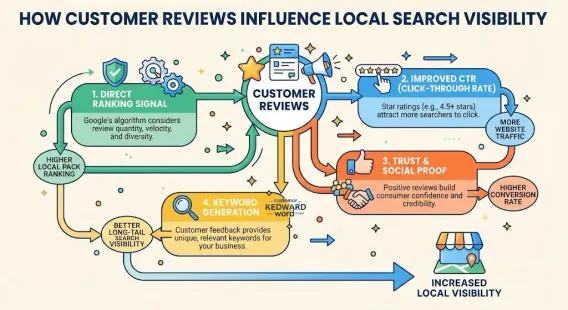
Google uses reviews as a major ranking signal. Businesses with more positive reviews, higher ratings, and a steady flow of new reviews tend to rank higher in Google Maps and the local pack. This is the core of customer reviews local SEO—your reviews help determine how visible you are in local search.
Reviews Differentiate You From Competitors
If you and a competitor offer similar services at similar prices, reviews can be the deciding factor. A business with 200 five-star reviews will win over one with 20, every time.
Reviews Provide Valuable Feedback
Reviews tell you what you’re doing well and where you can improve. They’re free customer research that helps you refine your business.
Reviews Compound Over Time
Every review you earn makes your profile stronger. Over months and years, a consistent review generation strategy builds an asset that keeps working for you.
Why Most Businesses Don’t Ask for Reviews
If reviews are so important, why don’t more businesses ask? Here are the most common reasons—and why they’re all wrong.
Fear of Being Pushy
This is the biggest barrier. Business owners worry that asking for a review will annoy customers or make them seem desperate. In reality, most customers are happy to help—they just need to be asked.
Not Knowing When to Ask
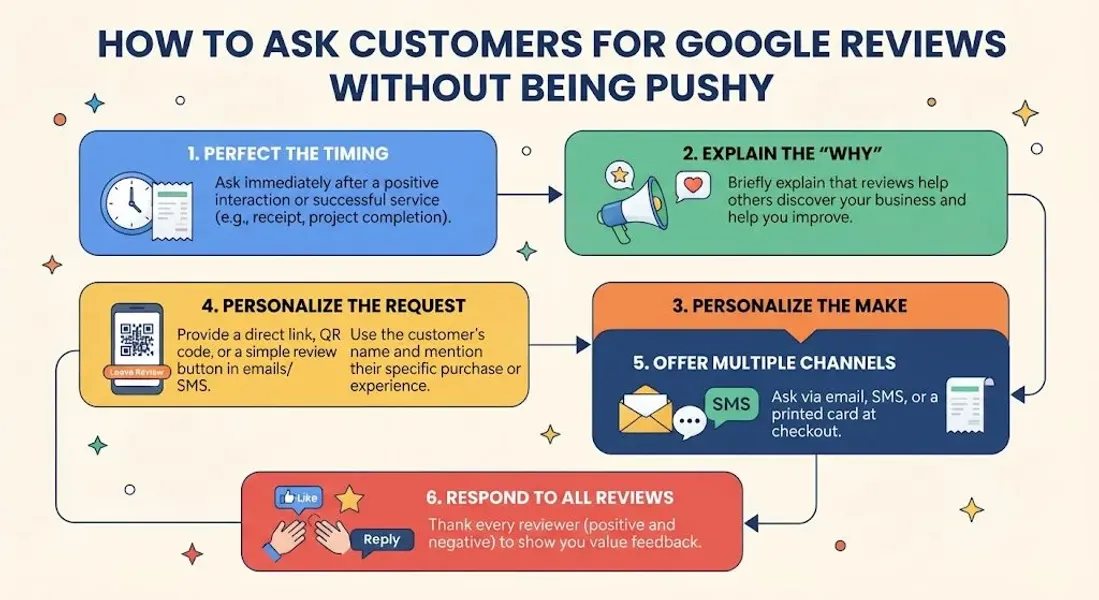
Timing matters. Ask too early and the customer hasn’t formed an opinion. Ask too late and the moment has passed. Knowing when to ask is key.
Not Knowing How to Ask
Many business owners don’t know what to say. They fumble through the request or make it awkward. A simple, natural script solves this.
Forgetting to Ask
In the rush of daily operations, asking for reviews falls through the cracks. It’s not intentional—it just doesn’t happen.
Assuming Customers Will Leave Reviews on Their Own
Some businesses assume that happy customers will naturally leave reviews. Most won’t—not because they’re unhappy, but because they’re busy. They need a nudge.
The Psychology of Asking for Reviews
Understanding the psychology behind reviews helps you ask more effectively.
Reciprocity
When you provide excellent service, customers feel a sense of gratitude. Asking for a review gives them a way to reciprocate. Frame your request as an opportunity to help you, not an obligation.
Social Proof
Customers want to feel part of a community. When you ask them to join other satisfied customers in leaving a review, you tap into that desire.
The Power of Timing
The best time to ask is immediately after a positive interaction. That’s when the experience is fresh and the customer is most likely to say yes.
The Power of Ease
The harder it is to leave a review, the fewer people will do it. Make it as easy as possible—send a direct link, remove barriers, and guide them through the process.
The Power of Specificity
Vague requests (“Let us know what you think!”) are less effective than specific ones (“Would you mind leaving us a quick Google review?”). Specificity makes it clear what you’re asking for.
When to Ask for Google Reviews
Timing is everything. Here are the best moments to ask.
Immediately After a Positive Interaction
The moment a customer expresses satisfaction—whether it’s a compliment, a thank-you, or a repeat purchase—is the ideal time to ask.
After a Successful Service or Purchase
Once the transaction is complete and the customer is happy, ask. For service businesses, this might be after the job is done. For retail, it might be at checkout.
During Follow-Up Communication
If you send follow-up emails or texts, include a review request. This is a natural touchpoint.
When Customers Return
Repeat customers are some of your best advocates. If they’ve come back, they’re happy—ask them for a review.
After Resolving a Complaint
If you’ve resolved an issue and the customer is satisfied, ask them to update their review or leave a new one. This can turn a negative into a positive.
Avoid These Moments
- Don’t ask during a complaint or before resolving an issue
- Don’t ask when a customer is rushed or distracted
- Don’t ask if the interaction was neutral or negative
- Don’t ask repeatedly if they’ve declined
How to Ask for Google Reviews: Proven Strategies
Now let’s get into the strategies. Here’s how to ask in a way that feels natural and effective.
Strategy 1: Ask In Person
In-person requests are powerful because they’re personal. Train your team to ask naturally at the end of a positive interaction.
What to say:
-
“If you enjoyed your experience today, we’d love a Google review—it really helps us out.”
-
“Thanks for coming in! If you have a minute, a quick Google review would mean a lot.”
-
“We’re so glad you’re happy. Would you mind leaving us a review on Google?” Tips:
-
Smile and be genuine
-
Keep it brief—don’t over-explain
-
Have a QR code or card ready with the review link
-
Don’t push if they decline
Strategy 2: Send a Follow-Up Email
Email is a great way to ask because it’s non-intrusive and gives customers time to respond.
What to include:
- A friendly subject line
- A brief thank-you for their business
- A direct link to your Google review page
- A simple, clear request Email template:
Subject: Thanks for choosing [Business Name]!
Hi [Customer Name],
Thank you for choosing [Business Name]! We hope you had a great experience.
If you have a moment, we’d love it if you could leave us a quick review on Google. Your feedback helps us improve and helps other customers find us.
[Leave a Review Button]
Thank you for your support!
[Your Name]
Tips:
- Send within 24-48 hours of the interaction
- Keep it short and friendly
- Use a direct link to your review page
- Don’t send multiple follow-ups if they don’t respond
Strategy 3: Send a Text Message
Text messages have high open rates and are perfect for quick requests.
Text template:
Hi [Name], thanks for visiting [Business Name] today! If you have a minute, a Google review would really help us out: [link]
Tips:
- Get permission to text first
- Keep it very short
- Include a direct link
- Don’t text too early or too late
Strategy 4: Use Receipts and Invoices
If you provide receipts or invoices, add a line asking for a review.
What to add:
“Enjoyed your experience? Leave us a Google review: [link]”
Tips:
- Make it visible but not overwhelming
- Include a QR code if possible
- Update receipts regularly
Strategy 5: Add Signage at Your Location
If you have a physical location, add signage asking for reviews.
Where to place signage:
-
At checkout counters
-
On tables or at service stations
-
Near exits
-
In waiting areas What to include:
-
A simple request
-
A QR code linking to your review page
-
A thank-you message
Strategy 6: Include a Link on Your Website
Add a “Leave a Review” link to your website—in the footer, on your contact page, or in a dedicated section.
Tips:
- Make it easy to find
- Use a clear call to action
- Link directly to your Google review page
Strategy 7: Use Email Signatures
Add a line to your email signature asking for reviews.
Example:
“Enjoyed working with us? Leave us a Google review: [link]“
Strategy 8: Ask on Social Media
Post occasional reminders on your social media channels asking for reviews.
What to post:
-
“Love what we do? Leave us a Google review—it helps more than you know! [link]”
-
“Your feedback matters! If you’ve had a great experience, please leave us a review on Google. [link]” Tips:
-
Don’t overdo it—occasional reminders are enough
-
Make it easy to click through
-
Thank reviewers publicly when appropriate
Google Review Request Templates
Here are templates you can adapt for different situations.
In-Person Request
“Thanks so much for coming in today! If you enjoyed your experience, would you mind leaving us a quick review on Google? It really helps us out.”
Email Request (Service Business)
Subject: How did we do?
Hi [Name],
Thank you for choosing [Business Name] for your recent [service]. We hope you’re happy with the results!
If you have a moment, we’d love a quick Google review. Your feedback helps us improve and helps other customers find us.
[Leave a Review]
Thanks again!
[Your Name]
Email Request (Retail)
Subject: Thanks for shopping with us!
Hi [Name],
Thanks for stopping by [Business Name]! We hope you love your purchase.
If you have a minute, would you leave us a quick Google review? It means a lot to our small team.
[Leave a Review]
See you soon!
[Your Name]
Text Message Request
Hi [Name], thanks for visiting [Business Name]! If you have a sec, a Google review would really help us: [link]
Post-Service Follow-Up
Hi [Name],
Just checking in to make sure you’re happy with the [service] we completed. If everything looks good, we’d be grateful for a Google review: [link]
Thank you!
Negative Experience Follow-Up
Hi [Name],
I’m sorry to hear about your recent experience. We take feedback seriously and would like to make things right.
If you’re open to it, we’d appreciate the chance to resolve this. Please contact me directly at [email/phone].
Thank you for giving us the opportunity to improve.
How to Make It Easy for Customers to Leave Reviews
The easier it is, the more reviews you’ll get. Here’s how to remove barriers.
Get Your Google Review Link
Go to your Google Business Profile dashboard and find your review link. This is the direct URL customers can use to leave a review.
Create a Short Link
Use a URL shortener to create a short, memorable link. This makes it easier to share in emails, texts, and on receipts.
Generate a QR Code
Create a QR code that links directly to your review page. Print it on receipts, signage, and business cards. Customers can scan and review in seconds.
Add a “Leave a Review” Button to Your Website
Make it easy for website visitors to leave a review. Add a button or link on your contact page, footer, or a dedicated review page.
Guide Customers Through the Process
If a customer isn’t sure how to leave a review, walk them through it. “Just click this link, tap the stars, and write a quick note—it takes about 30 seconds.”
Follow Up Once
If a customer doesn’t leave a review after your initial request, one gentle follow-up is fine. More than that feels pushy.
Common Mistakes to Avoid When Asking for Reviews
Avoid these mistakes to keep your requests effective and respectful.
Asking Too Often
One request is enough. If a customer declines or doesn’t respond, don’t keep asking.
Asking at the Wrong Time
Don’t ask during a complaint, when a customer is rushed, or before you’ve delivered a great experience.
Being Pushy or Desperate
Keep your request light and genuine. Don’t pressure customers or make them feel obligated.
Not Making It Easy
If leaving a review is complicated, customers won’t do it. Provide a direct link and clear instructions.
Offering Incentives
Google prohibits offering incentives for reviews—like discounts, freebies, or entries into drawings. This violates their guidelines and can get your profile suspended. For more, see our guide on Google Business Profile suspended.
Buying Fake Reviews
Buying reviews is a violation of Google’s policies and can result in removal, penalties, or suspension. For more, see our guide on fake Google reviews.
Ignoring Reviews After You Get Them
Responding to reviews is just as important as getting them. For negative reviews, see our guide on respond to negative Google reviews.
Not Tracking Your Progress
If you don’t track how many reviews you’re getting, you won’t know what’s working.
How to Respond to Reviews You Receive
Getting reviews is step one. Responding to them is step two.
Respond to Positive Reviews
Thank customers for their feedback. Personalize your response and mention specific details when possible.
Example:
“Thank you so much, [Name]! We’re thrilled you enjoyed your [service/product]. We appreciate you taking the time to share your experience!”
Respond to Negative Reviews
Respond professionally, apologize for the experience, and offer to make things right. Don’t argue or get defensive. For a detailed guide, see our article on respond to negative Google reviews.
Respond Promptly
Aim to respond within 24-48 hours. Timely responses show you’re engaged and attentive.
Use Keywords Naturally
Your responses can include relevant keywords, but don’t stuff them in. Be natural and helpful.
How Reviews Impact Your Local SEO
Reviews are a major ranking factor for local search. Here’s how they help.
Improved Local Pack Rankings
Reviews are one of the strongest ranking signals for the local pack. Businesses with more positive reviews are more likely to appear in top results.
Better Google Maps Visibility
Reviews help Google understand your business’s prominence, improving your Google Maps visibility.
Enhanced Trust Signals
Reviews build trust with customers, which can lead to more clicks, calls, and visits. These engagement signals can improve your ranking over time.
Support for Local Keyword Rankings
Reviews that mention specific services or locations help Google understand your relevance for those keywords.
Competitive Advantage
If your competitors have fewer reviews, your strong review profile gives you an edge in local search results.
Measuring the Impact of Your Review Strategy
To know if your efforts are working, track these metrics.
Review Count
Track how many reviews you have and how many you’re adding each month.
Average Rating
Monitor your average star rating over time.
Review Velocity
Track how many new reviews you receive each month. Consistency matters more than bursts.
Response Rate
Track how many reviews you respond to. Aim for 100%.
Local Rankings
Use local SEO tools to track your position in the local pack and Google Maps.
Google Business Profile Insights
Check Google Business Profile insights for views, calls, direction requests, and website clicks.
Conclusion
Asking for Google reviews doesn’t have to be pushy. When you ask at the right time, in the right way, and make it easy for customers to follow through, most will happily help. The key is to be genuine, respectful, and consistent.
Remember: reviews are one of the most powerful tools for local SEO. They build trust, improve your visibility, and help you stand out from competitors. The businesses that consistently ask for reviews—and respond to them—win in local search.
Don’t let awkwardness hold you back. Start asking today. Build a simple system, train your team, and make it part of your routine. Over time, those reviews compound into a powerful asset that drives real business growth.
Call to Action
Want more Google reviews but don’t know where to start? Let our local SEO experts help. We’ll build a review generation strategy, create templates for your business, and help you turn happy customers into five-star reviews.
Contact Us Today for a Free Local SEO Audit!
FAQs
Q1: Is it OK to ask customers for Google reviews? A: Yes, it’s perfectly acceptable to ask customers for reviews. Google encourages businesses to request reviews—just don’t offer incentives or buy fake reviews.
Q2: How do I ask for a Google review without being pushy? A: Ask at the right time (after a positive interaction), keep it brief, make it easy with a direct link, and don’t pressure customers if they decline.
Q3: Can I offer a discount for leaving a review? A: No. Google prohibits offering incentives for reviews. This violates their guidelines and can result in penalties or suspension.
Q4: How do I get my Google review link? A: Sign in to your Google Business Profile dashboard and find your review link. You can also use a URL shortener or generate a QR code.
Q5: How often should I ask for reviews? A: Ask after every positive interaction. Build it into your customer journey so it happens consistently.
Q6: What should I do if a customer leaves a negative review? A: Respond professionally, apologize, and offer to resolve the issue offline. For a detailed guide, see our article on respond to negative Google reviews.
Q7: Can I ask customers to update their reviews? A: Yes, if you’ve resolved an issue, it’s fine to ask a customer to update their review. Just don’t pressure them.
Q8: How do reviews impact local SEO? A: Reviews are a major ranking factor for local search. They improve your prominence, support local keyword relevance, and help you appear in the local pack and Google Maps. For more, see our guide on customer reviews local SEO.
Q9: What should I do if my business is not showing on Google Maps? A: Check for verification issues, suspensions, incorrect information, or ranking problems. See our guide on business not showing on Google Maps for a complete diagnostic checklist.
Q10: What should I do if my Google Business Profile is suspended? A: If your profile is Google Business Profile suspended, review Google’s guidelines, fix any violations, and submit an appeal. Our guide on suspended profiles covers this in depth.
Q11: How do I fix incorrect information on my Google Business Profile? A: If your profile shows incorrect information, you can edit it directly from your dashboard. For persistent issues, see our guide on how to fix Google Business Profile errors.
Internal Links
-
What Is Google Business Profile and How Does It Work? A Complete Guide
-
Google Business Profile vs Google Maps: What’s the Difference?
-
Google Business Profile Verification: Complete Step-by-Step Guide
-
How to Write the Perfect Google Business Profile Description
-
Google Business Profile Photos: Best Practices for Local SEO
-
Google Business Profile Services: How to Add and Optimize Them
-
Google Business Profile Attributes: What Are They and Why Do They Matter?
-
Google Business Profile Suspended? Common Causes and What to Do
-
What Are Local Citations and Why Are They Important for SEO?
-
Local Keywords: How to Find the Right Keywords for Your Business
-
[How to Find ](/blog/near-me-keywords)
-
Local Pack SEO: How Businesses Appear in Google’s Local Results## External Links
-
Google’s Guidelines for Representing Your Business on Google
Keep reading
Grow Your Google Maps Ranking on Autopilot
Stop spending hours every week manually replying to customer reviews and writing Google posts. Busirank automates your Google Business Profile to boost your local SEO rankings and turn searchers into paying clients.

 Busirank Team