 Busirank Team
Introduction
You’ve worked hard to build your reputation. You’ve earned positive reviews, responded to feedback, and maintained a five-star average. Then one day, it happens—a scathing one-star review appears on your Google Business Profile. You don’t recognize the name. You don’t recall the experience they describe. And the details don’t match anything your business offers.
It’s a fake review. And it’s one of the most frustrating problems local business owners face today.
Fake reviews can come from competitors trying to sabotage you, disgruntled former employees, trolls, or even bots. They can lower your star rating, scare away customers, and hurt your local search ranking. Unlike legitimate negative reviews—which you can learn from and respond to—fake reviews are personal attacks that feel impossible to fight.
But here’s the good news: Google has policies against fake reviews, and you have the right to report them. With the right approach and documentation, you can get fake reviews removed. In many cases, you can also protect your business from future attacks.
In this comprehensive guide, we’ll explain exactly how to handle fake Google reviews. We’ll cover how to identify them, how to report them to Google, what to do if Google won’t remove them, and how to prevent them from happening in the first place. By the end, you’ll have a clear playbook for protecting your reputation and your local SEO.
What Are Fake Google Reviews?
Fake Google reviews are reviews that violate Google’s content policies. They’re not genuine feedback from real customers who had a real experience. Instead, they’re created to manipulate ratings, damage reputations, or promote competing businesses.
Types of Fake Reviews
Negative fake reviews: These are false negative reviews designed to damage your reputation. They often come from competitors, disgruntled individuals, or trolls. They may include false claims, exaggerated complaints, or fabricated experiences.
Positive fake reviews: These are false positive reviews designed to boost a business’s rating. Some businesses buy fake reviews or ask employees and friends to leave reviews that misrepresent their experience. Google penalizes both types.
Spam reviews: These are reviews left by bots or automated systems. They often contain promotional content, links, or irrelevant text.
Review bombing: This is a coordinated attack where multiple fake negative reviews are posted in a short period. It’s often used by competitors or online mobs.
Incentivized reviews: These are reviews left in exchange for discounts, free products, or other rewards. Google prohibits incentivized reviews, even if the reviewer had a real experience.
Why Fake Reviews Matter
Fake reviews are more than an annoyance. They can:
- Lower your star rating: A single one-star review can drop your average significantly, especially if you have few reviews.
- Scare away customers: Negative reviews influence buying decisions. Fake negative reviews can cost you real revenue.
- Hurt your local ranking: Reviews are a major ranking factor for Google Maps and the local pack. Fake reviews can drag down your visibility.
- Damage your reputation: Even if a review is fake, some customers will believe it. The damage can linger long after the review is removed.
- Waste your time: Reporting fake reviews takes time and energy you could spend growing your business.
How to Identify Fake Google Reviews
Not every negative review is fake. Some are legitimate complaints from real customers. It’s important to distinguish between the two so you don’t waste time reporting genuine feedback.
Signs of a Fake Review
The reviewer has no other activity: If the account has only one review—yours—it’s suspicious. Fake accounts often have no history.
The reviewer isn’t a customer: Check your records. If you can’t find the reviewer in your customer database or appointment system, it may be fake.
The details don’t match: The review mentions products, services, or experiences your business doesn’t offer.
The review is vague or generic: Fake reviews often lack specific details. They may use generic complaints like “terrible service” or “worst experience ever.”
The review is overly dramatic: Fake reviews often contain exaggerated language designed to provoke a reaction.
The timing is suspicious: Multiple negative reviews appearing within hours or days suggests a coordinated attack.
The reviewer has a pattern: If the reviewer has left similar negative reviews for other local businesses, they may be a serial fake reviewer.
The review contains promotional content: Reviews that mention competitor names or include links are often spam.
The review is incoherent: Fake reviews generated by bots may contain gibberish, repetitive text, or irrelevant content.
How to Investigate
Check your customer records: Search your database, appointment system, or email for the reviewer’s name.
Look at the reviewer’s profile: Click on their name to see their other reviews. A pattern of negative reviews for local businesses is a red flag.
Note the timing: When was the review posted? Does it coincide with any events—like a competitor opening nearby or a dispute with a former employee?
Document everything: Take screenshots of the review, the reviewer’s profile, and any evidence that it’s fake. You’ll need this for your report.
Why Fake Reviews Happen
Understanding why fake reviews happen helps you prevent and respond to them.
Competitor Attacks
Unethical competitors may leave fake negative reviews to damage your reputation and steal your customers. This is one of the most common sources of fake reviews.
Disgruntled Individuals
Former employees, rejected vendors, or people who had a dispute with your business may leave fake reviews out of spite.
Trolls
Some people leave fake reviews for entertainment. They target random businesses with no personal connection.
Review Exchanges and Paid Services
Some businesses buy fake positive reviews to boost their ratings. Others pay services to leave negative reviews on competitors’ profiles.
Bots and Automated Attacks
Automated systems can post hundreds of fake reviews in a short period. These attacks are often random but can be devastating.
Mistaken Identity
Sometimes reviews are left on the wrong business by accident. The reviewer may have confused your business with another.
How to Report Fake Google Reviews
Google has a process for reporting reviews that violate its policies. Here’s how to do it.
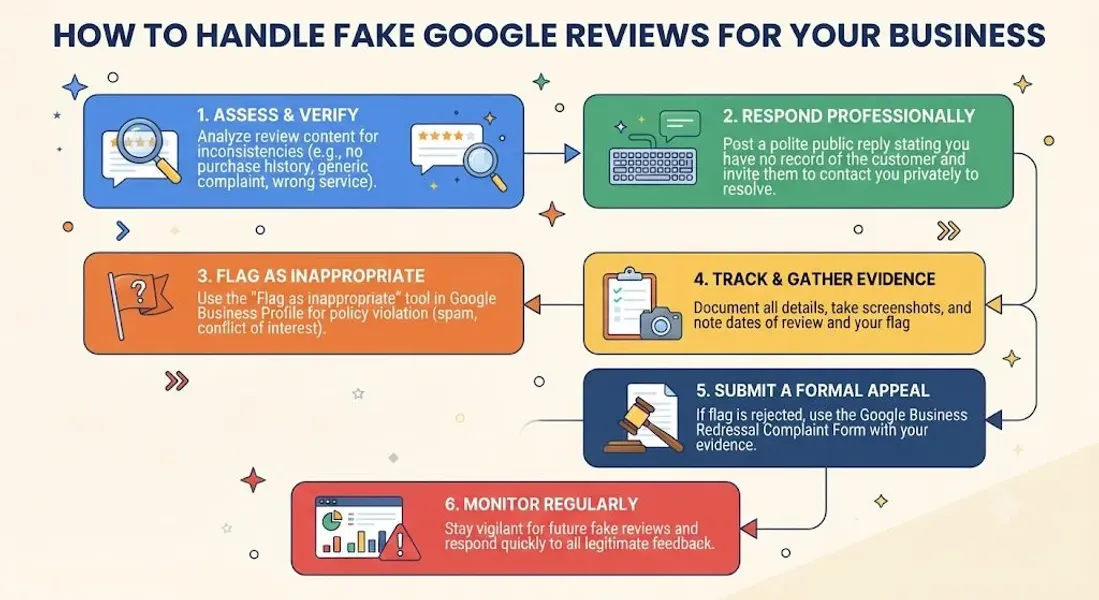
Step 1: Determine If the Review Violates Google’s Policies
Google removes reviews that violate its content policies. Common violations include:
- Spam and fake content
- Off-topic reviews
- Restrictive content (hate speech, harassment)
- Illegal content
- Personal information
- Conflicts of interest
- Impersonation For more, review Google’s review policies.
Step 2: Flag the Review
On desktop:
-
Sign in to your Google Business Profile.
-
Find the review you want to report.
-
Click the three dots next to the review.
-
Select “Report review.”
-
Choose the reason for reporting.
-
Submit. On mobile:
-
Open the Google Maps app.
-
Find your business listing.
-
Tap the review.
-
Tap the three dots.
-
Select “Report review.”
-
Choose a reason and submit.
Step 3: Document Your Evidence
Google may ask for additional information. Prepare documentation, including:
- Screenshots of the review
- Screenshots of the reviewer’s profile
- Evidence that the reviewer is not a customer
- Evidence of a coordinated attack
- Any other relevant information
Step 4: Wait for Google’s Response
Google reviews reports and may remove the review if it violates policies. This can take a few days to a few weeks.
Step 5: Follow Up If Needed
If the review isn’t removed, you can escalate through Google Business Profile support. Be persistent but polite. Provide additional evidence if you have it.
What to Do If Google Won’t Remove the Fake Review
Sometimes Google won’t remove a review, even if you believe it’s fake. Here’s what to do.
Respond Professionally
If the review stays up, respond professionally. Don’t argue or accuse the reviewer of lying. Instead, acknowledge the feedback, clarify any factual errors, and offer to resolve the issue offline.
Example: “We take all feedback seriously, but we don’t have a record of your visit. If this is a mistake, please contact us at [email/phone] so we can look into it. We’re committed to providing excellent service to all our customers.”
Bury It With Positive Reviews
The best defense against fake reviews is a steady stream of genuine positive reviews. Ask satisfied customers to leave reviews regularly. Over time, positive reviews will dilute the impact of the fake one.
For more, see our guide on ask for Google reviews.
Report the Reviewer
If the reviewer has left fake reviews on other businesses, report their profile to Google. This can result in their account being removed.
Consider Legal Action
In extreme cases, you may have legal options. If a fake review contains defamatory statements, you may be able to pursue legal action against the reviewer. Consult with an attorney.
Monitor and Document
Keep monitoring your profile for additional fake reviews. Document everything. If the attacks continue, you can escalate to Google and potentially pursue legal action.
How to Prevent Fake Google Reviews
You can’t prevent every fake review, but you can reduce your risk.
Claim and Verify Your Profile
An unclaimed or unverified profile is more vulnerable to attacks. Claim and verify your profile to maintain control.
Build a Strong Review Profile
The more genuine positive reviews you have, the less impact a fake negative review will have. Build a steady stream of reviews.
Monitor Your Profile Regularly
Check your reviews daily or weekly. The sooner you catch a fake review, the sooner you can report it.
Respond to All Reviews
Responding to reviews shows engagement and makes your business look more trustworthy. It also signals to Google that you’re active.
Don’t Buy Fake Reviews
Buying fake positive reviews violates Google’s guidelines and can result in penalties or suspension. Earn reviews honestly.
Train Your Team
Make sure your team knows not to leave fake reviews, ask for incentives, or engage in review manipulation.
Keep Customer Records
Maintain accurate customer records so you can verify whether a reviewer is a real customer.
Document Interactions
If you have a dispute with a customer, document it. This can help if they later leave a fake review.
Build a Positive Reputation
A strong reputation makes your business a less attractive target. Focus on delivering great service and earning genuine reviews.
When to Report a Fake Review to Google
Report a fake review if it:
- Violates Google’s content policies
- Contains false information
- Is from someone who was never a customer
- Is part of a coordinated attack
- Contains offensive or harassing content
- Includes personal information
- Is clearly spam Don’t report legitimate negative reviews, even if they hurt. Instead, respond professionally and learn from the feedback.
How Fake Reviews Impact Your Local SEO
Fake reviews can hurt your local SEO in several ways.
Lower Star Rating
A lower rating can reduce click-through rates and conversions, which can indirectly affect your ranking.
Reduced Prominence
Google considers reviews as a prominence signal. Fake negative reviews can reduce your prominence.
Damage to Local Pack Rankings
Businesses with lower ratings and fewer positive reviews are less likely to appear in the local pack.
Loss of Trust
Even if a review is fake, some customers will believe it. Loss of trust can lead to fewer calls, visits, and sales.
Time and Energy
Reporting fake reviews takes time and energy you could spend on more productive activities.
Conclusion
Fake Google reviews are a frustrating reality for local businesses. But they’re not unbeatable. With the right approach, you can report and remove fake reviews, protect your reputation, and prevent future attacks.
The key is to identify fake reviews quickly, report them with solid evidence, respond professionally if they stay up, and build a strong review profile that dilutes their impact. Monitor your profile regularly, document everything, and never give up.
Remember: your reputation is one of your most valuable assets. Protect it.
Call to Action
Dealing with fake Google reviews? Let our local SEO experts help. We’ll help you identify fake reviews, report them to Google, and build a review strategy that protects your reputation and improves your local rankings.
Contact Us Today for a Free Local SEO Audit!
FAQs
Q1: What are fake Google reviews? A: Fake Google reviews are reviews that violate Google’s content policies—such as spam, false information, or reviews from non-customers. They’re designed to manipulate ratings or damage reputations.
Q2: How do I report a fake Google review? A: Flag the review from your Google Business Profile dashboard or the Google Maps app. Select the reason for reporting and submit. Provide documentation if Google requests it.
Q3: How long does it take for Google to remove a fake review? A: It varies. Some reviews are removed within days; others take weeks. If the review isn’t removed, you can escalate through Google support.
Q4: What if Google won’t remove the fake review? A: Respond professionally, bury it with positive reviews, report the reviewer, and consider legal action if the review is defamatory.
Q5: Can I sue someone for leaving a fake review? A: In some cases, yes—especially if the review contains defamatory statements. Consult with an attorney to explore your options.
Q6: How can I prevent fake reviews? A: Claim your profile, build a strong review profile, monitor regularly, respond to all reviews, and never buy fake reviews.
Q7: Should I respond to fake reviews? A: Yes, if they remain online. Respond professionally, clarify any factual errors, and offer to resolve the issue offline. Don’t argue or accuse.
Q8: How do fake reviews impact local SEO? A: Fake reviews can lower your rating, reduce prominence, and hurt your local pack rankings. For more, see our guide on customer reviews local SEO.
Q9: What should I do if my business is not showing on Google Maps? A: Check for verification issues, suspensions, incorrect information, or ranking problems. See our guide on business not showing on Google Maps.
Q10: What should I do if my Google Business Profile is suspended? A: If your profile is Google Business Profile suspended, review Google’s guidelines, fix any violations, and submit an appeal. Our guide on suspended profiles covers this in depth.
Q11: How do I fix incorrect information on my Google Business Profile? A: If your profile shows incorrect information, you can edit it directly from your dashboard. For persistent issues, see our guide on how to fix Google Business Profile errors.
Internal Links
-
What Is Google Business Profile and How Does It Work? A Complete Guide
-
Google Business Profile vs Google Maps: What’s the Difference?
-
Google Business Profile Verification: Complete Step-by-Step Guide
-
How to Write the Perfect Google Business Profile Description
-
Google Business Profile Photos: Best Practices for Local SEO
-
Google Business Profile Services: How to Add and Optimize Them
-
Google Business Profile Attributes: What Are They and Why Do They Matter?
-
Google Business Profile Suspended? Common Causes and What to Do
-
What Are Local Citations and Why Are They Important for SEO?
-
Local Keywords: How to Find the Right Keywords for Your Business
-
Google Business Profile Insights: 10 Metrics Every Business Should Track
-
Contact Busirank## External Links
-
Google’s Guidelines for Representing Your Business on Google
Keep reading
Grow Your Google Maps Ranking on Autopilot
Stop spending hours every week manually replying to customer reviews and writing Google posts. Busirank automates your Google Business Profile to boost your local SEO rankings and turn searchers into paying clients.

 Busirank Team