 Busirank Team
Introduction
You’ve invested in local SEO. You’ve optimized your Google Business Profile, built citations, collected reviews, and published content. Your rankings have improved, and your profile looks active. But when the end of the month arrives and someone asks, “How’s our local SEO doing?”—do you have a clear answer?
For many businesses and agencies, monthly reporting is an afterthought. Reports get thrown together at the last minute, filled with vanity metrics that don’t tell a story, and delivered to stakeholders who skim them once and never look again. The result is a reporting process that consumes time but delivers little value.
The best local SEO reports do the opposite. They tell a clear story about what’s working, what isn’t, and what to do next. They connect activity to outcomes—rankings to calls, calls to customers, customers to revenue. They give decision-makers the confidence to keep investing—or the insight to pivot.
But building a report that accomplishes all that requires knowing what to include, how to present it, and how to frame the data so it drives action. That’s what this guide is about.
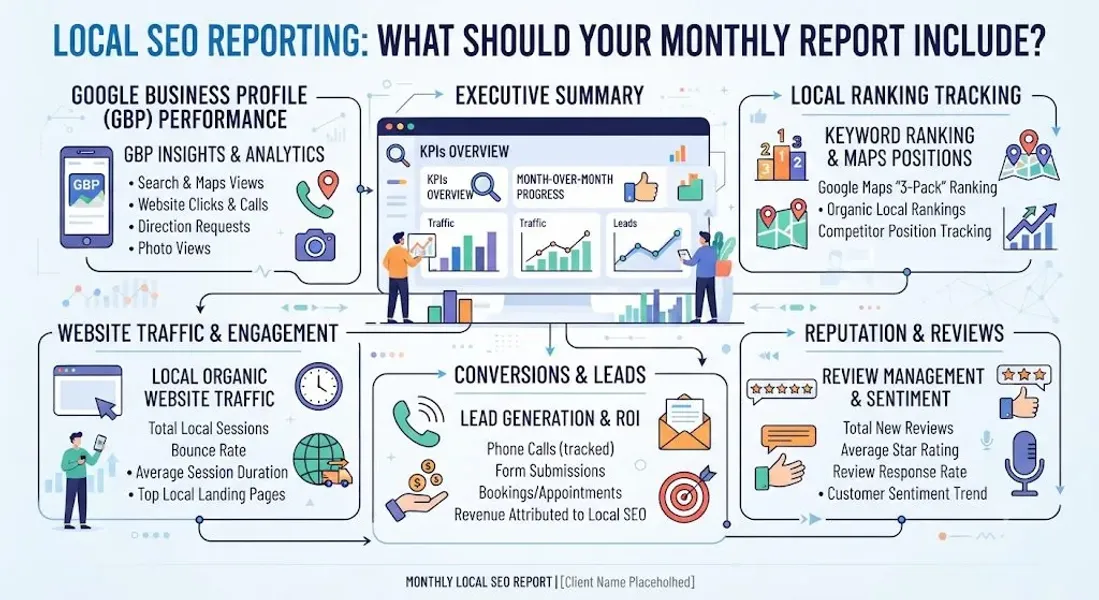
In this comprehensive guide, we’ll walk you through exactly what your monthly local SEO report should include. We’ll cover the essential sections, the metrics that matter, how to present data clearly, how to tailor reports for different audiences, and the tools that make reporting easier. By the end, you’ll have a complete framework for reports that inform, persuade, and drive results.
Why a Monthly Local SEO Report Matters
Before we get into the specifics, let’s establish why monthly reporting is so important.
It Proves ROI
Local SEO requires investment—time, money, or both. A monthly report connects that investment to measurable outcomes like calls, leads, and revenue. Without it, stakeholders have no way to judge whether the investment is paying off.
It Keeps Everyone Aligned
A report creates a shared understanding of goals, progress, and priorities. It aligns business owners, marketing teams, and agencies around the same metrics and objectives.
It Identifies Problems Early
Monthly reporting catches issues—ranking drops, declining calls, review stagnation—before they become crises. Early detection enables quick correction.
It Guides Strategy
Data from monthly reports informs decisions about where to focus next month. Should you invest more in reviews? Citations? Content? The report tells you.
It Creates Accountability
Whether you’re managing local SEO yourself or working with an agency, a monthly report creates accountability. Everyone knows what success looks like and whether it’s being achieved.
It Documents Progress
Over time, monthly reports build a record of progress. You can look back and see how far you’ve come—useful for annual reviews and strategic planning.
For more on the metrics behind reporting, see our guide on local SEO performance.
What Makes a Great Local SEO Report?
Not all reports are created equal. A great local SEO report has several qualities.
It’s Clear
The report is easy to read and understand. It avoids jargon and presents data in a way that non-experts can follow.
It’s Actionable
The report doesn’t just present data—it explains what the data means and what should be done about it. Every section leads to a conclusion or recommendation.
It’s Consistent
The report follows the same structure every month, making it easy to compare performance over time.
It’s Honest
The report includes both wins and challenges. It doesn’t hide bad news or spin poor results.
It’s Visual
Charts, graphs, and tables make data easier to digest than spreadsheets of raw numbers.
It’s Tailored
The report is tailored to its audience. A report for a business owner looks different from one for an agency’s internal team.
It’s Timely
The report is delivered on a consistent schedule—ideally within the first week of the following month.
For more on what to track, see our guide on local SEO performance.
The Essential Sections of a Monthly Local SEO Report
Here’s a complete framework for your monthly local SEO report. Not every report needs every section, but this structure covers all the bases.
Section 1: Executive Summary
The executive summary is the most important part of the report. It gives busy stakeholders a quick overview of performance without forcing them to read every detail.
What to include:
- A one-paragraph summary of the month’s performance
- 2-3 key wins or highlights
- 1-2 challenges or areas of concern
- Top-line metrics (e.g., total calls, total reviews, average ranking)
- Key recommendations for next month Why it matters: Most stakeholders won’t read the full report. The executive summary ensures they get the essential information even if they only skim.
Example:
“Local SEO performance improved across most metrics in March. Total profile views increased 18%, calls increased 22%, and we collected 12 new reviews (up from 7 in February). Local pack rankings improved for 6 of our 10 target keywords. One concern: website clicks declined 8%, which we’ll investigate next month. Priority for April: review generation and post frequency.”
Section 2: Visibility Metrics
This section answers the question: “Are we appearing in local search results?”
What to include:
-
Local pack rankings for target keywords
-
Google Maps rankings
-
Organic search rankings for local keywords
-
Profile views (Search vs. Maps)
-
Impressions
-
Search queries driving views How to present it:
-
Use a table to show rankings for each keyword, with columns for last month, this month, and change
-
Use a line chart to show profile views over time
-
Highlight which queries are driving the most views What to look for:
-
Are rankings improving or declining?
-
Which keywords are performing best?
-
What search queries are driving the most views?
-
Are you appearing for the right terms? For more on visibility metrics, see our guide on Google Business Profile insights.
Section 3: Engagement Metrics
This section answers the question: “Are customers interacting with our listing?”
What to include:
-
Calls
-
Direction requests
-
Website clicks
-
Messages
-
Bookings
-
Post views and clicks
-
Photo views How to present it:
-
Use a bar chart to compare this month’s engagement to previous months
-
Break down calls and clicks by source (Search vs. Maps)
-
Show which posts generated the most engagement What to look for:
-
Are calls increasing or decreasing?
-
Which posts drive the most clicks?
-
Are direction requests growing?
-
How does engagement compare to visibility? For more on tracking engagement, see our guide on how to track Google Business Profile calls.
Section 4: Reputation Metrics
This section answers the question: “What do customers think of our business?”
What to include:
-
Total review count
-
Average rating
-
New reviews this month
-
Review velocity (reviews per month over time)
-
Response rate
-
Sentiment trends How to present it:
-
Use a line chart to show review growth over time
-
Include a breakdown of star ratings
-
Highlight any notable reviews (positive or negative) What to look for:
-
Is review volume growing?
-
Is the average rating improving or declining?
-
Are you responding to all reviews?
-
What themes appear in customer feedback? For more on reviews, see our guide on customer reviews local SEO.
Section 5: Conversion Metrics
This section answers the question: “Are customers taking the actions that matter?”
What to include:
-
Conversion rate (profile views to actions)
-
Leads generated (calls, form submissions, bookings)
-
Cost per lead (if applicable)
-
Revenue attributed to local search (if trackable) How to present it:
-
Use a funnel chart to show the customer journey from view to conversion
-
Include a comparison to previous months
-
Highlight any changes in conversion rates What to look for:
-
Are conversions increasing or decreasing?
-
Which actions drive the most value?
-
How does conversion rate compare to industry benchmarks? For more on tracking conversions, see our guide on local SEO performance.
Section 6: Competitive Analysis
This section answers the question: “How do we compare to competitors?”
What to include:
-
Share of local pack (how often you appear vs. competitors)
-
Ranking gaps (keywords where competitors outrank you)
-
Review gaps (how your review count and rating compare)
-
Citation gaps (directories where competitors are listed but you aren’t) How to present it:
-
Use a table to compare your metrics to top competitors
-
Highlight areas where you’re winning and where you’re losing What to look for:
-
Are you gaining or losing ground?
-
Which competitors are outperforming you?
-
Where are the biggest opportunities? For more on competition, see our guide on local pack SEO.
Section 7: Actions Taken
This section documents what was done during the month to improve local SEO.
What to include:
- Profile optimizations (categories, description, services, attributes)
- Content published (posts, photos, videos)
- Citations built or updated
- Reviews requested and responded to
- Website updates Why it matters: This section connects activity to results. If rankings improved, what actions contributed? If they declined, what might have caused it?
Section 8: Next Steps and Recommendations
This section outlines priorities for the coming month.
What to include:
- Key priorities for next month
- Specific actions planned
- Tests to run
- Areas to investigate Why it matters: A report without next steps is just a history lesson. This section ensures the report drives action.
For a detailed look at what to track, see our guide on local SEO performance.
How to Present Your Report
The way you present data matters as much as the data itself. Here are best practices.
Use Visuals
Charts, graphs, and tables are easier to digest than raw numbers. Use:
- Line charts for trends over time
- Bar charts for comparisons
- Pie charts for breakdowns
- Tables for rankings and detailed data
- Funnel charts for conversion journeys
Keep It Simple
Don’t overwhelm with data. Focus on the metrics that matter most. If a metric doesn’t inform a decision, leave it out.
Use Color Strategically
Use green to indicate improvement, red for decline, and yellow for caution. This makes trends immediately visible.
Add Context
Numbers without context are meaningless. Always compare to previous periods. “Calls increased 15%” is more useful than “150 calls.”
Highlight Key Takeaways
Use callout boxes or bold text to highlight the most important findings. Make it easy for skimmers to get the gist.
Include a Summary Table
A one-page summary table showing all key metrics with month-over-month changes is invaluable for busy stakeholders.
Make It Scannable
Use headings, bullet points, and white space. Most people will skim before they read.
Tailoring Reports for Different Audiences
Different stakeholders need different information. Tailor your report accordingly.
For Business Owners
Focus on: ROI, leads, revenue, and high-level trends.
What they care about: Is local SEO making money? What’s the return on investment?
How to present: Lead with the executive summary. Show revenue and leads prominently. Keep technical details brief.
For Marketing Managers
Focus on: Channel performance, conversion rates, and tactical opportunities.
What they care about: Which activities are working? Where should we invest more?
How to present: Include more detail on engagement and conversion metrics. Show which posts, photos, and keywords perform best.
For Agencies and Consultants
Focus on: Comprehensive metrics, competitive analysis, and actionable recommendations.
What they care about: What should we do next? How do we prove value?
How to present: Include all sections. Provide detailed analysis and clear recommendations.
For Multi-Location Businesses
Focus on: Performance by location, top and bottom performers, and opportunities for improvement.
What they care about: Which locations are thriving? Which need help?
How to present: Break down metrics by location. Highlight top and bottom performers. Provide location-specific recommendations.
For more on multi-location management, see our guide on how to manage multiple Google Business Profiles.
Tools for Building Local SEO Reports
You don’t need expensive software to build great reports. Here are the best tools.
Google Looker Studio (Free)
Build custom dashboards combining data from Google Business Profile, Google Analytics, Google Search Console, and more. Highly customizable and free.
Google Business Profile Insights (Free)
Export your insights data as a CSV or PDF for inclusion in reports.
BrightLocal (Paid)
Comprehensive local SEO platform with automated reporting. Pulls data from multiple sources into clean, branded reports.
Local Falcon (Paid)
Specializes in grid-based local rank tracking. Excellent for showing geographic ranking patterns.
AgencyAnalytics (Paid)
Marketing reporting platform with local SEO integrations. White-label reports for agencies.
SEMrush (Paid)
All-in-one SEO platform with local SEO reporting features.
CallRail (Paid)
Call tracking with reporting features. Integrates with Google Analytics.
ReviewTrackers (Paid)
Review management with reporting and sentiment analysis.
For more on tracking tools, see our guide on local SEO performance.
Common Mistakes to Avoid
Avoid these mistakes when building your local SEO report.
Including Too Much Data
A 40-page report that nobody reads is worse than a 5-page report that gets reviewed. Focus on what matters.
Focusing Only on Rankings
Rankings matter, but they’re not the whole story. Include engagement, reputation, and conversion metrics.
Ignoring Negative Results
Don’t hide bad news. If rankings dropped or calls declined, report it—and explain what you’re doing about it.
Not Providing Context
Numbers without context are meaningless. Always compare to previous periods and benchmarks.
Skipping the Executive Summary
The executive summary is the most important section. Don’t skip it.
Failing to Include Next Steps
A report without recommendations is just a history lesson. Always include next steps.
Reporting Inconsistently
Sporadic reporting makes it hard to spot trends. Report on a consistent schedule.
Not Tailoring to the Audience
A report for a business owner looks different from one for an agency team. Tailor accordingly.
Using Jargon
Avoid technical jargon that non-experts won’t understand. Write for your audience.
Conclusion
A monthly local SEO report is more than a formality—it’s a strategic tool. It proves ROI, guides decisions, identifies problems, and creates accountability. When done well, it becomes the foundation for continuous improvement.
The essential sections of a great report include an executive summary, visibility metrics, engagement metrics, reputation metrics, conversion metrics, competitive analysis, actions taken, and next steps. Present data visually, keep it simple, and always include context and recommendations.
Tailor your report to your audience. Business owners want ROI. Marketing managers want tactics. Agencies want comprehensive data. Multi-location businesses want location-level insights.
Use the tools available—many of them free—to build reports efficiently. Then deliver them consistently. Over time, your reports become a record of progress and a guide for future strategy.
Start building your report this month. Your local SEO strategy will be stronger for it.
Call to Action
Need help building a monthly local SEO report that proves ROI and guides strategy? Let our local SEO experts help. We’ll set up your tracking, build custom reports, and provide the insights you need to grow your local presence.
Contact Us Today for a Free Local SEO Audit!
FAQs
Q1: What is a local SEO report? A: A local SEO report is a monthly document that summarizes your local search performance. It includes metrics on visibility, engagement, reputation, and conversions, along with analysis and recommendations.
Q2: What should be included in a local SEO report? A: A comprehensive report includes an executive summary, visibility metrics (rankings, views), engagement metrics (calls, clicks), reputation metrics (reviews, ratings), conversion metrics, competitive analysis, actions taken, and next steps.
Q3: How often should I produce a local SEO report? A: Monthly is standard. For competitive markets or fast-moving campaigns, weekly or bi-weekly reports may be useful.
Q4: What’s the most important metric in a local SEO report? A: It depends on your business. For most, calls and leads are the most important. For brick-and-mortar businesses, direction requests matter. For all businesses, revenue attributed to local search is the ultimate metric.
Q5: How do I create a local SEO report? A: Use tools like Google Looker Studio, BrightLocal, or AgencyAnalytics to pull data from Google Business Profile, Google Analytics, and rank trackers. Combine into a clear, visual report with analysis and recommendations.
Q6: What’s the difference between a local SEO report and a general SEO report? A: A local SEO report focuses on local metrics—Google Business Profile insights, local pack rankings, Maps visibility, and local citations. A general SEO report focuses on broader organic search performance.
Q7: How do I prove ROI in a local SEO report? A: Track calls, clicks, and conversions from local search. Assign a dollar value to each conversion. Calculate ROI as (Revenue − Cost) ÷ Cost × 100. For more, see our guide on local SEO performance.
Q8: What tools are best for building local SEO reports? A: Google Looker Studio is free and powerful. BrightLocal, Local Falcon, and AgencyAnalytics are excellent paid options for agencies and multi-location businesses.
Q9: How do I report on multiple locations? A: Break down metrics by location. Highlight top and bottom performers. Provide location-specific recommendations. For more, see our guide on how to manage multiple Google Business Profiles.
Q10: How do I track calls for my local SEO report? A: Use Google Business Profile insights for baseline data. For deeper attribution, use a call tracking tool like CallRail. For more, see our guide on Google Business Profile calls.
Q11: What should I do if my Google Business Profile is suspended? A: If your profile is Google Business Profile suspended, review Google’s guidelines, fix any violations, and submit an appeal. Our guide on suspended profiles covers this in depth.
Q12: What should I do if my business is not showing on Google Maps? A: Check for verification issues, suspensions, incorrect information, or ranking problems. See our guide on business not showing on Google Maps.
Q13: How do I fix incorrect information on my Google Business Profile? A: If your profile shows incorrect information, you can edit it directly from your dashboard. For persistent issues, see our guide on how to fix Google Business Profile errors.
Internal Links
-
What Is Google Business Profile and How Does It Work? A Complete Guide
-
Google Business Profile vs Google Maps: What’s the Difference?
-
Google Business Profile Verification: Complete Step-by-Step Guide
-
How to Write the Perfect Google Business Profile Description
-
Google Business Profile Photos: Best Practices for Local SEO
-
Google Business Profile Services: How to Add and Optimize Them
-
Google Business Profile Attributes: What Are They and Why Do They Matter?
-
Google Business Profile Suspended? Common Causes and What to Do
-
What Are Local Citations and Why Are They Important for SEO?
-
NAP Consistency: Why Name, Address and Phone Number Matter External Links
Keep reading
Grow Your Google Maps Ranking on Autopilot
Stop spending hours every week manually replying to customer reviews and writing Google posts. Busirank automates your Google Business Profile to boost your local SEO rankings and turn searchers into paying clients.

 Busirank Team