 Busirank Team
Introduction
Type “plumber near me” into Google and watch what happens. You get a map, three business listings, and a list of local options—all within seconds. No scrolling through pages of national websites. No clicking to page two. Just immediate, local results.
Now imagine your business appearing in those results. Every day, thousands of people search with “near me” intent. They’re not browsing. They’re not doing research. They need a product or service, and they need it close by. They’re ready to call, visit, or book right now.
This is the power of “near me” keywords. They represent some of the highest-intent searches in all of local SEO. And if your business isn’t optimized for them, you’re invisible to the customers who are most ready to buy.
Here’s the challenge: “near me” keywords work differently than other local keywords. When someone searches “plumber near me,” Google doesn’t just look for the words “near me” on a website. It uses the searcher’s location, the business’s proximity, relevance, and prominence to determine which results to show. You can’t simply stuff “near me” into your content and expect to rank.
In this comprehensive guide, we’ll walk you through everything you need to know about near me keywords. We’ll explain what they are, why they matter, how to find them, and how to optimize for them. By the end, you’ll have a clear roadmap for attracting more local customers through high-intent searches.
What Are “Near Me” Keywords?
“Near me” keywords are search queries that include phrases like “near me,” “nearby,” “in my area,” or “close to me.” Examples include:
- “Plumber near me”
- “Restaurants near me open now”
- “Dentist near me”
- “Coffee shop nearby”
- “Emergency electrician in my area” These keywords have one thing in common: they signal local intent. The searcher wants a business that’s close to their current location.
How “Near Me” Searches Work
When someone searches with “near me,” Google uses the searcher’s device location (from GPS, Wi-Fi, or IP address) to determine where they are. It then shows businesses that are:
- Relevant: Matching the search query
- Close: Within a reasonable distance from the searcher
- Prominent: Well-reviewed and well-known Google doesn’t need the words “near me” to appear on your website or Google Business Profile. Instead, it uses location data and ranking signals to deliver local results.
”Near Me” vs. Location-Based Keywords
Location-based keywords include a specific place name, like “plumber in Austin” or “pizza Chicago.” “Near me” keywords are more dynamic—they adapt to the searcher’s location. A business in Austin might appear for “plumber near me” when someone searches from Austin, but not when someone searches from Dallas.
This makes “near me” keywords powerful but also challenging. You can’t target a specific location because the location changes with each search. Instead, you need to optimize for proximity, relevance, and prominence in your actual service area.
Why “Near Me” Keywords Matter for Local SEO
“Near Me” keywords are among the most valuable in local search. Here’s why.
They Capture High-Intent Traffic
People searching with “near me” are ready to take action. They’re not researching or comparing options—they need a solution now. This makes them more likely to convert into customers.
They’re Growing in Popularity
“Near me” searches have grown dramatically in recent years. As more people use voice search and mobile devices, “near me” queries have become second nature. If you’re not optimizing for them, you’re missing a huge opportunity.
They Drive Mobile Traffic
Most “near me” searches happen on mobile devices. Mobile users are often on the go—looking for a place to eat, a service to call, or a store to visit. Optimizing for “near me” keywords helps you capture this mobile traffic.
They Improve Local Pack Rankings
The local pack—the block of three map results—is often triggered by “near me” searches. Ranking in the local pack requires optimizing for these high-intent keywords.
They Support Voice Search
Voice searches like “Hey Google, find a plumber near me” are becoming more common. These searches rely heavily on “near me” intent. Optimizing for these keywords helps you appear in voice search results.
They’re Cost-Effective
Unlike paid ads, “near me” keyword optimization is organic. You don’t pay per click. You earn visibility through optimization and reputation.
How to Find “Near Me” Keywords for Your Business
Now let’s get practical. Here’s how to find the “near me” keywords your customers are using.
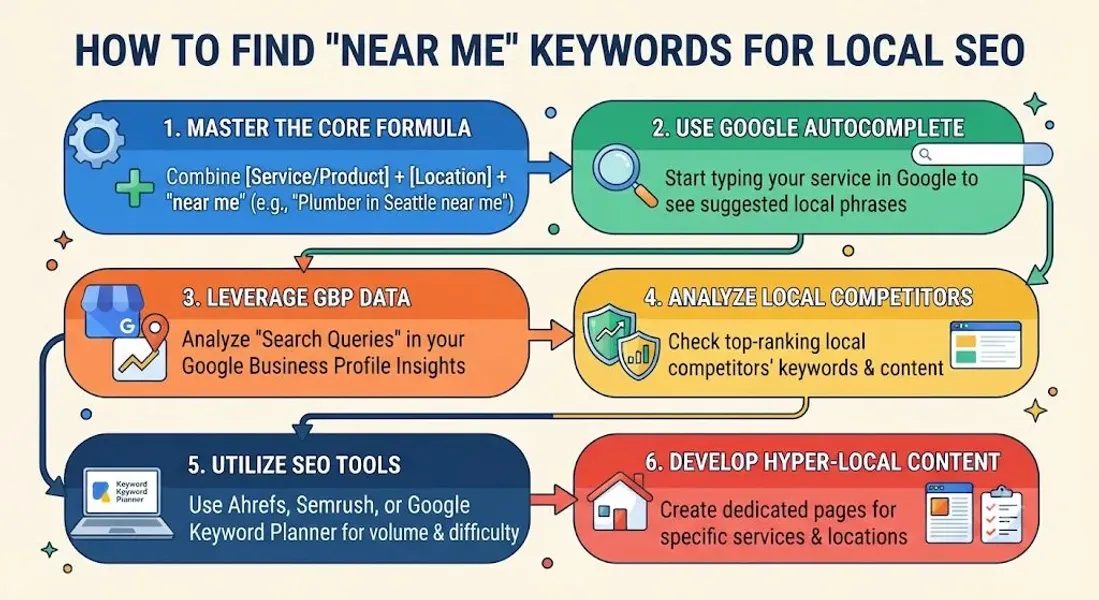
Step 1: Start With Your Core Services
List everything you offer. If you’re a plumber, this might include:
- Drain cleaning
- Water heater repair
- Emergency plumbing
- Bathroom remodeling Each service is a potential “near me” keyword: “drain cleaning near me,” “water heater repair near me,” etc.
Step 2: Use Google Autocomplete
Type your service into Google followed by “near” and see what autocomplete suggests.
Example: Type “plumber near” and Google might suggest:
- plumber near me
- plumber near me open now
- plumber near me free estimate
- plumber nearby These suggestions reveal what real people are searching for.
Step 3: Check “People Also Ask”
When you search for a “near me” keyword, Google shows “People Also Ask” questions. These reveal related queries and intent.
Example: Searching “dentist near me” might show:
- How do I find a good dentist near me?
- What is the best dentist near me?
- Are there emergency dentists near me? These questions are opportunities for content and FAQs.
Step 4: Explore Related Searches
Scroll to the bottom of Google search results to see “Related Searches.” These show additional keywords and variations.
Example: Searching “restaurants near me” might show:
- best restaurants near me
- cheap restaurants near me
- restaurants near me open now
- family restaurants near me
Step 5: Use Keyword Research Tools
Tools can help you find “near me” keyword variations and search volume. Options include:
- Google Keyword Planner: Filter by location to see local search volume
- Ubersuggest: Offers keyword suggestions and volume
- SEMrush: Provides local keyword data and competitor analysis
- Ahrefs: Shows keyword variations and difficulty
- BrightLocal: Built for local SEO with “near me” keyword tracking
Step 6: Check Your Google Business Profile Insights
Your Google Business Profile insights show what search queries triggered your listing. This is first-party data—it tells you exactly what people searched to find you.
Look for “near me” queries in your insights. These are the keywords you’re already ranking for—and opportunities to improve.
Step 7: Analyze Competitor Keywords
Use tools like SEMrush or Ahrefs to see what keywords your competitors rank for. Look for “near me” variations you might be missing.
Step 8: Consider Voice Search Variations
Voice searches often use natural language. Examples:
- “Where is the nearest coffee shop?”
- “Find a plumber near me”
- “What’s the best pizza place around here?” These variations are worth targeting through FAQs and conversational content.
How to Optimize for “Near Me” Keywords
Finding keywords is just the first step. Here’s how to optimize for them.
Optimize Your Google Business Profile
Your Google Business Profile is the most important asset for “near me” rankings. Optimize every element:
- Category: Choose the most specific Google Business Profile category
- Description: Include relevant keywords naturally
- Services and Products: List everything you offer
- Attributes: Add all applicable Google Business Profile attributes
- Photos: Upload high-quality Google Business Profile photos
- Reviews: Build a steady stream of customer reviews local SEO
- Posts: Post regularly using Google Business Profile post ideas
Ensure NAP Consistency
Your Name, Address, and Phone number must be consistent across all platforms. NAP consistency helps Google verify your location and improves your “near me” rankings.
Build Local Citations
Local citation building reinforces your geographic relevance. Citations on local directories, newspapers, and community sites help Google understand where you operate.
Create Location-Specific Content
If you serve multiple areas, create dedicated pages for each location. Include local keywords, testimonials from customers in that area, and information specific to that location.
Example: A plumber serving Austin and Round Rock might have:
/plumber-austin//plumber-round-rock/Each page targets “near me” and location-specific keywords.
Optimize for Mobile
Most “near me” searches happen on mobile. Ensure your website is mobile-friendly, loads quickly, and provides a great user experience.
Use Schema Markup
LocalBusiness schema markup on your website helps Google understand your business and location. This can improve your visibility for “near me” searches.
Encourage Reviews That Mention Location
Reviews that mention your city or neighborhood reinforce your local relevance. Encourage customers to mention their location when leaving reviews.
Monitor and Adjust
Use Google Business Profile insights and rank tracking tools to monitor your “near me” rankings. Adjust your strategy based on what’s working.
Best Practices for “Near Me” Keyword Optimization
Follow these best practices to maximize your results.
Focus on Proximity
“Near me” searches prioritize proximity. If you’re not close to the searcher, you won’t appear—no matter how well-optimized your profile is. Focus on your actual service area.
Build Prominence in Your Area
Prominence matters for “near me” rankings. Build reviews, citations, and local backlinks to strengthen your reputation in your area.
Be Specific With Your Category
Choose the most specific Google Business Profile category for your business. This helps you appear for relevant “near me” searches.
Use Natural Language
Don’t stuff “near me” into your content. Instead, create content that naturally addresses local intent. “Looking for a plumber in Austin? We serve the greater Austin area” is better than “plumber near me Austin near me.”
Target Long-Tail Variations
Long-tail “near me” keywords like “emergency plumber near me open now” have less competition and higher intent. Target these variations.
Optimize for Voice Search
Voice searches often use conversational language. Create FAQs and content that answer natural language questions.
Monitor Competitors
See what “near me” keywords your competitors rank for. Identify gaps and opportunities.
Stay Consistent
“Near me” rankings fluctuate based on searcher location. Don’t panic if you don’t rank in every search. Focus on your core service area.
Common “Near Me” Keyword Mistakes to Avoid
Avoid these mistakes to protect your rankings.
Keyword Stuffing
Adding “near me” repeatedly to your content looks spammy and doesn’t help. Google uses location data, not the words “near me,” to determine local results.
Ignoring Google Business Profile
Your profile is the most important asset for “near me” rankings. Don’t neglect it.
Inconsistent NAP Information
Inconsistent NAP information confuses Google and hurts your local rankings. Maintain NAP consistency everywhere.
Not Building Citations
Local citations reinforce your geographic relevance. Build them consistently.
Neglecting Reviews
Reviews are a major ranking factor for “near me” searches. Build them consistently and respond to all of them.
Focusing Only on High-Volume Keywords
High-volume “near me” keywords are competitive. Target long-tail variations with less competition and higher intent.
Not Tracking Results
If you’re not tracking your rankings, you don’t know what’s working. Monitor your progress regularly.
Giving Up Too Soon
Local SEO takes time. Results may take weeks or months. Stay consistent.
How “Near Me” Keywords Impact Your Local SEO
“Near Me” keywords are central to local SEO success. Here’s how they help.
Improved Local Pack Rankings
“Near me” searches often trigger the local pack. Optimizing for these keywords improves your chances of appearing in top results.
Better Google Maps Visibility
“Near me” keywords help Google understand your relevance for local searches, improving your Google Maps visibility.
More Calls and Direction Requests
“Near me” searchers are ready to act. They call, request directions, and visit. Optimizing for these keywords drives real business results.
Higher Conversion Rates
“Near me” traffic converts better than almost any other type of search traffic. These searchers are ready to buy.
Support for Voice Search
Voice searches rely heavily on “near me” intent. Optimizing for these keywords helps you appear in voice search results.
Competitive Advantage
If your competitors aren’t optimizing for “near me” keywords, you gain an edge in local search results.
Conclusion
“Near me” keywords are among the most valuable in local SEO. They capture high-intent traffic from customers who are ready to take action. And with the right strategy, you can appear in these searches and attract more local customers.
The process is straightforward: find the “near me” keywords your customers use, optimize your Google Business Profile and website for local relevance, build citations and reviews, and maintain NAP consistency. Track your progress and adjust as needed.
Remember: “near me” rankings depend on proximity, relevance, and prominence. Focus on your actual service area, build your reputation, and stay consistent. The results will follow.
Call to Action
Want to rank for “near me” keywords but don’t know where to start? Let our local SEO experts help. We’ll research the best “near me” keywords for your business, optimize your profile, and build a strategy that drives real results.
Contact Us Today for a Free Local SEO Audit!
FAQs
Q1: What are “near me” keywords? A: “Near me” keywords are search queries that include phrases like “near me,” “nearby,” or “in my area.” They signal local intent and capture high-intent traffic.
Q2: How do “near me” searches work? A: Google uses the searcher’s device location to determine where they are. It then shows businesses that are relevant, close, and prominent.
Q3: Do I need to include “near me” on my website to rank? A: No. Google uses location data and ranking signals, not the words “near me,” to determine local results. Focus on optimizing your Google Business Profile and building local relevance.
Q4: How do I find “near me” keywords for my business? A: Use Google Autocomplete, People Also Ask, Related Searches, keyword research tools, and your Google Business Profile insights to find “near me” keywords relevant to your business.
Q5: How long does it take to rank for “near me” keywords? A: It varies based on competition and your current optimization. Some businesses see improvements in weeks; others take months. Consistency is key.
Q6: Can I rank for “near me” keywords without a physical address? A: Yes, if you’re a service-area business. You can hide your address and specify your service areas. Focus on building citations and reviews in your target areas.
Q7: How do “near me” keywords help with local pack SEO? A: “Near me” searches often trigger the local pack. Optimizing for these keywords improves your chances of appearing in top results. For more, see our guide on local pack SEO.
Q8: What are Google Maps keywords? A: Google Maps keywords are the terms people use when searching on Google Maps. They often include “near me,” “open now,” and specific service terms. For more, see our guide on Google Maps keywords.
Q9: What should I do if my business is not showing on Google Maps? A: Check for verification issues, suspensions, incorrect information, or ranking problems. See our guide on business not showing on Google Maps for a complete diagnostic checklist.
Q10: What should I do if my Google Business Profile is suspended? A: If your profile is Google Business Profile suspended, review Google’s guidelines, fix any violations, and submit an appeal. Our guide on suspended profiles covers this in depth.
Internal Links
-
What Is Google Business Profile and How Does It Work? A Complete Guide
-
Google Business Profile vs Google Maps: What’s the Difference?
-
Google Business Profile Verification: Complete Step-by-Step Guide
-
How to Write the Perfect Google Business Profile Description
-
Google Business Profile Photos: Best Practices for Local SEO
-
Google Business Profile Services: How to Add and Optimize Them
-
Google Business Profile Attributes: What Are They and Why Do They Matter?## External Links
Keep reading
Grow Your Google Maps Ranking on Autopilot
Stop spending hours every week manually replying to customer reviews and writing Google posts. Busirank automates your Google Business Profile to boost your local SEO rankings and turn searchers into paying clients.

 Busirank Team