 Busirank Team
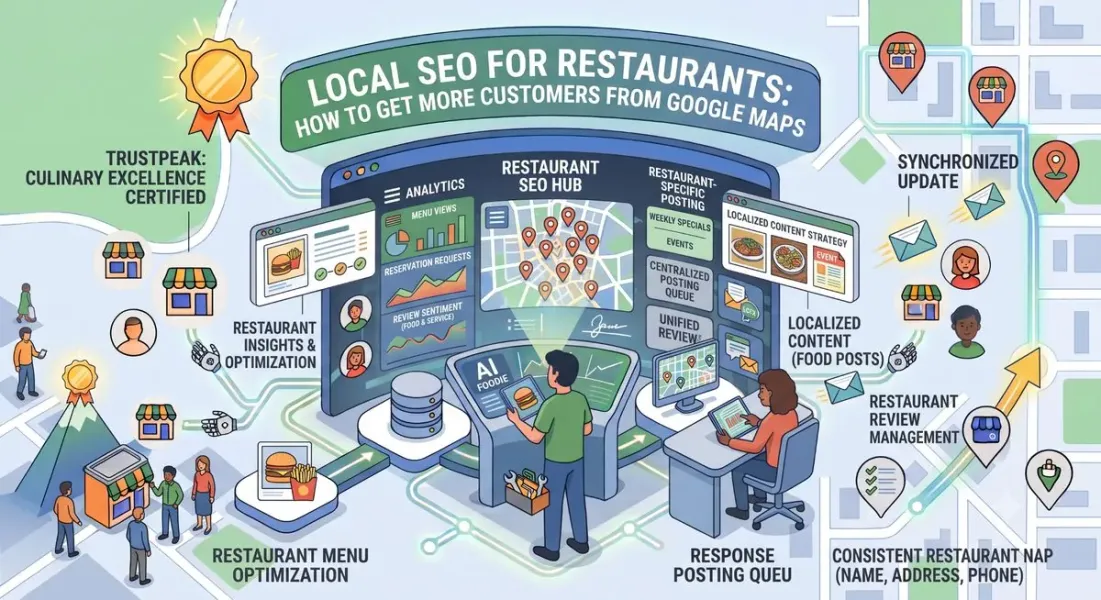
Page 1: Why Restaurants Live or Die in Local Search
The Moment of Decision
Someone is hungry. They’re standing on a street corner, sitting in a hotel room, or scrolling on their couch. They open Google Maps and type “pizza near me” or “best brunch in Austin.”
Within seconds they see three options. They scan star ratings, look at photos, check hours, maybe tap the menu. Within two minutes, they’ve chosen. They walk, drive, or order.
That entire decision happens inside Google’s ecosystem—often without ever visiting a restaurant’s website. If your restaurant isn’t visible in that moment, you don’t exist to that customer.
This is why local SEO for restaurants is fundamentally different from other verticals. You’re not competing for a slow, considered purchase. You’re competing for an impulse decision made in under 120 seconds.
What Makes Restaurants Unique in Local Search
Restaurants face a specific set of conditions that change how local SEO works:
-
Extremely high search volume. Food queries are among the most common local searches on Google. “Restaurants near me” and its variants generate billions of searches.
-
Visual-first decisions. Customers choose restaurants with their eyes. Photos—especially food photos—drive more decisions than text.
-
Urgency and proximity. “Open now” and “near me” dominate restaurant queries. Hours and location matter more than almost any other factor.
-
High review volume, high turnover. A popular restaurant can accumulate hundreds of reviews a year. Velocity matters enormously.
-
Multi-platform competition. Google Maps, Yelp, TripAdvisor, OpenTable, DoorDash, and others all compete for the same customer. Coordination across platforms matters.
-
Frequent repeat customers. Unlike a plumber, a restaurant wants the same customer back next week. Trust and consistency compound.
The Numbers That Matter
- 76% of people who search for something nearby visit a business within a day
- Restaurant searches are among the highest-intent local queries on Google
- Photos are one of the most-viewed elements on restaurant listings
- Menu and reservations are among the top actions taken from restaurant listings
- Reviews mentioning specific dishes influence both ranking and conversion
Where Restaurants Lose Customers
Most restaurants lose customers in Google Maps for one of five reasons:
-
Incomplete profiles. No menu, no photos, wrong hours, missing attributes.
-
Weak photo libraries. A handful of low-quality photos from 2018.
-
Stale reviews. No new reviews in months, signaling a decline.
-
No responses to reviews. Silent owners look indifferent.
-
Wrong categories. “Restaurant” instead of the specific cuisine or format that customers actually search for.
Each of these is fixable. And most of your competitors won’t fix them.
What This Guide Covers
- Page 1: Why restaurants are unique in local search
- Page 2: Profile setup—categories, menu, hours, attributes
- Page 3: Photos, reviews, and visual strategy
- Page 4: Posts, events, reservations, and multi-platform presence
- Page 5: Tracking, seasonal strategy, mistakes, and conclusion
Page 2: Profile Setup for Restaurants
Choosing the Right Categories
Restaurant categories matter more than almost any other vertical. A customer searching “sushi near me” and a customer searching “ramen near me” are looking for different things—even if your restaurant serves both.
Primary category: Choose the category that best describes your core offering. Be specific:
| Instead of | Choose |
|---|---|
| Restaurant | Italian Restaurant |
| Restaurant | Sushi Restaurant |
| Restaurant | Mexican Restaurant |
| Restaurant | Breakfast Restaurant |
| Restaurant | Pizza Restaurant |
| Cafe | Coffee Shop |
Secondary categories: Add 2–5 that genuinely apply:
- A ramen shop: “Ramen Restaurant” (primary), “Japanese Restaurant,” “Noodle Shop”
- A bakery-cafe: “Bakery” (primary), “Cafe,” “Breakfast Restaurant,” “Coffee Shop”
- A pizzeria with a bar: “Pizza Restaurant” (primary), “Italian Restaurant,” “Bar,” “Delivery Service” How to verify: Search your core dish or cuisine from a location near your restaurant. Look at the top three results in the local pack. Check what primary categories they use. The dominant category in your market is a strong signal.
Common mistake: Using “Restaurant” as your primary category because it feels safe. It’s the weakest choice—it makes you eligible for almost nothing specific.
Building a Complete Menu
For restaurants, the menu is one of the highest-impact fields on your Google Business Profile. Customers who view a menu are significantly more likely to visit.
How to add your menu:
- In your GBP dashboard, navigate to the Menu section
- Add menu sections (Appetizers, Entrees, Desserts, Drinks)
- Add individual items with names, descriptions, and prices
- Update seasonally Or link to a menu page: If your website has a well-designed menu page, link to it as your primary menu URL. Google may pull items automatically.
What to include:
- Item names exactly as they appear on your menu
- Short descriptions (10–20 words)
- Prices (update regularly)
- Dietary labels where applicable (vegetarian, vegan, gluten-free)
- Signature items highlighted Populate the “Popular dishes” section. Google pulls this from customer activity and your menu. Reviewers who mention specific dishes help this populate naturally.
Why the menu matters:
- Customers who view menus convert at higher rates
- Menu items are indexed and can appear in search
- Dish names in reviews and menu content reinforce relevance
- It reduces the friction between discovery and visit
Hours, Special Hours, and “Open Now”
Hours are disproportionately important for restaurants because “open now” is one of the most common search modifiers.
Do this:
-
Set regular hours for every day you operate
-
Use separate hours for kitchen vs. bar if they differ
-
Add holiday hours at least two weeks in advance
-
Mark temporary closures immediately (renovations, vacations, private events)
-
Use “more hours” for services like takeout, delivery, or brunch Common problems:
-
Hours listed don’t match reality (huge trust killer)
-
Holiday closures not updated, resulting in angry customers
-
Kitchen closing time not reflected
-
Delivery hours different from dine-in hours but not specified Pro tip: Assign one person to update hours weekly. Inaccurate hours are one of the most common complaints in restaurant reviews.
Attributes That Drive Restaurant Discovery
Attributes help you appear in filtered searches. Fill out every one that applies:
Service options:
-
Dine-in
-
Takeout
-
Delivery
-
Curbside pickup
-
No-contact delivery Popular for:
-
Breakfast
-
Brunch
-
Lunch
-
Dinner
-
Solo dining
-
Good for groups
-
Family-friendly Amenities:
-
Outdoor seating
-
Reservations required
-
Bar onsite
-
Free Wi-Fi
-
Restroom
-
TVs Accessibility:
-
Wheelchair accessible entrance
-
Wheelchair accessible restroom
-
Wheelchair accessible seating Atmosphere:
-
Casual
-
Cozy
-
Romantic
-
Upscale
-
Trendy Dietary:
-
Vegetarian options
-
Vegan options
-
Gluten-free options
-
Halal
-
Kosher Payments:
-
Credit cards
-
Debit cards
-
NFC mobile payments
-
Cash only Best practice: Fill out every attribute that accurately describes your restaurant. Under-filled attributes limit your visibility in filtered searches.
Service Options: Dine-In, Takeout, Delivery
If you offer multiple service types, make sure each is configured correctly.
Delivery:
-
Link to your preferred delivery partner (DoorDash, Uber Eats, Grubhub)
-
Or link to your own ordering system if you have one
-
Enable “Delivery” attribute
-
Specify your delivery radius Takeout:
-
Enable “Takeout” attribute
-
Link to your online ordering page
-
Specify pickup instructions in your description Curbside:
-
Enable if offered
-
Specify instructions
-
Mention in your description Why this matters: Customers searching “pizza delivery near me” filter by delivery attribute. If it’s not enabled, you’re invisible to that search.
Profile Setup Checklist
- Specific primary category chosen (not “Restaurant”)
- 2–5 relevant secondary categories
- Menu populated with items, descriptions, prices
- Popular dishes section filled
- Hours accurate including special hours
- Kitchen hours specified separately if different
- All applicable attributes filled out
- Service options configured (dine-in, takeout, delivery)
- Delivery partner links added
- Website link points to menu or homepage
- Phone number local and accurate
Page 3: Photos, Reviews, and Visual Strategy
Why Photos Drive Restaurant Decisions
Restaurant customers choose with their eyes. Photos are the single most influential element on a restaurant’s Google listing—more than description text, more than attributes.
The data:
- Restaurant listings with photos get significantly more clicks
- Food photos are among the most-viewed elements
- Profiles with 100+ photos outperform those with fewer
- Recent photos outperform old ones Photo categories to include:
| Type | Quantity | Purpose |
|---|---|---|
| Food (signature dishes) | 15–25 | Drives craving and decision |
| Interior | 5–10 | Sets atmosphere expectations |
| Exterior | 3–5 | Helps customers find you |
| Team/staff | 3–5 | Builds trust and humanizes |
| Menu items (rotating) | 5–10 | Keeps content fresh |
| Events/private dining | 3–5 | Attracts group bookings |
Target: 50+ photos at launch, then 5–10 new photos monthly.
Food Photography That Works
You don’t need a professional photographer for every shot—but you do need standards.
What works:
-
Natural lighting (near windows is often better than flash)
-
Close-up shots of signature dishes
-
Overhead “flat lay” shots for social sharing
-
Angled shots showing texture
-
Real portions (not over-styled)
-
Consistent background or plating style What doesn’t:
-
Dark, blurry, or low-resolution images
-
Stock food photos (customers recognize them)
-
Over-filtered images that misrepresent food
-
Photos of empty tables or unused spaces
-
Photos taken on a phone in poor lighting Pro tip: Designate one person on staff as your photo lead. Have them photograph 2–3 dishes per week. In six months, you’ll have a deep library without hiring anyone.
Exterior Photos Matter More Than You Think
Customers searching for a restaurant they’ve never visited need to recognize it when they arrive. Bad or missing exterior photos lead to wrong turns, parking frustration, and negative reviews.
Include:
- Storefront from the street
- Entrance from the parking area
- Signage (especially if you’re in a complex)
- Nearby landmarks (if helpful for directions)
Interior Photos Set Expectations
Customers want to know: Is it quiet or loud? Is it casual or upscale? Are there tables for groups?
Include:
- Dining room from multiple angles
- Bar area if applicable
- Outdoor seating
- Private dining spaces
- Restroom (if notably clean or design-forward)
Upload Fresh Photos Monthly
Google favors profiles with recent activity. A photo library that hasn’t been updated in a year signals a business that may not be current.
Monthly targets:
- 3–5 new food photos
- 1–2 interior or atmosphere shots
- 1 exterior or signage shot
- Seasonal specials or event photos
Reviews: The Restaurant Ranking Engine
Reviews matter more for restaurants than almost any other vertical. They influence both rankings and conversion—and restaurant customers read more reviews than most.
What restaurant reviews do:
- Influence local pack ranking (volume, quality, velocity, recency)
- Influence conversion (customers read reviews before choosing)
- Surface dish recommendations (which drives further conversion)
- Reveal operational issues (wait times, service, consistency) Target benchmarks:
| Market Type | Typical Competitor Reviews | Your Monthly Target |
|---|---|---|
| Small town | 100–300 | 8–15 new reviews |
| Mid-size city | 300–800 | 15–30 new reviews |
| Major metro | 800–3,000+ | 30–75 new reviews |
Restaurants should aim for higher velocity than other verticals because review volume is expected by customers.
Generating Restaurant Reviews
The best moments to ask:
-
When the customer compliments the meal to a server
-
At checkout when they say they enjoyed it
-
When they ask for the manager to give feedback
-
After a successful private event
-
When they become regulars The best channels:
-
Table tents with QR codes
-
Receipt footer with review link
-
Follow-up SMS for online orders
-
Email after reservation if you have that data
-
Server scripts at peak satisfaction Sample server script:
“I’m so glad you enjoyed the [dish]. If you have a moment, a quick Google review would really help our team. I can leave you a card with the link, or scan this QR code.”
What never works long-term:
- Buying reviews
- Offering free items in exchange for reviews
- Review gating (only asking happy customers)
- Asking staff to leave reviews All violate Google’s policies and risk suspension.
Responding to Restaurant Reviews
Response rate should be 100%—positive and negative.
For positive reviews: Reference the specific dishes mentioned. This signals to future customers that the dishes are worth trying.
“Thank you, Rachel! So glad the short rib lived up to the hype—it’s one of our favorites too. Hope to see you back soon.”
For negative reviews: Acknowledge the specific issue. Restaurants face three common complaints: wait time, service, and food consistency. Address each specifically.
“Thank you for telling us, Marcus. A 40-minute wait for a table on a Saturday isn’t the experience we want to give—we’re working on our reservation system to fix this. I’d love to make it right; please reach out at [email]. — Maria, Owner”
For mixed reviews: Balance praise and criticism.
“Thanks for the feedback, Elena. Glad the pasta was on point, but sorry the service felt rushed—that’s not our standard. We’d love another chance to show you what a full dinner with us looks like.”
Photos and Reviews Checklist
- 50+ photos uploaded (food, interior, exterior, team)
- 5–10 new photos uploaded monthly
- Exterior photos clear and recognizable
- Interior photos show multiple areas
- Review count matches or exceeds top three competitors
- Rating between 4.3 and 4.8
- 8–30+ new reviews per month (based on market)
- Every review responded to within 48 hours
- Responses reference specific dishes when mentioned
- Negative responses acknowledge specific issues
- QR codes and review links at every touchpoint
Page 4: Posts, Events, Reservations, and Multi-Platform Presence
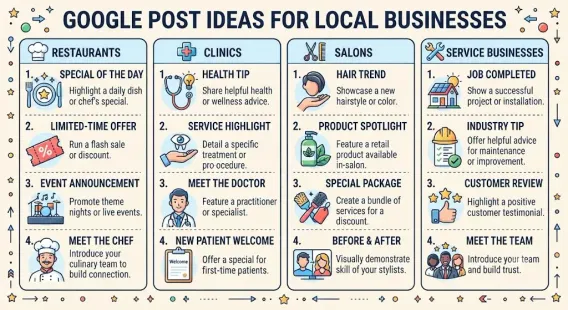
Google Business Profile Posts for Restaurants
Posts are one of the most underused tools for restaurants. They appear directly in your listing and can drive reservations, orders, and visits.
What to post:
Weekly specials and features:
“New this week: house-made pappardelle with short rib ragu. Available Thursday through Sunday or until we sell out.”
Seasonal menus:
“Fall menu launches October 15. Expect squash, brown butter, and slow-braised meats. Reservations open now.”
Events:
“Wine dinner, November 12: five courses paired with Piedmont wines. Limited to 30 seats. Tickets available at [link].”
Holiday hours:
“We’ll be closed December 25 and open for special New Year’s Eve service starting at 5pm. Reservations recommended.”
New hires or team features:
“Meet our new pastry chef, Dana. She’s launching a rotating dessert menu starting this weekend.”
Post cadence:
-
Weekly minimum for most restaurants
-
2–3x per week for high-volume or fast-moving menus
-
Always around holidays and seasonal transitions What works best:
-
Real food photography
-
Specific details (dish names, dates, prices)
-
Clear CTA (Reserve, Order, Learn more)
-
Timely relevance (this week, this weekend, tonight)
Using Events Posts for Restaurant Promotions
Events posts stay visible until their end date—unlike “What’s New” posts that expire in seven days. This makes them valuable for anything with a scheduled date.
Use Events posts for:
-
Wine dinners
-
Tasting menus
-
Holiday services
-
Live music nights
-
Cooking classes
-
Pop-up collaborations
-
Anniversary celebrations
-
Seasonal menu launches What to include:
-
Clear title
-
Date and time range
-
Short description
-
Image
-
CTA button
-
Link to reservations or tickets
Reservations and Booking Integration
If you take reservations, integrate them into your listing.
Options:
- Reserve with Google (native integration with many reservation platforms)
- OpenTable, Resy, Tock, or SevenRooms links
- Direct phone number prominently displayed
- Website reservation page linked from your profile Best practice: Offer multiple paths. Some customers want to book online; others want to call. Make both easy.
If you don’t take reservations:
- Make this clear in your description
- Use the Q&A to answer “Do you take reservations?” with a definitive “No, we’re walk-in only”
- Manage wait times with tools like Yelp Waitlist or Waitwhile if available
Q&A: Answer Restaurant Questions Proactively
The Q&A section appears in search results and influences whether customers visit.
Seed answers to common questions:
- Do you take reservations?
- Do you have outdoor seating?
- Is there parking?
- Are you kid-friendly?
- Do you have vegetarian/vegan/gluten-free options?
- Do you offer takeout or delivery?
- Is there a dress code?
- Do you have a bar?
- Can you accommodate large groups?
- Are you dog-friendly? Monitor weekly for new questions and answer within 48 hours. This section is read by potential customers and can reduce friction significantly.
Multi-Platform Presence
Restaurants live in a broader ecosystem than most local businesses. You need coordinated presence across:
Yelp:
-
Claim and complete your profile
-
Respond to reviews
-
Keep hours and menu updated
-
Monitor for accuracy TripAdvisor:
-
Essential if you serve tourists
-
Claim your listing
-
Respond to reviews
-
Upload photos OpenTable / Resy / Tock:
-
Keep availability updated
-
Respond to post-dining reviews
-
Use the data to understand customer behavior Delivery platforms (DoorDash, Uber Eats, Grubhub):
-
Ensure menu accuracy
-
Monitor ratings separately from Google
-
Respond to delivery-specific reviews
-
Coordinate promotional offers Social media:
-
Instagram is often the primary discovery platform for restaurants
-
Use geo-tags and local hashtags
-
Keep hours and location consistent with your GBP Why coordination matters: A customer who sees your restaurant on Instagram and then checks Google Maps expects consistent hours, menus, and pricing. Discrepancies cost you the visit.
Reservations and Multi-Platform Checklist
- Weekly GBP posts published
- Events posts created for scheduled events
- Reserve with Google or booking link active
- Q&A seeded with 10+ common questions
- Q&A monitored weekly
- Yelp profile claimed and updated
- TripAdvisor profile claimed and updated
- Reservation platform synced with GBP
- Delivery platforms have accurate menus
- Social media hours and location match GBP
- All platforms respond to reviews
Page 5: Tracking, Seasonal Strategy, and Conclusion
What to Track for Restaurant Local SEO
Restaurant metrics differ from other local businesses. Focus on metrics that reflect dining behavior.
| Metric | Tool | Frequency |
|---|---|---|
| GBP calls | GBP Insights | Weekly |
| Direction requests | GBP Insights | Weekly |
| Website clicks | GBP Insights | Weekly |
| Menu views | GBP Insights | Weekly |
| Reservations via GBP | Booking platform | Weekly |
| Review count and rating | GBP dashboard | Weekly |
| Review velocity | Manual tracking | Monthly |
| Discovery vs. direct searches | GBP Insights | Monthly |
| Photo views | GBP Insights | Monthly |
| Geo-grid average rank | Local Falcon | Monthly |
| Competitor benchmark | Manual | Monthly |
Use UTM parameters on your GBP website link so you can isolate Maps traffic in Google Analytics:
?utm_source=google&utm_medium=gbp&utm_campaign=restaurant_maps
The “Direction Requests” Metric Matters Most
For restaurants, direction requests are often a stronger signal than website clicks. A customer who requests directions is likely on their way—they don’t need your website.
If direction requests are high but calls are low, you may be attracting customers who prefer to walk in without a reservation. That’s fine.
If direction requests are low but views are high, you have a conversion problem—likely tied to photos, reviews, or price perception.
Seasonal Strategy for Restaurants
Restaurants are highly seasonal. Plan your local SEO around these rhythms.
Winter (Dec–Feb):
-
Holiday hours prominently posted
-
New Year’s Eve and Valentine’s Day events
-
Comfort food and warm beverage features
-
Post-holiday “new year, new menu” content Spring (Mar–May):
-
Spring menu launches
-
Mother’s Day and Easter events
-
Outdoor seating announcements
-
Graduation season promotions Summer (Jun–Aug):
-
Extended patio hours
-
Summer specials and cocktails
-
Tourist-season highlights (if applicable)
-
Father’s Day events Fall (Sep–Nov):
-
Fall menu launches
-
Thanksgiving and harvest events
-
Back-to-school dining promotions
-
Halloween and fall festival tie-ins Plan posts 4–8 weeks ahead for major seasonal moments. Update menus and hours proactively.
Benchmarking Against Competitors
Monthly, compare your restaurant to the top three in your local pack:
- Review count and rating
- Review velocity (new reviews in last 30 days)
- Photo count and recency
- Post frequency
- Menu completeness
- Service options offered (delivery, takeout)
- Q&A completeness Identify gaps and prioritize closing them.
Common Restaurant Local SEO Mistakes
- Using “Restaurant” as primary category instead of specific cuisine
- Menu missing or outdated — one of the highest-impact fields
- Hours wrong or not updated for holidays
- Few photos or old photos — visual first impressions
- No food photography — losing the strongest conversion driver
- Ignoring reviews or only responding to negatives
- No posts — profile looks dormant
- Not enabling delivery or takeout attributes
- Ignoring Yelp and TripAdvisor when customers use them
- Not benchmarking against local competitors
- No tracking of calls, direction requests, or menu views
- Buying reviews — violates policy and risks suspension
- Review gating — offering incentives or filtering unhappy customers
- Inconsistent hours across platforms (Maps, website, Yelp, social)
- No Q&A seeding — missing an easy opportunity
Quick Restaurant Local SEO Checklist
Profile:
-
Specific primary category chosen
-
2–5 relevant secondary categories
-
Complete menu with prices and descriptions
-
Popular dishes section filled
-
Accurate hours including special hours
-
All applicable attributes completed
-
Service options configured
-
Delivery partner links active
-
Q&A seeded with common questions Visuals:
-
50+ photos uploaded
-
5–10 new photos monthly
-
Food photography prioritized
-
Exterior and interior photos clear
-
Team photos included Reviews:
-
Review count matches top competitors
-
Rating between 4.3 and 4.8
-
8–30+ new reviews per month
-
100% response rate
-
Negative reviews handled with specifics Engagement:
-
Weekly GBP posts
-
Events created for scheduled happenings
-
Reservations integrated
-
Yelp and TripAdvisor claimed and updated
-
Social platforms consistent Measurement:
-
GBP metrics tracked weekly
-
Geo-grid analysis monthly
-
Competitor benchmarking monthly
-
UTM tracking on GBP link
A Realistic Timeline
| Timeframe | Expected Progress |
|---|---|
| Month 1 | Profile complete, categories fixed, menu populated, 50+ photos uploaded |
| Month 2–3 | Review velocity improving, weekly posts running, Q&A seeded |
| Month 4–6 | Visibility radius expands, direction requests increasing |
| Month 6–12 | Consistent local pack presence, review count competitive |
| Year 2+ | Defensible visibility, repeat customer base growing |
Conclusion
Local SEO for restaurants comes down to a handful of fundamentals, executed consistently:
- Be found: Get your categories, hours, and location right—these determine whether you appear at all.
- Be seen: Photos drive restaurant decisions more than anything else. Invest heavily.
- Be trusted: Reviews are the ranking and conversion engine. Generate them consistently and respond to every one.
- Be current: Weekly posts, updated menus, seasonal content, and holiday hours keep your profile fresh.
- Be coordinated: Google Maps is the center, but Yelp, TripAdvisor, OpenTable, and delivery platforms all feed the same customer. Most restaurants do the first two and stop. The ones that win do all five, continuously, for years. That’s the gap you can exploit.
Start with your category, menu, and photos this week. Then build the review engine. Then commit to weekly posts. In twelve months, your restaurant will be visible in places most competitors aren’t—and your Map listing will do more selling than any ad campaign could.
Call to Action
Want a complete restaurant local SEO system? Download our free Restaurant Google Maps Toolkit, including a menu optimization template, food photography guide, review request scripts, seasonal posting calendar, and monthly tracking dashboard. [Link to toolkit]
FAQs
How do I rank my restaurant higher on Google Maps?
Start with a specific primary category (not “Restaurant”), a complete menu with prices, accurate hours, 50+ photos including food shots, and consistent review generation. These five factors move rankings more than anything else.
What’s the most important thing for restaurant local SEO?
Photos and reviews. Restaurant customers choose visually and trust socially. A strong photo library and steady review velocity outperform almost every other optimization.
How many Google reviews does a restaurant need?
Match or exceed your top three local pack competitors. Small-town restaurants may compete with 100–300 reviews. Major metro restaurants often need 800+ with steady monthly velocity.
Should I use “Restaurant” or a specific cuisine category?
Always choose the most specific category that accurately describes you. “Sushi Restaurant” beats “Restaurant.” “Breakfast Restaurant” beats “Cafe.” Specific categories unlock more relevant searches.
How often should restaurants post on Google Business Profile?
At least weekly. Restaurants with rotating menus, events, or seasonal offerings should post 2–3 times per week to stay fresh and visible.
Do I need a menu on my Google Business Profile?
Yes. Menu views correlate strongly with visits. Add menu items with descriptions and prices directly, or link to a well-designed menu page on your website.
How do I handle delivery on Google Maps?
Enable the “Delivery” attribute, link to your preferred delivery partner (DoorDash, Uber Eats, Grubhub), and specify your delivery radius in your description.
What should I do about negative restaurant reviews?
Respond within 24 hours. Acknowledge the specific issue—wait time, service, dish quality. Apologize sincerely, move the conversation offline, and sign with a name. Never argue publicly.
Can I offer discounts for reviews?
No. Google’s policies prohibit incentivizing reviews. You can ask genuinely, but you cannot offer free items, discounts, or gifts in exchange for reviews. Doing so risks suspension.
How do I handle holiday hours on Google Maps?
Update special hours at least two weeks in advance. Inaccurate hours are one of the most common restaurant complaints and can drive negative reviews.
How do I track whether my restaurant local SEO is working?
Track calls, direction requests, website clicks, and menu views in your GBP dashboard. Direction requests are often the strongest signal for restaurants—they indicate customers are on their way.
Internal & External Links
Internal links: Replace these with your own URLs.
-
Local SEO for small businesses External links:
Grow Your Google Maps Ranking on Autopilot
Stop spending hours every week manually replying to customer reviews and writing Google posts. Busirank automates your Google Business Profile to boost your local SEO rankings and turn searchers into paying clients.
 Busirank Team