 Busirank Team
Introduction
Two websites can publish identical content and earn identical backlinks — yet one ranks and the other doesn’t. More often than you’d expect, the difference comes down to architecture.
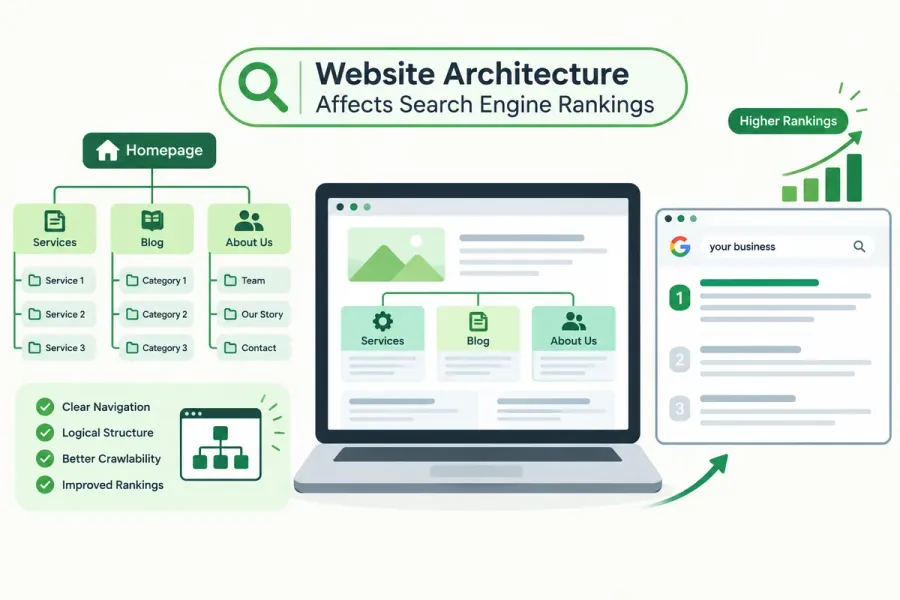
Website architecture is the way your pages are organized and connected. It determines how Google crawls your site, how link authority flows between pages, and how clearly search engines understand what your site is about. It also decides whether visitors find what they need in two clicks or give up after five.
For business websites, architecture is quietly one of the highest-leverage SEO investments you can make. Fix it once, and every page you publish afterward benefits.
In this guide, you’ll learn how website architecture affects rankings, what a strong structure looks like, and how to audit and improve your own.
What Is Website Architecture?
Website architecture (also called site structure or information architecture) is how your pages are organized and linked together. It includes:
- Hierarchy — how pages nest under categories and subcategories
- Navigation — menus, breadcrumbs, and internal link paths
- URL structure — how your URLs reflect that hierarchy
- Internal linking — how pages connect to each other
- Depth — how many clicks it takes to reach any page from the homepage
Architecture is the skeleton. Content is the flesh. A weak skeleton can’t support much weight.
How Search Engines Experience Your Website
Google doesn’t see your site the way a human does. It sees:
- A crawl — Googlebot follows links from page to page, starting from known URLs and your sitemap
- A link graph — every page is a node, every internal link an edge
- A hierarchy — inferred from link depth and internal linking patterns
- A topical map — determined by which pages link to which, and with what anchor text
If your architecture is confusing, all four of these signals become muddled — and your rankings suffer.
How Website Architecture Affects Rankings
1. Crawl Efficiency and Crawl Budget
Google allocates a limited crawl budget per site. A shallow, well-linked structure lets Googlebot reach more important pages faster. Deep, tangled structures waste crawl budget on low-value URLs and leave key pages undiscovered.
2. Indexation
Pages that are buried — many clicks from the homepage or reachable only through weak links — are indexed slowly or not at all. Architecture determines which pages Google considers important enough to index.
3. Link Equity Distribution
Link equity flows through internal links. A flat, well-structured site spreads authority across many pages. A deep site pools authority at the top and starves interior pages.
Related: This ties directly to our guide on internal linking SEO — architecture is the blueprint, internal linking is the construction.
4. Topical Relevance and Clarity
When related pages are grouped together and interlinked, Google understands the relationship. When a site mixes unrelated topics randomly, Google struggles to determine what the site is authoritative about.
Related: Strong architecture reinforces topical authority for local business websites.
5. User Experience and Engagement Signals
Clear navigation reduces bounce rates, increases pages per session, and helps users find what they want. These engagement signals correlate with better rankings, even if they’re not direct ranking factors.
6. Keyword Cannibalization Prevention
A logical hierarchy naturally separates pages targeting different intents. A chaotic structure invites overlap and cannibalization.
Related: See our guide on identifying and fixing keyword cannibalization.
7. Mobile Usability
Mobile users have less screen space and less patience. Architecture that works well on desktop but collapses on mobile hurts both UX and rankings.
Related: Explore mobile-first SEO for more on this.
The Three Common Architecture Models
1. Flat Architecture
Every page is within a few clicks of the homepage.
Pros: Fast crawling, good equity distribution, easy for users. Cons: Impractical for large sites; can dilute topical focus.
Best for: Small business websites under ~100 pages.
2. Deep (Hierarchical) Architecture
Pages are nested under multiple category levels.
Pros: Clear topical grouping, scales well. Cons: Important pages can become buried; equity dilutes with depth.
Best for: E-commerce and large content sites.
3. Silo Architecture
Content is grouped into distinct thematic silos, with strong internal linking within each silo and limited cross-silo linking.
Pros: Strong topical signals, clear hierarchy, excellent for authority building. Cons: Requires discipline; can feel rigid if overdone.
Best for: Businesses building topical authority around multiple service areas.
Most business websites benefit from a hybrid: a shallow top-level structure with siloed content clusters underneath.
What a Strong Site Architecture Looks Like
Here’s a simple, effective structure for a small business website:
Homepage
├── Services
│   ├── Service Category A
│   │   ├── Service A1
│   │   └── Service A2
│   └── Service Category B
│       ├── Service B1
│       └── Service B2
├── Locations
│   ├── City A
│   └── City B
├── About
├── Blog
│   ├── Pillar Page 1
│   │   ├── Cluster Article
│   │   └── Cluster Article
│   └── Pillar Page 2
│       ├── Cluster Article
│       └── Cluster Article
└── Contact
Key principles:
- Every important page is within 3 clicks of the homepage
- Related pages are grouped logically
- URLs reflect hierarchy (
/services/plumbing/emergency-repair) - Navigation mirrors the hierarchy
- Breadcrumbs reinforce the path
How to Audit Your Website Architecture
Step 1: Crawl Your Site
Use Screaming Frog, Sitebulb, or a similar tool to generate a full URL list and visualize the structure.
Step 2: Measure Click Depth
Identify how many clicks each page is from the homepage. Flag any important page more than 3 clicks deep.
Step 3: Find Orphan Pages
Pages with no internal links pointing to them are invisible to architecture. These need to be linked from relevant pages or removed.
Step 4: Check URL Structure
Look for:
- Inconsistent patterns (
/blog/postvs/articles/post) - Parameters and IDs (
?id=123) - Overly deep paths
Related: See SEO-friendly URL structures for best practices.
Step 5: Review Navigation and Breadcrumbs
Does your main menu reflect your priority pages? Do breadcrumbs appear on interior pages and match the hierarchy?
Step 6: Analyze Internal Link Distribution
Count internal links per page. Are your money pages getting enough? Are low-value pages getting too many?
Step 7: Check Search Console Coverage
Use the Pages report to spot:
- Pages “Discovered – currently not indexed”
- Pages “Crawled – currently not indexed”
- Crawl anomalies
These often indicate architectural problems.
How to Improve Your Website Architecture
1. Flatten Where It Makes Sense
Bring important pages closer to the homepage. Reduce unnecessary nesting.
2. Group Related Content Into Clusters
Organize content into themed clusters with a pillar page and supporting articles.
Related: See content clusters SEO for the full method.
3. Strengthen Internal Linking
Add contextual links between related pages. Link from high-authority pages to priority pages.
4. Use Breadcrumbs Consistently
Breadcrumbs make hierarchy visible to users and Google. Mark them up with BreadcrumbList schema.
5. Keep URLs Aligned With Hierarchy
Your URL should tell Google where a page sits in the structure.
6. Create a Sitemap That Reflects Your Structure
Your XML sitemap should include only indexable, canonical URLs — organized logically.
7. Prune or Consolidate Weak Pages
Thin, outdated, or overlapping pages dilute architecture. Merge or remove them.
8. Improve Mobile Navigation
Ensure menus collapse cleanly, tap targets are large, and hierarchy is preserved on small screens.
Common Website Architecture Mistakes
- Burying important pages deep in the hierarchy
- Orphan pages with no internal links
- Flat navigation that gives equal weight to everything
- Random URL patterns that don’t reflect structure
- Silo leakage — excessive cross-linking that blurs topical boundaries
- No breadcrumbs — losing a free hierarchy signal
- Navigation overload — menus with 50+ links
- Ignoring mobile — desktop-only structure that breaks on phones
- Duplicating content across multiple URL paths
How Architecture Connects to Other SEO Strategies
| Strategy | Connection |
|---|---|
| Internal linking SEO | Architecture defines the link paths |
| Topical authority | Siloed clusters build subject expertise |
| Technical SEO checklist | Crawl and index issues often trace to structure |
| Content clusters SEO | Clusters live inside your architecture |
| Keyword cannibalization | Clear hierarchy prevents overlap |
| Mobile-first SEO | Structure must work on small screens |
| SEO-friendly URL structure | URLs express your hierarchy |
How to Measure Architecture Improvements
Track these over 3–6 months after restructuring:
- Indexation rate — more pages indexed
- Crawl stats — more frequent, efficient crawling
- Average click depth — shallower
- Rankings for priority pages — upward movement
- Organic sessions per page — broader traffic distribution
- Pages per session — increased engagement
Conclusion
Website architecture is the invisible force shaping how Google crawls, understands, and ranks your site. It’s not glamorous, and it rarely makes headlines — but it determines whether your content and backlinks actually reach the pages that matter.
Build a shallow, logically grouped, well-linked structure. Keep important pages within three clicks. Use URLs, navigation, and breadcrumbs that mirror your hierarchy. Then reinforce it all with disciplined internal linking.
Do this, and every other SEO effort you make will work harder.
Call to Action
Is your website architecture helping or hindering your rankings?
BusiRank’s SEO audit includes a full architecture review — click depth analysis, orphan page detection, internal link mapping, and a prioritized fix list.
👉 Get Your Free Architecture & SEO Audit
FAQs
1. What is website architecture in SEO?
Website architecture is how your pages are organized and linked together — including hierarchy, navigation, URLs, and internal links. It affects how Google crawls, indexes, and ranks your site.
2. How many clicks deep should pages be?
Aim for every important page to be within 3 clicks of the homepage. Pages deeper than that are crawled less often and indexed more slowly.
3. What’s the difference between flat and silo architecture?
Flat architecture keeps all pages close to the homepage. Silo architecture groups content into distinct thematic clusters with strong internal links. Most business sites benefit from a hybrid.
4. How do I know if my website architecture is bad?
Signs include orphan pages, important pages buried deep, inconsistent URLs, poor internal linking, low indexation rates, and pages stuck in “Discovered – currently not indexed.”
5. Does website architecture directly affect rankings?
Yes, indirectly but powerfully. Architecture influences crawlability, indexation, link equity distribution, topical clarity, and user experience — all of which affect rankings.
6. How often should I review my website architecture?
Review annually, or whenever you add significant new content, restructure services, launch new locations, or migrate your site.
7. Can I fix website architecture without rebuilding my site?
Often yes. Many improvements — internal linking, breadcrumbs, URL cleanup, navigation tweaks — can be done without a full rebuild. Major hierarchy changes may require redirects and restructuring.
Internal & External Links
Internal Links
- internal linking SEO
- topical authority for local business websites
- keyword cannibalization
- mobile-first SEO
- SEO-friendly URL structures
- content clusters SEO
- technical SEO checklist
- Get Your Free Architecture & SEO Audit
External Sources
| Source | Purpose |
|---|---|
| Google Search Central – Site Structure | Official guidance on structuring sites |
| Google Search Central – Crawling & Indexing | How Google discovers and indexes pages |
| Nielsen Norman Group – Information Architecture | UX perspective on structuring content |
| Screaming Frog – Site Structure Visualization | Tool for visualizing architecture |
| Sitebulb – Crawl Depth Analysis | Tool for depth and orphan page analysis |
Grow Your Google Maps Ranking on Autopilot
Stop spending hours every week manually replying to customer reviews and writing Google posts. Busirank automates your Google Business Profile to boost your local SEO rankings and turn searchers into paying clients.

 Busirank Team
