 Busirank Team
Introduction
Your local SEO strategy has a leak. It’s not your website, your Google Business Profile, or even your reviews. It’s the dozens—maybe hundreds—of online directories showing the wrong phone number, a misspelled business name, or an address you haven’t used in three years.
This is the citation consistency problem, and it’s one of the most overlooked yet impactful factors in local search visibility.
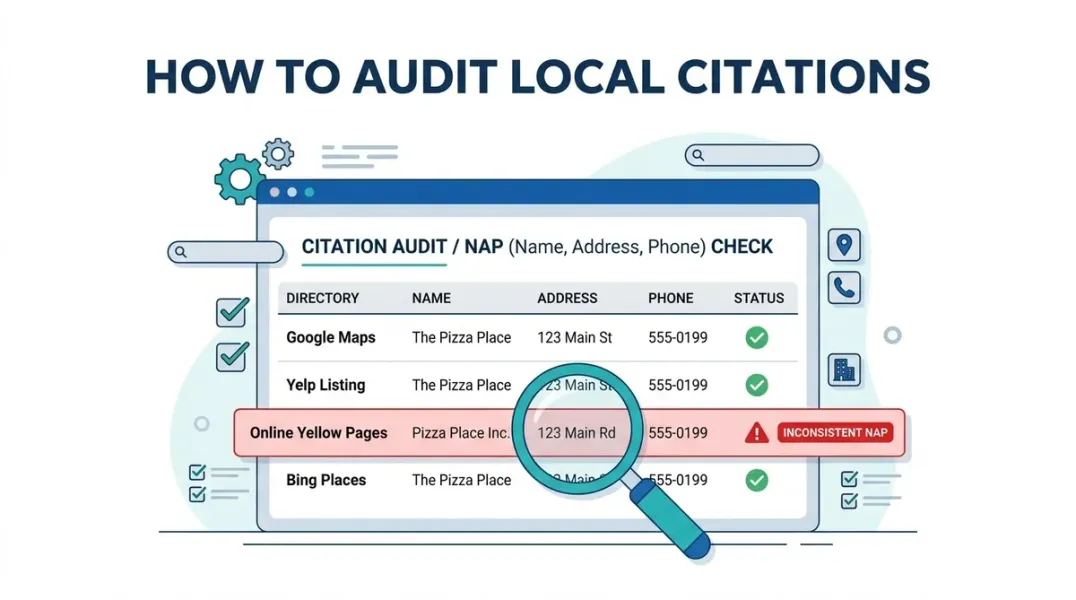
Google verifies your business identity by cross-referencing your Name, Address, and Phone number (NAP) across every online mention it can find. When those mentions agree, Google trusts your data. When they conflict, Google’s confidence drops—and your Map Pack rankings suffer as a result .
Here’s what makes this problem insidious: you probably don’t know it exists. A directory you haven’t thought about in years still shows your old suite number. A tracking phone number from a previous marketing campaign is still live on Yelp. A former employee created a second Google Business Profile that’s now splitting your reviews and visibility.
These inconsistencies don’t just confuse search engines. They confuse customers. A wrong phone number loses calls. An old address sends people to the wrong place. A duplicate listing collects reviews that should be on your main profile .
In this guide, you’ll learn a systematic process for auditing your local citations, finding every inconsistency, and fixing the problems that are holding your rankings back.
Why Citation Consistency Matters More Than You Think
Before diving into the audit process, it’s worth understanding the stakes.
How Google Uses Citations
Google’s local algorithm doesn’t just look at your Google Business Profile in isolation. It looks at the pattern of information across the web. When Yelp, Facebook, BBB, and dozens of other directories all show the same NAP, Google treats that as confirmation of your business’s legitimacy and location .
When they disagree, Google faces uncertainty. Which phone number is correct? Which address is current? If Google can’t be confident about your basic business information, it’s far less likely to recommend you to searchers .
The AI Search Angle
This isn’t just about traditional search anymore. AI-powered tools like Google’s AI Overviews, ChatGPT, and Perplexity pull from verified, structured sources to answer local queries. Inconsistent NAP data creates conflicting facts in the data these systems read, making it less likely they’ll recommend your business confidently .
As Locafy puts it: “When they all agree, you look established and trustworthy. When they conflict, the engines don’t know which version to believe—so they hedge by recommending someone else” .
The Common Inconsistencies
Citation problems take many forms. Here are the most common :
| Inconsistency Type | Example |
|---|---|
| Old phone numbers | Tracking numbers from past campaigns still live |
| Previous addresses | Old location never updated after a move |
| Name variations | ”Joe’s Plumbing” vs “Joe’s Plumbing LLC” vs “Joe’s Plumbing & Heating” |
| Suite/unit discrepancies | Suite number present on some listings, missing on others |
| Street abbreviations | ”Avenue” vs “Ave,” “Boulevard” vs “Blvd” |
| Phone formats | ”(555) 123-4567” vs “555-123-4567” vs “555.123.4567” |
| Duplicate listings | Multiple profiles for the same location |
| Rebranded names | Former business name still showing on directories |
Even minor discrepancies count. “123 Main Street” and “123 Main St” are technically different strings. While Google can often reconcile these, why introduce any uncertainty? Pick one format and use it everywhere .
The Citation Audit Process: Step by Step
A thorough citation audit involves scanning every online mention of your business and comparing it against your canonical NAP. Here’s how to do it systematically.
Step 1: Define Your Canonical NAP
Before you can find inconsistencies, you need to know what “correct” looks like.
Your canonical NAP is the official version of your business information, as shown on your Google Business Profile and website. You need to define the exact format for :
- Business Name: Legal name vs. public-facing name
- Address: Full street address, including suite/unit, in a specific format
- Phone Number: Primary business line, in a specific format
Action: Create a master document—a “source of truth”—that specifies the exact, approved NAP for your business. Every correction you make should align with this document .
For multi-location businesses, each location needs its own distinct canonical NAP. Cross-contamination between locations (wrong phone number paired with the right address) is a common and damaging problem .
Step 2: Choose Your Audit Tool
Manual auditing is possible for very small businesses, but most will benefit from a citation scanning tool.
| Tool | What It Does | Cost |
|---|---|---|
| BrightLocal Citation Tracker | Finds incorrect NAP, detects duplicates, analyzes competitor citations | Paid |
| Moz Local Listing Checker | Checks NAP consistency across 50+ directories | Paid, with free tier |
| Locafy Free Citation Checker | Sweeps 15 top directories, provides 0-100 consistency score | Free |
| Apify NAP Consistency Scanner | Scans public sources, flags mismatches and duplicates | Pay-per-run |
For a quick, free starting point, Locafy’s citation checker sweeps 15 major directories including Yelp, Yellow Pages, BBB, Facebook, and Foursquare, and provides a consistency score with prioritized fixes .
Step 3: Run the Scan
Enter your business information into your chosen tool and run the audit. The tool will search major directories and data aggregators for your business and compare the NAP it finds against your canonical version.
What the tool will find:
- Exact matches: Your NAP is consistent on that directory. No action needed.
- Near mismatches: Minor formatting differences (e.g., “St” vs “Street”). Usually low priority.
- Hard mismatches: Wrong phone number, wrong address, or wrong name. High priority.
- Missing profiles: Your business isn’t listed on that directory. Consider building it.
- Duplicate listings: Multiple profiles for the same business. High priority.
- Wrong domains: A different website URL is listed. Medium priority.
Step 4: Supplement with Manual Searches
Tools don’t catch everything. Supplement your automated audit with manual searches :
- Search Google for “[Your Business Name] + [Phone Number]” to find mentions the tools missed.
- Search Google for “[Your Business Name] + [Address]” to find address-based inconsistencies.
- Check directories specific to your industry that general tools might miss.
Step 5: Create Your Citation Inventory
Build a spreadsheet with the following columns :
| Column | What to Record |
|---|---|
| Directory/Source | Where the listing was found |
| Profile URL | Direct link to the listing |
| Business Name | What’s displayed |
| Address | What’s displayed |
| Phone | What’s displayed |
| Match Status | Exact match, near mismatch, hard mismatch, duplicate, missing |
| Priority | High/Medium/Low |
| Action Needed | What fix is required |
| Status | Pending, In Progress, Fixed |
This inventory becomes your remediation queue—a prioritized list of what to fix and in what order .
Prioritizing Your Fixes
You can’t fix everything at once. Here’s how to prioritize based on impact.
Priority 1: High-Authority Directories with Hard Mismatches
Fix these first:
- Google Business Profile: The single most important citation. If it’s wrong, everything else suffers.
- Apple Business Connect: Powers Apple Maps and Siri.
- Bing Places: Powers Microsoft search results.
- Yelp, Facebook, BBB: Major trust signals.
- Data Aggregators: Data Axle, Neustar Localeze, Foursquare. Corrections here propagate to hundreds of downstream sites .
A wrong phone number on Yelp is more damaging than a wrong suite number on a minor directory. Focus on the sources that matter most to customers and search engines .
Priority 2: Duplicate Listings
Duplicates split your visibility and reviews. They also confuse Google about which listing is authoritative. A duplicate Google Business Profile, in particular, can prevent your main listing from appearing in the Local Pack .
For Google Business Profile duplicates:
- Find the duplicate listing in Google Maps.
- Click Suggest an edit → Close or remove → Duplicate of another place .
- If you own the duplicate, mark it as “Permanently Closed” first, then request removal .
- For stubborn duplicates, contact Google Business Profile support and request a merge rather than a deletion. This preserves reviews and transfers them to your main listing .
For non-Google duplicates:
- Claim the duplicate if possible, then update or merge it.
- If you can’t claim it, use the directory’s “suggest an edit” feature.
- For data aggregators, submit corrections that will propagate downstream .
Priority 3: Name Variations and Minor Formatting
These are lower priority but still worth fixing. Standardize on one format and use it everywhere:
- Decide: “Street” or “St”?
- Decide: “(555) 123-4567” or “555-123-4567”?
- Decide: Include suite number or not?
Even if Google can reconcile these, eliminating uncertainty is always better .
Fixing Citations: The Process
Once you’ve prioritized your list, it’s time to fix.
For Directories You Control
If you have an account with the directory (Yelp, Facebook, BBB), log in and update your information directly. This is the fastest and most reliable fix .
For Listings You Don’t Control
Use the directory’s “claim” or “suggest an edit” feature. For some listings, you may need to provide proof of ownership (utility bill, business license, signage photo) .
For Data Aggregators
Submit corrections to Data Axle, Neustar Localeze, and Foursquare. Corrections here propagate to hundreds of downstream sites over 8-16 weeks .
For Stubborn Listings
Some directories are notoriously slow to update. If a listing won’t respond to your edit requests, you may need to :
- Escalate to the directory’s support team
- Use a citation cleanup service that handles outreach at scale
- Accept that some minor directories may not be fixable quickly
Monitoring and Prevention
A citation audit isn’t a one-time project. Citations drift over time as directories refresh their data, old information resurfaces, and new inconsistencies appear.
Set Up Ongoing Monitoring
Use a citation tracking tool to monitor your listings monthly or quarterly. BrightLocal’s Citation Tracker, for example, monitors your citations and alerts you to new inconsistencies .
Establish Internal NAP Standards
Create a document that specifies the exact format for every element of your business information. Share this with anyone who creates accounts or listings on your behalf—marketing agencies, employees, franchisees .
Update Systematically
Every time your NAP changes (new phone number, address change, rebrand), update in this order :
- Google Business Profile
- Your website
- All other citations systematically
Use Structured Data
Implement LocalBusiness schema markup on your website. This provides Google with an authoritative, machine-readable version of your NAP, reducing reliance on third-party citations .
When to Hire a Citation Cleanup Service
DIY citation audits work for small businesses with limited citations. But for multi-location businesses, franchises, or businesses that have moved or rebranded, a cleanup service can be worth the investment.
What a Good Service Provides
- Manual review (not just automated scans)
- A clearly defined source-of-truth record for every location
- Separate handling for duplicates, moves, closures, and practitioner listings
- Account credentials or documented ownership transferred to your business
- Verification after submission (not just “request sent”)
- A plan for ongoing monitoring
Red Flags to Avoid
- Promises of “guaranteed rankings”
- Bulk submission to hundreds of low-quality directories
- No verification of corrections
- No documentation of what was fixed
Conclusion
Citation inconsistencies are the quiet killers of local SEO. They don’t announce themselves. They don’t trigger alerts. They just sit there—wrong phone numbers, old addresses, duplicate listings—eroding Google’s trust in your business and sending potential customers to competitors.
The audit process is systematic:
- Define your canonical NAP—the exact, correct version of your business information.
- Scan your citations using a tool to find every mention and compare it against your canonical version.
- Prioritize fixes by impact: high-authority directories and hard mismatches first, duplicates second, minor formatting third.
- Fix what you can directly, claim and edit what you can’t, and escalate stubborn listings.
- Monitor ongoing, because citations drift and new inconsistencies appear.
A clean citation profile isn’t glamorous. It won’t generate headlines or viral social posts. But it’s the foundational trust signal that supports everything else in local SEO . Google needs to be confident about who you are, where you are, and how to reach you. Consistent citations provide that confidence.
Audit your citations. Fix what’s broken. Monitor for drift. Your rankings will thank you.
Call to Action
Ready to find and fix your citation inconsistencies?
We’ve created a Citation Audit Workbook with templates, prioritization frameworks, and step-by-step fix instructions for every major directory.
👉 Download the Workbook and start your audit today.
👉 Or run a free citation scan to see where your business information is inconsistent across the web.
FAQs
1. What is a local citation audit?
A citation audit is a systematic process of scanning every online mention of your business’s Name, Address, and Phone number (NAP) and comparing it against your canonical (official) version to find inconsistencies .
2. How often should I audit my citations?
Quarterly is recommended for most businesses. Monthly monitoring is better for multi-location businesses or after a move, rebrand, or phone number change .
3. What are the most common citation inconsistencies?
Old phone numbers, previous addresses, name variations, suite/unit discrepancies, street abbreviations, phone format differences, and duplicate listings .
4. How do I find my existing citations?
Use a citation scanning tool like BrightLocal Citation Tracker, Moz Local, or Locafy’s free citation checker. Supplement with manual Google searches for your business name + phone number and business name + address .
5. What’s the difference between a near mismatch and a hard mismatch?
A near mismatch is a minor formatting difference (e.g., “St” vs “Street”). A hard mismatch is wrong information (e.g., wrong phone number, wrong address). Hard mismatches should be fixed first .
6. How do I fix a duplicate Google Business Profile?
Find the duplicate in Google Maps, click “Suggest an edit → Close or remove → Duplicate of another place.” If you own it, mark it “Permanently Closed” first, then request removal. For better results, request a merge rather than deletion—this transfers reviews to your main listing .
7. How long do citation corrections take to propagate?
Direct directory edits can appear within days. Data aggregator corrections can take 8-16 weeks to propagate downstream .
8. What’s the best free citation audit tool?
Locafy’s Free Citation Checker sweeps 15 top directories and provides a 0-100 consistency score with prioritized fixes .
9. Can I fix citations myself, or should I hire a service?
For small businesses with limited citations, DIY is feasible. For multi-location businesses, franchises, or after a major change, a citation cleanup service can save time and ensure thoroughness .
10. How does citation consistency affect AI search?
AI tools like ChatGPT and Google AI Overviews rely on verified, structured sources. Inconsistent NAP data creates conflicting facts that make AI systems less likely to recommend your business confidently .
Internal & External Links
Internal Links
- Local Citations Explained: Which Business Directories Actually Matter?
- Industry-Specific Citations: How to Find the Best Directories for Your Business
- Local Citation Building vs Link Building: What’s the Difference?
- Google Business Profile vs Google Maps: What’s the Difference?
- How to Reverse-Engineer a Competitor’s Local SEO Strategy
External Sources
Grow Your Google Maps Ranking on Autopilot
Stop spending hours every week manually replying to customer reviews and writing Google posts. Busirank automates your Google Business Profile to boost your local SEO rankings and turn searchers into paying clients.

 Busirank Team