 Busirank Team
Introduction
Most business owners obsess over backlinks — links from other websites — while ignoring the links they fully control: the ones on their own site.
Internal linking is one of the few SEO levers you own completely. No outreach, no negotiations, no waiting on anyone else. And yet it’s consistently one of the most neglected parts of on-page SEO.
Get it right, and you’ll help Google discover your pages faster, understand what each page is about, and push authority toward the pages that actually make you money. Get it wrong, and you’ll bury your best content three clicks deep where neither crawlers nor customers can find it.
In this guide, you’ll learn exactly how internal linking affects SEO performance and how to build an internal link structure that works for your business website.
What Is Internal Linking?
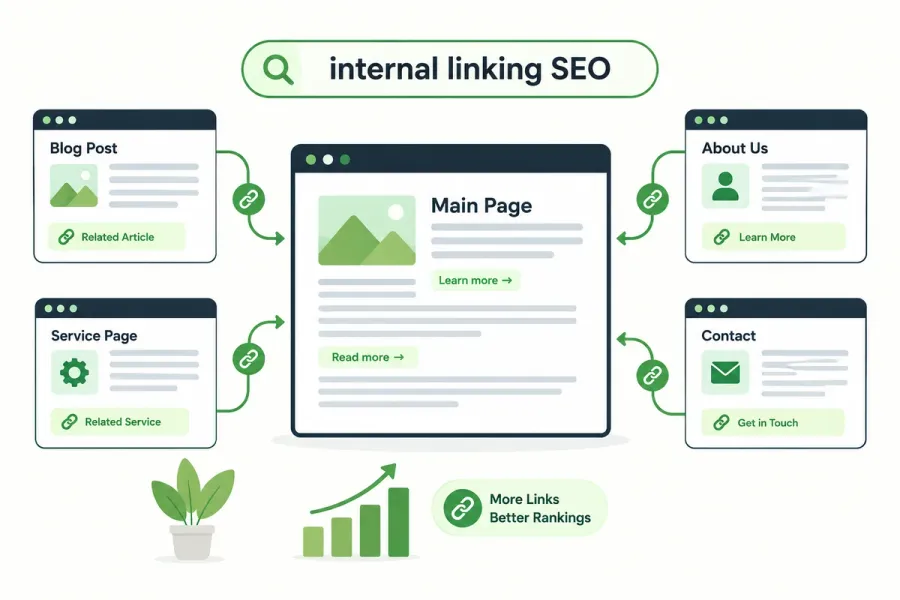
An internal link is a hyperlink from one page on your website to another page on the same website. That’s it — no external domains involved.
For example, if your services page links to your contact page, or a blog post links to a related blog post, those are internal links.
Internal links vs. external links:
| Type | Definition | Example |
|---|---|---|
| Internal link | Links to another page on your own site | /blog/seo-tips → /services/seo |
| External link | Links to a different website | Your site → Google Search Central |
| Inbound/backlink | Another site links to you | Moz → your blog post |
Internal links pass something called link equity (or “link juice”) between your own pages. External backlinks bring authority into your site; internal links distribute that authority around once it’s there.
Why Internal Linking Matters for SEO
1. It Helps Google Discover Your Pages
Google discovers new pages primarily by following links. If a page has no internal links pointing to it, it’s called an orphan page — and orphan pages are crawled slowly, if at all.
Sites with strong internal linking get new content indexed in days. Sites without it can wait weeks or months.
2. It Distributes Link Equity
When an external site links to your homepage, that page gains authority. Internal links let you pass that authority to your service pages, blog posts, and money pages.
Without internal links, authority pools on a few pages and never reaches the rest of your site.
3. It Clarifies What Each Page Is About
Anchor text — the clickable text in a link — tells Google what the destination page is about. If you link to your pricing page with the anchor “pricing,” Google understands that page is about pricing.
Descriptive internal anchor text reinforces the topical relevance of your target pages.
4. It Builds Topical Authority
Internal linking is how you connect your content into clusters. A pillar page linking to 15 supporting articles, each linking back, signals deep coverage of a subject.
This is where internal linking connects directly to our guide on building topical authority for local business websites — the two strategies are inseparable.
5. It Improves User Experience
Good internal linking keeps visitors moving through your site instead of bouncing. More pages per session, longer dwell time, and clearer navigation paths all support better engagement — which correlates with better rankings.
6. It Spreads Ranking Power to Important Pages
You decide which pages matter most. Strategic internal links can push your service pages, location pages, and conversion pages higher in search results.
Types of Internal Links
Navigation Links
Your main menu, footer, and breadcrumbs. These appear sitewide and pass authority to your most important pages.
Contextual Links
Links embedded within body content. These are the most powerful for SEO because they’re topically relevant and editorially placed.
Sidebar and Widget Links
Links in sidebars, “related posts” sections, or popular post widgets. Useful but lower value than contextual links.
Breadcrumb Links
Show the path from homepage to current page. Help both users and Google understand site hierarchy.
How to Build an Effective Internal Linking Structure
Step 1: Identify Your Priority Pages
Not all pages deserve equal link equity. Decide which pages must rank:
- Service pages
- Location/service area pages
- Key blog pillars
- Conversion pages (contact, quote, booking)
These should receive the most internal links.
Step 2: Create a Logical Site Hierarchy
Structure your site in clear levels:
Homepage
├── Services
│   ├── Service A
│   ├── Service B
│   └── Service C
├── Locations
│   ├── City A
│   └── City B
└── Blog
├── Pillar: Topic 1
│   ├── Cluster article
│   └── Cluster article
└── Pillar: Topic 2
Aim for any important page to be reachable within 3 clicks of the homepage.
Step 3: Link With Descriptive Anchor Text
Use anchor text that describes the destination page.
| ❌ Poor Anchor | ✅ Better Anchor |
|---|---|
| Click here | technical SEO checklist |
| Read more | internal linking SEO guide |
| This page | SEO-friendly URL structure |
Avoid exact-match keyword stuffing — vary your anchors naturally while keeping them descriptive.
Step 4: Link Contextually, Not Randomly
Place links where they genuinely help the reader. If you mention “Core Web Vitals,” link to your guide on it. Contextual relevance matters.
Step 5: Link Up, Down, and Across
A healthy internal link structure includes:
- Up: Cluster articles link to their pillar page
- Down: Pillar pages link to cluster articles
- Across: Related articles link to each other
Step 6: Fix Orphan Pages
Audit your site to find pages with no internal links pointing to them. Use tools like Screaming Frog or Google Search Console’s “Links” report.
Once found, add relevant internal links from existing content.
Step 7: Limit Links Per Page
Google can follow hundreds of links, but too many dilute the value each one passes. Keep contextual links focused — typically 3–10 per page depending on length.
Step 8: Audit Internal Links Regularly
Internal linking isn’t a one-time task. As you publish, links need updating. Run an audit every quarter to:
- Fix broken internal links
- Update anchor text on old posts
- Add links from new content to older priority pages
- Remove irrelevant links
Common Internal Linking Mistakes
- Orphan pages — pages with zero internal links
- Generic anchor text — “click here,” “read more,” “this”
- Over-optimized anchors — repeating the exact same keyword every time
- Too many links per page — dilutes equity and overwhelms readers
- Broken internal links — 404s waste crawl budget and frustrate users
- Linking only to new content — older high-value pages get neglected
- Ignoring navigation and footer — sitewide links are powerful
- No topical connection — random links confuse Google about relevance
How Internal Linking Connects to Other SEO Strategies
Internal linking doesn’t work in isolation. It’s the connective tissue between:
- Topical authority — clusters depend on internal links
- Site architecture — hierarchy is built through links
- Technical SEO — crawlability and indexation rely on link paths
- Search intent optimization — linking users to the next logical step
- Keyword cannibalization fixes — consolidating similar pages via links
How to Measure Internal Linking Performance
Track these in Google Search Console and analytics:
- Indexation rate — are all pages indexed?
- Crawl stats — how often is Googlebot visiting?
- Pages per session — are users clicking through?
- Bounce rate — do users find relevant next steps?
- Rankings for target pages — do linked pages move up?
- Internal link count per page — audit balance across the site
Conclusion
Internal linking is the most underrated SEO tactic available to any business website. It costs nothing, requires no outreach, and directly influences how Google discovers, understands, and ranks your pages.
The strategy is simple: build a clear hierarchy, link contextually with descriptive anchor text, connect your content into clusters, and audit regularly.
Do this consistently, and your site becomes easier to crawl, easier to understand, and easier to rank — for both Google and your customers.
Call to Action
Wondering if your internal links are helping or hurting your SEO?
Get a free internal linking audit from BusiRank. We’ll map your site structure, find orphan pages, identify weak anchor text, and show you exactly where to add links for maximum impact.
👉 Get Your Free SEO Audit
FAQs
1. How many internal links should a page have?
There’s no strict limit, but aim for 3–10 contextual links per page for most business content. Navigation and footer links add more but carry less weight individually.
2. Do internal links really affect rankings?
Yes. Internal links help Google discover pages, distribute authority, and understand topical relationships. Numerous studies and Google’s own documentation confirm their importance.
3. What’s the difference between internal and external links for SEO?
External links point to other websites and can build credibility. Internal links point within your site and distribute authority, improve crawlability, and reinforce topical relevance.
4. Should I use “nofollow” on internal links?
Generally no. Nofollow on internal links prevents equity flow and can confuse Google. Only use it for specific cases like login pages or user-generated content you don’t endorse.
5. Can too many internal links hurt SEO?
Excessive links can dilute the value passed to each page and overwhelm users. Keep links relevant and purposeful rather than linking every mention of a keyword.
6. How do I find orphan pages on my website?
Use Screaming Frog, Sitebulb, or Google Search Console’s Links report. Compare your sitemap against pages with zero internal links pointing to them.
7. How often should I update internal links?
Audit quarterly. Also update links whenever you publish new content, consolidate pages, or change your site structure.
Internal & External Links
Internal Links
- topical authority for local business websites
- technical SEO checklist
- website architecture SEO
- SEO-friendly URL structure
- content clusters SEO
- keyword cannibalization
- Core Web Vitals for small business
- Get Your Free SEO Audit
External Sources
| Source | Purpose |
|---|---|
| Google Search Central – Link Best Practices | Official guidance on link structure |
| Google Search Central – Crawling & Indexing | How Google discovers pages |
| Moz – Internal Linking Guide | Industry best practices |
| Ahrefs – Internal Links Study | Data on how internal links impact rankings |
| Screaming Frog SEO Spider | Tool for auditing internal links |
Grow Your Google Maps Ranking on Autopilot
Stop spending hours every week manually replying to customer reviews and writing Google posts. Busirank automates your Google Business Profile to boost your local SEO rankings and turn searchers into paying clients.

 Busirank Team
