 Busirank Team
Introduction
Your URL is more than just a web address. It’s one of the first signals Google uses to understand what a page is about — and one of the first things users see before deciding whether to click.
A clean URL like /services/emergency-plumbing tells Google and users exactly what to expect. A messy URL like /index.php?cat=1&id=123&sort=desc tells them nothing.
Yet URL structure remains one of the most neglected parts of SEO — especially on business websites where pages get added over years without a consistent naming strategy.
This guide covers the URL best practices that actually matter for business websites: hierarchy, readability, keywords, hyphens vs. underscores, parameters, and how to fix URLs that are already a mess.
What Is URL Structure?
A URL (Uniform Resource Locator) is the web address used to access a specific page or resource. A typical URL contains several components:
https://www.example.com/blog/seo-url-structure
URL structure refers to how these components are organized — the hierarchy, naming conventions, and patterns you use across your site.
Why URL Structure Matters for SEO
1. It communicates site structure
A logical URL structure makes it easier for search engines to categorize your site architecture and index pages quickly and accurately. A bot can easily trace the path /trains/locomotives/steam-engines — steam engines are a type of locomotive, which is part of the trains category.
2. It signifies relevance
Including relevant keywords in your URLs sends a clear signal to search engines about what a page is about, confirming it aligns with a user’s search intent.
3. It improves crawlability
When bots can crawl distinct URLs efficiently, they index more of your pages — conserving your site’s crawl budget.
4. It builds credibility and click-through rates
Users are more likely to click on URLs that are clear and easy to read. Research shows URLs that clearly match search intent earn 45% higher click-through rates than unclear alternatives.
5. It reduces duplicate content issues
Messy URLs with product variations, filters, session IDs, and query parameters can inadvertently lead Google to create duplicate pages in its index. Duplicate content dilutes rankings.
URL Best Practices for Business Websites
1. Use Hyphens, Not Underscores
When separating words in a URL slug, use hyphens (-) instead of underscores (_).
Why: Search engines treat hyphens as spaces, making URLs more readable. Underscores can be interpreted as word joiners, which confuses how Google parses the slug.
| ✅ Good | ❌ Avoid |
|---|---|
| /emergency-plumbing | /emergency_plumbing |
| /seo-url-structure | /seo_url_structure |
2. Keep URLs Short and Descriptive
Shorter URLs — typically 50 to 60 characters — are easier for people to read, remember, copy, and share, and less likely to be truncated in Google’s search results.
Long URLs can dilute the power of keywords. Search engines may give less importance to a keyword buried deep in a long string of words.
| ✅ Good | ❌ Avoid |
|---|---|
| /buildings/sheds | /buildings/outbuildings/2025/top-rated/easy-to-assemble/sheds |
| /services/seo | /services/our-professional-search-engine-optimization-services |
3. Use Lowercase Letters Only
URLs should always use lowercase letters.
Why: URLs are case-sensitive on many servers. /Services/SEO and /services/seo may be treated as different pages, creating duplicate content issues. Standardize on lowercase to avoid this.
4. Include Keywords Naturally
Including relevant keywords in URLs helps search engines understand page content, but keyword stuffing violates Google’s spam policies and can harm rankings.
Rule: Use 1–3 words that accurately describe the page. Don’t force keywords where they don’t belong.
| ✅ Good | ❌ Avoid |
|---|---|
| /seo-url-structure | /best-seo-url-structure-tips-guide-2026 |
| /emergency-plumbing-austin | /plumber-plumbing-emergency-austin-plumber |
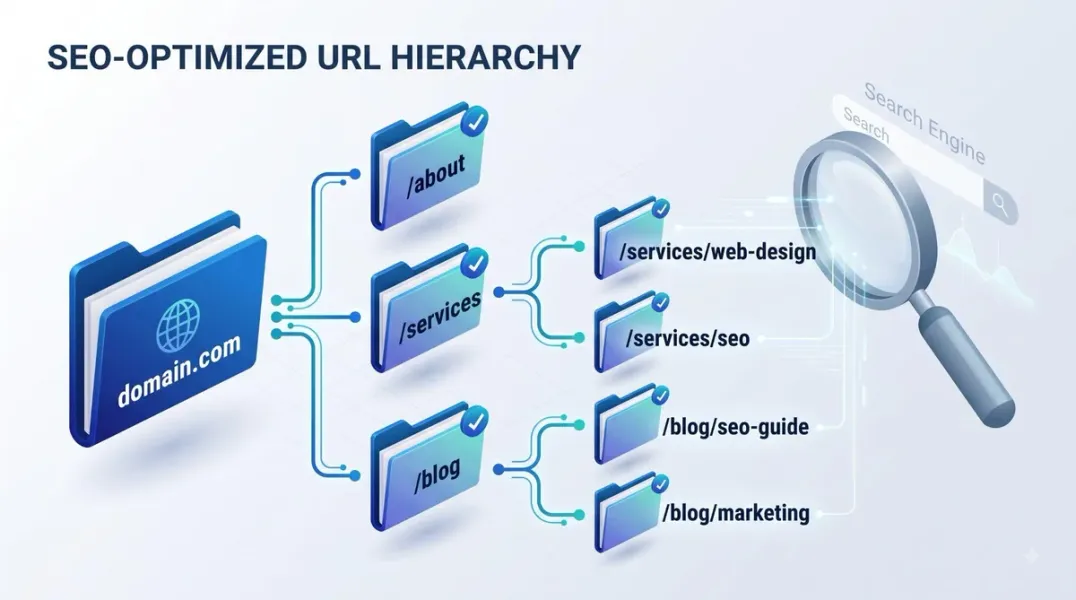
5. Build a Logical Hierarchy
Use subdirectories (/category/subcategory/page) to reflect your site’s organization.
Why: Hierarchical URLs help search engines understand relationships between pages and support breadcrumb navigation.
Recommended structure for business sites:
example.com/services/emergency-plumbing
example.com/services/water-heaters
example.com/locations/austin
example.com/blog/seo-url-structure
Query parameters (?key=value) multiply URL versions quickly. Tracking codes, session IDs, and filters create duplicate paths that confuse crawlers.
Google’s guidance: Keep parameters out of indexable URLs unless they change core content. Use ?key=value format rather than ? alone, and avoid repeating the same parameter.
| ✅ Good | ❌ Avoid |
|---|---|
| /t-shirt?color=green | /t-shirt?green |
| /photo-frames?page=2 | /photo-frames?page=2&page=3 |
Exception: E-commerce filters and variants may need parameters — but canonicalize them properly.
7. Choose HTTPS, Not HTTP
Use HTTPS rather than HTTP. HTTPS encrypts information transferred between a user’s browser and your website’s server, and Google has confirmed HTTPS as a ranking signal.
8. Avoid Stop Words and Unnecessary Characters
Words like “and,” “the,” “or,” and “but” add no value to URLs and should be omitted. Special characters (spaces, commas, ampersands) should be avoided or encoded.
| ✅ Good | ❌ Avoid |
|---|---|
| /electronics/laptops | /electronics-and-laptops |
| /seo-url-structure | /seo%20url%20structure |
9. Maintain Consistency Across Your Site
Pick a pattern and stick to it. Consistent use of lowercase letters, hyphens, and logical folder structures makes URLs more user-friendly and easier for Google to process.
If your site uses /blog/post-name for blog posts, don’t mix in /articles/post-name elsewhere.
10. Use Descriptive Slugs, Not IDs
Avoid URLs that rely on IDs or numbers alone. Descriptive slugs tell Google and users what the page is about.
| ✅ Good | ❌ Avoid |
|---|---|
| /product/smartphone-model-x | /product/3243 |
| /blog/seo-url-structure | /blog/post-4821 |
URL Structure by Business Type
Different business types benefit from different URL patterns:
| Business Type | Recommended Pattern |
|---|---|
| Content/Blog | example.com/category/post-title |
| E-commerce | example.com/product-category/product-name |
| Service Business | example.com/service-category/service-name |
| Local Business | example.com/location/service |
| Portfolio | example.com/portfolio/project-name |
How to Fix Bad URLs (Without Losing Rankings)
If your URLs are already messy, changing them can cause more harm than good — leading to broken links and lost SEO value — unless properly managed.
The Safe Process
- Create a redirect map — every old URL → new URL
- Implement 301 redirects — permanent redirects pass link equity
- Update internal links — don’t rely on redirects long-term
- Update your sitemap — remove old URLs, add new ones
- Submit to Google Search Console — request indexing
- Monitor for errors — check the Indexing report for 404s
When to Change URLs
| Situation | Should You Change? |
|---|---|
| New page | Yes — get it right from the start |
| URL has no traffic or backlinks | Yes — low risk |
| URL has traffic and backlinks | Only if essential — high risk |
| URL is technically broken | Yes — with proper redirects |
Rule of thumb: If a URL is ranking and has backlinks, leave it alone unless there’s a compelling reason to change it.
Common URL Structure Mistakes
- Keyword stuffing — violates Google’s spam policies
- Uppercase letters — creates duplicate content issues
- Underscores instead of hyphens — hurts readability for search engines
- Query parameters everywhere — creates duplicate URLs
- Overly long URLs — dilutes keyword power, truncated in results
- Inconsistent patterns — confuses users and crawlers
- ID-based URLs — no relevance signals
- Missing HTTPS — hurts trust and rankings
- Changing URLs without redirects — loses rankings and backlinks
How URL Structure Connects to Other SEO Strategies
| Strategy | Connection |
|---|---|
| Website architecture | URLs express your hierarchy |
| Internal linking SEO | Clean URLs make linking easier |
| Technical SEO checklist | Redirects, canonicals, and parameters are technical issues |
| Keyword cannibalization | Duplicate URLs from parameters cause cannibalization |
| Topical authority | Logical URL structure reinforces clusters |
| Content gap analysis | URL patterns reveal coverage gaps |
Conclusion
URL structure isn’t glamorous, but it’s foundational. Clean, descriptive, hierarchical URLs help Google crawl and index your site, signal relevance to users, and reduce duplicate content problems.
The rules are simple: use lowercase, hyphens, and short descriptive slugs. Build a logical hierarchy. Avoid parameters in indexable URLs. Use HTTPS. And maintain consistency across your entire site.
If your URLs are already messy, fix them carefully — with 301 redirects, updated internal links, and patience. The upfront work pays off in stable, sustainable rankings.
Call to Action
Is your URL structure helping or hurting your SEO?
BusiRank audits your site’s URL patterns, identifies duplicate content risks, and delivers a prioritized fix plan with redirect maps ready to implement.
👉 Get Your Free URL Structure Audit
FAQs
1. What is an SEO-friendly URL?
An SEO-friendly URL is short, descriptive, uses lowercase letters and hyphens, includes relevant keywords naturally, and follows a logical hierarchy. It helps Google understand page content and improves click-through rates.
2. Should I use hyphens or underscores in URLs?
Use hyphens (-). Search engines treat hyphens as spaces, making URLs more readable. Underscores can be interpreted as word joiners and confuse how Google parses the slug.
3. How long should a URL be?
Aim for 50–60 characters total. Shorter URLs are easier to read, remember, and share. Long URLs can dilute keyword power and get truncated in search results.
4. Can I change my URLs without losing rankings?
Yes, but carefully. Implement 301 redirects from old to new URLs, update all internal links, and submit the new sitemap to Google Search Console. Don’t change URLs that have strong traffic and backlinks unless necessary.
5. What’s the difference between static and dynamic URLs?
Static URLs (/services/seo) contain descriptive keywords and are preferred. Dynamic URLs (/index.php?cat=1&id=123) rely on parameters, are harder to read, and create duplicate content risks.
6. Should URLs include the date?
Generally no. Including dates in URLs (like /blog/2024/01/post-name) makes content feel outdated and complicates updates. Omit dates unless your content is inherently time-sensitive.
7. How do I fix duplicate URLs caused by parameters?
Use canonical tags to point parameterized URLs to the primary version. Configure Google Search Console’s URL parameters tool. Avoid internally linking to parameterized URLs.
8. Do URLs affect rankings directly?
URL structure is a minor ranking factor. Keywords in URLs help Google understand relevance, but content quality and backlinks matter far more. URL structure mainly affects crawlability, indexation, and click-through rates.
Internal & External Links
Internal Links
- website architecture SEO
- internal linking SEO
- technical SEO checklist
- keyword cannibalization
- topical authority for local business websites
- content gap analysis
- Get Your Free URL Structure Audit
External Sources
| Source | Purpose |
|---|---|
| Google Search Central – URL Structure Best Practices | Official guidance on URL design for e-commerce |
| Google Search Central – Crawling & Indexing | How Google discovers and indexes URLs |
| Moz – URL Structure Guide | Industry best practices |
| Ahrefs – URL Structure for SEO | Data-backed recommendations |
| web.dev – URL Best Practices | Technical implementation guidance |
Grow Your Google Maps Ranking on Autopilot
Stop spending hours every week manually replying to customer reviews and writing Google posts. Busirank automates your Google Business Profile to boost your local SEO rankings and turn searchers into paying clients.

 Busirank Team
