 Busirank Team
Introduction
Publishing one-off blog posts and hoping they rank is a strategy that stopped working years ago. Google now rewards websites that demonstrate deep, organized expertise on a topic — not scattered coverage of many.
Content clusters are how you build that depth.
A content cluster is a group of related pages — one comprehensive pillar page supported by several focused articles — all interlinked to form a coherent topic. Done well, clusters make your site easier for Google to understand, easier to crawl, and far more likely to rank across hundreds of related keywords.
This guide walks you through what content clusters are, why they outperform standalone posts, and exactly how to plan, build, and interlink them for maximum organic visibility.
What Is a Content Cluster?
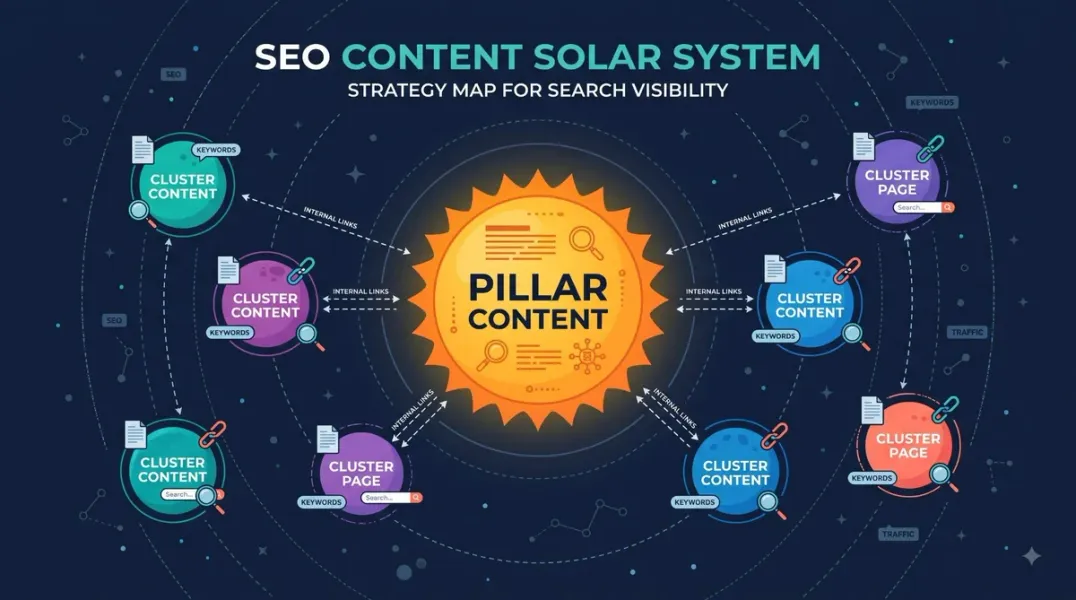
A content cluster (also called a topic cluster) is a group of interlinked pages that cover one topic comprehensively. It has two components:
- A pillar page — a broad, comprehensive guide to the main topic
- Cluster articles — supporting pages that dive deep into specific subtopics
Every cluster article links back to the pillar page. The pillar page links out to every cluster article. Related cluster articles link to each other where relevant.
The result: a self-contained topical structure that signals depth and expertise.
Why Content Clusters Work for SEO
1. They build topical authority
Google rewards sites that cover subjects comprehensively. Clusters demonstrate depth in a way isolated posts never can.
Related: See our guide on topical authority for local business websites.
2. They help Google understand your site
Internal links within clusters create clear topical relationships. Google learns what each page is about and how pages relate.
3. They distribute link equity strategically
The pillar page absorbs authority and redistributes it to cluster articles — and vice versa — strengthening the whole cluster.
Related: See internal linking SEO.
4. They rank for hundreds of keywords
Each cluster article targets a specific long-tail keyword. Together, a cluster can rank for dozens or hundreds of related queries.
5. They improve user experience
Visitors who land on one page in a cluster find natural paths to related content — increasing pages per session and engagement.
6. They make content planning easier
Instead of hunting for random topics, you build out clusters systematically — one pillar, multiple supporting articles.
7. They compound over time
Every new cluster article strengthens the pillar. Every refresh strengthens the cluster. Authority accumulates.
The Anatomy of a Content Cluster
Let’s use a local plumbing business as an example.
Pillar Page
“The Complete Guide to Residential Plumbing”
- 3,000–5,000 words
- Covers all major subtopics briefly
- Links to every cluster article
- Targets a broad, competitive keyword
Cluster Articles
- “How to Fix a Leaky Faucet”
- “Signs You Have a Hidden Water Leak”
- “Water Heater Maintenance Checklist”
- “When to Replace vs. Repair a Toilet”
- “How to Unclog a Drain Without Chemicals”
- “Plumbing Maintenance Tips for Homeowners”
- “What to Do When a Pipe Bursts”
- “How Much Does a Plumber Cost?”
Each cluster article:
- Targets a specific long-tail keyword
- Links back to the pillar
- Links to 2–3 related cluster articles
- Links to relevant service pages
Supporting Elements
- Navigation and breadcrumbs reflecting cluster structure
- Related posts modules showing cluster siblings
- Internal linking between pillar, clusters, and service pages
Cluster Structure Diagram
┌─────────────────────┐
│   PILLAR PAGE       │
│ Complete Guide to   │
│ Residential Plumbing│
└──────────┬──────────┘
│
┌──────────┬───────────┼───────────┬──────────┐
│          │           │           │          │
▼          ▼           ▼           ▼          ▼
┌─────────┐┌─────────┐┌─────────┐┌─────────┐┌─────────┐
│Cluster 1││Cluster 2││Cluster 3││Cluster 4││Cluster 5│
│Leaky    ││Water    ││Water    ││Toilet   ││Drain    │
│Faucet   ││Leak     ││Heater   ││Repair   ││Cleaning │
└────┬────┘└────┬────┘└────┬────┘└────┬────┘└────┬────┘
│          │           │           │          │
└──────────┴───────────┴───────────┴──────────┘
│
Cross-links between related
cluster articles and service pages
Step-by-Step: How to Build a Content Cluster
Step 1: Choose Your Pillar Topic
Your pillar topic should be:
- Broad enough to support 10–20 supporting articles
- Relevant to your business and services
- Searchable — there’s real demand for the topic
- Achievable — you can realistically compete
Good pillar topics:
- “Complete Guide to [Service Category]”
- “Everything You Need to Know About [Topic]”
- “[Topic]: The Ultimate Resource”
Bad pillar topics:
- Too broad (“Marketing”)
- Too narrow (“How to Fix One Specific Faucet Model”)
- Off-brand for your business
Step 2: Research Keywords for the Cluster
For your pillar topic, identify:
Primary keyword: The main keyword for the pillar (e.g., “residential plumbing”)
Cluster keywords: 10–20 related long-tail keywords for supporting articles (e.g., “leaky faucet repair,” “water heater maintenance,” “pipe burst emergency”)
Where to find them:
- Google Search Console — queries you already rank for
- Google Keyword Planner — volume data
- Ahrefs / SEMrush — related keywords, “questions” reports
- People Also Ask boxes in Google
- AnswerThePublic — question discovery
- Google autocomplete
Related: See content gap analysis for finding underserved topics.
Step 3: Map Cluster Articles to Subtopics
Group your cluster keywords into coherent subtopics. Each subtopic becomes one article.
Example for a plumbing pillar:
| Subtopic | Target Keyword | Article Type |
|---|---|---|
| Leaky faucets | leaky faucet repair | How-to guide |
| Water leaks | hidden water leak signs | Diagnostic guide |
| Water heaters | water heater maintenance | Checklist |
| Toilets | toilet repair vs. replace | Decision guide |
| Drains | unclog drain without chemicals | How-to guide |
| Emergency plumbing | what to do when pipe bursts | Emergency guide |
| Costs | plumber cost guide | Pricing guide |
Each article should target one primary keyword and address one clear intent.
Step 4: Determine Content Format by Intent
Match format to intent:
| Intent | Best Format |
|---|---|
| Informational — how to | Step-by-step guide |
| Informational — what is | Explainer article |
| Informational — comparison | Comparison post |
| Commercial — cost | Pricing guide |
| Commercial — service | Service page |
| Transactional — booking | Booking/contact page |
| Navigational | Homepage or brand page |
Related: See optimizing content for search intent.
Step 5: Write the Pillar Page
The pillar page is your cluster’s anchor. It should:
- Be comprehensive (typically 3,000–5,000 words)
- Cover the topic broadly but not exhaustively
- Link to every cluster article
- Be updated whenever you add cluster articles
- Rank for the primary keyword
- Serve as a hub for users exploring the topic
Structure:
- Introduction
- Overview of each subtopic (with links to cluster articles)
- Practical advice and key takeaways
- Conclusion and next steps
- Internal links throughout
Step 6: Write the Cluster Articles
Each cluster article should:
- Target one specific keyword
- Dive deeply into one subtopic
- Link back to the pillar page
- Link to 2–3 related cluster articles
- Link to relevant service pages or conversion pages
- Be 1,200–2,500 words depending on topic
- Include original insights, examples, or data where possible
Related: See E-E-A-T SEO for building trust signals in content.
Step 7: Interlink Strategically
Interlinking is what turns separate articles into a cluster.
Linking rules:
- Every cluster article links up to the pillar
- The pillar links down to every cluster article
- Cluster articles link across to 2–3 related siblings
- Cluster articles link outward to relevant service or conversion pages
- Use descriptive anchor text
Avoid:
- Linking every article to every other article (over-linking)
- Orphan cluster pages with no pillar link
- Generic anchor text like “click here”
Step 8: Optimize Each Page
For each page in the cluster:
- Meta title — target keyword, under 60 characters
- Meta description — benefit + CTA, 150–160 characters
- URL — clean, keyword-based
- H1 — descriptive, keyword-inclusive
- H2/H3 — logical structure with secondary keywords
- Images — optimized, descriptive alt text
- Schema — Article, FAQPage, BreadcrumbList where relevant
Related: See technical SEO checklist and image SEO optimization.
Step 9: Update and Expand
Clusters aren’t static. Every few months:
- Refresh pillar pages with new sections
- Add new cluster articles as you find new keywords
- Update internal links as the cluster grows
- Merge thin articles into stronger ones
- Remove or redirect outdated content
Step 10: Measure Performance
Track:
- Rankings for pillar and cluster keywords
- Impressions and clicks in Search Console
- Internal link clicks between cluster pages
- Time on page and pages per session
- Conversions — traffic to service pages and contact forms
Content Cluster Examples by Industry
Local Service Business (Plumber)
- Pillar: Complete Guide to Residential Plumbing
- Clusters: Leaky faucets, water heaters, drain cleaning, emergency plumbing, plumbing costs, seasonal maintenance
Law Firm
- Pillar: Complete Guide to Personal Injury Claims
- Clusters: Car accidents, slip and fall, workers’ comp, insurance negotiations, settlement amounts, statute of limitations
E-commerce (Coffee Shop)
- Pillar: The Complete Guide to Coffee Brewing
- Clusters: Pour-over, French press, espresso, cold brew, grind size, water temperature, bean storage
SaaS
- Pillar: The Complete Guide to Project Management
- Clusters: Agile, Kanban, Scrum, Gantt charts, team collaboration, remote workflows, tool comparisons
Local Restaurant
- Pillar: The Complete Guide to [Cuisine Type] in [City]
- Clusters: Dish guides, ingredient sourcing, seasonal menus, chef interviews, neighborhood guides
Common Content Cluster Mistakes
- No pillar page — clusters without an anchor lose cohesion
- Weak interlinking — cluster articles that don’t link up or across
- Too broad pillar topic — “marketing” instead of “local SEO for plumbers”
- Thin cluster articles — 400-word posts that don’t add value
- Off-topic articles — cluster members must be genuinely related
- Over-linking — linking every article to every other
- Ignoring search intent — mismatched format for the query
- Building one cluster and stopping — authority compounds with multiple clusters
- Never updating — clusters need maintenance
How Content Clusters Connect to Other SEO Strategies
| Strategy | Connection |
|---|---|
| Topical authority | Clusters are how you build it |
| Internal linking SEO | Clusters depend on disciplined interlinking |
| Content gap analysis | Reveals missing cluster members |
| SEO competitor analysis | Shows which clusters to build |
| Search intent optimization | Determines format of each cluster article |
| Keyword cannibalization | Clusters prevent overlap when planned well |
| E-E-A-T SEO | Depth and expertise reinforce trust |
How Long Do Content Clusters Take to Work?
Realistic expectations:
- 3 months: New cluster articles start appearing in Search Console impressions
- 6 months: Early rankings for low-competition cluster keywords
- 9–12 months: Meaningful organic traffic growth across the cluster
- 12–18 months: Pillar page begins ranking competitively for the primary keyword
Clusters compound. The earlier you start, the faster the returns.
Conclusion
Content clusters are how successful websites organize content in the age of topical authority. Instead of publishing random posts, you build structured, interlinked resources that signal depth and expertise.
Choose a strong pillar topic. Research supporting keywords. Write comprehensive pillar and cluster content. Interlink everything. Update regularly.
Do this across multiple topics, and you build a site Google trusts — not just page by page, but topic by topic.
Call to Action
Ready to build content clusters that actually move rankings?
BusiRank plans, writes, and interlinks content clusters for local and small business websites — mapped to real search demand and designed to build lasting topical authority.
👉 Get Your Free Content Cluster Plan
FAQs
1. What is a content cluster in SEO?
A content cluster is a group of related pages — one pillar page and multiple supporting articles — all interlinked to cover a topic comprehensively and build topical authority.
2. How many articles should be in a content cluster?
Most clusters include 8–20 supporting articles. Quality and relevance matter more than quantity, but coverage needs to be thorough enough to signal depth.
3. What’s the difference between a pillar page and a cluster article?
A pillar page covers a broad topic comprehensively and links to all cluster articles. Cluster articles dive deep into specific subtopics and link back to the pillar.
4. How long should a pillar page be?
Typically 3,000–5,000 words for competitive topics. The goal is comprehensive coverage — length follows substance.
5. How do I choose a pillar topic?
Pick a topic that’s broad enough to support 10–20 related articles, relevant to your business, has real search demand, and is achievable to rank for.
6. Do content clusters work for local businesses?
Yes — especially well. Local businesses can build clusters around their services and add local angles (city-specific guides, local case studies) to dominate both topic and location.
7. How often should I update content clusters?
Refresh pillar pages every 6 months. Add new cluster articles as you discover new keywords or subtopics. Update internal links whenever you publish new content.
8. Can I build multiple content clusters at once?
You can, but it’s usually better to build one cluster to completion before starting another. Focus compounds faster than spreading thin.
Internal & External Links
Internal Links
- topical authority for local business websites
- internal linking SEO
- content gap analysis
- SEO competitor analysis
- optimizing content for search intent
- keyword cannibalization
- E-E-A-T SEO
- technical SEO checklist
- Get Your Free Content Cluster Plan
External Sources
| Source | Purpose |
|---|---|
| Google Search Central – Creating Helpful Content | Content quality guidance |
| Ahrefs – Topic Clusters Guide | Industry methodology |
| Moz – Pillar Pages and Topic Clusters | Foundational concepts |
| SEMrush – Topic Cluster Guide | Practical frameworks |
| Nielsen Norman Group – Information Architecture | UX perspective on grouping content |
Grow Your Google Maps Ranking on Autopilot
Stop spending hours every week manually replying to customer reviews and writing Google posts. Busirank automates your Google Business Profile to boost your local SEO rankings and turn searchers into paying clients.

 Busirank Team
