 Busirank Team
Page 1: The Review Response Problem Nobody Talks About
The Hidden Cost of Doing It Right
Every guide tells you to respond to every Google review. Few mention what that actually costs.
If you’re a single-location business averaging 20 new reviews a month, responding thoughtfully takes roughly 15 minutes per review once you’ve read it, checked your records, considered tone, and written something genuine. That’s five hours a month.
Now multiply it. Three locations: fifteen hours. A busy restaurant with 80 reviews a month: twenty hours. A dental group with six offices: forty hours or more.
Most businesses don’t have forty spare hours. So they do one of three things:
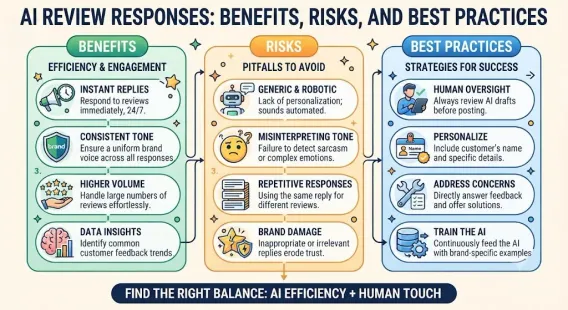
- They stop responding. Which erodes trust, engagement, and rankings.
- They copy-paste. Which looks lazy and can actually hurt—identical responses signal automation and indifference.
- They respond to negatives only. Which is the worst option, because it makes their profile read like a complaint log. None of these are good. And that’s exactly why AI review replies have become one of the most practical applications of artificial intelligence in local marketing.
Why AI Fits This Task So Well
Review responses have a set of characteristics that make them ideal for AI assistance:
They’re highly repetitive in structure. Nearly every good response follows the same shape: thank, acknowledge specifics, add value or invite back.
They’re short. Typically 2–4 sentences. AI excels at constrained output.
They follow tone patterns. Warm, professional, apologetic, enthusiastic—these are learnable styles.
They’re volume-heavy. The more reviews you have, the more AI helps.
They’re low-risk when edited. Unlike a legal document or medical advice, a review response that’s slightly off is recoverable.
They’re public but not permanent. You can edit or delete your response at any time.
Compare that to, say, writing a service page or a contract. Review responses are the ideal entry point for AI in a local business workflow.
The Brand Voice Risk
Here’s the part that scares business owners—and rightly so.
AI defaults to a specific register: pleasant, generic, slightly corporate. It writes like a competent customer service rep who’s never met your customers and doesn’t know your neighborhood.
If you publish that raw, three things happen:
-
Your profile starts sounding like everyone else’s. Your differentiation disappears.
-
Customers notice. “Thank you for your valuable feedback, we appreciate your business” reads as automated. People can spot it.
-
You lose the trust response was supposed to build. The whole point of a public reply is to demonstrate that a real human cares. Generic AI output proves the opposite.
But—and this is the key insight—the problem isn’t AI. The problem is unedited AI.
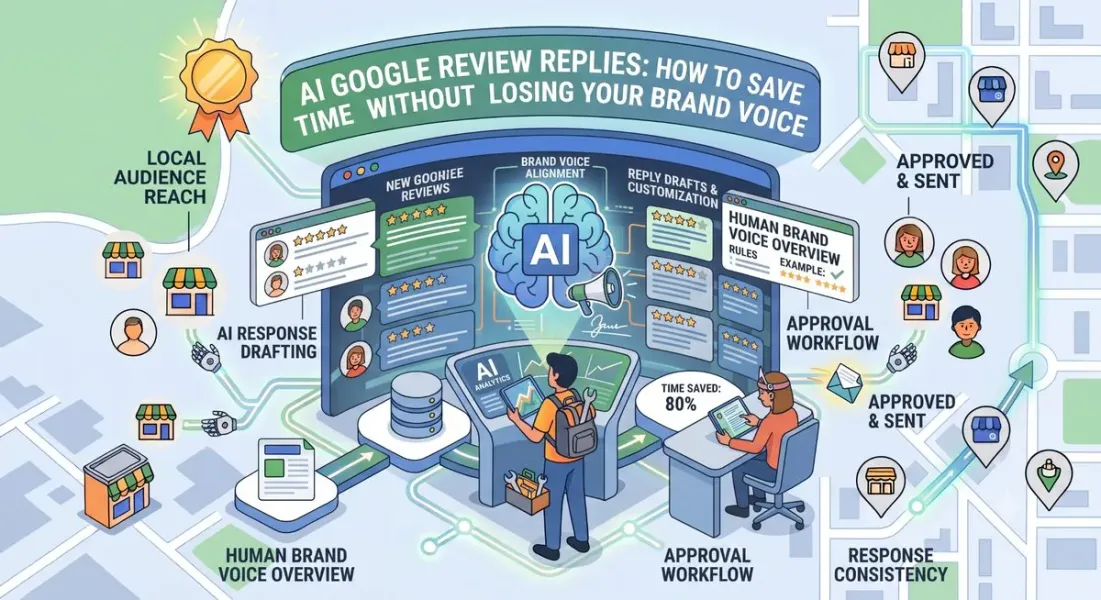
AI drafts. You decide. That single principle separates businesses that save ten hours a month from businesses that damage their brand while trying.
What This Guide Covers
Over the next five pages, you’ll learn:
- Page 1: Why review replies are a perfect AI use case, and the real risk
- Page 2: How to build a brand voice guide AI can actually follow
- Page 3: Prompts, workflows, and before/after examples
- Page 4: Handling negative and sensitive reviews without losing your humanity
- Page 5: Quality control, tools, mistakes, and conclusion
Page 2: Building a Brand Voice Guide AI Can Follow
Why Your Brand Voice Must Be Documented First
You can’t ask AI to match a voice that only exists in your head.
Before you generate a single AI response, write down how your business actually talks. This takes about 30–45 minutes once, and it transforms the quality of everything AI produces afterward.
A usable brand voice guide covers five things:
- Tone
- Vocabulary
- Sentence style
- Things you always do
- Things you never do
1. Tone
Describe your tone in three to five adjectives—and be specific. “Friendly” is too vague. AI will interpret it as generic pleasantness.
Vague: Friendly, professional
Specific: Warm but not gushy. Direct. Confident without being boastful. Light humor where appropriate, never sarcastic.
Examples across business types:
| Business Type | Tone Description |
|---|---|
| Family restaurant | Warm, casual, food-obsessed. Uses first names. Talks about dishes like a proud host. |
| Law firm | Measured, precise, reassuring. No exclamation points. No casual slang. |
| Auto repair shop | Straightforward, plainspoken, slightly irreverent. Explains things without jargon. |
| Pediatric dental | Gentle, encouraging, parent-focused. Celebrates small wins with kids. |
| Luxury salon | Refined, understated, confident. Compliments without flattery. |
2. Vocabulary
List words and phrases you use—and ones you avoid.
Use:
-
“We” instead of “the team” or “our staff”
-
Customer first names when they’re in the review
-
Specific service names (“root canal” not “procedure”)
-
Local references (“our Round Rock shop”) Avoid:
-
“Valuable feedback”
-
“We appreciate your business” (the most overused phrase in review responses)
-
“At your earliest convenience”
-
“Please do not hesitate to”
-
Corporate jargon of any kind
-
Excessive exclamation points The jargon test: Read your AI response aloud. If you’d be embarrassed to say it to a customer’s face, delete it.
3. Sentence Style
Give AI structural guidance:
- Average length: Short. 12–18 words per sentence.
- Paragraph count: Two to three maximum.
- Structure: Thank → specific detail → forward-looking statement
- Punctuation: Minimal exclamation points, no em dashes if that’s not your style
- Emoji: Either never, sparingly, or freely—pick one and be consistent
4. Always Do
The non-negotiables:
- Use the reviewer’s name when it’s available
- Reference a specific detail from their review
- Match the length of your response to the review (short review = short reply)
- Include a forward-looking statement (invite back, offer help, express enthusiasm)
- Sign off with an owner or team name for negative reviews
5. Never Do
The hard limits:
- Argue, correct, or debate publicly
- Share private customer information
- Offer refunds or compensation in public replies
- Use identical wording across responses
- Respond emotionally to a negative review
- Mention that a review is fake in the response
- Sound like a press release
Turning Your Guide Into an AI Instruction Block
Once you’ve documented your voice, convert it into a reusable instruction block you paste at the start of every AI session.
Example instruction block:
You are writing Google review responses for [Business Name], a [business type] in [city]. Tone: warm but not gushy, direct, confident, light humor when appropriate. Never use these phrases: “valuable feedback,” “we appreciate your business,” “do not hesitate.” Keep responses to 2–3 sentences. Always use the reviewer’s first name. Always reference one specific detail from their review. Average sentence length under 18 words. No emojis. No exclamation points except in genuinely enthusiastic replies. Never argue with a reviewer. Never share private information.
This block does more for output quality than any individual prompt you’ll ever write.
Brand Voice Checklist
- Tone described in 3–5 specific adjectives
- Vocabulary do’s and don’ts listed
- Sentence style guidelines documented
- “Always do” list written
- “Never do” list written
- Instruction block created and saved
- 3 example responses written by you as reference samples Pro tip: Write three responses yourself—one positive, one neutral, one negative. Include them in your instruction block as examples. AI matches examples far better than descriptions.
Page 3: Prompts, Workflows, and Before/Afters
The Core Workflow
Here’s the process that works for most small businesses:
- Collect reviews in batches (weekly or biweekly) from your GBP dashboard or review tool
- Paste your instruction block at the top of the AI session
- Feed reviews one at a time with a short prompt
- Generate a draft for each
- Edit each draft to add specificity and remove generic phrasing
- Publish within 48 hours
- Track your output volume and time saved Batching matters. Doing this weekly for 5–10 reviews takes 30–40 minutes. Doing it one at a time takes far longer because you lose context switching.
Prompts That Actually Work
For positive reviews:
Review: “[paste review]”
Write a response following my brand voice guide. Thank them by name, reference the specific thing they praised, and invite them back. Two sentences. Warm, not gushy. No “we appreciate your business.”
For 3-star or mixed reviews:
Review: “[paste review]”
Write a balanced response. Acknowledge what they liked, take ownership of what fell short without excuses, and invite them to reach out. Three sentences. No defensive language.
For negative reviews with a valid complaint:
Review: “[paste review]”
Write a response that acknowledges the specific issue, apologizes sincerely without the phrase “we’re sorry you feel that way,” offers a direct contact for resolution, and stays calm and professional. Three sentences. Do not argue or explain.
For rating-only reviews:
Rating: 5 stars, no text
Write a one-sentence thank-you. Warm, brief, mentions the business name. No questions.
For reviews in another language:
Review: “[paste review in Spanish]”
Write a response in Spanish following my brand voice guide, adjusted for cultural norms. Then provide an English translation for my review.
Before and After: What Editing Actually Looks Like
This is the most important section in this guide. Here’s where AI drafts fail and how to fix them.
Example 1 — Positive review
Customer review:
“Came in with a badly chipped tooth on a Saturday morning and they got me in within an hour. Dr. Reyes was calm and explained everything. Didn’t feel rushed at all. Highly recommend.”
Raw AI draft:
“Thank you so much for your kind words! We’re thrilled to hear that you had a positive experience and that Dr. Reyes was able to help you. We appreciate your recommendation and look forward to seeing you again!”
What’s wrong: Generic. Doesn’t mention the chip, the Saturday, or the hour wait. “Kind words,” “thrilled,” “look forward to seeing you again” — all filler.
Edited version:
“Thank you, Marcus! Getting a chipped tooth on a Saturday is stressful, and we’re glad we could get you in quickly. Dr. Reyes will be happy to hear you felt taken care of. See you at your next visit.”
What changed: Named the specific problem, the day, and the doctor. Cut the filler. Sounds like a real front desk person.
Example 2 — Negative review
Customer review:
“Food was good but we waited 45 minutes for our entrees. Nobody came by to check on us. For the price, that’s not acceptable.”
Raw AI draft:
“Thank you for your feedback. We apologize for the wait time you experienced and any inconvenience this may have caused. We strive to provide excellent service and will use your feedback to improve. Please contact us at [email] so we can make this right.”
What’s wrong: “We apologize for the wait time you experienced” is passive and evasive. “Any inconvenience” minimizes. “We strive to provide excellent service” is corporate filler. It reads like a template because it is one.
Edited version:
“Thank you for telling us, Elena. A 45-minute wait with no check-in isn’t the experience we want to give anyone, and we’re sorry. We’d like to make it right — please reach out to me directly at [email] and I’ll take care of you. — Maria, Owner”
What changed: Named the specific complaint, owned it directly, removed the minimizing language, added the owner’s name. This response builds more trust than the generic one ever could.
Example 3 — Overly enthusiastic review
Customer review:
“BEST PLUMBER EVER!!! Saved our basement at 2am, absolute legend!!!”
Raw AI draft:
“Wow, thank you so much for the amazing review! We’re so happy we could help and appreciate your enthusiasm! We look forward to serving you again!”
What’s wrong: Matching their energy with exclamation marks feels performative. “Wow” and “amazing” add nothing.
Edited version:
“Thanks, Dave! 2am basement floods are no joke — glad we could help. Call us anytime.”
What changed: Matched their warmth without the theatrics. Referenced the specific situation. Sounded like a human plumber, not a marketing department.
The Editing Rules
When you edit AI drafts, apply these five rules:
- Add one specific detail the AI couldn’t know—a service name, a day, a location, a staff member
- Delete every generic phrase (“valuable feedback,” “appreciate your business,” “look forward to serving you”)
- Cut the length by 20–30%. AI overwrites.
- Read it aloud. If you wouldn’t say it, rewrite it.
- Vary your openings. If your last five responses all start with “Thank you,” change some.
Time Savings Reality Check
| Approach | Time per review | Monthly (20 reviews) |
|---|---|---|
| Fully manual | 12–15 min | 4–5 hours |
| AI draft, unedited | 1 min | 20 minutes |
| AI draft + human edit | 3–4 min | 1–1.5 hours |
| Recommended | 3–4 min | 1–1.5 hours |
The recommended path saves roughly 3–4 hours a month while maintaining quality. Unedited AI saves more time but costs you your voice—which is a bad trade.
Prompt and Workflow Checklist
- Instruction block saved and reused
- Three reference examples included
- Reviews batched weekly or biweekly
- One prompt per review type prepared
- Every draft edited before publishing
- Responses published within 48 hours
- Openings varied across responses
Page 4: Negative and Sensitive Reviews
Why Negative Reviews Need More Human Involvement
Positive reviews are low-stakes. Negative reviews are not.
A poorly handled negative review can escalate, attract pile-ons, get screenshotted, or damage a relationship with a customer who might have returned. AI doesn’t understand context, history, or the emotional temperature of a situation.
The rule: AI drafts. Humans decide. For negative reviews, humans decide more.
The Negative Review Workflow
- Read the review yourself first. Before AI touches it.
- Check your records. What actually happened? Was there a service failure?
- Decide your position. Are you acknowledging fault, correcting a misunderstanding, or both?
- Generate an AI draft with explicit instructions about your position
- Rewrite, don’t just edit. Negative responses usually need substantial human rewriting.
- Have a second person read it if the review is serious
- Publish within 24 hours
What AI Gets Right and Wrong
AI gets right:
-
Structure (acknowledge, apologize, move offline)
-
Neutral, non-defensive tone
-
Concise length
-
Avoiding emotional language AI gets wrong:
-
Specificity about what happened
-
Judgment about whether to apologize at all
-
Awareness of your business history with that customer
-
Knowing when a review is fake versus genuine
-
Handling threats, legal issues, or accusations of discrimination That last category is where AI should not be used without heavy human involvement—and often legal review.
Handling Specific Difficult Scenarios
Scenario: Unfair review that misstates facts
Don’t argue publicly. Use AI to draft a calm response that acknowledges their experience, briefly and neutrally states your position, and moves offline.
Edited example:
“Thank you for sharing this, James. We understand the project took longer than you expected. We did communicate the delay on the 14th and offered a partial credit, but clearly we could have kept you better informed along the way. I’d welcome the chance to talk this through — please call me directly at [phone]. — Dan, Owner”
Scenario: Review from someone who was never a customer
Don’t accuse. Use language that quietly signals to readers.
Edited example:
“Thank you for the feedback. We take all reviews seriously, but we’re unable to find a record matching this experience. If we’ve made a mistake, we’d genuinely like to know — please reach out at [email].”
Scenario: Coordinated negative reviews or a viral moment
Stop responding individually. Pause all scheduled posts. Draft one master statement with your team. AI can help you refine wording, but the strategy must be human.
Scenario: Review mentioning a legal issue or injury
Do not respond without legal guidance. AI should not be used here at all beyond basic structure.
Scenario: Review containing hate speech or personal attacks
Flag it for removal first. If it stays, keep your response minimal and professional. Don’t engage with the content.
Where AI Should Never Be Used Alone
- Reviews alleging discrimination
- Reviews mentioning injury, safety, or legal action
- Reviews that could involve regulatory issues (medical, financial, legal)
- Any review where you’re uncertain about the facts
- Any review that triggers a strong emotional reaction in you In these cases, AI can help you draft after a human has decided the substance. It cannot decide the substance.
Preserving Humanity in Negative Responses
Three techniques that make AI-assisted negative responses feel genuine:
-
Name a person. “I’m sorry — please contact me directly” is weaker than “I’m sorry — please contact me, Maria, at [email].” Named accountability reads as real.
-
Reference the specific failure. Not “your experience” but “the 45-minute wait” or “the missed appointment on Tuesday.”
-
Use shorter sentences. Emotionally loaded responses benefit from brevity. Long, balanced sentences sound like legal departments.
Tone Matching for Negative Reviews
| Review Emotion | Your Response Tone |
|---|---|
| Frustrated but reasonable | Calm, accountable, direct |
| Angry and aggressive | Brief, professional, unemotional |
| Disappointed and sad | Warm, sincere, personal |
| Confused about facts | Clarifying without correcting |
| Threatening | Minimal, factual, offline immediately |
Negative Review Checklist
- Read the review yourself before using AI
- Check records for context
- Decide your position before drafting
- Generate AI draft with explicit position instructions
- Rewrite substantially, don’t just edit
- Have a second reader for serious reviews
- Name a person and reference specifics
- Publish within 24 hours
- Skip AI entirely for legal or sensitive cases
Page 5: Quality Control, Tools, and Conclusion
The Quality Control System
If you’re generating AI drafts at volume, you need a check before publishing. Here’s a simple five-point filter.
-
The Read-Aloud Test Read the response out loud. Does it sound like something you’d say to a customer’s face? If not, rewrite.
-
The Swap Test Could this response work for a different customer at a different business? If yes, it’s too generic. Add specificity.
-
The Repeat Test Have you used this opening or phrase in the last five responses? If yes, change it.
-
The Named-Detail Test Does the response contain at least one specific detail from the review? Service, day, staff member, product? If not, add one.
-
The Tone Test Does the tone match your brand voice guide’s three to five adjectives? If it drifted, bring it back.
Five seconds per response. Catches most problems.
Tools Worth Knowing
| Tool | Best For | AI Reply Features |
|---|---|---|
| Podium | Small to mid-size businesses | AI-assisted replies, review requests, messaging |
| Birdeye | Multi-location and franchises | AI reply suggestions, sentiment analysis |
| GatherUp | Budget-conscious businesses | Review generation and reply tools |
| Grade.us | Agencies | White-label review management |
| ChatGPT / Claude / Gemini | Full control over prompts and voice | Fully custom, no platform lock-in |
| Reputation.com | Enterprise multi-location | AI replies at scale with approval workflows |
Recommendation for most small businesses: Start with ChatGPT or Claude plus your own instruction block. It’s free or low-cost, fully customizable, and forces you to define your voice properly. Add a dedicated platform when volume makes manual batching painful—usually around 40+ reviews per month.
Measuring Whether It’s Working
Track these monthly:
| Metric | Why It Matters |
|---|---|
| Response rate | Are you responding to 100% of reviews? |
| Average response time | Under 48 hours is the target |
| Time spent on responses | Should drop 60–75% vs. fully manual |
| Response sentiment trend | Are your replies landing well? |
| Customer replies to your responses | Do people engage back? |
| Review volume | Still growing? |
| Rating trend | Holding or improving? |
Signs AI is helping: Time down, response rate up, quality steady, no customer complaints about robotic replies.
Signs AI is hurting: Responses sound identical, customers call it out, engagement drops, your profile reads like everyone else’s.
Common Mistakes With AI Review Replies
- Publishing raw AI output without editing
- Using the same opening line repeatedly
- Skipping the brand voice guide entirely
- Letting AI handle legal or sensitive reviews alone
- Copy-pasting the same response structure across every review
- Over-apologizing on reviews that don’t warrant it
- Losing your distinctive vocabulary in favor of corporate phrasing
- Never checking whether responses sound like you
- Using AI to generate fake reviews (policy violation, potential suspension)
- Automating so heavily that you stop reading reviews at all That last one is subtle but important. Reviews contain operational intelligence. If you’re only reading AI summaries, you’re missing the signal.
A Sustainable AI Review Workflow
Here’s what this looks like in practice for a typical small business:
Weekly (30 minutes):
-
Pull the week’s new reviews into a document
-
Paste your instruction block into AI
-
Generate drafts for each review
-
Edit each draft using the five-point filter
-
Publish Monthly (15 minutes):
-
Review your response rate and average time
-
Scan your last 20 responses for repetition
-
Note any recurring complaints for operations
-
Update your instruction block if needed Quarterly (30 minutes):
-
Re-read your brand voice guide
-
Update vocabulary lists based on what’s drifted
-
Refresh your reference examples
-
Consider whether a dedicated platform is worth adding Total: roughly three hours a month for full review response coverage—down from five to twenty hours manually. And the quality stays high because the judgment stays human.
Quick Checklist
- Brand voice guide documented
- Instruction block saved and reused
- Reference examples included
- Reviews batched weekly
- AI drafts never published unedited
- Five-point quality filter applied
- Negative reviews handled with human judgment
- Legal and sensitive reviews reviewed manually
- Response rate at 100%
- Response time under 48 hours
- Monthly quality review completed
- Operations learnings extracted from reviews
Conclusion
AI Google review replies solve a real problem. Responding to every review is one of the highest-ROI habits in local SEO—and one of the hardest to sustain. AI removes the friction without removing the work entirely.
The formula that works is simple:
- Document your voice first. You can’t match what you haven’t defined.
- Let AI draft. It’s fast, structured, and consistent.
- Edit with human judgment. Add specifics, cut filler, vary openings.
- Keep humans in the loop for anything sensitive. Negative, legal, or emotional reviews need your brain, not just your prompt.
- Measure results. Time saved, response rate, engagement, and rating trend. The businesses that win with AI here aren’t the ones automating the most. They’re the ones automating the repetitive parts while keeping their voice, their judgment, and their local knowledge intact.
AI can write a hundred responses a week. Only you know what it sounds like when your business actually talks.
Call to Action
Want a plug-and-play system for AI review replies? Download our free AI Review Reply Kit, including a brand voice template, 12 tested prompts, before/after editing examples, and a five-point quality checklist. [Link to kit]
FAQs
Is it against Google’s policies to use AI for review replies?
No. Google doesn’t prohibit AI-assisted review responses. What it prohibits is fake reviews, incentivized reviews, and review gating. Using AI to draft your responses is fine.
Can Google detect AI-written review responses?
Google’s systems may identify patterns, but there’s no indication that AI-assisted responses are penalized. What does get noticed by customers and algorithms is generic, identical responses—which is why editing matters.
How do I keep my brand voice when using AI?
Document your voice first: tone adjectives, vocabulary do’s and don’ts, sentence style, and always/never rules. Include three example responses you wrote yourself. AI matches examples far better than descriptions.
Should I use AI for negative review responses?
Yes, as a drafting tool—but with heavier human involvement. Read the review yourself, check your records, decide your position, generate a draft, then rewrite substantially. Never publish a raw AI response to a negative review.
What should I never let AI handle?
Reviews involving legal issues, injury, safety, discrimination claims, or regulatory matters. In these cases, AI can help with wording only after a human has decided the substance—and often after legal review.
How much time does AI actually save on review replies?
Fully manual responses take 12–15 minutes each. AI-drafted, human-edited responses take 3–4 minutes. For 20 reviews a month, that’s a savings of 3–4 hours.
What’s the biggest mistake with AI review replies?
Publishing drafts without editing. Raw AI output is generic, repetitive, and detectable. It can actively hurt your brand by making your business look automated.
Do I need a paid tool, or is ChatGPT enough?
ChatGPT or Claude with a well-written instruction block is enough for most small businesses. Paid platforms like Podium or Birdeye become worthwhile around 40+ reviews per month or when managing multiple locations.
Can AI write my actual Google reviews?
No. Generating fake reviews violates Google’s policies and can get your profile suspended. AI can help you request reviews, respond to them, and analyze them—but the reviews themselves must come from real customers.
How do I know if AI responses are hurting my brand?
Watch for: identical-sounding replies, customers commenting that responses feel automated, declining engagement, or your profile reading like your competitors’. If you see these, your edits aren’t doing enough.
Internal & External Links
Internal links: Replace these with your own URLs.
-
Google Business Profile ranking factors 2026 External links:
Grow Your Google Maps Ranking on Autopilot
Stop spending hours every week manually replying to customer reviews and writing Google posts. Busirank automates your Google Business Profile to boost your local SEO rankings and turn searchers into paying clients.

 Busirank Team