 Busirank Team
Introduction
Google has been telling website owners for years that page experience matters. Core Web Vitals are how Google measures it.
If you’ve opened Google Search Console recently and seen a “Core Web Vitals” report full of red and orange URLs, you’re not alone. Most small business websites fail at least one Core Web Vitals metric — usually without the owner knowing.
The problem isn’t that the metrics are complicated. It’s that most explanations are written for developers, not business owners. This guide fixes that.
You’ll learn what Core Web Vitals are, why they matter for your rankings and revenue, and exactly what to fix — in plain language, prioritized by impact.
What Are Core Web Vitals?
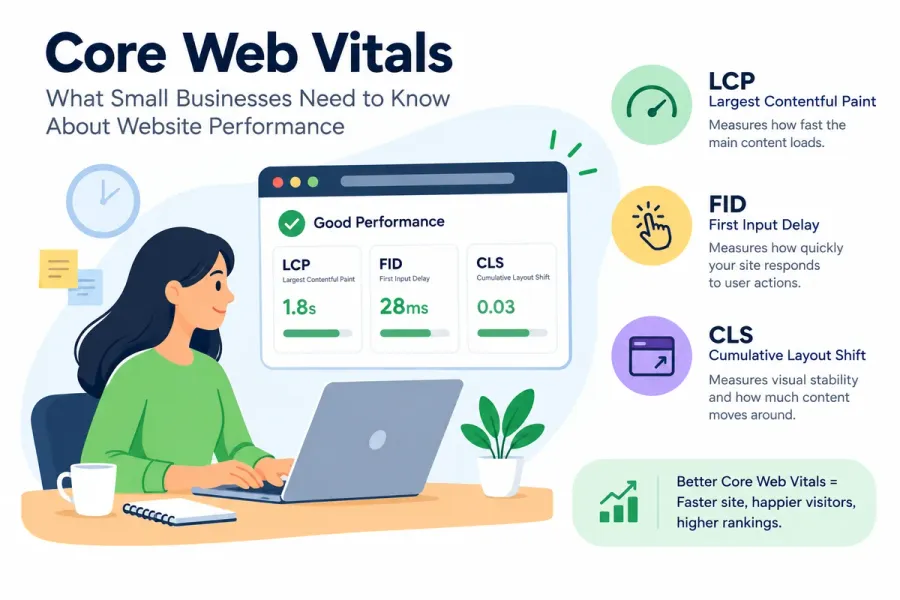
Core Web Vitals are three specific metrics Google uses to measure real-world user experience on your website. They’re part of Google’s broader Page Experience signals.
The three metrics are:
| Metric | What It Measures | Good Threshold |
|---|---|---|
| LCP (Largest Contentful Paint) | Loading speed | Under 2.5 seconds |
| INP (Interaction to Next Paint) | Responsiveness | Under 200 milliseconds |
| CLS (Cumulative Layout Shift) | Visual stability | Under 0.1 |
In simple terms:
- LCP — How fast does the main content appear?
- INP — How quickly does the page respond when I click or tap?
- CLS — Does the page jump around while I’m reading?
Google collects this data from real users (called field data) via the Chrome User Experience Report (CrUX). It also provides lab data through tools like PageSpeed Insights, which simulates loading.
Why Core Web Vitals Matter for Small Businesses
1. They’re a confirmed ranking signal
Google uses Core Web Vitals as part of its page experience ranking signals. They’re not the biggest factor — relevance and content still dominate — but they’re a tiebreaker when everything else is equal.
2. They directly affect conversions
Slow, janky pages lose customers. Research consistently shows that even a one-second delay reduces conversions significantly.
3. They impact every visitor
Unlike backlinks or content, Core Web Vitals affect every single person who lands on your site. Improving them improves your entire user experience.
4. Small sites can fix them faster
You don’t need a dedicated engineering team. Most Core Web Vitals issues on small business websites trace back to a handful of fixable causes.
5. They’re a competitive advantage
Most small business competitors ignore Core Web Vitals. Fixing yours puts you ahead of businesses that outspend you on ads but neglect their site.
Metric 1: LCP (Largest Contentful Paint)
What It Is
LCP measures how long it takes for the largest visible element on the page — usually a hero image, video poster, or large heading — to fully render.
Thresholds:
- Good: Under 2.5 seconds
- Needs improvement: 2.5–4.0 seconds
- Poor: Over 4.0 seconds
Common Causes of Poor LCP
- Large, uncompressed hero images
- Slow server response times
- Render-blocking CSS or JavaScript
- Images lazy-loaded above the fold
- Slow hosting or no CDN
- Web fonts that delay text rendering
How to Fix LCP
- Optimize your hero image
- Compress it aggressively
- Use WebP or AVIF format
- Serve correct dimensions for each device
- Preload it:
<link rel="preload" as="image" href="hero.webp">
Related: See our full guide on image SEO optimization.
2. Never lazy-load the hero image
Lazy loading above-the-fold images delays LCP. Only lazy-load images below the fold.
- Improve server response time (TTFB)
- Upgrade hosting if needed
- Use a CDN
- Enable caching
- Reduce server-side processing
- Eliminate render-blocking resources
- Defer non-critical JavaScript
- Inline critical CSS
- Load non-critical CSS asynchronously
- Optimize web fonts
- Use
font-display: swap - Preload critical fonts
- Consider system fonts
Metric 2: INP (Interaction to Next Paint)
What It Is
INP measures how quickly your page responds to user interactions — clicks, taps, and keyboard input. It replaced First Input Delay (FID) in March 2024.
Thresholds:
- Good: Under 200 milliseconds
- Needs improvement: 200–500 milliseconds
- Poor: Over 500 milliseconds
Common Causes of Poor INP
- Heavy JavaScript execution
- Long tasks blocking the main thread
- Third-party scripts (chat widgets, analytics, ads)
- Large DOM size
- Unoptimized event handlers
How to Fix INP
1. Reduce JavaScript
Audit your scripts. Remove unused libraries and plugins.
2. Break up long tasks
Split heavy JavaScript into smaller chunks. Use requestIdleCallback or setTimeout for non-critical work.
3. Defer third-party scripts
Load chat widgets, analytics, and ads only when needed — or use facades.
4. Reduce DOM size
Aim for fewer than 1,500 DOM elements. Simplify complex page structures.
5. Optimize event handlers
Debounce or throttle rapid-fire events like scroll and resize.
Metric 3: CLS (Cumulative Layout Shift)
What It Is
CLS measures visual stability — how much the page layout shifts unexpectedly while loading.
Thresholds:
- Good: Under 0.1
- Needs improvement: 0.1–0.25
- Poor: Over 0.25
Common Causes of Poor CLS
- Images without width/height attributes
- Ads, embeds, or iframes without reserved space
- Web fonts causing text reflow (FOIT/FOUT)
- Dynamically injected content above existing content
- Buttons or banners appearing late
How to Fix CLS
- Always set width and height on images
<img src="hero.webp" alt="..." width="1200" height="600">2. Reserve space for ads and embeds
Use CSS aspect-ratio or fixed containers.
3. Preload fonts and use `font-display: swap“
`Prevents text from shifting when fonts load.
4. Avoid injecting content above existing content
If you must, reserve space in advance.
5. Use CSS transform animations instead of layout-affecting properties
Animate transform and opacity, not top, left, width, or height.
How to Measure Core Web Vitals
Free Tools
| Tool | What It Shows |
|---|---|
| PageSpeed Insights | Lab + field data for individual URLs |
| Google Search Console | Site-wide Core Web Vitals report |
| Chrome DevTools | Performance and Lighthouse audits |
| web-vitals library | Real-user measurement via JavaScript |
| CrUX Dashboard | Historical field data |
Field Data vs. Lab Data
| Type | Source | Use |
|---|---|---|
| Field | Real users (CrUX) | What Google actually uses for rankings |
| Lab | Simulated tests | Debugging and diagnosis |
Important: Google uses field data for ranking. Lab data helps you diagnose issues, but real-user performance is what matters.
How to Prioritize Fixes
Not all fixes are equal. Prioritize in this order:
- Fix LCP first — it has the biggest impact on both rankings and user perception
- Then CLS — layout shifts are the most frustrating for users
- Then INP — responsiveness matters most on interactive pages
- Focus on your highest-traffic pages — homepage, top service pages, top blog posts
- Focus on mobile first — most traffic and most issues occur on mobile
Core Web Vitals for Small Business: Practical Checklist
Quick Wins (Do These First)
- ☐ Compress all images and convert to WebP
- ☐ Add width/height to every image
- ☐ Stop lazy-loading hero images
- ☐ Enable browser caching
- ☐ Use a CDN
- ☐ Defer non-critical JavaScript
- ☐ Preload critical fonts and use
font-display: swap
Medium-Term Improvements
- ☐ Audit and remove unused plugins/scripts
- ☐ Reduce DOM size on key pages
- ☐ Optimize third-party scripts (chat, analytics, ads)
- ☐ Improve server response time
- ☐ Implement responsive images with
srcset
Ongoing Monitoring
- ☐ Review Search Console Core Web Vitals report monthly
- ☐ Run PageSpeed Insights on priority pages quarterly
- ☐ Monitor real-user metrics with the web-vitals library
- ☐ Re-audit after any redesign or major plugin change
Common Core Web Vitals Mistakes
- Chasing lab scores instead of field data — Google uses field data
- Lazy-loading the LCP image — directly hurts your worst metric
- Ignoring mobile — most issues appear on mobile first
- Adding plugins to “fix” speed — often makes it worse
- Optimizing only the homepage — audit your top pages
- Not setting image dimensions — the #1 cause of CLS
- Loading every third-party script immediately — kills INP
- Assuming a good PageSpeed score means good field data — they can differ
Do Core Web Vitals Actually Affect Rankings?
Yes — but with nuance.
Google confirmed Core Web Vitals are a ranking signal as part of Page Experience. However, they’re relatively minor compared to relevance and content quality. You won’t outrank a more relevant competitor just by having faster pages.
However: Core Web Vitals matter more in competitive niches where relevance is similar. And they affect user experience and conversions directly — which have their own indirect SEO benefits.
Bottom line: Fix them, but don’t obsess. Content and relevance still win.
How Core Web Vitals Connect to Other SEO Strategies
| Strategy | Connection |
|---|---|
| Image SEO optimization | Images drive LCP and CLS |
| Technical SEO checklist | Speed and stability are core technical factors |
| Mobile-first SEO | Core Web Vitals are measured on mobile first |
| Website architecture | Simpler structure improves performance |
| Internal linking SEO | Fewer redirects and cleaner paths help speed |
Conclusion
Core Web Vitals aren’t a mystery — they’re three measurable aspects of how your website feels to real users. Loading speed (LCP), responsiveness (INP), and visual stability (CLS).
For small businesses, the fixes are usually straightforward: compress images, set dimensions, stop lazy-loading hero images, defer scripts, and use a CDN. Most issues trace back to a handful of causes.
Fix them, and you improve both rankings and user experience at the same time. Ignore them, and you’ll keep losing ground to competitors who took the time to care.
Call to Action
Is your website failing Core Web Vitals?
BusiRank audits your site’s LCP, INP, and CLS — then gives you a prioritized, plain-language fix list tailored to your CMS and hosting setup.
👉 Get Your Free Core Web Vitals Audit
FAQs
1. What are Core Web Vitals in simple terms?
Core Web Vitals are three metrics Google uses to measure user experience on your website: loading speed (LCP), responsiveness (INP), and visual stability (CLS).
2. Do Core Web Vitals affect SEO rankings?
Yes, they’re part of Google’s Page Experience ranking signals. They’re a tiebreaker rather than a primary factor — relevance and content still matter most.
3. What’s a good LCP score?
Under 2.5 seconds is good. Between 2.5 and 4.0 seconds needs improvement. Over 4.0 seconds is poor.
4. What replaced First Input Delay (FID)?
INP (Interaction to Next Paint) replaced FID in March 2024. INP measures responsiveness more comprehensively.
5. How do I check my Core Web Vitals?
Use Google Search Console’s Core Web Vitals report for site-wide field data, and PageSpeed Insights for individual URLs.
6. Can I fix Core Web Vitals myself?
Many fixes are simple — compressing images, setting dimensions, enabling caching. Others may require developer help. Most small business sites can see major improvements with basic fixes.
7. Do I need a developer to fix Core Web Vitals?
Not always. Image compression, caching, and plugin optimization can be done by most business owners. JavaScript and server-level issues often need developer support.
8. How long after fixing Core Web Vitals do rankings improve?
Field data in Search Console updates over 28 days. Ranking improvements may take weeks to months, depending on competition and other factors.
Internal & External Links
Internal Links
- image SEO optimization
- technical SEO checklist
- mobile-first SEO
- website architecture SEO
- internal linking SEO
- Get Your Free Core Web Vitals Audit
External Sources
| Source | Purpose |
|---|---|
| web.dev – Core Web Vitals | Official metric definitions and thresholds |
| Google PageSpeed Insights | Testing tool |
| Google Search Console Help – Core Web Vitals | Field data reporting |
| Chrome User Experience Report (CrUX) | Real-user data source |
| web-vitals JavaScript library | Real-user measurement |
Grow Your Google Maps Ranking on Autopilot
Stop spending hours every week manually replying to customer reviews and writing Google posts. Busirank automates your Google Business Profile to boost your local SEO rankings and turn searchers into paying clients.

 Busirank Team
