 Busirank Team
Introduction
You’ve done everything right. Your Google Business Profile is fully optimized, you have more reviews than your competitors, and your website is fast and mobile-friendly. So why do you rank #1 when you search for your business from your office—but disappear entirely when you check from across town?
This is one of the most frustrating realities of local SEO: Google Maps rankings change by location.
It’s not a glitch. It’s not a penalty. It’s how Google Maps was designed to work.
Unlike traditional organic search results, which are relatively consistent across a region, Google Maps rankings are hyper-local. They shift based on where the searcher is standing—or more precisely, where their device is located when they perform a search.
This phenomenon is driven by a concept called proximity—one of the three primary ranking factors in Google’s local search algorithm. The closer a searcher is to your business, the more likely you are to appear in their local pack results.
But proximity isn’t the only factor. Competition, prominence, and relevance all play a role—and they interact with location in complex ways.
In this guide, we’ll explain why Google Maps rankings fluctuate by location, introduce you to the concept of local search grids (also called geo-grids), and show you how to measure and improve your true local visibility.
Let’s get started.
The Three Pillars of Google Maps Rankings
Before we dive into location-based fluctuations, let’s review the foundation. Google’s local search algorithm is built on three core factors:
- Relevance – How well your business matches what the user is searching for.
- Distance (Proximity) – How close your business is to the searcher.
- Prominence – How well-known and well-regarded your business is.
These three factors work together. A highly relevant, prominent business can rank well even if it’s farther away. But for most searches, proximity is the tiebreaker—and sometimes the deciding factor.
This is why two people searching for “pizza near me” from different locations will see completely different results.
What Is Proximity and Why Does It Matter?
Proximity is Google’s way of answering the question: “Which businesses are closest to this searcher right now?”
When someone searches on Google Maps or Google Search with location services enabled, Google uses their device’s GPS coordinates to determine their location. It then ranks nearby businesses based on how close they are.
The closer you are, the higher you rank—all else being equal.
But here’s the catch: “All else” is rarely equal.
If a competitor two miles away has 500 reviews and you have 50, they might outrank you even when the searcher is standing in your parking lot. Prominence can override proximity—but only to a point.
This is why understanding the interplay between proximity and prominence is essential.
How Local Search Grids Work
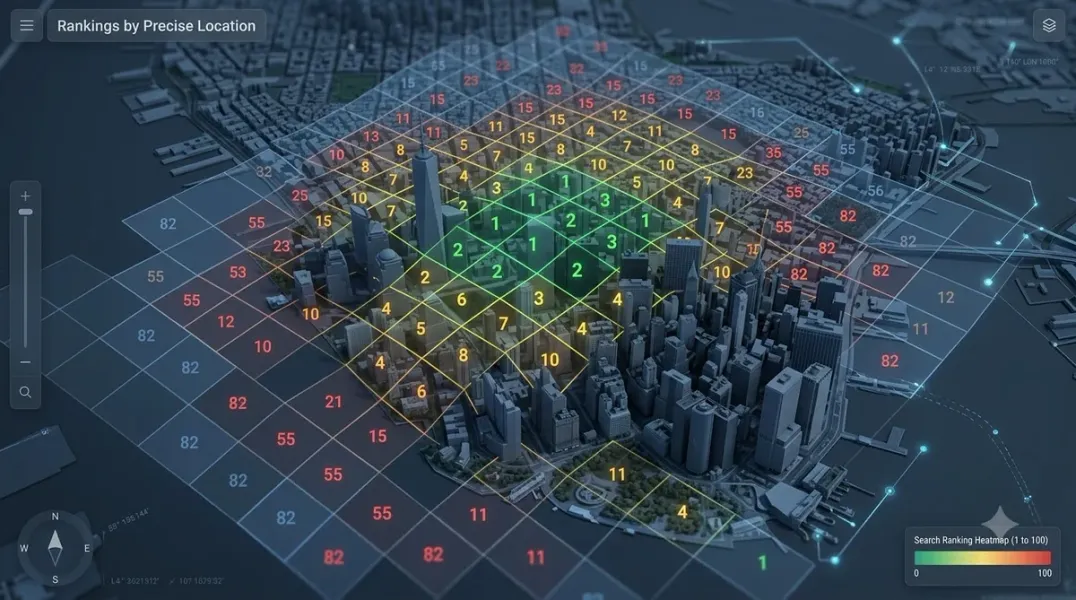
A local search grid (or geo-grid) is a visual representation of how your business ranks across a geographic area.
Here’s how it works:
- A tool divides a geographic area into a grid of points (e.g., 5x5, 7x7, or 9x9).
- For each point, the tool simulates a search from that exact location.
- It records where your business ranks for a specific keyword at each point.
- The results are displayed as a heatmap—green for high rankings, red for low rankings.
The result is a snapshot of your true local visibility—not just where you rank from your office, but everywhere your customers might be searching.
Example: You might rank #1 at your business location, #3 a mile north, #7 two miles east, and #15 three miles south. A geo-grid shows you exactly where you’re strong and where you’re invisible.
Why Rankings Change by Location: The Key Factors
Let’s break down the specific reasons Google Maps rankings fluctuate across a geographic area.
1. Proximity to the Searcher
This is the most obvious factor. If a searcher is standing next to your business, you’re likely to rank #1. If they’re 10 miles away, you might not appear at all.
Why it matters: You can’t be everywhere at once. But you can understand how far your visibility extends.
2. Competitor Density
In dense urban areas, you might have 20 competitors within a one-mile radius. In suburban or rural areas, you might have 2. The more competitors, the harder it is to rank consistently across a grid.
Why it matters: High-competition areas require stronger prominence signals (reviews, backlinks, citations) to overcome proximity disadvantages.
3. Prominence Signals
Prominence includes:
- Number of reviews
- Review rating
- Review velocity (how often you get new reviews)
- Local citations (directory listings)
- Local backlinks
- Social signals
- Brand mentions
A business with strong prominence can rank well even when it’s farther from the searcher.
Why it matters: Prominence is the lever you can pull to expand your visibility beyond your immediate vicinity.
4. Relevance Signals
Relevance includes:
- Business categories
- Keywords in your business name (careful—keyword stuffing is against guidelines)
- Services and products listed
- Website content
- Google Posts
A business that’s highly relevant to a search query can rank higher, even if it’s farther away.
Why it matters: Relevance helps Google understand what you do, so it can match you to the right searches.
5. Search Query Type
Not all searches behave the same way.
- “Near me” searches are heavily proximity-driven.
- Branded searches (e.g., “Starbucks”) are less proximity-driven—users want the specific brand.
- Category searches (e.g., “coffee shop”) are a mix of proximity, relevance, and prominence.
Why it matters: Different queries require different optimization strategies.
6. Device and Location Settings
Google uses different signals depending on the device:
- Mobile with location services on: Highly accurate proximity data.
- Desktop: Often uses IP address, which is less precise.
- Location services off: Google may use approximate location or previous search history.
Why it matters: Rankings can vary between mobile and desktop, and between users with different privacy settings.
The “Near Me” Effect
The rise of “near me” searches has made proximity even more important.
According to Google, “near me” searches have grown exponentially over the past decade. When someone searches “dentist near me,” they’re not looking for the best dentist in the country—they’re looking for the closest one that meets their needs.
This means:
- Your visibility is limited by your physical location.
- You need to optimize for the areas you can serve.
- You need to understand how far your visibility extends.
A geo-grid helps you visualize this.
How to Measure Your Local Visibility with Geo-Grids
Measuring your local visibility requires more than checking your ranking from your office. Here’s how to do it properly.
Step 1: Choose a Geo-Grid Tool
Popular options include:
- Local Falcon – The industry standard for geo-grid rank tracking.
- Places Scout – Advanced features for agencies.
- BrightLocal – Includes geo-grid tracking in its local SEO platform.
- Semrush – Offers local ranking grid tools.
- AgencyAnalytics – For agencies managing multiple clients.
Step 2: Define Your Grid
Choose:
- Grid size – 5x5 (25 points), 7x7 (49 points), or 9x9 (81 points).
- Grid radius – How far out from your business do you want to measure? (e.g., 1 mile, 5 miles, 10 miles)
- Keyword – The search term you want to track (e.g., “plumber near me”).
Step 3: Run the Scan
The tool will simulate searches from each point in the grid and record your ranking.
Step 4: Analyze the Heatmap
Look for:
- Green zones – Where you rank #1-3.
- Yellow zones – Where you rank #4-10.
- Red zones – Where you rank #11+ or not at all.
Step 5: Identify Opportunities
- Are there areas where you should rank but don’t?
- Are competitors dominating certain parts of your grid?
- Is your visibility shrinking or growing over time?
Step 6: Take Action
Based on your findings:
- Build more citations and backlinks to boost prominence.
- Encourage reviews from customers in underserved areas.
- Create location-specific content.
- Adjust your service area targeting.
Why Rankings Fluctuate Over Time
Location isn’t the only variable. Rankings also change over time due to:
- New competitors entering the market.
- Review velocity – Competitors gaining reviews faster than you.
- Google algorithm updates – Local search algorithms change frequently.
- Seasonality – Some businesses are more relevant at certain times of year.
- GBP changes – Updates to your listing (or competitors’ listings) can shift rankings.
This is why ongoing tracking is essential. A one-time ranking check tells you nothing about trends.
Strategies to Improve Rankings Across a Larger Area
If your visibility is limited to a small radius around your business, here’s how to expand it.
1. Strengthen Prominence Signals
- Get more reviews. Quantity, quality, and velocity all matter.
- Build local citations. Ensure NAP consistency across directories.
- Earn local backlinks. Sponsorships, partnerships, and community involvement.
- Increase brand mentions. Social media, press, and local media.
2. Improve Relevance
- Optimize your GBP categories. Choose the most specific primary category.
- Add services and products. Include keywords naturally.
- Create location-specific landing pages. For each area you serve.
- Publish local content. Blog posts about local events, news, and topics.
3. Target Underserved Areas
- Use geo-grid data to identify gaps.
- Create content and citations targeted at those areas.
- Encourage reviews from customers in those areas.
4. Optimize for “Near Me” Searches
- Include “near me” and location keywords in your website content.
- Ensure your GBP is fully optimized.
- Use schema markup to help Google understand your location.
5. Monitor Competitors
- Track competitor rankings in your geo-grid.
- Identify where they’re strong and where they’re weak.
- Adjust your strategy accordingly.
Common Mistakes Businesses Make
- Checking rankings only from your office. This gives a false sense of security.
- Ignoring proximity. You can’t rank everywhere—but you can expand your radius.
- Neglecting prominence. Reviews and citations are your levers for overcoming distance.
- Not tracking over time. Rankings fluctuate. You need historical data.
- Assuming one keyword tells the whole story. Different keywords behave differently.
Conclusion
Google Maps rankings change by location because Google’s local algorithm is designed to prioritize proximity. The closer a searcher is to your business, the more likely you are to appear—but proximity isn’t the only factor. Prominence, relevance, and competition all play a role.
Understanding this reality is the first step. The second step is measuring your true local visibility with local search grids. A geo-grid shows you exactly where you rank across your service area—not just where you think you rank.
Armed with that data, you can make smarter decisions: where to focus your review generation efforts, which areas need more citations, and how to compete with nearby businesses.
The bottom line: You can’t manage what you don’t measure. And in local SEO, geo-grids are the measurement tool you need.
Call to Action
Want to see your true local visibility?
Stop guessing. Start tracking.
👉 Run a free geo-grid scan to see exactly where you rank across your service area—and where you’re invisible.
👉 Download our Local Visibility Playbook for step-by-step strategies to expand your rankings beyond your immediate vicinity.
Your customers are searching from everywhere. Make sure they find you—no matter where they are.
FAQs
1. Why do my Google Maps rankings change depending on where I search?
Because Google uses your device’s location to determine proximity. The closer you are to a business, the higher it tends to rank. Rankings shift as you move across a geographic area.
2. What is a local search grid?
A local search grid (or geo-grid) is a visual tool that shows how your business ranks across multiple points in a geographic area. It’s displayed as a heatmap, with green indicating high rankings and red indicating low rankings.
3. How often should I run a geo-grid scan?
Monthly is ideal for most businesses. If you’re in a competitive market or actively optimizing, weekly scans can help you track progress more closely.
4. Can I rank #1 everywhere in my city?
Rarely. Proximity limits how far your visibility extends. However, by strengthening prominence and relevance, you can expand your ranking radius significantly.
5. What’s more important: proximity or reviews?
Both matter. Proximity is a primary factor, but reviews (prominence) can help you overcome distance disadvantages—especially in less competitive areas.
6. How do I improve my rankings in areas where I’m invisible?
Focus on building prominence signals (reviews, citations, backlinks) in those areas. Create location-specific content and encourage reviews from customers who live there.
7. Does Google Maps ranking differ from Google Search ranking?
Yes. Google Search rankings (organic) are more consistent across a region. Google Maps rankings are hyper-local and change based on the searcher’s location.
8. Why do my rankings fluctuate even when I haven’t changed anything?
Competitors, algorithm updates, seasonality, and review velocity can all cause fluctuations. This is why ongoing tracking is essential.
Internal & External Links
Internal Links
- Google Business Profile vs Google Maps: What’s the Difference?
- Geo-Grid Rank Tracking: How to Measure Your True Local Visibility
- How to Track Google Maps Rankings Across Multiple Locations
- Local SEO Rank Tracking: Which Keywords Should Local Businesses Monitor?
- How to Find Your Competitors in the Google Local Pack
External Sources
Grow Your Google Maps Ranking on Autopilot
Stop spending hours every week manually replying to customer reviews and writing Google posts. Busirank automates your Google Business Profile to boost your local SEO rankings and turn searchers into paying clients.

 Busirank Team
