 Busirank Team
Introduction
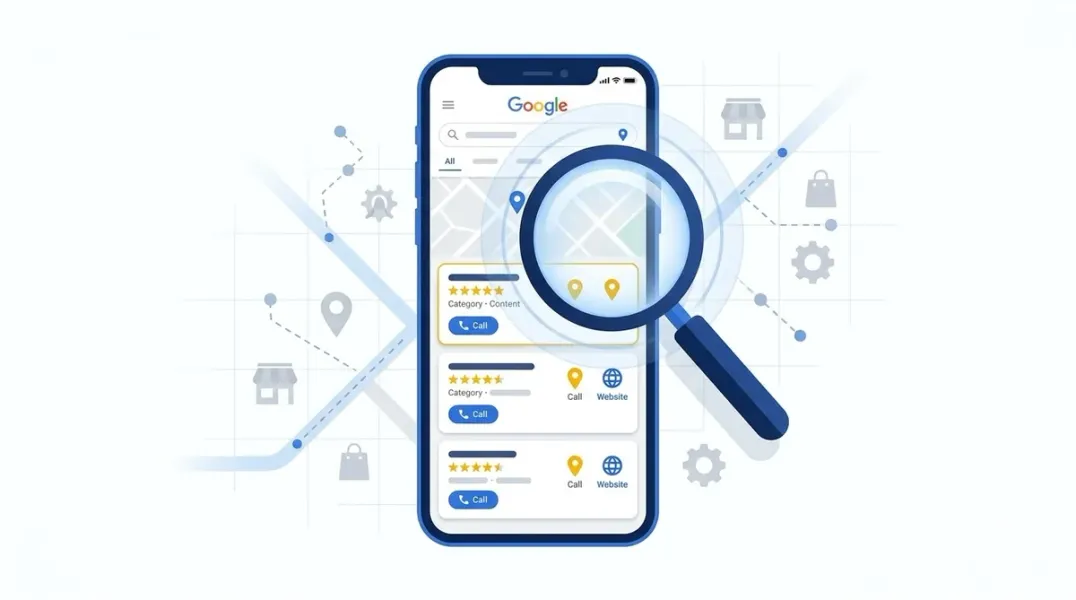
When someone searches for a service you offer in your city, Google shows them a block of three businesses at the very top of the results. This is the Local Pack—sometimes called the Map Pack or the 3-Pack. It appears above the organic results, often with a map, and it captures the lion’s share of clicks.
If your business isn’t in that pack, you’re invisible to a massive portion of potential customers.
But here’s the problem: many businesses don’t actually know who their real local competitors are. They assume it’s the shop down the street or the franchise across town. In reality, the businesses competing for Local Pack visibility might be entirely different from the ones you see in your neighborhood.
Local SEO doesn’t care about your personal assumptions. It cares about relevance, proximity, and prominence—and the businesses that rank for your keywords are the ones you’re actually competing against for customers.
In this guide, you’ll learn how to identify the businesses dominating your Local Pack, analyze why they’re winning, and build a strategy to take their place.
The Local Pack is the block of three business listings that appears when someone performs a search with local intent. It typically includes:
- A map showing the business locations
- The business name
- Star rating and review count
- Address and hours
- Links to call, get directions, or visit the website
These three spots get the most clicks of any result on the page. For many local searches, the Local Pack is the only thing users interact with—they never scroll down to the organic results.
This is why identifying and understanding your Local Pack competitors is the foundation of any serious local SEO strategy.
Why Your Assumed Competitors Might Be Wrong
Before you start analyzing, it’s important to understand that the businesses you think are your competitors may not be the ones you’re actually competing against in Google’s eyes.
The Proximity Problem
Google’s local algorithm weighs proximity heavily. A business that’s closer to the searcher is more likely to appear in the Local Pack—even if it’s not the “best” option or the most established.
This means that the competitors appearing for your keywords might be businesses you’ve never considered—ones located closer to the population centers you’re targeting.
The Category Problem
Google matches businesses to searches based on their Google Business Profile categories. If a competitor has chosen a primary category that’s a better match for a keyword than yours, they may outrank you even if you offer the same service .
The Personalization Problem
Google personalizes local results based on the searcher’s location, search history, and device . This means your Local Pack competitors can vary depending on where the search is performed—and even who is performing it.
The lesson: Don’t assume. Verify.
Step 1: Search Your Core Keywords
The first step to identifying your Local Pack competitors is to search the keywords your customers actually use.
What to Search
Start with 5 to 10 of your most important keywords—the terms that describe your core services plus your target location. Examples:
- “emergency electrician [city]”
- “best coffee shop [neighborhood]”
- “family dentist near me”
- “HVAC repair [zip code]“
Where to Search
Search in Google Search to see the Local Pack, and also in Google Maps to see the broader map results. These can differ significantly .
Important: For the most accurate results, search from your business’s actual location, or use a location-spoofing tool if you’re researching from elsewhere . Google personalizes results based on proximity, so searching from outside your market will give you a distorted view.
What to Record
As you search, create a spreadsheet and note :
| Column | What to Record |
|---|---|
| Keyword | The search term you used |
| Business Name | Each business appearing in the Local Pack |
| Position | 1, 2, or 3 |
| SERP Section | Local Pack, Maps, or Organic |
| Location | Where you searched from |
Track how often the same businesses appear across multiple keywords. The businesses that show up repeatedly are your strongest competitors—and the ones deserving the most attention .
Step 2: Use Tools to Automate the Process
Manual searching works for a quick snapshot, but it’s not practical for ongoing tracking across multiple keywords and locations.
Local Rank Tracking Tools
Tools like SEOptimer can automatically monitor your positions and your competitors’ across different keywords and locations. This saves time and provides reliable trend data over weeks and months, rather than a single search on a single day .
Geo-Grid Tools
Tools like Local Falcon and BrightLocal’s Local Search Grid take this further by showing competitor presence across a geographic grid. Instead of just seeing who ranks #1 from one point, you see who dominates each neighborhood .
BrightLocal’s Local Search Grid, for example, shows you “full local performance benchmarking against your top 20 rivals” and your “share of voice in your local neighborhood” .
Chrome Extensions for Quick Audits
Several browser extensions can help you inspect competitor Google Business Profiles directly within Google Maps:
- GMB Plug – Detects primary and secondary categories for any GBP, helping you see how competitors are positioning themselves .
- Phantom – GMB Audit Tool – Provides review audits, post audits, and photo audits for competitor profiles .
- RetainerReach Local Competitor Intel – Shows the map-pack signals behind any GBP you open, including category, reviews, hours, and photos .
These tools let you quickly assess why a competitor might be ranking higher than you.
Step 3: Analyze the Top 3 to 5 Competitors
Once you have your list, focus on the top 3 to 5 businesses that keep appearing for your most valuable keywords. Trying to analyze everyone wastes time and dilutes your insights .
For each competitor, dig into the following areas.
Google Business Profile Analysis
Your competitors’ GBPs are the most important thing to study. Open each profile and examine :
- Categories: What primary and secondary categories have they chosen? Primary category is one of the biggest ranking factors .
- Completeness: Is their name, address, phone, hours, and website all filled in?
- Description: How do they describe their business and services?
- Photos and Posts: Do they upload new images often? Do they publish Google Posts with deals or updates?
- Attributes: Are they using tags like “women-owned” or “free estimates”?
- Engagement: Do they reply to reviews and questions?
Note anything they do better than you. These are your quick wins—easy changes you can make to improve your own profile .
Reviews and Ratings
Reviews shape both rankings and customer choice. For each competitor, count:
- Total reviews
- Average star rating
- Review recency (are they getting new reviews regularly?)
A business with 200 reviews at 4.7 stars sends stronger signals than one with 30 reviews at 5 stars .
Then read their 20 to 30 most recent reviews and look for patterns :
- Which services get mentioned most?
- What do customers praise—speed, price, quality?
- What complaints come up in negative reviews?
Also check how they respond. Businesses that reply to every review—not just the bad ones—build more trust with prospective customers .
Website and On-Page Local SEO
Visit each competitor’s website and examine:
- Title tags and meta descriptions: Do they include city names and service terms?
- Headers and content: How do they weave in local keywords?
- Location pages: Do they have separate pages for each service area? Businesses with dedicated city pages often rank higher than those with a single generic service area page .
- Schema markup: Are they using LocalBusiness schema to help Google understand their information?
Step 4: Analyze the Market Context
Individual competitor analysis is important, but so is understanding the broader competitive landscape.
How Far Does Google Reach to Fill the Pack?
Pay attention to how far Google reaches to fill the Local Pack for your keywords. For a common search like “pizza near me,” Google may only pull from businesses a mile or two away. For a rare service, it might stretch 15 miles or more .
This tells you how competitive your market is and how wide your reach needs to be.
Who Dominates Each Geographic Area?
Use a geo-grid tool to see which competitors appear at each point on the map. This reveals where you’re strong, where you’re weak, and where competitors are taking customers you should be winning .
Are There Spam Listings?
Fake names, virtual offices, and keyword-stuffed business names can artificially inflate competitor rankings. BrightLocal’s Local Search Grid includes a feature to “spot and fight spam in seconds” by identifying listings that may be violating Google’s guidelines .
Step 5: Turn Competitive Intelligence into Action
The goal of competitor analysis isn’t just to know who’s winning—it’s to close the gap.
Quick Wins
- Match or exceed their categories: If competitors have secondary categories you’re missing, add them .
- Fill in every GBP field: Attributes, services, products, and descriptions. Completeness matters.
- Respond to all reviews: Show engagement and build trust.
- Post regularly: Google Posts signal an active, engaged business.
Medium-Term Improvements
- Increase review velocity: Getting more reviews, more consistently, strengthens prominence signals .
- Build local citations: Ensure your NAP is consistent across directories.
- Earn local backlinks: Sponsorships, partnerships, and community involvement.
Long-Term Strategy
- Create location-specific content: Build pages that target each service area you compete in.
- Improve proximity signals: You can’t change your address, but you can build prominence to overcome distance disadvantages.
- Monitor continuously: Competitors change. New businesses enter. Rankings shift. Ongoing tracking is essential.
Conclusion
The businesses in Google’s Local Pack aren’t necessarily the ones you assume are your competitors. They’re the ones Google has determined are most relevant, proximate, and prominent for your keywords.
Finding them requires a systematic approach:
- Search your core keywords from a relevant location and record who appears.
- Use tools to automate tracking across keywords and locations.
- Analyze the top 3 to 5 competitors across GBP, reviews, and website.
- Understand the market context—how far Google reaches, who dominates where, and whether spam is a factor.
- Turn intelligence into action by closing the gaps you identify.
The Local Pack is the most valuable real estate in local search. Knowing who occupies it—and why—is the first step to claiming your place.
Call to Action
Want to see exactly who’s beating you in the Local Pack?
Stop guessing. Start tracking.
👉 Run a free Local Pack competitor analysis with our guide and template.
👉 Try a geo-grid scan to see which competitors dominate each neighborhood in your market.
Your customers are choosing from the Local Pack every day. Make sure your business is one of the options they see.
FAQs
1. What is the Google Local Pack?
The Local Pack is the block of three business listings that appears at the top of Google search results for local searches, often with a map. It captures the majority of clicks for local queries.
2. How do I find my Local Pack competitors?
Search your core keywords in Google Search and Google Maps from a relevant location. Record which businesses appear in the top 3. Tools like SEOptimer, Local Falcon, and BrightLocal can automate this process across keywords and locations .
3. Why are my assumed competitors different from my actual Local Pack competitors?
Google’s local algorithm weighs proximity, relevance, and prominence. The businesses closest to the searcher, with the best-matching categories, and the strongest review profiles often rank—even if they’re not the ones you consider your direct competitors .
4. How many competitors should I analyze?
Focus on the top 3 to 5 businesses that appear most consistently for your most valuable keywords. Trying to analyze everyone wastes time and dilutes your insights .
5. What should I look for in a competitor’s Google Business Profile?
Check their categories (primary and secondary), completeness, description, photos, posts, attributes, and review engagement. The primary category is one of the biggest ranking factors .
6. How do reviews affect Local Pack rankings?
Review count, average rating, and review velocity (how often new reviews come in) all influence prominence—one of the three primary local ranking factors. A business with 200 reviews at 4.7 stars often outranks one with 30 reviews at 5 stars .
7. Can I see which competitors rank in different neighborhoods?
Yes. Geo-grid tools like BrightLocal’s Local Search Grid and Local Falcon show competitor presence across multiple points on a map, revealing where you’re strong and where competitors are winning .
8. How often should I analyze my Local Pack competitors?
Monthly is ideal for most businesses. Competitors change, new businesses enter the market, and rankings shift. Ongoing tracking is essential for staying competitive.
9. What if a competitor is using spam tactics?
If you suspect a competitor is using fake names, virtual offices, or other guideline violations to rank, you can report them to Google. Some tools, like BrightLocal’s Local Search Grid, include features to identify potential spam listings .
10. What’s the most important thing to fix first after competitor analysis?
Start with quick wins: match or exceed their GBP categories, fill in every field of your profile, respond to all reviews, and post regularly. These are easy changes that can have immediate impact .
Internal & External Links
Internal Links
- Google Business Profile vs Google Maps: What’s the Difference?
- Why Google Maps Rankings Change by Location: Understanding Local Search Grids
- Geo-Grid Rank Tracking: How to Measure Your True Local Visibility
- How to Track Google Maps Rankings Across Multiple Locations
- Local SEO Rank Tracking: Which Keywords Should Local Businesses Monitor?
External Sources
Grow Your Google Maps Ranking on Autopilot
Stop spending hours every week manually replying to customer reviews and writing Google posts. Busirank automates your Google Business Profile to boost your local SEO rankings and turn searchers into paying clients.

 Busirank Team
