 Busirank Team
Page 1: What Automation Can and Can’t Do for Local SEO
The Honest Framing
Local SEO automation is one of the most oversold topics in marketing. Every platform promises to “automate your local presence.” Every agency sells “hands-off local SEO.” Most of it collapses into one of two failure modes: tools nobody uses, or automation that produces generic output nobody trusts.
So let’s be precise before we go further.
Automation works well for:
-
Repetitive tasks with clear rules (posting on schedule, requesting reviews, updating hours)
-
Data collection and reporting (pulling metrics into one dashboard)
-
Trigger-based workflows (review received → notify manager → route response)
-
Multi-location consistency (pushing templates to 40 profiles at once)
-
Volume tasks that are impossible manually (monitoring 200 listings for NAP drift) Automation works poorly for:
-
Anything requiring local judgment (choosing categories, handling sensitive reviews)
-
Content that needs to sound human (unedited AI-generated posts)
-
Relationship-dependent work (responding to a frustrated customer)
-
Strategy (deciding what to prioritize in a specific market)
The rule: automate the repeatable, keep humans on the relational.
Where Local SEO Breaks Without Automation
Consider what a multi-location business actually faces:
- 12 locations × 4 weekly posts = 48 posts per month
- 12 locations × 25 reviews = 300 reviews per month to monitor and respond to
- 12 locations × 15 directories = 180 listings to keep consistent
- 12 locations × monthly reporting = 12 separate dashboards to compile That’s not a workload problem. It’s a structural impossibility. Without automation, things get dropped—and dropped items are exactly what erode local rankings.
Even a single-location business faces a version of this. Weekly posts expire after seven days. Review responses need to happen within 48 hours. Hours change seasonally. Citations drift. Manual consistency is a losing game against entropy.
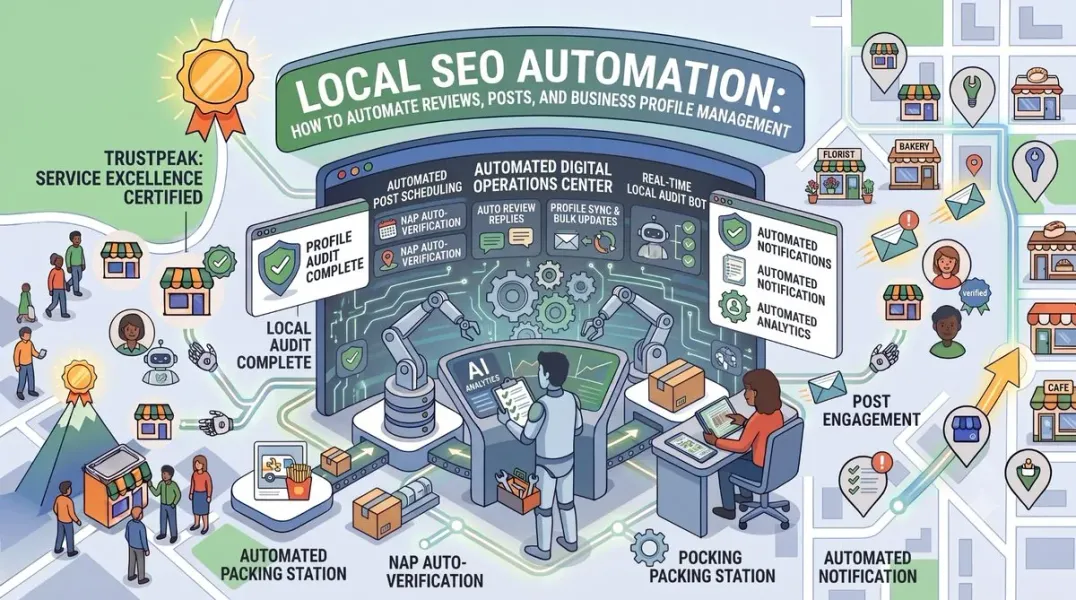
The Three Layers of Local SEO Automation
Layer 1: Scheduled publishing Queue content (posts, review requests, updates) to publish automatically on a schedule. Lowest complexity, fastest payoff.
Layer 2: Trigger-based workflows Actions fire in response to events. A review arrives → notification sent → response drafted → manager approves. Higher complexity, higher leverage.
Layer 3: Integrated reporting and monitoring Data flows from GBP, review platforms, website analytics, and call tracking into unified dashboards. Alerts fire when something goes wrong.
Most small businesses should start at Layer 1, add Layer 2 selectively, and only pursue Layer 3 when managing multiple locations or high volume.
What This Guide Covers
- Page 1: What automation can and can’t do, and where it breaks
- Page 2: Automating review generation, monitoring, and responses
- Page 3: Automating Google Business Profile posts
- Page 4: Automating profile management, citations, and reporting
- Page 5: Tools, workflows, mistakes, and conclusion
Page 2: Automating Reviews
Automating Review Generation
Review generation is the highest-ROI automation in local SEO. It’s repetitive, rule-based, and directly tied to rankings and conversion.
The automated workflow:
- Trigger: Customer completes a transaction (appointment, purchase, service call)
- Delay: Wait 1–4 hours for the experience to settle
- Action: Send SMS or email with direct review link
- Follow-up: If no review after 3 days, send one reminder
- Final nudge: If still no review after 7 days, send one last message
- Stop: Don’t continue after two follow-ups Where this integrates:
-
CRM (HubSpot, Salesforce, ServiceTitan, Jobber)
-
POS systems (Square, Toast, Clover)
-
Booking platforms (OpenTable, Calendly, Acuity)
-
Practice management (Dentrix, Kareo) Tools that handle this:
-
Podium
-
Birdeye
-
GatherUp
-
NiceJob Sample automation rules:
| Trigger | Delay | Channel | Message |
|---|---|---|---|
| Appointment completed | 2 hours | SMS | Initial review request |
| No review after 3 days | 72 hours | SMS | Gentle reminder |
| No review after 7 days | 96 hours | Final request | |
| Review submitted | Immediate | Internal | Notify team |
What never to automate:
- Generating fake reviews (policy violation)
- Offering incentives for reviews (policy violation)
- Review gating (policy violation)
- Asking staff to leave reviews
Automating Review Monitoring
Monitoring manually doesn’t scale. Automation ensures you never miss a review.
What to automate:
- Aggregation: Pull reviews from Google, Yelp, Facebook, industry platforms into one dashboard
- Notifications: Alert the right person when a new review arrives
- Routing: Send positive reviews to one channel, negatives to another with higher urgency
- Sentiment analysis: Categorize each review by theme and sentiment
- Escalation: Trigger alerts when negative reviews cross a threshold Routing rules example:
| Review Type | Route To | Response SLA |
|---|---|---|
| 5-star | Marketing coordinator | 48 hours |
| 4-star | Location manager | 48 hours |
| 3-star | Location manager + regional | 24 hours |
| 1–2 star | Owner + regional manager | 12 hours |
| Mentions legal issue | Legal + owner | Immediate |
Tools that handle this:
- Birdeye
- Podium
- Reputation.com
- SOCi
- BrightLocal
Automating Review Responses
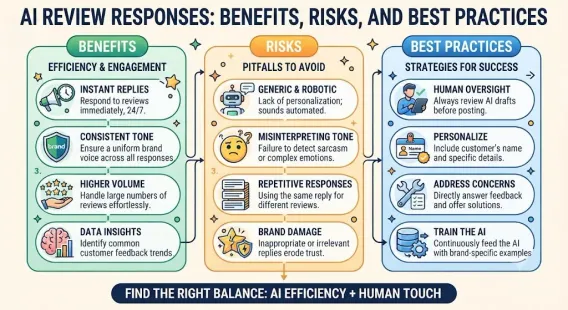
This is where automation gets tricky. Responses need to sound human—and unedited AI output fails that test.
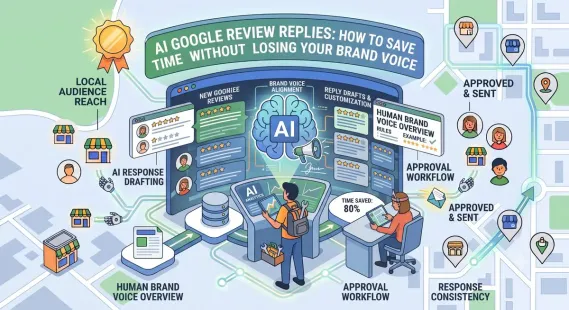
The workflow that works:
- Review arrives → notification sent
- AI drafts response based on your brand voice guide and the review content
- Human reviews and edits the draft (adds specifics, removes filler)
- Human publishes within SLA window
- System logs the response and tracks response rate What to automate:
-
Draft generation
-
Notification and reminders
-
Response tracking and reporting
-
Template suggestions What to keep human:
-
Final approval
-
Personalization details
-
Negative review handling
-
Anything sensitive or legal The efficiency gain: Fully manual responses take 12–15 minutes. AI-drafted, human-edited responses take 3–4 minutes. For 100 reviews a month, that’s 15+ hours saved.
Automating Review Analytics
AI-powered sentiment analysis turns reviews into operational intelligence.
What to automate:
- Theme categorization: Tag each review by topic (service quality, wait time, pricing, staff)
- Sentiment tracking: Measure sentiment trend over time
- Recurring issue detection: Alert when a specific complaint pattern emerges
- Staff mention tracking: Surface which employees are named positively or negatively
- Competitor review analysis: Compare your themes to competitors’ Why this matters: If 30% of your negative reviews mention wait times, you have an operations problem—not a marketing problem. Automation surfaces these patterns months before you’d notice manually.
Review Automation Checklist
- Review request sequence triggered by transaction
- SMS and email channels configured
- Follow-up timing set (3-day, 7-day)
- Review aggregation running across platforms
- Notification routing rules documented
- Sentiment analysis enabled
- AI draft generation configured
- Human approval step in place
- Response time tracking active
- Compliance verified (no incentives, no gating)
Page 3: Automating Google Business Profile Posts
Why Post Automation Is Essential
Google Business Profile “What’s New” posts expire after seven days. That means a business posting monthly has an empty profile 75% of the time.
Weekly posting is the minimum for consistency. For multi-location businesses, that’s a structural requirement that manual posting can’t sustain.
The math:
- 1 location, weekly posts = 52 posts/year
- 10 locations, weekly posts = 520 posts/year
- 50 locations, weekly posts = 2,600 posts/year Manual posting at 50 locations is a full-time job. Automation is the only viable path.
The Batch-and-Schedule Workflow
This is the process that works for most businesses:
Step 1: Monthly content session (60–90 minutes) Write or generate 4–8 post drafts for the month.
Step 2: Apply templates Use a rotating framework:
- Week 1: Informational
- Week 2: Promotional
- Week 3: Trust-building
- Week 4: Seasonal or engagement Step 3: Add images Prepare 1200 x 900 px images for each post. Real photos outperform stock.
Step 4: Load into scheduling tool Upload to Podium, Birdeye, SOCi, or Yext.
Step 5: Schedule publish dates Set dates and times. Stagger across locations if applicable.
Step 6: Set reminder to review Check performance mid-month. Swap anything underperforming.
Tools for Post Automation
| Tool | Best For | Scheduling Support |
|---|---|---|
| Podium | Small to mid-size businesses | Yes |
| Birdeye | Multi-location | Yes |
| SOCi | Franchise and enterprise | Yes, at scale |
| Yext | Brands with many locations | Yes |
| Semrush Local | Agencies and mid-market | Limited |
| Zapier / Make | Custom workflows | Yes, with setup |
Important limitation: Google’s native GBP dashboard has limited scheduling support. For reliable automation, you need a third-party tool with API access.
Multi-Location Post Automation
Posting across many locations requires a different approach than single-location posting.
The three-tier content model:
-
Corporate brand posts (20–30%) Identical across locations. Brand announcements, company milestones, corporate promotions.
-
Templated local posts (50–60%) Same structure, localized details. Corporate provides the template, local teams fill in specifics like local offers, local events, or local staff.
-
Fully local posts (20–30%) Created entirely by local teams. Local community involvement, local events, local news.
Publishing rules:
- Don’t publish identical posts to all locations on the same day
- Stagger publish times across time zones
- Vary images between locations when possible
- Track per-location post performance
Automating Post Generation With AI
AI dramatically accelerates post creation—as long as you edit the output.
The workflow:
- Provide AI with your business context, this month’s themes, and post type requirements
- Generate 4–8 drafts
- Edit each for local specificity and brand voice
- Add real photos
- Schedule via your tool Sample prompt:
“Write 4 Google Business Profile posts for a family-owned HVAC company in Austin, Texas. One informational (AC maintenance tips), one promotional (fall tune-up special), one trust-building (meet our lead technician), one seasonal (preparing for winter). Each post needs a hook in the first 100 characters, a 200-character body, and a call to action. Tone: warm, straightforward, not salesy.”
What to edit:
- Add specific local references
- Replace generic phrasing with your voice
- Verify claims and offers
- Add your own photos
Post Automation Checklist
- Posting tool selected and connected
- Monthly batch session scheduled
- Four-week content framework in place
- Image library prepared
- Posts loaded and scheduled
- Multi-location tier model applied (if applicable)
- AI drafts edited before scheduling
- Mid-month performance check scheduled
- Compliance with Google’s post policies verified
Page 4: Automating Profile Management
Automating Hours and Special Hours
Hours are one of the most commonly broken elements of a GBP—and one of the most consequential, since “open now” searches are so common.
What to automate:
- Regular hours sync: If your hours change seasonally, update in bulk across locations
- Holiday hours: Push holiday schedules to all locations at once, two weeks ahead
- Temporary closures: Mark and unmark closures automatically based on your calendar
- Kitchen/service hours: Push separately from general hours where relevant Tools: Yext, SOCi, and Uberall support bulk hours management. For single locations, calendar reminders work.
Automating NAP and Citation Management
Citation inconsistency is a slow, invisible problem. Automation catches it.
What to automate:
-
Listing distribution: Push NAP to major directories from one source
-
Duplicate detection: Scan for and flag duplicate listings
-
Consistency monitoring: Alert when a directory changes your information
-
Review management across directories: Aggregate reviews from Yelp, Bing, and others Tools:
-
Yext (most comprehensive)
-
Moz Local
-
BrightLocal
-
Uberall
-
Whitespark What to keep human:
-
Deciding which directories matter for your industry
-
Handling disputes with directories
-
Resolving duplicate listings that require manual claims
Automating Photo Management
Photos drive engagement. Automation helps with consistency and freshness.
What to automate:
- Scheduled uploads: Push new photos to profiles on a monthly cadence
- Missing photo alerts: Flag locations that haven’t uploaded in 30+ days
- Photo performance tracking: Identify which photos drive the most views
- Customer photo monitoring: Alert when customers upload photos Tools: SOCi, Yext, and Birdeye support multi-location photo management.
Automating Q&A Management
Q&A appears in search results and influences conversion. Automation keeps it clean.
What to automate:
-
Monitoring: Alert when a new question appears
-
Seeded FAQ answers: Push standard answers to common questions
-
Response routing: Send questions to the right person based on topic
-
Spam detection: Flag questions that violate policies What to keep human:
-
Answering nuanced or sensitive questions
-
Deciding how to handle criticism in Q&A
-
Escalating brand-level questions to corporate
Automating Reporting
Reporting is where automation pays for itself in saved time.
What to automate:
-
Metric aggregation: Pull GBP data across locations into one dashboard
-
Scheduled reports: Email monthly summaries to stakeholders
-
Alerting: Flag anomalies (a location’s calls dropped 40%)
-
Competitor tracking: Monitor competitor review counts and ratings Tools:
-
Looker Studio (custom dashboards)
-
BrightLocal (multi-location reporting)
-
Birdeye (performance dashboards)
-
SOCi (franchise reporting)
-
Local Falcon (geo-grid ranking reports) What to keep human:
-
Interpreting what changes mean
-
Deciding strategic responses to trends
-
Presenting insights to executives
Automating Access Management
Multi-location businesses often have access sprawl—former employees with owner permissions, franchisees with corporate-level access, agencies with broad control.
What to automate:
- Quarterly access audits: Alert when someone hasn’t logged in for 90+ days
- Role verification: Flag users with excessive permissions
- Access request workflows: Route access requests through approval
- Offboarding: Trigger access removal when someone leaves Tools: Most enterprise platforms (SOCi, Yext, Reputation.com) include access management. For smaller businesses, calendar reminders and documentation suffice.
Profile Management Checklist
- Hours automation configured for seasonal changes
- Holiday hours pushed across all locations
- Citation distribution automated
- Duplicate detection running
- Photo upload schedule set
- Missing photo alerts configured
- Q&A monitoring active
- Seeded FAQs pushed
- Reporting dashboard built
- Anomaly alerts enabled
- Quarterly access audit scheduled
- Offboarding workflow documented
Page 5: Tools, Workflows, Mistakes, and Conclusion
Choosing the Right Automation Stack
Single-location business:
| Need | Tool |
|---|---|
| Review generation and responses | Podium or GatherUp |
| Post scheduling | Podium or manual with calendar |
| Citation management | Moz Local or BrightLocal |
| Reporting | GBP dashboard + GA4 |
Multi-location business (5–20 locations):
| Need | Tool |
|---|---|
| Review management | Birdeye or Podium |
| Post scheduling at scale | Birdeye or SOCi |
| Citation management | BrightLocal or Yext |
| Rank tracking | Local Falcon or BrightLocal |
| Reporting | Looker Studio or Birdeye |
Franchise or enterprise (20+ locations):
| Need | Tool |
|---|---|
| Full platform | SOCi, Yext, or Reputation.com |
| Review management | Birdeye or Reputation.com |
| Multi-location reporting | SOCi or Yext |
| Access control | SOCi or Yext |
Budget-conscious approach: Start with one tool that handles your highest-volume problem (usually reviews). Add layers as volume grows.
Building a Complete Automation Workflow
Here’s what a mature local SEO automation system looks like:
Daily (automated):
-
Reviews monitored across platforms
-
Notifications routed to appropriate people
-
Messages flagged for response Weekly (15–30 minutes human):
-
Review responses published
-
Post scheduled for the week
-
Q&A monitored
-
Any anomalies investigated Monthly (90 minutes human + automation):
-
Next month’s posts batched and scheduled
-
Review velocity and sentiment reviewed
-
Citation consistency checked
-
Metrics compiled and reported
-
Photo uploads triggered Quarterly (3–4 hours human + automation):
-
Full GBP audit
-
Competitor benchmarking
-
Access audit
-
Strategy review
-
Tool evaluation
Common Automation Mistakes
- Automating before you have a process. Automating chaos produces faster chaos.
- Publishing unedited AI content. Generic output damages brand and rankings.
- Automating sensitive reviews. Legal, medical, and emotional reviews need human judgment.
- No human approval step. Every automated workflow needs a check before external-facing actions.
- Over-notifying. If every alert goes to everyone, nobody reads any of them.
- Never reviewing tool performance. Automations break. Tools change. Review quarterly.
- Paying for tools you don’t use. Buying platforms before building habits is a common waste.
- Ignoring compliance. Automating fake reviews or gating is a policy violation, not a shortcut.
- No baseline measurement. Can’t prove ROI without before/after data.
- Forgetting the human touch. Local SEO is relational. Automation removes friction, not relationships.
Measuring Automation ROI
Track before and after implementing each automation:
| Metric | Before | After | Impact |
|---|---|---|---|
| Time spent on review responses | 15 min/review | 4 min/review | 73% saved |
| Reviews generated per month | 8 | 18 | 125% increase |
| Posts published per month | 1 | 4.3 | 330% increase |
| Response rate | 45% | 100% | 122% increase |
| Citation inconsistencies | 14 | 2 | 86% reduction |
| Reporting time | 6 hours | 45 min | 88% saved |
For a typical small business, a modest automation stack saves 15–25 hours per month while producing measurably better results.
The Minimum Viable Automation Stack
If you’re just starting, here’s the smallest system that produces real results:
- Review request automation via SMS or email (Podium, GatherUp, or your CRM)
- Post scheduling via a tool or a monthly calendar reminder
- Review monitoring via GBP notifications plus one aggregation tool
- Monthly reporting via a simple spreadsheet That’s it. Two tools, two habits. You can run this as a single-location business for about $100–200/month.
Add complexity only when the simple version is running smoothly.
Quick Automation Checklist
Reviews:
-
Request sequence automated
-
Monitoring across platforms
-
Response draft generation configured
-
Human approval in place
-
Sentiment analysis running Posts:
-
Scheduling tool connected
-
Monthly batch session scheduled
-
Content framework in place
-
AI drafts edited before publishing Profile:
-
Hours automation configured
-
Citation distribution automated
-
Duplicate detection running
-
Photo uploads scheduled
-
Q&A monitoring active Reporting:
-
Dashboard built
-
Monthly reports scheduled
-
Anomaly alerts configured
-
Metrics tied to revenue Governance:
-
Access audit scheduled quarterly
-
Offboarding workflow documented
-
Compliance verified across all tools
A Realistic Automation Timeline
| Timeframe | Focus |
|---|---|
| Month 1 | Review requests + monitoring |
| Month 2–3 | Post scheduling + reporting dashboard |
| Month 4–6 | Citation automation + Q&A management |
| Month 6–12 | Refinement, additional locations, deeper reporting |
| Year 2+ | Full platform consolidation where warranted |
Conclusion
Local SEO automation isn’t about removing humans from the process. It’s about removing the friction that stops humans from doing the work consistently.
The framework is straightforward:
- Automate the repeatable. Review requests, post scheduling, citation distribution, reporting.
- Keep humans on the relational. Response approval, sensitive reviews, strategy, judgment.
- Layer your stack. Start with the highest-volume problem. Add complexity only when the simple version works.
- Measure the impact. Track time saved and metrics improved against a baseline. Most local businesses fail at consistency, not capability. Automation solves consistency. That’s its real value.
Start with review requests this week. Add post scheduling next month. Build toward a system that runs whether you’re paying attention or not—because the businesses that win locally are the ones still posting, still responding, and still showing up when everyone else has gotten busy.
Call to Action
Want a complete automation blueprint? Download our free Local SEO Automation Kit, including a review request workflow template, a post batching calendar, a tool comparison sheet, and a monthly automation ROI tracker. [Link to kit]
FAQs
What parts of local SEO can be automated?
Review requests, review monitoring, post scheduling, citation distribution, hours management, Q&A monitoring, and reporting are all highly automatable. Category selection, sensitive review responses, and strategy require human judgment.
Can I automate Google Business Profile posts?
Yes, but not natively. Google’s dashboard has limited scheduling. Third-party tools like Podium, Birdeye, SOCi, and Yext support post scheduling and bulk publishing across locations.
Is it against Google’s policies to automate reviews?
Automating review requests is fine. Automating review generation—creating fake reviews—is a policy violation that can get your profile suspended. Review gating and incentivizing reviews are also prohibited.
What’s the best tool for local SEO automation?
It depends on your size. Single-location businesses do well with Podium or GatherUp. Multi-location businesses benefit from Birdeye or BrightLocal. Franchises and enterprises typically need SOCi, Yext, or Reputation.com.
How much time does local SEO automation save?
A typical small business saves 15–25 hours per month. Response times drop from 12–15 minutes per review to 3–4 minutes. Reporting time drops by 80–90%.
Should I use AI to write review responses?
Yes, as a drafting tool—but always edit before publishing. AI drafts tend to be generic. Adding specificity and brand voice is what makes responses effective.
Can automation handle negative reviews?
Automation can monitor, route, and draft. Humans must handle the final response, especially for legal, medical, or emotionally charged reviews.
How many locations can be managed with automation?
Manual management works up to about 5 locations. Beyond that, a platform is essential. Enterprise tools like SOCi and Yext handle thousands of locations.
What should I automate first?
Review requests. It’s the highest-ROI automation with the lowest complexity. Get review generation running, then add monitoring, then posts, then citations.
Do I need expensive tools to start?
No. A review request tool and a spreadsheet can take a single-location business a long way. Add paid tools when volume makes manual work unsustainable—usually around 40+ reviews per month.
Internal & External Links
Internal links: Replace these with your own URLs.
Grow Your Google Maps Ranking on Autopilot
Stop spending hours every week manually replying to customer reviews and writing Google posts. Busirank automates your Google Business Profile to boost your local SEO rankings and turn searchers into paying clients.
 Busirank Team