 Busirank Team
Introduction
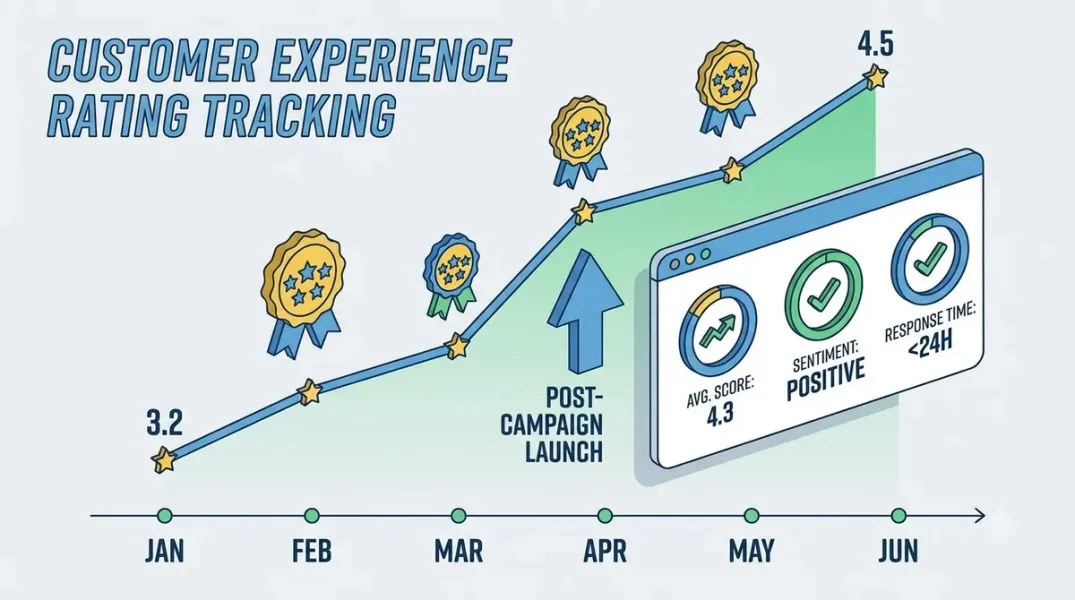
A customer experience campaign—a new training program, a revised service process, a faster response policy, a new feedback loop—is launched with the expectation that ratings will improve. The campaign runs, the team works hard, and then someone checks the rating and asks: did it work?
The answer is harder to produce than it looks. Ratings move for many reasons, most of which have nothing to do with the campaign. A single one-star review can drop a five-star average. A seasonal influx of new customers can change the mix. A competitor’s closure can bring new customers with different expectations. A change in who is being asked to review can shift the average without any change in the underlying experience.
Tracking rating changes credibly requires controlling for as much of this noise as possible and interpreting the result with appropriate caution. This guide explains how.
Why Average Rating Is a Blunt Instrument
The average rating is the most visible metric, and the least sensitive. It moves slowly, it is dominated by historical reviews, and it can mask significant changes in the distribution.
A business with 500 reviews and an average of 4.3 has a large base of historical ratings. A campaign that improves the experience for new customers will shift the average only gradually, because the new reviews are a small fraction of the total. The average may barely move even if the campaign is working.
The distribution is more sensitive. The share of one-star and two-star reviews, the share of five-star reviews, and the ratio between them change faster than the average because they are driven by recent reviews rather than the full history. A campaign that reduces one-star reviews from 8 percent to 5 percent has achieved something real, even if the average rating has not visibly moved.
Track both, but weight the distribution more heavily when evaluating a campaign’s early effect.
Defining the Campaign Window and the Baseline
The first design decision is the campaign window—when the campaign started and when it ended—and the baseline against which it will be compared.
The campaign start date is when the new process, training, or policy went live for customers, not when it was announced internally. The end date is when the campaign concluded, or the evaluation date if the campaign is ongoing.
The baseline is a period before the campaign that represents the “before” state. The cleanest baseline is the same period in the prior year, which controls for seasonality. Where year-over-year data is unavailable, use the months immediately preceding the campaign and note the limitation.
For a campaign that runs for several months, evaluate in phases: the first month after launch, the first quarter, and the first six months. Early effects may be visible in the distribution before they appear in the average.
Choosing the Metrics That Matter
A campaign evaluation should track a small set of metrics, chosen in advance, that together tell the story.
Share of negative reviews—the percentage of reviews in the period that are one or two stars. This is the most direct measure of whether the campaign reduced the worst experiences.
Share of five-star reviews—the percentage of reviews that are five stars. This shows whether the campaign increased the best experiences.
Average rating of new reviews—the average rating of reviews received in the period, separate from the all-time average. This is more sensitive than the cumulative average because it reflects recent experience.
Review volume—the number of reviews received. A campaign that reduces complaints but also reduces review volume may be suppressing feedback rather than improving experience.
Topic-level sentiment—the sentiment of reviews mentioning the topics the campaign targeted. A campaign about wait times should be evaluated on sentiment about wait times, not on overall sentiment alone.
Review velocity—the rate of new reviews, as covered in our guide to review velocity. A campaign may change velocity if it changes who is asked to review.
Choose these metrics before the campaign launches. Choosing after seeing the data invites cherry-picking.
Controlling for Confounds
Several factors can move ratings independently of the campaign. A credible evaluation acknowledges and, where possible, controls for them.
Seasonality. Customer mix and expectations vary by season. Compare to the same period last year, or to a control location that did not run the campaign.
Review solicitation changes. If the campaign included a review request push, the new reviews may come from a different population than the baseline. Note the change and interpret accordingly.
External events. A local event, a competitor change, or a widely reported incident can shift ratings. Note any known external factors in the evaluation.
Staffing changes. A campaign that coincides with staff turnover may show mixed results because the experience changed for reasons unrelated to the campaign.
Platform changes. Google occasionally changes how reviews are displayed or filtered. A change in the visible reviews may reflect a platform change rather than a campaign effect.
Where a control location exists—a similar location that did not run the campaign—compare the campaign locations to the control. The difference between the two is a cleaner estimate of the campaign’s effect than the campaign locations alone.
Analyzing the Data
With the metrics and controls defined, the analysis follows a sequence.
Start with the distribution. Compare the share of one-star, two-star, three-star, four-star, and five-star reviews in the baseline period and the campaign period. Note which categories moved and by how much.
Move to the new-review average. Compare the average rating of reviews received in each period. This is more sensitive than the cumulative average and shows whether recent experience has changed.
Look at topic-level sentiment. For the topics the campaign targeted, compare sentiment in the baseline and campaign periods. Read a sample of reviews in each period to understand the text behind the numbers.
Check volume. Compare the number of reviews in each period. A campaign that changes the number of reviews may be changing who is reviewing, which affects interpretation.
Bring in the control if available. Compare the campaign locations to the control locations on the same metrics. The difference between them is the campaign effect estimate.
Look for unintended consequences. Did the campaign improve the target topic but worsen another? Did it reduce complaints but also reduce positive mentions? The topic-level view catches these.
Interpreting With Appropriate Caution
The evaluation should state its conclusions with the appropriate level of confidence. A finding that “one-star reviews declined from 9 percent to 6 percent in the campaign period, a change that is larger than the control locations and consistent with the campaign’s target” is more credible than one that says “the campaign reduced one-star reviews.”
State the limitations. Sample size, seasonality, concurrent changes, and the self-selection of reviewers all limit what can be concluded. Acknowledging the limitations makes the evaluation more trustworthy, not less.
Where the evidence is ambiguous, say so. An ambiguous result is a finding: the campaign may not have worked, or it may have worked in ways the metrics did not capture. Either conclusion is more useful than false certainty.
Acting on the Findings
The findings should feed into a decision: continue the campaign, adjust it, or end it. Each decision should be documented with the reasoning and the evidence.
If the campaign improved the target metrics without worsening others, continue and consider extending it to other locations. If it improved some metrics but not others, adjust the campaign to address the gaps. If it did not improve the target metrics, investigate whether the implementation was faithful before concluding the concept failed.
Document the evaluation for the next campaign. The record of what was tried, what was measured, and what was found is the most valuable input to future customer experience work.
Conclusion
Tracking rating changes after a customer experience campaign is harder than checking the average, but the effort produces a credible answer to the question the campaign was meant to answer. Define the window and baseline, choose the metrics in advance, control for confounds, analyze the distribution and the new-review average, and interpret with appropriate caution. The result is a finding the team can act on and a record that makes the next campaign better.
Call to Action
Before your next customer experience campaign, define the campaign window, the baseline, and the metrics you will use to evaluate it. Identify a control location if one is available. After the campaign, run the analysis and document the findings alongside the decision.
FAQs
Should I track the average rating or the distribution?Both, but the distribution is more sensitive for campaign evaluation. The average is dominated by historical reviews; the distribution reflects recent experience.
How long after a campaign should I wait to evaluate?Evaluate in phases: the first month, the first quarter, and the first six months. Early effects show in the distribution before the average moves.
What is a control location?A similar location that did not run the campaign. Comparing campaign locations to the control isolates the campaign effect from other factors.
What if ratings declined during the campaign?Investigate before concluding the campaign failed. Check implementation fidelity, confounds, and topic-level sentiment. The campaign may have worked on its target while another factor drove the decline.
How do I report an ambiguous result?State the ambiguity and the limitations. A finding of “mixed evidence” is more useful than false certainty, and it points to what to investigate next.
Internal and External Links
Internal links:
- How to Compare Customer Sentiment Before and After a Service Improvement
- How to Measure Review Growth Over Time Using Review Velocity
- How to Build Monthly Local Marketing Reports That Clients Can Understand
External links:
- Google Business Profile APIs: Reviews reference
- Google Business Profile Help: Understand your business insights
- BrightLocal: Local Consumer Review Survey
Grow Your Google Maps Ranking on Autopilot
Stop spending hours every week manually replying to customer reviews and writing Google posts. Busirank automates your Google Business Profile to boost your local SEO rankings and turn searchers into paying clients.

 Busirank Team