 Busirank Team
Introduction
A business changes something—a new process, a new menu, a new staffing model, a new response time—and the team believes it has improved the customer experience. Belief is not evidence. The change may have worked, may have made no difference, or may have quietly made something else worse.
Customer sentiment analysis is how the business finds out. Sentiment is the emotional tone of customer feedback—positive, negative, or neutral—and the topics that drive it. Comparing sentiment before and after a change shows whether the change moved the needle, and text analysis of reviews shows why.
The challenge is that sentiment is noisy. Reviews are subjective, volume varies, and external factors—seasonality, competitor actions, local events—affect what customers say. A credible comparison controls for as much of this as possible and interprets the result with appropriate caution. This guide explains how to design that comparison.
How to Build Monthly Local Marketing Reports That Clients Can Understand
What Sentiment Analysis Measures
Sentiment analysis takes customer feedback and assigns it a polarity—positive, negative, or neutral—and often a set of topics or themes. In the context of Google reviews, it can be applied at several levels.
Overall polarity is the average tone of reviews in a period. A business whose reviews are 70 percent positive and 20 percent negative has a different sentiment profile from one that is 50/50.
Topic-level sentiment breaks the analysis down by what customers are talking about—service, speed, staff, price, quality, cleanliness, wait times. Each topic has its own sentiment, and changes may appear in one topic while others remain stable.
Rating distribution is a crude but reliable sentiment signal. The share of five-star, four-star, three-star, two-star, and one-star reviews in a period shows the shape of customer opinion.
Text-based themes go beyond polarity to identify what customers are saying—the specific complaints, the specific praise, the specific requests. This is often the most actionable output of sentiment analysis.
The right combination depends on the question. A general “did the change help?” question uses overall polarity and rating distribution. A “what changed?” question uses topic-level sentiment and text themes.
Designing a Before-and-After Comparison
A credible comparison requires four design decisions.
Define the change date and the analysis windows. The change date is when the new process, menu, or model went live—not when it was announced. The before window is a defined period before the change date; the after window is a defined period after. Both should be long enough to include enough reviews for statistical meaningfulness and short enough to avoid confounds from other changes. Three months before and three months after is a common starting point; longer windows are better for low-volume locations.
Control for seasonality. If the change happened in June and the comparison uses April–May as “before” and June–July as “after,” the difference may reflect summer rather than the change. The cleanest control is a year-over-year comparison: the same months in the prior year as the baseline. Where year-over-year data is unavailable, compare the change location to similar locations that did not change, if such locations exist.
Control for volume. A change that coincides with a review-generation campaign will show a sentiment shift that is partly driven by who was asked to review. Note any concurrent changes that could affect the review population, and interpret accordingly.
Choose the metric before looking at the data. Decide in advance whether the success criterion is average rating, share of negative reviews, sentiment polarity, or a specific topic’s sentiment. Choosing the metric after seeing the data invites cherry-picking.
Collecting and Preparing the Data
The data comes from review exports and, where available, from the platform’s sentiment analysis. The Google Business Profile APIs expose reviews with timestamps, ratings, and text, which is sufficient for basic analysis. Review management tools often provide sentiment scoring and topic classification.
Prepare the data by separating reviews into the before and after windows, by location and by location group if applicable. Clean out reviews that are clearly outside the period of interest—a review from three years ago should not be in either window. Separate reviews by source if you have multiple platforms, since sentiment norms differ by platform.
For text analysis, a simple approach is to read a sample of reviews in each window and code them manually for themes. For larger volumes, use a text analysis tool or an LLM-based classifier, with human validation of a sample. The output is a list of themes with counts and example quotes, which is more useful than a single sentiment score.
Analyzing the Results
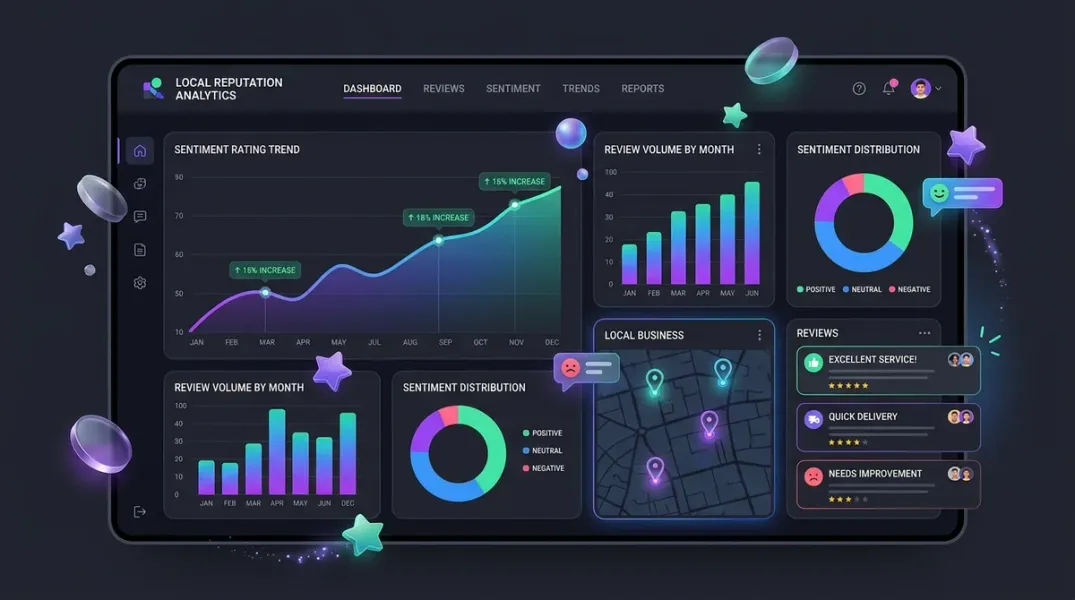
Start with the high-level metrics: average rating, rating distribution, and overall sentiment polarity for each window. Compare the before and after values and note the direction and size of the change.
Then go to the topic level. Which topics improved? Which worsened? A change that improves speed but worsens staff friendliness is a partial success, and the topic-level view shows it. A change that leaves overall sentiment stable but shifts the topic mix—fewer complaints about wait times, more about price—is a change in what customers care about, which is itself informative.
Then read the text. The numbers tell you whether something changed; the text tells you what. Sample the reviews in each window, focus on the reviews that mention the topic the change was intended to affect, and read for specific evidence. A before-window review saying “the wait was unacceptable” and an after-window review saying “much faster than before” is the qualitative evidence that supports the quantitative result.
Finally, look for unintended consequences. Did the change improve the target topic but create a new problem elsewhere? Sentiment analysis is good at catching these because it does not assume the change had only the intended effect.
Interpreting With Appropriate Caution
Sentiment comparisons are suggestive, not definitive. Several factors limit what can be concluded.
Sample size. A location with ten reviews per month will have thirty reviews in a three-month window—enough for a directional read, not enough for statistical confidence. Low-volume locations need longer windows or pooled analysis across locations.
Reviewer self-selection. Customers who leave reviews are not representative of all customers. A sentiment shift in reviews may reflect a shift in who is reviewing rather than a shift in the underlying experience.
Confounding changes. Other changes may have occurred in the same period—staff turnover, competitor openings, local events, pricing changes. The comparison attributes the difference to the change of interest unless confounds are controlled.
Text analysis limitations. Automated sentiment analysis misclassifies sarcasm, mixed sentiment, and domain-specific language. Human validation of a sample is essential before drawing conclusions from automated scores.
Present the findings with these limitations stated. A finding that says “review sentiment about wait times improved in the after window, though the sample is small and other factors may have contributed” is more honest and more useful than one that says “the change worked.”
Acting on the Findings
The findings should feed into one of three decisions: keep the change, adjust it, or reverse it.
If sentiment improved in the target topic without worsening elsewhere, the change is working and should be kept and documented. If sentiment improved in the target topic but worsened elsewhere, the change may need adjustment—keep the improvement, address the new problem. If sentiment did not improve or worsened, the change may not be working; investigate why before reversing, because the issue may be implementation rather than concept.
Document the analysis and the decision. The next time a similar change is proposed, the record shows what happened last time.
Conclusion
Comparing customer sentiment before and after a service improvement is how a business learns whether its changes actually worked. It requires a defined change date, controlled windows, a pre-chosen metric, and careful interpretation. The result is not a definitive proof but a credible signal, and a credible signal is far better than a belief. The businesses that measure sentiment around changes make better changes over time, because they know which ones worked.
Call to Action
Pick one recent service change and run a before-and-after sentiment comparison using the last six months of reviews. Choose your metric in advance, control for seasonality with a year-over-year baseline, and read a sample of reviews in each window. Use the findings to decide whether to keep, adjust, or reverse the change.
FAQs
How many reviews do I need for a meaningful comparison?As a rule of thumb, at least thirty reviews in each window for a directional read. Low-volume locations should use longer windows or pool across locations.
What is the best window length?Three months before and after is a common starting point. Longer windows reduce noise but increase the chance of confounding changes.
How do I control for seasonality?Use a year-over-year comparison—the same months in the prior year as the baseline—or compare to similar locations that did not change.
Can I use automated sentiment analysis?Yes, with human validation of a sample. Automated tools misclassify sarcasm and mixed sentiment, so human review is essential before drawing conclusions.
What if the results are ambiguous?State the ambiguity. A finding that says the evidence is mixed is more useful than a false certainty. Investigate the topic-level detail and the text before deciding.
Internal and External Links
Internal links:
- How to Measure Review Growth Over Time Using Review Velocity
- How to Track Changes in Review Ratings After a Customer Experience Campaign
- How to Build Monthly Local Marketing Reports That Clients Can Understand
External links:
- Google Business Profile APIs: Reviews reference
- Google Cloud Natural Language API: Sentiment analysis
- BrightLocal: Local Consumer Review Survey
Grow Your Google Maps Ranking on Autopilot
Stop spending hours every week manually replying to customer reviews and writing Google posts. Busirank automates your Google Business Profile to boost your local SEO rankings and turn searchers into paying clients.
 Busirank Team