 Busirank Team
Introduction
An agency managing ten clients from a single, flat workspace is an agency one mistake away from a serious incident. A staff member with access to every listing can edit a client’s hours by accident, publish a post meant for another brand, or export data that should not leave the client’s account. The workspace that felt convenient at three clients becomes a liability at thirty.
Separating client workspaces is not about distrust. It is about architecture. A workspace is a boundary: it defines what data is visible, who can access it, and what actions are possible within it. When the boundary is drawn correctly, teams can work efficiently without constantly worrying about crossing a line. When it is drawn incorrectly—or not at all—every action requires vigilance, and vigilance fails under deadline pressure.
This guide explains how to architect separate workspaces for multi-client management, using Google Business Profile’s account structure and the workspace features of the management tools agencies rely on.
Why Workspace Separation Matters
The risks of a shared workspace fall into three categories, and each is worth understanding before designing the separation.
Permission risk is the most immediate. In a shared workspace, access is often granted at the workspace level rather than the client level. A coordinator who needs to update one client’s holiday hours is given access to every client’s listings, because the tool does not offer a more granular option. The access is broader than the task requires, and the broader access persists after the task is done.
Data risk follows from permission risk. A client’s performance data, review history, and unpublished campaign plans are visible to anyone with workspace access, including staff who have no reason to see them. In a competitive market, that visibility is a confidentiality problem.
Operational risk is the least discussed and often the most damaging. When all clients share a workspace, the workspace’s naming conventions, location groups, and publishing schedules become a compromise among every client’s needs. A schedule that suits a restaurant chain does not suit a dental practice, and forcing both into one structure produces a workspace that suits neither.
Separate workspaces resolve these risks by aligning the boundary with the client relationship. Each client has its own space, its own structure, and its own access list.
Using Google Business Profile’s Account Structure
Google Business Profile provides the native architecture for separation through its account types. Understanding these types is the prerequisite for designing a multi-client workspace structure.
Google supports four account types: Personal, Organization, Location Group, and User Group. A personal account is the Google account an individual signs in with. An organization account is the overlying entity that represents the agency or the client. Location groups and user groups live inside an organization account. Location groups manage sets of locations, allowing bulk actions and permission inheritance; locations can belong to multiple location groups at once. User groups enable scalable permission management by granting access to multiple location groups, so that adding a person to a user group grants them access to every location underneath.
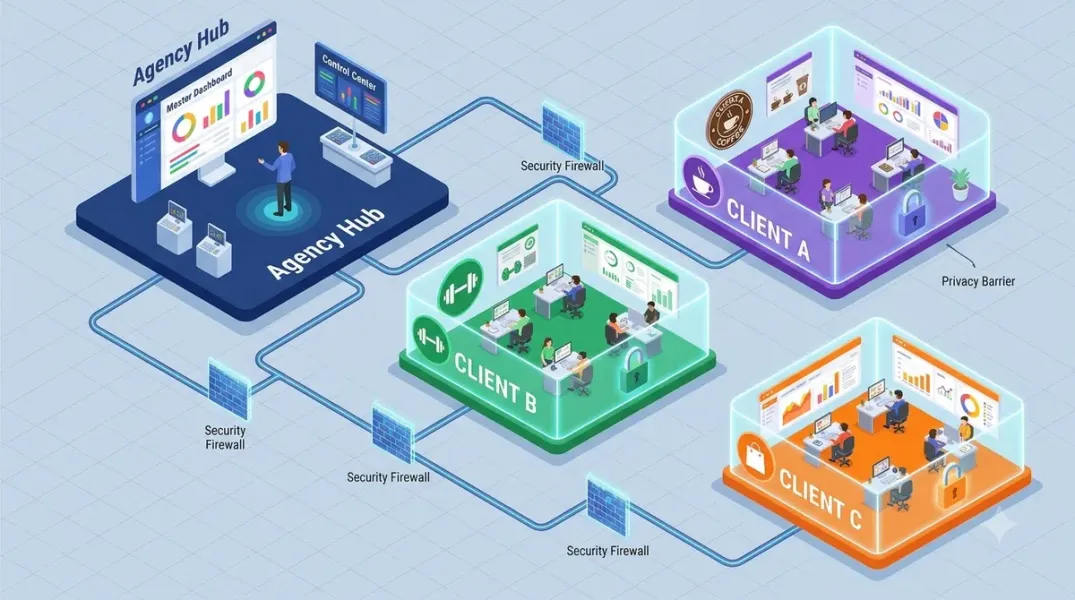
For an agency, the cleanest structure is one organization account per client, or one organization account for the agency with a separate location group per client. The first option provides the strongest separation: each client’s listings, location groups, and user groups are entirely contained within the client’s organization account, and agency staff are invited as admins to that account. The second option is more efficient for the agency but requires discipline to ensure that location groups and user groups do not cross client boundaries.
Google’s documentation notes that locations can be part of multiple organizations, which means a listing can be managed from more than one organization account if necessary. This is useful for transition periods—when a client is moving from one agency to another, for example—but it should be an exception, not the default.
Designing the Separation Model
The right separation model depends on the agency’s size, the clients’ requirements, and the tools in use. Three models are common.
One workspace per client is the strongest model. Each client has its own workspace, its own location groups, its own user groups, and its own access list. Agency staff who work on the client are added to that client’s workspace; staff who do not work on the client have no access. This model is the easiest to audit and the easiest to explain to clients, because the boundary is obvious.
One workspace with client-level location groups is a middle model. The agency maintains a single workspace, but each client’s locations are placed in a separate location group, and permissions are granted at the location group level. This model is more efficient for the agency but requires rigorous discipline: a location that is accidentally placed in the wrong group creates a permission breach, and a user group that spans multiple client groups creates exactly the cross-client access the separation was meant to prevent.
Hybrid model uses separate workspaces for large or sensitive clients and a shared workspace with location groups for smaller clients. This model is pragmatic but should be documented clearly, because the inconsistency can confuse staff and auditors.
For most agencies, the first model—one workspace per client—is the right default. The efficiency cost is small, and the risk reduction is large.
Permissions Within a Client Workspace
Separating workspaces is necessary but not sufficient. Within each client workspace, permissions must still be designed.
Google’s location group model supports two roles: Owner and Manager. Both owners and managers can create, edit, and delete locations within a location group. Owners can manage the group’s settings and users; managers cannot. The practical design is to assign owner-level access sparingly—to the account lead and perhaps a senior team member—and manager-level access to the staff who do the day-to-day work.
User groups simplify this at scale. Instead of adding each staff member to each client workspace individually, the agency creates a user group for each role—“Local SEO Coordinators,” “Content Team,” “Account Leads”—and grants that user group access to the client workspaces where the role applies. When a new coordinator joins, they are added to the user group and inherit access to the appropriate clients. When a coordinator leaves, they are removed from the user group and lose access everywhere at once.
The user group model requires care. A user group that has access to every client workspace recreates the shared-workspace problem at the user group level. Create user groups per client or per client tier, not one global group.
Onboarding and Offboarding Clients
Workspace separation makes client transitions cleaner, but only if the onboarding and offboarding process is designed for it.
Onboarding should create the client’s workspace before any work begins. The process should include creating the organization account or location group, importing the client’s locations, setting up the client’s user groups, and documenting the access list. The client’s Google account should be invited as an owner of their organization account, so that the client retains ultimate control even if the agency relationship ends.
Offboarding should remove the agency’s access without disrupting the client’s operations. Because the client owns the organization account, the agency can be removed as an admin, and the client retains their listings, location groups, and data. If the agency owns the account, the offboarding process should include transferring ownership to the client, which is a more involved process and should be planned in advance.
Document the access list at onboarding and review it at offboarding. An agency that cannot list who has access to a client’s workspace cannot credibly claim to have protected it.
Auditing the Separation
Separation degrades over time. Staff change roles, clients are added and removed, and temporary access is granted for projects and never revoked. A quarterly audit is the control that keeps the separation intact.
The audit checks four things. Workspace inventory: does every active client have a workspace, and does every workspace correspond to an active client? Access list: does every person with access to a client workspace still need it, and is their role appropriate? Location mapping: is every location in the correct client workspace or location group, with no cross-client placement? User group membership: are user group memberships current, and do any user groups span client boundaries unintentionally?
The audit should be documented. The record is useful for client conversations, for compliance, and for the next audit.
Conclusion
Separating client workspaces is an architectural decision, not an administrative one. It determines who can see what, who can change what, and what happens when a relationship ends. Use Google’s account structure to create the boundaries, design permissions within each workspace, manage onboarding and offboarding deliberately, and audit the separation quarterly. The result is an agency that can scale its client base without scaling its risk.
Call to Action
Audit your current workspace structure this week. Identify every client whose listings share a workspace with another client, and assess the permission and data risk. For each, decide whether to separate the workspace or to implement client-level location groups with strict permissions. Document the decision and begin the migration with your highest-risk clients.
FAQs
Do I need a separate Google account for each client?No. You can manage multiple clients from one personal Google account, provided each client has its own organization account or location group and permissions are granted at the appropriate level.
Can a location belong to more than one organization account?Yes, Google allows locations to be part of multiple organizations. This is useful for transitions but should be an exception rather than the default.
What is the difference between an owner and a manager in a location group?Both can create, edit, and delete locations within the group. Owners can also manage the group’s settings and users; managers cannot.
How do user groups simplify permissions?You add people to a user group and grant that user group access to location groups. Everyone in the user group inherits access to the locations underneath, so you do not configure each person individually.
What should happen to a client’s workspace when the engagement ends?If the client owns the organization account, remove the agency’s admin access. If the agency owns the account, transfer ownership to the client as part of offboarding.
Internal and External Links
Internal links:
- How to Control Staff Access to Individual Business Locations
- How to Use Activity Logs to Review Changes Made to Business Profiles
- How to Organize Google Business Profiles Into Groups for Easier Management
External links:
- Google Business Profile APIs: Manage locations at scale
- Google Business Profile Help: Create a business group
- Google Business Profile Help: Manage owners and managers
Grow Your Google Maps Ranking on Autopilot
Stop spending hours every week manually replying to customer reviews and writing Google posts. Busirank automates your Google Business Profile to boost your local SEO rankings and turn searchers into paying clients.
 Busirank Team