 Busirank Team
Introduction
The most common access-control failure in multi-location management is not a malicious insider. It is a well-intentioned coordinator who needed to update one location’s holiday hours and was given access to every location in the account because the tool did not offer a more precise option. The coordinator does their job correctly, and then retains access to every listing indefinitely, because nobody remembers to revoke it.
This is a design problem, not a people problem. Access control that operates at the account level forces a choice between granting too little access (and blocking work) and granting too much (and creating risk). Access control that operates at the location or location group level removes the trade-off: staff receive exactly the access their role requires, and nothing more.
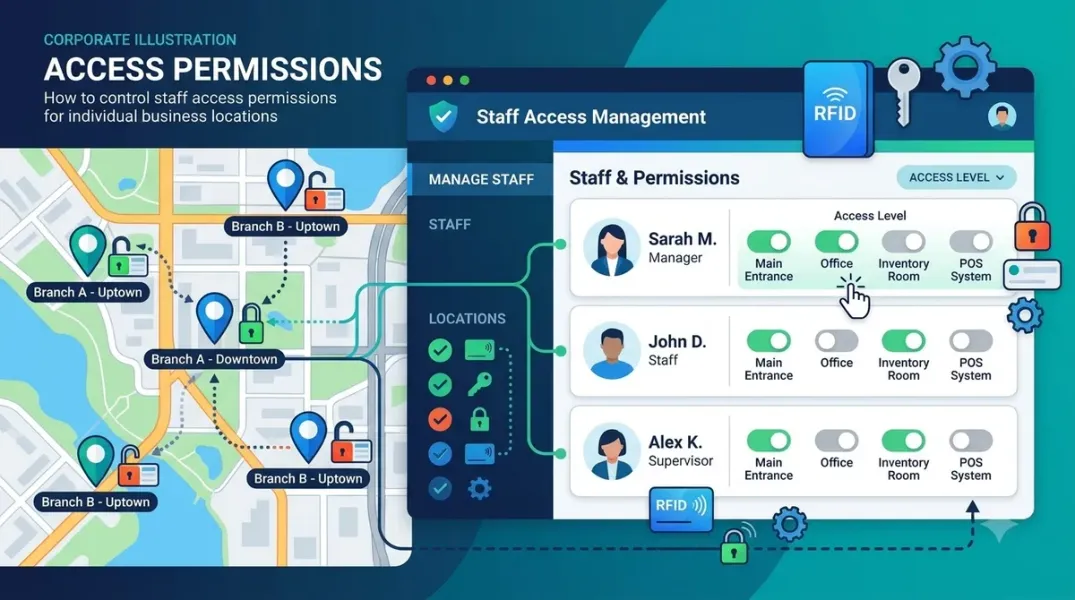
Google Business Profile supports location-level and location-group-level permissions through its owner and manager roles and its user groups. This guide explains how to use them to build an access model that scales.
The Roles: Owner and Manager
Google Business Profile distinguishes two roles at the location and location group level: Owner and Manager.
Owners have full control over the location or location group. They can edit all profile information, manage users, and in the case of a location group, manage the group’s settings. Managers have most of the same access to the profile—they can edit business information, create posts, respond to reviews, and manage photos—but they cannot manage users or transfer ownership. Google’s documentation notes that managers, formerly known as “site managers,” have mostly the same access to the profile as owners.
The practical distinction is this: owners can change who has access; managers cannot. For day-to-day operations—updating hours, responding to reviews, publishing posts—manager access is sufficient and safer. Owner access should be reserved for the people who are accountable for the location or group and who need to manage access, typically a small number of account leads.
At the location group level, both owners and managers can create, edit, and delete profiles within the group. This means a manager of a location group has operational control over every location in the group, which is appropriate for a regional lead but not for a coordinator who works on a single location.
Location-Level vs. Group-Level Access
Access can be granted at two levels, and the right level depends on the scope of the person’s work.
Location-level access is appropriate when a person works on a specific location. A store manager who needs to update their own location’s hours, respond to its reviews, and publish its posts should have manager access to that location only. They should not have access to sister locations, because their work does not require it and the broader access creates unnecessary risk.
Location-group-level access is appropriate when a person works across a set of locations. A regional operations lead who oversees twenty locations in a region should have manager access to the region’s location group, so they can act on any location in the group without needing individual access to each one. When a new location opens in the region and is added to the group, the lead inherits access automatically.
The mistake to avoid is granting group-level access to people whose work is location-specific. A store manager with group-level access can edit every location in the group, which is more access than their role requires.
Using User Groups for Scalable Permissions
Managing access location by location does not scale. At fifty locations and twenty staff, the access matrix has a thousand cells, and maintaining it manually is error-prone. User groups solve this.
A user group is a collection of personal Google accounts. You add people to the user group, then grant the user group management access to one or more location groups. Everyone in the user group inherits access to every location underneath those location groups.
The model works by aligning user groups with roles and location groups with organizational units. Create a user group for “Store Managers – West Region,” grant it manager access to the “West Region” location group, and add each store manager to the user group. When a store manager joins, add them to the user group; when they leave, remove them. The access follows the role, not the individual, which is what makes it maintainable.
For agencies, the same model applies with client boundaries. Create a user group for each client’s account team, grant it access to that client’s location groups, and add the team members. A user group that spans multiple clients recreates the cross-client access problem that workspace separation was meant to prevent.
Google’s documentation notes that user groups can be added directly to location groups from the web interface, and that the My Business Account Management API allows programmatic creation and management of these structures.
Designing the Access Model
A workable access model has four layers, each with a defined scope and role.
Account leads have owner access to the organization account or to all of a client’s location groups. They are accountable for the account and manage access for others. This should be a small group—two or three people at most.
Regional or functional leads have manager access to the location groups they oversee. They can operate on any location in their group but cannot manage users. This layer maps to the organizational structure: regional managers, brand managers, or functional leads.
Location-level staff have manager access to specific locations. They can operate on their own location but not on others. This layer maps to store managers, local coordinators, and on-site staff.
Support and specialist staff have access through user groups that map to their function—for example, a content team user group with manager access to the location groups where content is published. This layer maps to centralized functions that support multiple locations.
Each layer should be documented with the role, the scope, and the user group that implements it. The documentation is the basis for the audit.
Onboarding and Offboarding Staff
Access control fails at the transitions. A new staff member needs access on day one; a departing staff member should lose it on the last day. Without a process, the first happens late and the second happens never.
Onboarding should add the person to the appropriate user groups before their first day. Because the user groups already have the correct permissions, the new person inherits exactly the access their role requires, with no per-listing configuration.
Role changes should move the person between user groups. A coordinator promoted to regional lead moves from the location-level user group to the regional user group; their access expands to match their new scope.
Offboarding should remove the person from all user groups on their last day. If the person had direct access to individual locations outside the user groups—which should be rare—that access should be removed separately.
The process should be owned by a named person, typically the account lead or an operations manager. An access change that depends on someone remembering is an access change that will be missed.
Auditing Access
An access model is only as good as its audit. Quarterly, review the following.
User group membership: is every member still in the right group, and does every group have the members it should? Location group mapping: is every location in the correct group, and are there locations that have not been added to any group? Owner access: who has owner-level access, and does each person still need it? Direct location access: are there people with direct access to individual locations that bypasses the user group model, and should that access be converted or removed?
Document the audit and act on the findings. An access audit that finds issues and does not fix them is a report, not a control.
Conclusion
Controlling staff access to individual locations is a matter of using the right level of permission for the right scope of work. Location-level access for location-specific work, group-level access for group-level work, and user groups to make both maintainable. Define the layers, document the model, manage the transitions, and audit quarterly. The result is an access model that gives staff what they need to do their jobs and nothing more.
Call to Action
Map your current access model this week. List every person with access to your locations, their role, and their scope. Identify anyone with broader access than their role requires, and convert their access to the appropriate user group. Schedule a quarterly audit to keep the model current.
FAQs
What is the difference between an owner and a manager?Owners can manage users and transfer ownership; managers can edit profile information but cannot manage access. Managers, formerly site managers, have most of the same profile access as owners.
Can I grant access to a single location without granting access to others?Yes. You can add a person as a manager of a specific location. For multiple locations, use a location group.
How do user groups work?Add people to a user group, grant the user group access to location groups, and everyone in the user group inherits access to the locations underneath.
Should store managers have group-level access?Generally no. Group-level access is appropriate for regional or functional leads who work across locations. Store managers should have location-level access to their own store.
How often should access be audited?Quarterly, and whenever there is a significant staffing change. The audit should check user group membership, location group mapping, and owner-level access.
Internal and External Links
Internal links:
- How to Separate Client Workspaces When Managing Multiple Local Brands
- How to Organize Google Business Profiles Into Groups for Easier Management
- How to Use Activity Logs to Review Changes Made to Business Profiles
External links:
- Google Business Profile APIs: Manage locations at scale
- Google Business Profile Help: Manage owners and managers
- Google Business Profile Help: About location groups
Grow Your Google Maps Ranking on Autopilot
Stop spending hours every week manually replying to customer reviews and writing Google posts. Busirank automates your Google Business Profile to boost your local SEO rankings and turn searchers into paying clients.

 Busirank Team