 Busirank Team
Introduction
A business profile changes. The hours are different, a category has been added, or a phone number is wrong. Someone made the change—a team member, a client, an agency, or Google itself—and the first question in the investigation is always the same: who changed it, and when?
Without an activity log, that question is unanswerable. The profile shows the current state, not the history of how it got there. The team relies on memory, email threads, and guesswork, and the investigation takes hours instead of minutes. With an activity log, the question is answered in seconds: the change was made by a named user at a specific time, through a specific channel.
Activity logs are not a native, fully featured capability in every Google Business Profile surface. Google’s own edit history is limited, and the Business Profile APIs have retired some admin-related endpoints that previously supported account auditing. This means teams need a combination of native features, third-party tools, and API-based logging to get the visibility they need. This guide explains what is available and how to build a practical activity-log practice.
What Activity Logs Capture
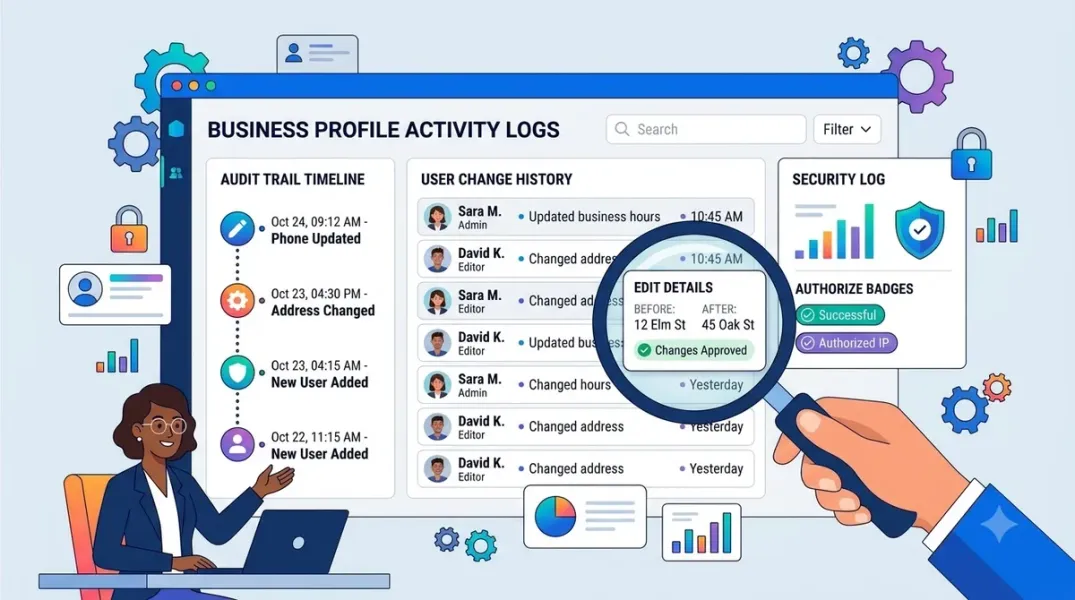
An activity log records the changes made to a profile, who made them, when, and often the source or channel of the change.
The most useful logs capture four dimensions. The change itself: which field was modified, and what the old and new values were. The actor: which user made the change, identified by name or email. The timestamp: when the change occurred, ideally with time zone. The source: whether the change was made manually in the interface, through an API, through a bulk operation, through Google sync, or by a system process.
Third-party tools describe this clearly. Jepto’s activity tab is described as a comprehensive log for tracking updates and modifications, with each action timestamped and an “Edited By” field that indicates the user who made the change. Localith’s activity log records user and system activity across a workspace, including review replies and business information updates, with changes made in bulk, through an API, during Google sync, or by a system process. Ahrefs’ GBP Monitor keeps a historical record of all updates made to listings, from any source, and provides real-time email alerts for changes.
Native Google Features and Their Limits
Google Business Profile provides some native visibility into changes, but it is limited.
The interface shows recent activity and change notifications for a location. When a field changes, the profile may indicate that it was updated, and in some cases whether the change was a “suggested edit” from a user or an “update” from Google itself. This is useful for diagnosing the source of a change, but it is not a comprehensive, exportable log with actor names and timestamps for every field.
Google’s Business Profile APIs have historically supported admin and account management operations, but some admin endpoints have been retired. The changelog notes that changes to accounts, accounts.admins, accounts.invitations, and accounts.locations.admins are now retired in the Google My Business API. This means API-based auditing of admin changes is less available than it once was, and teams that relied on it need alternative methods.
The practical implication is that native Google features are a starting point, not a complete solution. For comprehensive activity logging, teams need third-party tools or a custom logging layer.
Building an Activity Log Practice
A practical activity-log practice has three components: collection, review, and response.
Collection is the act of capturing changes. This can be done through a third-party tool that connects to Google Business Profile and logs changes automatically, through an API-based script that polls the profile and records differences, or through a manual process for low-volume accounts. The collection method should capture the four dimensions described earlier—change, actor, timestamp, and source—and store them in a place the team can access.
Review is the act of examining the log. A daily or weekly review of recent changes catches unauthorized edits, unintended changes, and patterns that suggest a problem. The review should focus on high-impact fields—name, address, phone, hours, categories—and on changes made by unexpected actors.
Response is the act of acting on what the review found. An unauthorized change should be reverted and the actor’s access reviewed. A pattern of changes by a specific user should prompt a conversation about their role or training. A change made by Google should be documented and, if incorrect, corrected through the proper channel.
The practice should be documented, with a named owner and a defined cadence. An activity log that is collected but never reviewed is a data archive, not a control.
Using Logs to Resolve Disputes and Suspensions
Activity logs are most valuable when something goes wrong.
Disputes with clients are resolved by the log. When a client says they did not approve a change, the log shows who made it and when. When a client says a change was made incorrectly, the log shows the old and new values. The log provides an objective record that replaces recollection and blame.
Suspension appeals are strengthened by the log. Google’s suspension process often hinges on whether a change was made legitimately. A log that shows the sequence of changes, the actors, and the sources gives the appeal a factual basis. Practitioners recommend maintaining a centralized audit log so that when a listing is suspended, a clear log of recent edits makes it easier to pinpoint the trigger and file a successful reinstatement appeal.
Internal investigations are faster with the log. When a profile shows incorrect information, the log shows whether the change came from a staff member, a client, a third-party tool, or Google. That distinction determines the fix: a staff error needs training, a client error needs communication, a tool error needs configuration, and a Google error needs correction through Google’s processes.
Alerts vs. Logs
Activity logs and change alerts are related but distinct. A log is a historical record; an alert is a real-time notification. Both are useful, and the best tools provide both.
Alerts catch changes as they happen, which is important for high-impact fields. If a profile’s name or address changes unexpectedly, an alert allows the team to investigate immediately rather than discovering the change days later. Ahrefs’ GBP Monitor, for example, offers real-time email alerts for changes made to profiles, with the option to select specific businesses or receive alerts for all.
Logs catch changes that alerts miss—changes made before the alert was configured, changes made through a channel the alert does not cover, and patterns that are only visible when changes are viewed together over time.
Configure alerts for the fields that matter most, and review the log for the complete picture. The two together provide both immediate awareness and historical context.
Choosing a Logging Approach
The right logging approach depends on the number of locations, the number of users, and the risk profile.
For a small number of locations with a small team, native Google features plus a manual change log may be sufficient. The team records significant changes in a shared document, and the native interface provides a basic check.
For a larger portfolio, a third-party tool is the practical choice. Tools such as Ahrefs’ GBP Monitor, Jepto, Localith, and similar platforms provide automated logging, actor identification, and often alerts and revert functionality. The tool should be evaluated on the fields it logs, the sources it captures, the retention period, and the export options.
For organizations with engineering capacity, an API-based logging layer provides the most control. A script can poll the profile at intervals, compare the current state to the previous state, and record the differences with timestamps. The limitation is that the script sees the state, not the actor, unless the API exposes actor information—which, given the retirement of some admin endpoints, may not be available. A hybrid approach—API logging for field changes plus native or tool-based logging for actor information—is often the most complete.
Conclusion
Activity logs turn a profile from an opaque current state into a documented history. They answer the questions that matter when something goes wrong: who changed it, when, and how. Google’s native features provide a starting point; third-party tools and API-based logging provide the completeness that multi-location operations need. Collect the log, review it regularly, and use it when disputes or suspensions arise. The log is the record that protects the business when memory and goodwill are not enough.
Call to Action
Audit your current activity-logging capability. Can you answer “who changed this field, and when?” for your highest-traffic locations? If not, evaluate a third-party logging tool or build a simple API-based diff logger. Configure alerts for the fields that matter most, and schedule a weekly review of recent changes.
FAQs
Does Google Business Profile have a native activity log?It has limited native visibility into recent changes and change notifications, but not a comprehensive, exportable log with actor names and timestamps for every field. Third-party tools fill this gap.
What should an activity log capture?The change (field and values), the actor, the timestamp, and the source (manual, API, bulk, sync, or system process).
Can I get alerts for changes?Yes, through third-party tools that offer real-time email or other alerts for profile changes.
How do activity logs help with suspensions?A clear log of recent edits helps pinpoint the change that triggered a suspension and supports a reinstatement appeal.
What if I cannot afford a third-party tool?Use native features plus a manual change log for significant fields, and consider a simple API-based diff logger if you have engineering support.
Internal and External Links
Internal links:
- How to Restore a Broken Google Business Profile Connection After Authorization Expires
- How to Control Staff Access to Individual Business Locations
- How to Verify That Business Location Data Is Synced Correctly Across Your Dashboard
External links:
- Ahrefs: About Google Business Profile Monitor
- Jepto: Local Listings Activity
- Google Business Profile APIs: Changelog
Batch complete: Blogs 85–87. Say “c” to continue with Blogs 88–90 (Estimating Automation ROI, Local SEO Software Comparison Checklist, and the Cost of Manual vs. Software Listing Management).
c
The user wants me to continue with blogs 88-90. I need to search for current data on GBP automation ROI, local SEO software features, and the cost of manual vs. software listing management. I’ll perform several searches in parallel to gather this information.
Found 57 web pages
The search results provide useful data. I need to open several of these to extract key statistics and pricing information for the blogs.
Read 6 pagesHow to Automate Google Business Profile Management (2026)Multi-Location GBP + AI: The 2026 Management Guide”Should we manage our 120 locations manually or pay for a platform?” This is the question I’ve discussed with many multi-location retailers. My answer always focuses on opportunity costs. Consider… | Josh BecerraAlternative to Manual GBP Management: When DIY Stops Working15 Best Local SEO Tools for Multi Location 2026
View All
The search results provide sufficient data for the blogs. I’ll now write blogs 88-90 with the full structure, incorporating the pricing and time-saving data.
Continuing with the final batch, Blogs 88–90, in the same full format.
Grow Your Google Maps Ranking on Autopilot
Stop spending hours every week manually replying to customer reviews and writing Google posts. Busirank automates your Google Business Profile to boost your local SEO rankings and turn searchers into paying clients.
 Busirank Team