 Busirank Team
Introduction
Every local SEO platform’s website claims to do everything. Bulk editing, review management, rank tracking, citation sync, AI responses, white-label reporting—the feature lists converge, and the differences disappear into marketing language.
The differences do not disappear in practice. A platform that handles twenty locations elegantly can be unusable at two hundred. A tool with excellent review management may have weak listing sync. A platform with strong reporting may have no approval workflow for posts. The right choice depends on which features matter for your operation, at your scale, and those priorities are specific to you.
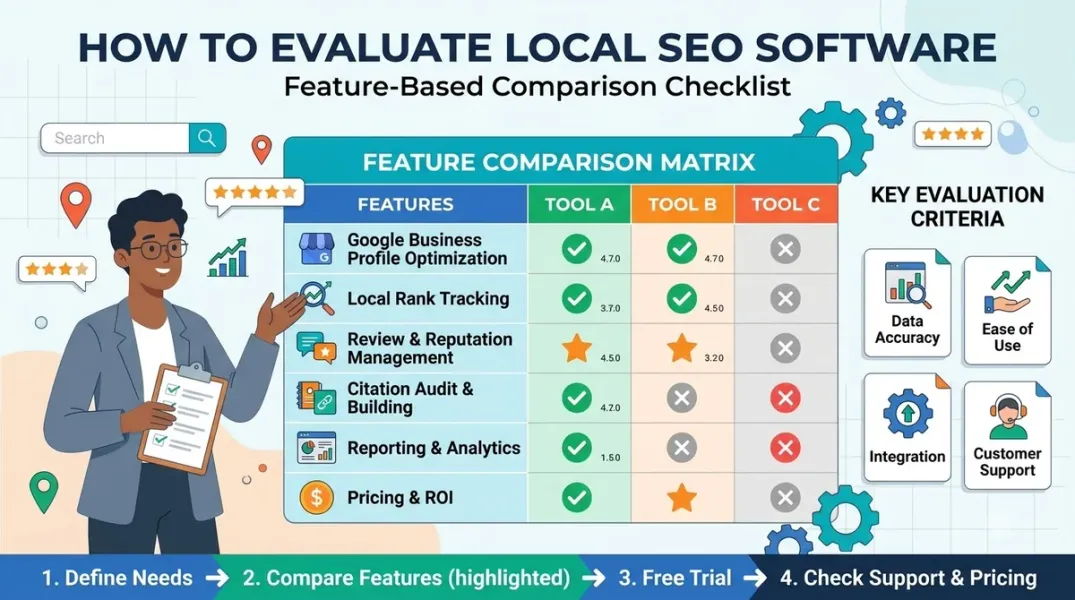
A weighted comparison checklist makes the evaluation systematic. It forces you to define what matters before you look at the tools, scores each tool against those criteria, and produces a comparison that reflects your priorities rather than the vendor’s. This guide explains how to build one.
Start With the Problems, Not the Features
The most common mistake in software evaluation is starting with the feature list. The feature list is the vendor’s framing; the problems are yours.
Start by listing the operational problems the software is meant to solve. For a multi-location business, these typically include: inconsistent data across locations, slow review response, manual posting at scale, lack of visibility into what is changing, difficulty managing permissions, and reporting that takes too long to produce.
Each problem maps to a capability. Inconsistent data maps to listing sync and NAP auditing. Slow review response maps to review monitoring and response workflows. Manual posting maps to bulk posting and scheduling. Lack of visibility maps to activity logs and change alerts. Permission difficulty maps to user groups and role management. Reporting time maps to automated reporting and white-label output.
The checklist should be organized around these problems, not around the vendor’s feature categories. A capability that does not solve a problem you have is not a criterion; it is a distraction.
The Core Criteria for Multi-Location Evaluation
The criteria that matter most for multi-location management fall into a small number of categories. Each should be defined precisely, because “bulk editing” means different things in different tools.
Bulk editing. Can you edit hours, descriptions, categories, attributes, and posts across multiple locations at once? Is the edit applied to all locations or a selected subset? Can you preview before committing? The practical test is whether anything that works one profile at a time stops being used at around five locations—bulk editing is the capability that prevents that.
Rollup and drill-down reporting. Can leadership see the estate view while a branch manager sees their own row in the same document? A tool that requires separate reports for each audience adds reporting time rather than saving it.
Location minimums and per-location pricing at scale. Some enterprise platforms will not sell below a threshold—Uberall, for example, has a 25-location minimum. Per-location pricing compounds, so the cost at double your current location count matters more than the cost today.
Review management depth. Does the tool monitor reviews, alert on new ones, support response drafting and approval, and route low ratings for escalation? Does it integrate with the response workflow you have designed?
Listing sync network. How many directories does the tool sync to, and how quickly do changes propagate? Does it detect duplicates and inconsistencies? A tool with a large network but slow propagation may be worse than a smaller, faster one.
Activity logging and change alerts. Can you see who changed what and when? Does the tool alert on unexpected changes? This capability is increasingly important for suspension defence and dispute resolution.
Permissions and multi-client architecture. Does the tool support user groups, role-based access, and separate client workspaces? For agencies, white-label reporting and multi-client dashboards are essential.
AI capabilities and governance. If the tool offers AI review responses or post generation, what guardrails does it provide—approval workflows, prohibited-claim checks, human review before publishing?
Integrations. Does the tool connect to your CRM, call tracking, booking system, and analytics? An integration gap can add manual work that offsets the automation gains.
Building the Weighted Scorecard
With the criteria defined, build a scorecard. Each criterion gets a weight that reflects its importance to your operation, and each tool gets a score against each criterion.
The weights should sum to 100. A typical weighting for a multi-location business might allocate: bulk editing 20, reporting 15, pricing at scale 15, review management 15, listing sync 10, activity logging 10, permissions 5, AI governance 5, integrations 5. An agency might shift weight toward permissions, white-label reporting, and multi-client architecture.
Score each tool on a 1–5 scale for each criterion, with a written justification for each score. The justification is what makes the scorecard useful: a score of 4 with a note that says “bulk edit works for hours and posts but not for attributes” is more informative than a bare number.
Multiply weight by score and sum for each tool. The result is a weighted total that reflects your priorities. Do not treat the total as a decision—treat it as a structured conversation starter. A tool with a slightly lower total but a decisive advantage on a criterion you care about most may be the right choice.
The Criteria That Catch Vendors Out
Some criteria are worth testing specifically because vendors are inconsistent about them.
The per-location price at twice your size. Ask each vendor for the price at your current count and at double your count. Some tools have tiered pricing that drops per location at scale; others have minimums or enterprise tiers that jump. The cost at scale is the number that matters.
The bulk edit that is not actually bulk. Test whether a bulk edit applies to all fields or only some. Test whether it can be previewed and reverted. Test whether it works across location groups or only within a single group.
The review workflow that stops at alerting. Many tools alert on new reviews; fewer support the full workflow of drafting, approving, and escalating. Test the workflow end to end.
The activity log that does not name the actor. Some tools log that a change occurred but not who made it. A log without an actor is a partial log.
The AI that cannot be constrained. If the tool offers AI responses, test whether you can prohibit certain claims and require human approval. An AI feature without governance is a liability.
Running a Pilot
A scorecard narrows the field; a pilot decides it. Run a structured pilot with two or three finalists over two to four weeks.
The pilot should test the criteria that matter most, with real data and real tasks. Import a sample of locations, run a bulk edit, respond to a live review through the workflow, generate a report, and check the activity log. Time each task and compare it to your current process.
The pilot should involve the people who will use the tool, not just the person buying it. A tool that scores well on paper but frustrates the team will not be adopted.
Document the pilot results against the scorecard and update the scores. The final decision should be based on the pilot evidence, not the sales demo.
Conclusion
Evaluating local SEO software is a structured comparison against your own priorities, not a reaction to a feature list. Define the problems, build a weighted scorecard with precise criteria, test the criteria that vendors are inconsistent about, and run a pilot with the people who will use the tool. The result is a choice that reflects how your operation actually works—and a scorecard you can reuse when the next tool arrives.
Call to Action
Build your weighted scorecard this week. List the six to ten criteria that matter most for your operation, assign weights, and score your current tool against them. Then score two alternatives. The gaps will show you where your current tool is costing you time—and what a replacement would need to fix.
FAQs
How many criteria should the scorecard have?Six to twelve. Fewer and it misses important differences; more and it becomes unwieldy and the weights lose meaning.
Should price be a criterion or a separate decision?Include it as a criterion (cost at scale) but also consider it separately. A tool that is 20 percent more expensive and decisively better on the criteria you care about may still be the right choice.
How do I weight criteria for an agency versus a multi-location brand?Agencies weight permissions, multi-client architecture, and white-label reporting higher. Brands weight bulk editing, listing sync, and reporting higher.
What if the pilot contradicts the scorecard?Trust the pilot. The scorecard is a hypothesis; the pilot is evidence. Update the scores with what the pilot revealed.
How often should the scorecard be revisited?When the tool is up for renewal, when the operation’s scale changes significantly, or when a new capability becomes important. Reuse the scorecard rather than building a new one from scratch.
Internal and External Links
Internal links:
- How to Estimate the Time Saved by Automating Google Business Profile Tasks
- How to Calculate the Cost of Managing Business Listings Manually vs. With Software
- How to Separate Client Workspaces When Managing Multiple Local Brands
External links:
- Local SEO Tool: 15 Best Local SEO Tools for Multi Location (2026)
- Search Atlas: SEO Software for Multi-Location Brands
- GMBapi: Best Local SEO Tools for Agencies to Scale
Grow Your Google Maps Ranking on Autopilot
Stop spending hours every week manually replying to customer reviews and writing Google posts. Busirank automates your Google Business Profile to boost your local SEO rankings and turn searchers into paying clients.

 Busirank Team