 Busirank Team
Introduction
You’ve probably seen it done, or maybe you’ve done it yourself without realizing it was a problem.
A customer seems happy. You hand them a card with a Google review link. A customer seems upset. You apologize and maybe offer a refund—but you don’t ask them for a review. On the surface, this feels like common sense. Why invite criticism?
The answer: because review gating is prohibited by Google, and increasingly, by law.
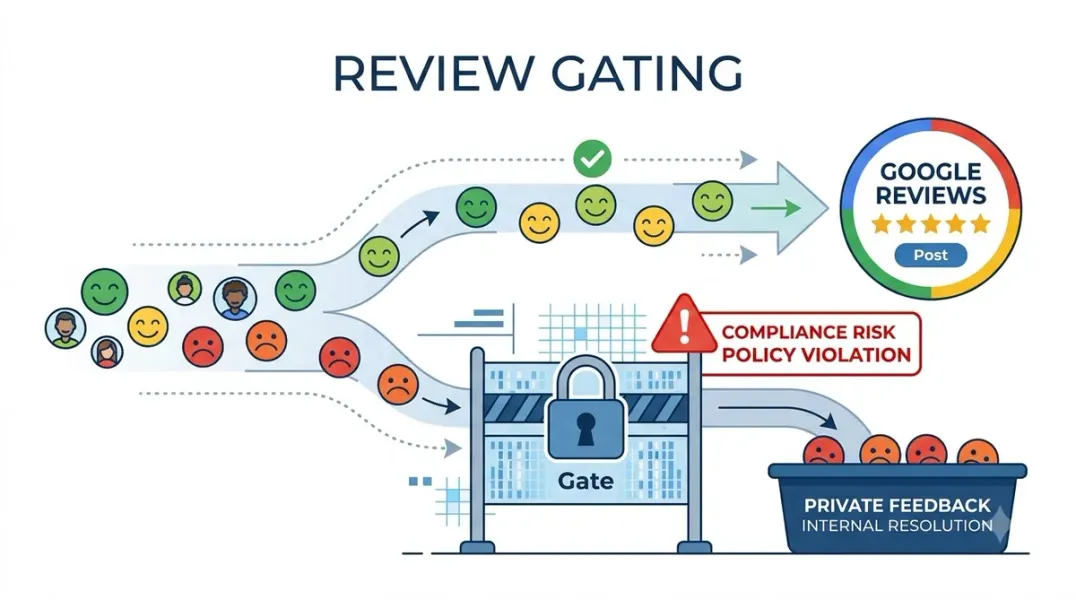
Review gating is the practice of selectively soliciting reviews based on a customer’s anticipated sentiment. Happy customers get asked to leave a public review; unhappy customers are quietly excluded from the request . It’s a tactic that feels harmless—even logical—to many business owners. But it violates Google’s Prohibited and Restricted Content policies and can result in severe penalties, including the removal of all your reviews or suspension of your Business Profile .
Worse, the regulatory landscape has shifted dramatically. The Federal Trade Commission’s Consumer Review Rule, effective October 2024, explicitly prohibits review suppression and has already resulted in warning letters to ten companies and a $4.2 million penalty against Fashion Nova for similar practices .
In this guide, you’ll learn exactly what review gating is, why it’s risky, how to spot it in your own processes, and how to collect reviews ethically—without sacrificing your reputation or your rankings.
What Is Review Gating?
Review gating is a collection-side practice where a business pre-screens customers to determine their satisfaction level before deciding whether to invite them to leave a public review .
The typical pattern looks like this:
- A customer completes a transaction.
- The business sends a “satisfaction survey” or asks how the experience was.
- If the customer indicates they’re happy, they’re directed to a Google review link.
- If the customer indicates they’re unhappy, they’re routed to a private feedback form—and never asked to leave a public review .
The intent is simple: keep negative reviews off Google. The problem is equally simple: Google prohibits it, and consumer protection laws in most countries do too .
The Critical Distinction: Collection-Side vs. Display-Side
Before going further, there’s an important distinction that clears up most confusion about review gating: collection-side vs. display-side .
| Collection-Side (Prohibited) | Display-Side (Allowed) |
|---|---|
| Asking only happy customers for a public review | Embedding only 4+ star reviews on your homepage |
| Routing unhappy customers to a private form first | Hiding an off-topic review from your widget |
| Suppressing public review invites based on a survey | Filtering embedded reviews by platform or date |
| Editing what a customer can write before posting | Choosing which platforms feed into your widget |
The key principle: If every review a customer wrote is still live on Google, you haven’t manipulated the public record. You’ve just decided what to feature on your own marketing real estate . That’s the same call any business makes when picking which customer quotes go on a sales page.
Review gating is about who you ask. Display-side curation is about what you showcase.
Why Google Prohibits Review Gating
Google’s position is straightforward: all customers should have the same opportunity to leave a review, regardless of their experience .
The rationale is consumer protection. A business’s Google rating should reflect the authentic distribution of customer experiences—not a curated highlight reel. When businesses gate reviews, they distort the public record and mislead future customers.
Google’s Prohibited and Restricted Content guidelines classify review gating as “Deceptive content” . This isn’t a minor technical violation. It’s a fundamental breach of the trust Google places in its review ecosystem.
The Risks: What Happens If You Gate Reviews
The consequences of review gating are significant and escalating.
Google’s Enforcement Actions
If Google detects review gating on your Business Profile, it may :
- Temporarily disable new reviews and ratings
- Unpublish existing reviews—potentially all of them, not just gated ones
- Show a warning to consumers that fake or suspicious reviews were removed
- Suspend your Business Profile entirely, removing your presence from Maps and local search
Google has formalized stronger enforcement against fake and incentivized reviews, including review gating . In its documentation on Business Profile restrictions, Google states it may notify business owners by email when restrictions are planned .
FTC and Legal Risks
The Federal Trade Commission has made review gating enforcement a priority. The Consumer Review Rule, effective October 21, 2024, prohibits :
- Review suppression: Using selective display practices, gating mechanisms, or other tools to hide negative feedback
- Incentivized sentiment: Conditioning compensation on a reviewer expressing a particular sentiment
- Fake or false reviews: Creating, purchasing, or disseminating reviews from individuals who did not actually use the product or service
Penalties can reach $53,088 per violation, a figure subject to further inflation adjustment . Critically, that penalty applies per violation—a single non-compliant campaign can generate hundreds of individual violations .
Precedent: Fashion Nova was required to pay $4.2 million to settle FTC allegations that it used a third-party tool to suppress negative reviews .
The FTC issued warning letters to ten companies in December 2025, signaling a shift from education to active enforcement . The agency has indicated it will hold brands responsible for conduct by third-party vendors acting on their behalf, even if the brand disclaimed responsibility in a contract .
How Review Gating Happens Accidentally
Many businesses gate reviews without realizing it. Here are common scenarios:
The “Satisfaction Check” That Becomes a Filter
A hotel receptionist asks: “Was everything perfect with your stay?” If the customer says yes: “Then we’d really appreciate it if you could leave us a review on Google.” The word “then” is the problem. It predicates the review request on the customer’s previous answer .
The Survey That Routes Differently
A business sends a post-service survey: “How was your experience? (1) Great! (2) Not great.” If the customer selects “Great,” they’re shown a Google review link. If they select “Not great,” they’re shown a private feedback form . This is textbook gating.
The Review Filtering Feature
Some reputation management platforms include review filtering features that allow businesses to avoid posting reviews under a certain rating. ServiceTitan announced it is sunsetting this feature to align with FTC regulations, noting that “both ServiceTitan and companies using this feature could be investigated and endure enforcement action by the FTC” .
What Google Actually Says
Google’s Prohibited and Restricted Content guidelines are clear. For businesses requesting reviews:
“Don’t discourage or prohibit negative reviews or selectively solicit positive reviews from customers.”
Google’s position: all customers should have the same opportunity to leave a review .
Ethical Alternatives to Review Gating
The good news: you can build a robust review profile without gating. Here’s how.
1. Ask Every Customer—Neutrally
Send review invitations to all customers, not just the ones you think will be happy. Use neutral language that doesn’t nudge toward positivity .
Compliant wording:
- “We’d appreciate your honest feedback. Would you share your experience on Google?”
- “If you have a moment, a review helps us improve and helps others find us.”
Non-compliant wording:
- “Tell us how much you loved it!”
- “If you had a great experience, please leave us a review.”
- “We hope you’ll give us a 5-star rating!“
2. Separate Private Feedback from Public Reviews
You can—and should—capture private feedback for service recovery. The key is keeping it separate from the public review invitation .
The ethical approach:
- Send a private satisfaction survey to all customers
- Use the results to improve operations and reach out to unhappy customers
- Still invite everyone to leave a public review, regardless of their survey response
The gating approach (prohibited):
- Send a satisfaction survey
- Route happy customers to Google
- Route unhappy customers only to private feedback
The distinction: private feedback should complement, not replace, public review invitations .
3. Use Display-Side Curation, Not Collection-Side Gating
On your own website, you can curate which reviews to feature. Embedding only 4-star and 5-star reviews on your homepage is not review gating .
The rule: As long as every review remains public on Google, you can choose what to showcase on your own marketing channels .
4. Respond to All Reviews—Including Negative Ones
Responding to negative reviews doesn’t just show care—it’s good for business. Research shows 80% of consumers are more likely to use a business that responds to all reviews, and 42% avoid businesses that ignore them .
Negative reviews also provide valuable insights into where you can improve .
The “Authenticity Paradox”
Here’s the counterintuitive truth: a wall of perfect 5-star reviews is less trustworthy than a mix of reviews with some negative ones .
Consumers are sophisticated. They know that businesses aren’t perfect. Research shows consumers value authenticity and become suspicious of profiles with exclusively 5-star ratings. A 4-star review that mentions a minor issue—and a business response showing how it was resolved—builds more trust than a generic 5-star review .
This means review gating doesn’t just violate policies. It may actually hurt conversion by making your profile look fake.
How to Audit Your Current Process
If you’ve been using review gating—even unknowingly—here’s how to fix it.
Step 1: Audit Your Review Requests
Look at the language you use in emails, texts, and in-person scripts. Ask:
- Do we ask all customers for reviews, or only some?
- Does our wording nudge toward positive reviews?
- Do we route unhappy customers away from public review platforms?
Step 2: Check Your Tools
Review management platforms sometimes include gating features by default. Check your settings for:
- Satisfaction-based routing
- Review filtering by rating
- Pre-screening questions before review invites
Step 3: Fix Your Workflows
Immediate corrective actions :
- Stop gating immediately. Disable any pre-screening workflows that filter customer sentiment before review invitations.
- Reinstate neutral invitations. Begin sending unbiased invitations to all customers equally.
- Document the change. If you have public documentation, consider a brief statement acknowledging that your review process has been updated.
Step 4: Train Your Team
Everyone who interacts with customers should understand:
- Why review gating is prohibited
- What language is acceptable
- How to respond when a customer is unhappy (resolve privately, but still invite them to review if appropriate)
What About Asking In Person?
Google’s 2026 policy updates have made in-person review requests more nuanced . While in-person asks aren’t outright banned, anything that feels pressured, scripted, or structured can raise flags.
What to avoid :
- Handing someone an iPad at checkout
- Running coordinated campaigns tied to specific providers
- Directing or incentivizing patients to mention staff by name
- Asking only customers who seem happy
What’s safe:
- Neutral, low-pressure invitations
- QR codes on receipts that invite feedback
- Text or email follow-ups sent to all customers
Conclusion
Review gating feels like a smart tactic. It isn’t. It’s a policy violation that can result in review removal, profile suspension, and FTC penalties exceeding $50,000 per violation.
The distinction that matters is collection-side vs. display-side:
- Collection-side (prohibited): Selectively asking only happy customers for reviews
- Display-side (allowed): Curating which public reviews to feature on your own website
Google’s position is unambiguous: all customers should have the same opportunity to leave a review . The FTC has reinforced this with an enforcement framework that includes civil penalties and warning letters.
The ethical alternative is also the more effective one:
- Ask every customer with neutral language
- Separate private feedback from public review invitations
- Curate your display without suppressing your collection
- Respond to all reviews, including negative ones
Authenticity isn’t just compliant. It’s more trustworthy—and trust is what drives customers to choose you.
Call to Action
Not sure if your review process is compliant?
We’ve created a Review Gating Audit Checklist to help you spot prohibited practices, fix your workflows, and collect reviews ethically.
👉 Download the Checklist and make sure your review strategy is safe.
👉 Or run a free GBP audit to see how your review profile compares to competitors.
FAQs
1. What is review gating?
Review gating is when a business selectively asks only happy customers to leave a public review while excluding unhappy customers. It’s prohibited by Google and violates FTC regulations .
2. Is review gating illegal?
It violates Google’s policies and, under the FTC’s Consumer Review Rule, can result in civil penalties of up to $53,088 per violation. The Rule prohibits review suppression and gating mechanisms .
3. What happens if Google catches me gating reviews?
Google may temporarily disable new reviews, unpublish existing reviews, show a warning to consumers, or suspend your Business Profile entirely .
4. What’s the difference between review gating and display-side curation?
Review gating is about who you ask (prohibited). Display-side curation is about what you showcase on your own website (allowed, as long as all reviews remain public on Google) .
5. Can I hide negative reviews on my website?
Yes, as long as those reviews remain public on Google. Hiding a review on your WordPress widget is display-side curation, not gating—because the review is still accessible to anyone on the source platform .
6. Is asking only happy customers for reviews always obvious?
No. Gating often happens accidentally. Using “then” after a satisfaction check (“Was everything perfect? Then please leave a review”) predicates the request on the answer and constitutes gating .
7. What’s the ethical way to collect reviews?
Ask every customer with neutral language. Separate private feedback surveys from public review invitations. Never route unhappy customers away from public reviews .
8. Does Google allow incentives for reviews?
No. Offering discounts, freebies, or other compensation in exchange for reviews is prohibited by Google and the FTC. This includes incentives for positive reviews or for removing negative ones .
9. Can I ask customers to mention specific staff members in reviews?
Google’s 2026 policy updates flag directing or incentivizing customers to mention staff by name as a potential violation .
10. What should I do if I’ve been gating reviews?
Stop immediately. Disable any pre-screening workflows. Reinstate neutral invitations to all customers. Document the change. Don’t delete existing reviews yourself—let Google’s processes handle any enforcement .
Internal & External Links
Internal Links
- Negative Google Reviews: When to Respond, Report, or Ignore Them
- How to Build a Google Review Funnel That Generates Reviews Consistently
- How Review Velocity Can Influence Local Search Visibility
- How to Identify Fake or Suspicious Google Reviews
- Can Customers Edit Google Reviews? What Businesses Should Know
External Sources
Grow Your Google Maps Ranking on Autopilot
Stop spending hours every week manually replying to customer reviews and writing Google posts. Busirank automates your Google Business Profile to boost your local SEO rankings and turn searchers into paying clients.

 Busirank Team
