 Busirank Team
Introduction
Your Google Business Profile (GBP) website link is one of the most valuable pieces of real estate in local search. It appears in the Knowledge Panel, the local pack, Google Maps, and mobile search results—often before a customer ever sees your homepage. Yet most businesses treat it as an afterthought, pointing every click to a generic homepage.
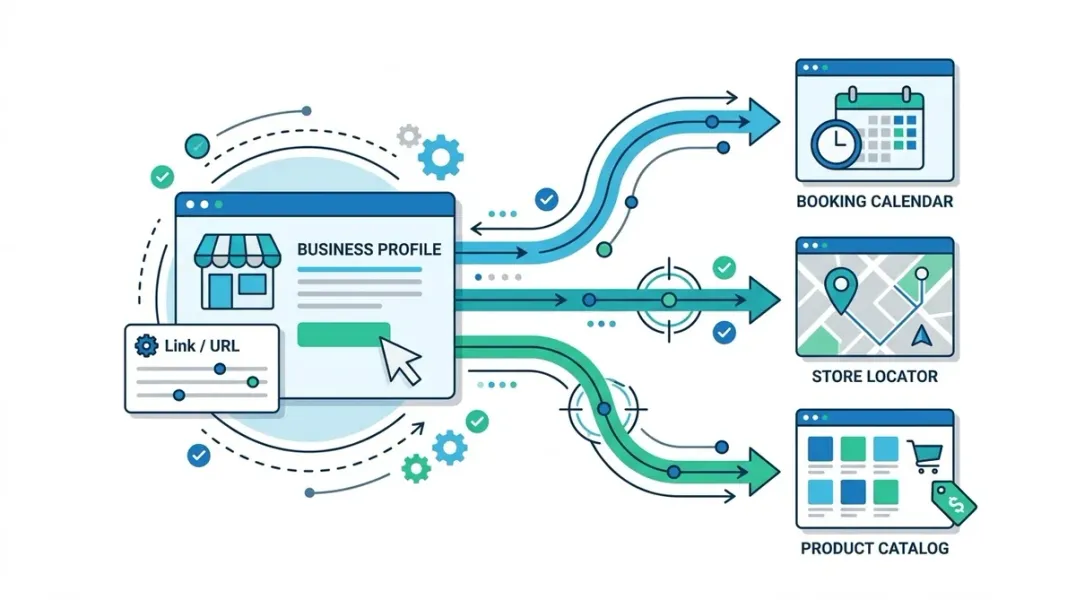
That’s a missed opportunity. The page you choose as your GBP website link directly influences how many people call, book, visit, or buy. It also sends relevance signals to Google about what your business does and where it operates. Choose the wrong page, and you leak high-intent traffic. Choose the right one, and you convert searchers into customers.
This guide walks you through how to choose the right destination page for your Google Business Profile, covering intent matching, multi-location strategy, tracking, and common pitfalls to avoid.
When someone searches for a local business, they’re usually far down the buying funnel. They’ve already decided they need a product or service—now they’re choosing who to buy it from. That means every click from your GBP carries high commercial intent.
Google itself uses your website link as a relevance and quality signal. A link that leads to a fast, relevant, mobile-friendly page strengthens your profile. A link that leads to a broken page, a slow redirect chain, or an irrelevant homepage weakens it.
Most importantly, the destination page determines whether a visitor takes the next step. A homepage asks them to figure out where to go. A well-chosen destination page answers their question immediately.
Step 1: Match the Destination Page to Search Intent
The single most important rule is alignment between what the searcher wants and what the page delivers.
For service businesses: Link to a location-specific service page. A plumber in Austin should link to an “Austin Plumbing Services” page, not the company homepage or a national services page.
For restaurants: Link to the menu, reservation page, or online ordering page—whichever drives the most revenue. If you take reservations, that’s usually the winner.
For retail: Link to the store locator page or a promotions page if you’re running a local offer.
For healthcare and professional services: Link to the appointment booking page or the specific practitioner/location page.
For hospitality: Link to the booking engine or the specific property page, not a chain-wide homepage.
The test is simple: if a customer landed on this page from a local search, could they complete their intended action in one or two clicks?
Step 2: Use Location Pages for Multi-Location Brands
If you operate more than one location, each GBP should link to its own dedicated location page. This is non-negotiable for local SEO.
A proper location page should include:
- The exact business name, address, and phone number (NAP) for that location
- Embedded Google Map
- Location-specific hours (including holiday hours)
- Services or products offered at that location
- Staff or practitioner bios where relevant
- Directions and parking information
- A clear call to action (call, book, get directions)
Linking every profile to a single homepage dilutes relevance, confuses customers, and wastes the SEO value of having unique location pages. It also makes tracking impossible—you can’t tell which location is driving traffic.
Step 3: Prioritize Conversion Pages Over Informational Pages
Your GBP link should drive action, not just awareness. That means favoring:
- Booking and appointment pages
- Contact pages with click-to-call buttons
- Online ordering or reservation pages
- Quote request forms
- Store locator pages (for retail with multiple branches)
Avoid linking to:
- Blog posts
- About Us pages
- Generic “Services” overview pages
- Career or press pages
- Pages behind a login
If your highest-converting action is a phone call, make sure the destination page prominently features a tap-to-call number, especially on mobile where the majority of local searches happen.
Step 4: Consider Using UTM Parameters
UTM parameters let you track exactly how much traffic and conversions come from your GBP. A typical tagged URL looks like this:
https://example.com/austin-plumbing?utm_source=google&utm_medium=organic&utm_campaign=gbp
Once tagged, you can view GBP performance in Google Analytics 4 alongside your other channels. This data tells you whether your chosen destination page is actually working—or whether it needs to be swapped.
Note: Google may strip some UTM parameters in certain contexts, and UTM-tagged URLs can occasionally cause issues with canonicalization. Test carefully and monitor for unexpected behavior.
Step 5: Avoid Redirects, Broken Links, and Slow Pages
Google’s guidelines discourage excessive redirects, and for good reason—they slow down load times and can break tracking. Follow these rules:
- Link directly to the final destination page (no 301 chains)
- Ensure the page loads in under 3 seconds on mobile
- Use HTTPS
- Make sure the page works on all devices
- Verify the link monthly—pages get moved or deleted
A broken GBP link is worse than a suboptimal one. It signals neglect to both Google and customers.
Step 6: Test, Measure, and Iterate
Your first choice may not be your best. Treat the GBP website link as a living decision:
- Baseline your metrics. Track clicks, calls, direction requests, and website visits in GBP Insights and GA4.
- Change one variable at a time. Swap the destination page and observe for 30 days.
- Compare conversion rates. Which page drives more bookings, calls, or purchases per click?
- Consider seasonal swaps. During holidays, link to a promotions page. During slow seasons, link to a booking page with an offer.
For multi-location brands, you can test different page types across similar locations to identify the highest-performing approach, then roll it out network-wide.
Step 7: Align With Your Broader Local Strategy
Your GBP website link doesn’t exist in isolation. It should align with:
- Your local landing page strategy
- Your citation and listing consistency (NAP must match)
- Your paid search landing pages (consistent messaging reduces bounce)
- Your review response strategy (link to the same page when replying)
When your GBP, website, and citations all point to the same consistent information, Google gains confidence in your business—and rankings tend to follow.
Conclusion
The website link on your Google Business Profile is a conversion lever, not a formality. Choosing the right destination page means matching search intent, using location-specific pages for multi-location brands, prioritizing conversion over information, and tracking what actually works.
Stop defaulting to your homepage. Start treating your GBP link as a strategic decision that compounds over time. Small improvements here—a better page, a cleaner URL, a faster load—can meaningfully lift calls, bookings, and revenue across every location you manage.
Call to Action
Audit your Google Business Profile website links today. Map each profile to its most relevant, highest-converting destination page, add UTM tracking, and measure the impact within 30 days. If you manage multiple locations, build this into your quarterly local marketing review so no profile drifts out of alignment.
FAQs
Can I link to a social media page instead of a website? Technically yes, and Google allows it. But a dedicated website page almost always converts better, supports SEO, and gives you more control over tracking and user experience. Use social only if you don’t have a website.
Should I use a dedicated landing page or my main website? Use your main website if it’s fast, mobile-friendly, and relevant to the search. Use a dedicated landing page if your main site is slow, cluttered, or doesn’t have a location-specific page.
How often should I update my GBP website link? Review it quarterly, and also whenever you launch a campaign, change your service offerings, or open/close a location. Broken or outdated links should be fixed immediately.
Does the destination page affect my local rankings? Yes. Google uses engagement signals—click-through rate, dwell time, and behavior—as indirect ranking factors. A relevant, fast page keeps users engaged and can improve your position over time.
Should every location link to a different page? For multi-location brands, yes. Each location should have its own page with unique NAP, hours, and content. This improves relevance, tracking, and customer experience.
What if I don’t have a location-specific page? Create one. Even a simple page with NAP, hours, a map, and a call to action outperforms sending all traffic to a homepage. Prioritize building these pages for your highest-revenue locations first.
Can I use a shortened URL or a link shortener? Avoid it. Shortened URLs can obscure the destination, add a redirect, and reduce trust. Link directly to the final page.
Internal & External Links
Internal Links
- How to Build a Master Location Database for Local Marketing Teams
- Centralized vs Decentralized Local Marketing: Which Model Fits Your Business?
- How to Detect Outdated Business Details Before They Affect Customer Experience
- How to Create a Business Profile Data Dictionary for Multi-Location Brands
External Sources
Grow Your Google Maps Ranking on Autopilot
Stop spending hours every week manually replying to customer reviews and writing Google posts. Busirank automates your Google Business Profile to boost your local SEO rankings and turn searchers into paying clients.

 Busirank Team
