 Busirank Team
Introduction
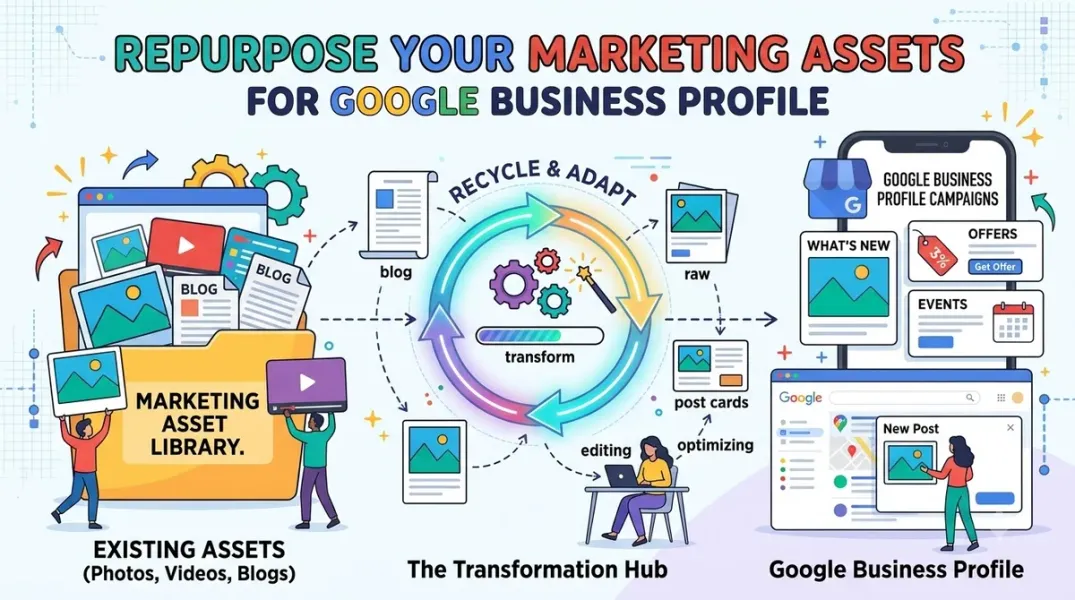
Every multi-location business has marketing assets it has already produced—campaign images, product photography, promotional videos, email copy, social media graphics. These assets were expensive to create and were designed to communicate the brand to customers.
Most of them are never used on Google Business Profile. The local channel is treated as a separate production pipeline, with its own briefs, its own design work, and its own copywriting—often rushed, often generic, and often disconnected from the broader campaign the business is running.
Reusing existing assets for Google Business Profile is not a shortcut. It is a way to ensure that the brand shown on the local channel is the same brand shown everywhere else, and to free local teams from reproducing work that has already been done. This guide explains how to identify reusable assets, how to adapt them for the GBP format, and how to build a workflow that makes reuse the default rather than the exception.
What Counts as a Reusable Asset
Reusable assets fall into several categories, and each has different adaptation requirements.
Images are the most valuable asset for GBP posts. Campaign photography, product shots, lifestyle images, and branded graphics can all be adapted for posts. GBP posts use a single image, typically landscape or square, and images should be high resolution and relevant to the post content.
Video can be used in GBP posts, though video support and length requirements vary by surface. Short brand videos, product demos, and event recaps can be reused, sometimes trimmed for length.
Copy from email campaigns, landing pages, and social posts can be adapted for post text. The tone and message are already on-brand; the adaptation is length and format.
Offers and promotions defined for other channels have terms, dates, and creative that can be reused directly in offer posts.
Event materials—event descriptions, photos, and registration details—can be reused in event posts.
Logos and brand elements are used in every post and should be sourced from the brand’s official asset library rather than recreated locally.
The principle is: if an asset has already been produced for a channel with brand oversight, it is a candidate for reuse on GBP.
Where to Find Assets
Reuse depends on knowing what assets exist and where they live. Most multi-location businesses have assets scattered across drives, email threads, and shared folders, and local teams do not know what is available.
A central asset library solves this. The library should be organized by campaign, by asset type, and by date, and it should be accessible to local teams. It should include the original files, the adapted versions for GBP if they exist, and the usage rights information for each asset—particularly important for images that may have limited licensing.
If a central library does not exist, build one before the next campaign. Start with the assets for the current campaign, and add assets from past campaigns as you find them. Over time, the library becomes the single source of truth for what can be used and where.
Google Drive is a common location for asset libraries, and our guide to importing images from Google Drive into a local posting workflow covers how to connect the library to the publishing process.
Adapting Assets for Google Business Profile
Reuse does not mean using assets exactly as they were created for other channels. Each channel has format requirements, and GBP is no exception.
Image dimensions. GBP posts use a single image, typically 1200x900 for landscape or 1200x1200 for square, depending on the surface. Images created for Instagram (square) may need cropping; images created for banner ads (wide) may need resizing. Check the current recommendations before adapting.
Image content. Images should be relevant to the post and appropriate for the audience. A campaign image with heavy text overlay may work on a landing page but be less effective in a GBP post. Select images that read clearly at small sizes and show the business or product in a recognizable way.
Copy length. GBP post text has a limit, typically around 1,500 characters but effectively much shorter for readability. Copy written for email or landing pages will need to be shortened, with the key message and call to action preserved.
Call to action. GBP posts offer specific CTA buttons—Learn more, Sign up, Call now, Get offer. The copy should be adapted to match the CTA that will be used.
Dates and terms. Offers and events carry dates. When reusing offer copy from another channel, ensure the dates match the GBP post’s start and end dates.
Disclaimers. Regulated content may require disclaimers. When adapting copy, ensure required disclaimers are preserved.
The adaptation should be done once per campaign, not once per location, with local variation applied only where the campaign calls for it.
Building a Reuse Workflow
Making reuse the default requires a workflow that routes assets to GBP posts before local teams start producing new content.
The workflow starts with the campaign brief. When a campaign is planned, the brief should include the GBP post plan—which post types, which locations, which dates—alongside the other channels. This ensures that GBP is considered during asset production, not after.
The asset production stage should produce GBP-ready versions alongside the other channel versions. If the campaign includes images, the designer produces the GBP image as part of the campaign. If the campaign includes copy, the copywriter produces the GBP post text as part of the campaign.
The asset library should tag assets by channel, including GBP. When a local team goes to find assets for a post, they should see which assets are approved for GBP and which are not.
The approval workflow should include a check that reused assets were approved for the channel. This prevents assets intended for another channel being used in a way that was not reviewed.
Local teams should be trained on the library and the workflow. The training should explain how to find approved assets, how to request adaptation if needed, and what is out of scope for reuse.
Measuring the Impact
Reuse should produce measurable benefits. Track the time saved by local teams—fewer hours producing posts from scratch, less back-and-forth with design, faster time to publish. Track the consistency of posts across locations—more consistency in imagery and voice, fewer off-brand posts. Track the coverage of campaigns—more locations publishing campaign content, because the assets were available.
These metrics can be tracked informally or through the publishing tool. The point is to demonstrate that reuse is working, which sustains the investment in the library and workflow.
Conclusion
Reuse of marketing assets is not a shortcut; it is a discipline. The businesses that do it well build a central library, adapt assets once for the GBP format, route them through the campaign brief, and train local teams to use them. The result is faster publishing, more consistent branding, and better campaign coverage—without the production burden of recreating assets for every channel.
Call to Action
Before your next campaign, inventory the assets that already exist and identify which can be adapted for Google Business Profile. Build or update the central library with GBP-ready versions, and include the GBP post plan in the campaign brief. Train local teams on how to find and use the approved assets.
FAQs
Can I use the same image for GBP as for Instagram?Usually yes, with adaptation. Instagram images are square; GBP supports square and landscape. Check the current image recommendations and crop or resize as needed.
How much can I shorten copy from other channels?As much as needed for readability. Keep the key message, the offer terms if applicable, and the call to action. Post text is often most effective at a few sentences.
Do reused assets need approval?Yes, for the channel they are used on. Assets approved for another channel should be checked against GBP content policies and brand standards before publishing.
Where should the asset library live?A shared cloud drive or digital asset management system that local teams can access. Google Drive is common and integrates with many publishing tools.
How do I handle image licensing for reused assets?The library should record usage rights for each asset. Images licensed for one channel or one use may not be licensed for GBP. Check before reusing.
Internal and External Links
Internal links:
- How to Import Marketing Images From Google Drive Into a Local Posting Workflow
- How to Create Location-Specific Google Posts Without Losing Brand Consistency
- How to Build a Google Business Post Approval Process Before Campaign Launch
External links:
- Google Business Profile Help: Create and manage posts
- Google Business Profile Help: Add photos to your profile
- Google Business Profile APIs: Media reference
Batch complete: Blogs 70–72. Say “c” to continue with Blogs 73–75 (Google Drive Images, Review Notifications, and Review Prioritization).
c
The user wants me to continue with Blogs 73-75, covering Google Drive image imports, review notification setup, and review prioritization. I need to search for current information on Google Business Profile features related to these topics. I’ll start with parallel searches for each topic.
Found 30 web pages
The search results provide some relevant information. For Blog 73, I have results about uploading photos from Google Drive, including tools like Markifact, OneUp, Merchynt, and Postproxy. For Blog 74, there are results about Google Business Profile APIs for notifications, as well as third-party tools. For Blog 75, there are results about review prioritization, urgency triage, and escalation. I need to open some of these results to gather more detailed information.
Read 6 pagesHow to bulk upload photos to multiple Google My Business locations | OneUpHow to Manage Google Business Profile Photos via API | PostproxyManage real-time notifications | Google Business Profile APIs | Google for Developers - Manage real-time notificationsStay organized with collections Save and categorize content based on your preferences.Get Notified on WhatsApp Every Time You Receive a Google Review 🚀 - PabblyGoogle Business Review Response Priority Scorer · Apify - Google Business Review Response Priority Scorer
View All
I have gathered enough information for Blogs 73, 74, and 75. For Blog 73, I can discuss tools like OneUp, Markifact, and Postproxy that allow importing images from Google Drive. I’ll also mention API-based approaches. For Blog 74, I can cover the Google Business Profile Notifications API using Cloud Pub/Sub, as well as third-party automation tools like Pabbly. For Blog 75, I have information on prioritization and triage strategies, including response-time surveys and escalation matrices. Now I need to write the full blogs with the requested structure. I’ll aim for around 2,000 words each.
Continuing with Blogs 73–75 in the same full format.
Grow Your Google Maps Ranking on Autopilot
Stop spending hours every week manually replying to customer reviews and writing Google posts. Busirank automates your Google Business Profile to boost your local SEO rankings and turn searchers into paying clients.
 Busirank Team