 Busirank Team
Introduction
Most marketing campaigns have an approval process. The email gets reviewed. The ad copy gets signed off. The landing page goes through QA. The Google Business Profile posts, somehow, often skip all of it. A regional manager drafts a post, hits publish, and it is live before anyone with brand authority has seen it.
The gap is understandable. GBP posts feel small and low-stakes—short copy, one image, a button. But they publish to the public feed of every location, they appear alongside reviews and photos, and they are one of the first things a customer sees when they check a business on Google. A post with a wrong price, a broken link, an expired offer, or a typo is not a small mistake. It is a visible one, on a high-traffic surface, sometimes for weeks.
An approval process fixes this. Not a bureaucratic one that slows campaigns to a crawl, but a lightweight, staged review that catches the errors that matter and gets good posts live quickly. This guide covers how to design that process before your next campaign launches.
Why Approval Processes Fail
Before designing a process, it helps to know why most approval processes break down. They fail for three reasons.
They are too heavy. If every post requires five approvals and a meeting, teams route around the process. They publish directly, or they batch approvals at the last minute, or they get “pre-approved” for everything. A process that is harder than the work it governs will not be followed.
They are undefined. Nobody knows who approves what. The regional lead thinks marketing approves; marketing thinks the regional lead approves. Posts sit in limbo, and eventually someone publishes to unblock the campaign.
They are disconnected from the calendar. Approvals happen in email threads and chat messages, separate from the schedule. The approver does not see what else is scheduled for the same location or date, so they cannot catch conflicts or duplication.
A good process is lightweight, clearly owned, and embedded in the same system where posts are scheduled. It adds a checkpoint, not a bottleneck.
Defining What Needs Approval
Not every post carries the same risk, so not every post needs the same review. Tier your approval requirements by risk.
Low-risk posts include routine updates—new hours for a holiday, a seasonal greeting, a photo of a renovated space. These can be approved by a single regional lead, or even published directly by a trained team member within an approved template.
Medium-risk posts include location-specific offers and service announcements. These involve pricing, dates, or commitments, and they should be reviewed by someone with marketing authority, typically at the regional or brand level.
High-risk posts include national campaign launches, anything mentioning a regulated product or service, anything with legal or compliance implications, and any post that changes the business’s stated offering. These should require sign-off from marketing leadership and, where relevant, legal or compliance.
Write the tiers down. Publish them in the same place where the team accesses the calendar. When a drafter knows which tier their post falls into, they know who to route it to.
Designing the Review Stages
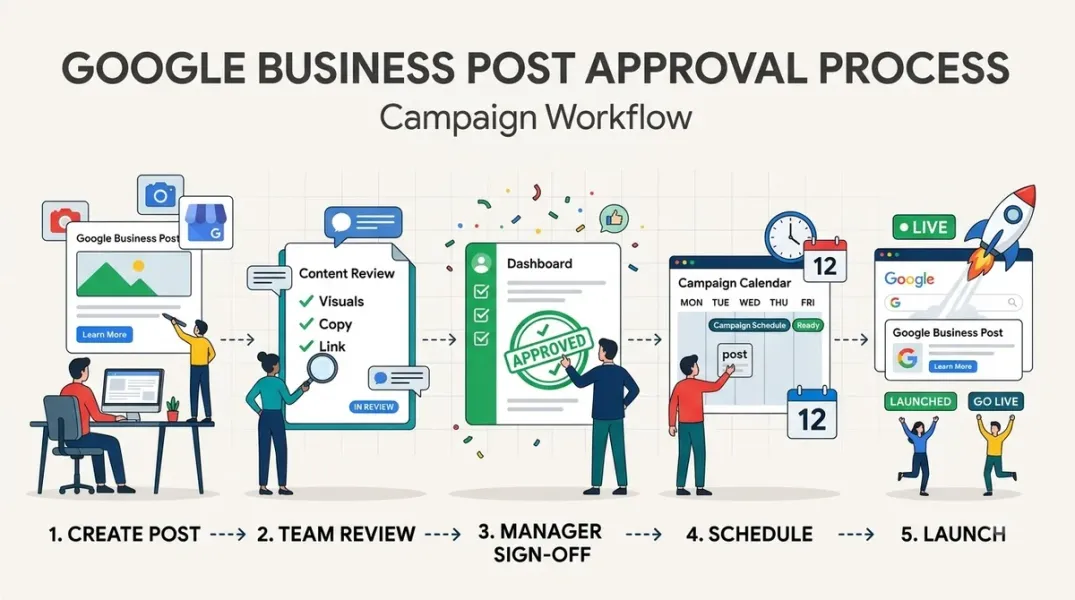
A workable approval process has three stages: draft review, conflict check, and final sign-off. In smaller teams, one person may perform all three, but the stages should still happen.
Draft review checks the content itself. Is the copy accurate? Does the offer match the approved promotion? Is the image correct and properly sized? Does the post comply with Google’s content policies—no prohibited content, no misleading claims, no inappropriate imagery? This stage catches most errors, and it is where a checklist is most valuable.
Conflict check compares the post against the calendar. Is there already a post scheduled for this location on this date? Does this offer overlap with a national campaign? Does the end date conflict with another promotion? This stage is why the approval should live inside the scheduling tool rather than in email—the approver needs to see the full schedule to do this check properly.
Final sign-off is the formal approval that moves the post into the scheduled queue. It confirms that the draft review and conflict check are complete, and it assigns accountability. For high-risk posts, it is a separate person from the drafter. For low-risk posts, it may be the same person who drafted.
Each stage should have a defined turnaround time—for example, twenty-four hours for draft review and sign-off, and same-day for conflict checks. Turnaround commitments prevent approvals from becoming the bottleneck.
The Pre-Launch Checklist
A checklist makes the draft review concrete and repeatable. It should be short enough to complete in minutes and thorough enough to catch the errors that actually happen.
The checklist covers: Accuracy—does every claim match approved materials, are prices and dates correct, are locations and hours accurate? Compliance—does the post follow Google’s content policy, does it avoid prohibited categories, does it include required disclaimers? Brand—does the copy match the brand voice, are logos and images approved assets, is the spelling and punctuation correct? Links—do all URLs resolve, do they go to the right location page, are they tracked properly? Targeting—is the post going to the correct locations or location groups, not a broader set than intended? Dates—are start and end dates correct, and does the post end before the offer expires?
Each item is a yes/no check. The approver signs off by confirming the checklist. If any item fails, the post goes back to the drafter with a specific note.
The checklist should evolve. When a new type of error slips through, add a check to prevent it. The checklist is a living document, not a formality.
Roles and Accountability
Define who holds each role in the approval process, by name or by job title.
Drafter produces the post and submits it for review. Drafters are trained on the checklist before they submit their first post.
Reviewer performs the draft review and conflict check. Reviewers have authority to send posts back and to suggest edits.
Approver performs final sign-off. Approvers are accountable for what publishes, and they are the escalation point when a post is disputed.
Publisher schedules or publishes approved posts. In most teams, the publisher is either the approver or a scheduling tool configured to publish only approved posts.
Name the roles in your publishing policy. When a team member is unsure who approves their post, the policy should answer the question in seconds.
Making the Process Stick
A process that exists only in a document will be ignored. Embed it in the systems and rituals the team already uses.
Configure your publishing tool to support the stages. Most multi-location platforms allow posts to move from draft to pending approval to scheduled. If your tool supports approval workflows, turn them on and configure the roles.
Add approval status to the weekly calendar review. The review should surface any posts scheduled for the next two weeks that are not yet approved, so nothing publishes without sign-off.
Train new team members on the process before they are given access. A five-minute walkthrough of the checklist and the routing rules prevents most of the errors the process exists to catch.
Audit after each campaign. When a campaign finishes, review what was approved, what was edited, what was rejected, and what slipped through. Use the findings to refine the checklist and the tier definitions.
Conclusion
A post approval process is not about slowing campaigns down. It is about making sure that the posts customers see are accurate, on-brand, and free of conflicts, without relying on everyone happening to remember every rule. Design it lightweight, tier it by risk, embed it in the calendar, and refine it after each campaign. The process should be nearly invisible when it works and obvious only when it catches something.
Call to Action
Before your next campaign launch, define your approval tiers and roles, publish a one-page checklist, and configure your publishing tool to require approval for medium and high-risk posts. Run the first campaign with a weekly approval review, then audit it to find where the process needs tightening.
FAQs
Do all Google Business Profile posts need approval?No. Tier by risk. Routine updates can be published by trained team members within templates; offers, events, and campaign launches should require review.
How long should approval take?Set a turnaround commitment, typically twenty-four hours for draft review and sign-off. Turnaround commitments keep approvals from becoming bottlenecks.
Who should be the final approver?Someone with brand or marketing authority at the appropriate level. For high-risk posts, a separate person from the drafter.
What should happen if an error publishes?Delete the post as soon as possible, document what went wrong, and add a checklist item to prevent recurrence. Review the approval flow to find the missed checkpoint.
Can approval happen in email?It can, but it should not. Approvals in email lose visibility into the schedule and are hard to audit. Keep approvals inside the publishing tool where the calendar is visible.
Internal and External Links
Internal links:
- How to Prevent Conflicting Google Business Posts When Multiple Team Members Publish Content
- How to Coordinate Offer Start and End Dates Across Multiple Business Locations
- How to Create Location-Specific Google Posts Without Losing Brand Consistency
External links:
- Google Business Profile Help: Create and manage posts
- Google Business Profile Help: Posts content policy
- Google Business Profile APIs: Local posts reference
Grow Your Google Maps Ranking on Autopilot
Stop spending hours every week manually replying to customer reviews and writing Google posts. Busirank automates your Google Business Profile to boost your local SEO rankings and turn searchers into paying clients.

 Busirank Team