 Busirank Team
Introduction
The default way to read reviews is in date order. Newest first, or oldest first, the dashboard presents a chronological list and the team works through it top to bottom. It is intuitive, it is what the interface encourages, and for a business with a handful of reviews it is fine.
For a multi-location business with hundreds of reviews across dozens of listings, date order is a liability. The review that needs attention most urgently—the one-star complaint about a safety issue, the review accusing the business of discrimination, the review from a customer who is about to churn—is not necessarily at the top of the list. It may be buried behind a week of five-star thank-yous, and by the time the team reaches it, the damage has had days to compound.
Urgency-based prioritization replaces date order with a triage system: reviews are scored or categorized by risk and response need, and the highest-urgency reviews are surfaced first. This guide explains how to build that system, what signals define urgency, and how to implement it without abandoning the routine responses that keep the review feed healthy.
Why Date Order Fails at Scale
Date order assumes that all reviews are equal except for recency. That assumption breaks down in three ways.
Risk is not evenly distributed. A one-star review alleging food poisoning is not equivalent to a one-star review complaining about parking. Both are negative, but one carries legal, safety, and reputational risk that the other does not. Date order treats them the same.
Volume creates delay. If a location receives twenty reviews a week and the team responds in date order, a review posted on Monday may not be reached until Thursday or Friday. For a high-risk review, that delay is unacceptable.
Positive reviews crowd out negative ones. A business with strong review flow may receive many five-star reviews for every one-star review. In date order, the positive reviews occupy the top of the queue and the negative reviews wait. The team spends its time on thank-yous while the reviews that need recovery sit unanswered.
Urgency-based prioritization fixes this by separating the question “what is newest?” from the question “what matters most?”
Defining Urgency Signals
Urgency is a function of risk, sentiment, and response status. A review is urgent if it carries high risk, if its sentiment is strongly negative, or if it has gone unanswered beyond the response target.
Star rating is the simplest signal. One- and two-star reviews are the highest priority. Three-star reviews are next, because they often contain specific, fixable complaints that can be recovered. Four- and five-star reviews are lower priority unless they contain a question or a service issue mentioned in the text.
Escalation keywords capture risk that star rating alone misses. Reviews mentioning refunds, legal action, safety incidents, health issues, discrimination, or threats require immediate attention regardless of star rating. Tools that score review urgency use keyword detection alongside star rating and sentiment to flag these cases.
Owner response status identifies reviews that have been waiting. A three-star review posted an hour ago may be lower priority than a three-star review posted three days ago with no response. The longer a review has been unanswered, the higher its priority rises.
Sentiment adds nuance. A five-star review with a complaint buried in the text—“great food but the wait was unacceptable”—is not purely positive. Sentiment analysis catches these mixed reviews and routes them for closer attention.
Review velocity and pattern matter at the location level. A location that suddenly receives three one-star reviews in a week is a different priority than a location that receives one one-star review a month. Pattern detection surfaces emerging issues before they become trends.
Building the Triage Queue
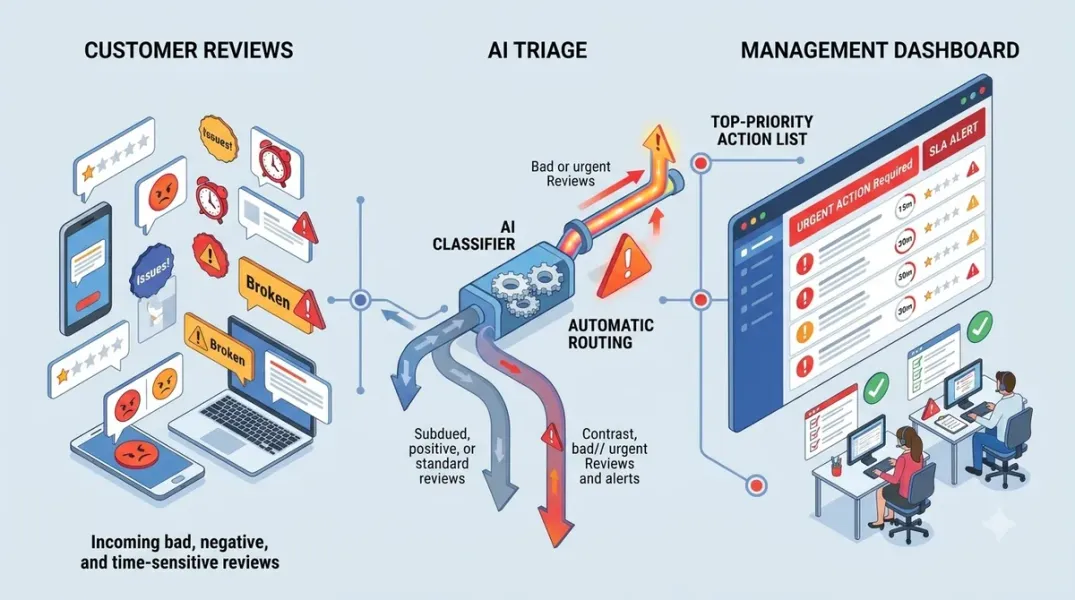
A triage queue is a prioritized list of reviews that need response, ordered by urgency rather than date. Building one requires three components: ingestion, scoring, and routing.
Ingestion pulls reviews from Google Business Profile into a system where they can be sorted and scored. This can be a spreadsheet with a manual export, a third-party review management tool, or an API-based pipeline. The system should capture the review text, rating, date, location, and current response status.
Scoring assigns a priority to each review based on the urgency signals. A simple scoring model might assign points for star rating, escalation keywords, and days unanswered, then sort by total score. More sophisticated models use separate tiers—critical, high, routine—rather than a single number.
Routing sends each review to the appropriate responder. Critical reviews go to a manager or escalation team. High-priority reviews go to the location’s primary responder. Routine positive reviews go to a batch thank-you queue. The routing logic should match the escalation rules the business has defined.
The queue should be visible. A shared dashboard, a Slack channel, or a ticketing system that shows the current queue—sorted by priority and aging—keeps the team focused on what matters most.
Triage in Practice: What to Respond to First
The practical triage order is consistent across most guidance: negative reviews first, then unanswered neutrals, then positive reviews in batches.
On a busy day, respond to one- and two-star reviews and unanswered three-star reviews before anything else. These are the reviews where recovery is possible and where delay causes the most damage. Positive reviews can be batched and answered later in the day or week; they are important for engagement but not urgent.
For negative reviews, the response framework matters as much as the speed. Acknowledge the issue, take responsibility where appropriate, invite the customer to a private channel, and state what will be done. Do not argue in public. The goal is recovery and a visible record of a professional response.
For reviews containing escalation keywords, the response may need to be drafted by or reviewed by a manager before publishing. Speed still matters, but a poorly handled high-risk response can make the situation worse.
Response Time Targets
Prioritization is connected to response time targets. Without targets, there is no definition of “late” and no basis for escalation.
Industry survey data provides useful benchmarks. BrightLocal’s 2026 Local Consumer Review Survey found that 19 percent of consumers expect a same-day reply, 32 percent expect a reply by the next day, and 81 percent are satisfied with anything inside a week. These benchmarks suggest a tiered target: same-day for negative and critical reviews, next-day for neutral reviews, and within a week for positive reviews.
Set targets explicitly and measure against them. A review that has exceeded its target should rise in priority automatically. The target is what turns prioritization from a sorting exercise into an accountability system.
Tooling for Triage
Triage can be done manually with a spreadsheet and a defined process, but it scales better with tooling.
Review management platforms typically offer priority sorting, sentiment analysis, and escalation flags. Some tools score reviews for response urgency using star rating, missing owner response, sentiment, and escalation keywords, and output a queue-ready dataset with priority, SLA, and suggested response angle. Others focus on queue management with role-based routing and SLA tiers.
API-based approaches can build a custom triage layer. The Google Business Profile APIs expose review data, and a custom script can score and route reviews according to the business’s own rules. This is appropriate for organizations that need a bespoke model or that already have a data pipeline.
The tool should make the queue visible and the aging obvious. A review that has been in the queue for three days should look different from one that arrived an hour ago.
Measuring Whether Triage Is Working
The metrics for a triage system are different from the metrics for a review response program. Triage metrics focus on speed and risk coverage.
Time to first response by priority tier shows whether high-priority reviews are being reached quickly. Percentage of critical reviews responded within target shows whether escalation is working. Backlog aging shows whether the queue is growing faster than it is being cleared. Response rate by star rating shows whether negative reviews are getting proportionate attention.
Review these metrics monthly. If high-priority reviews are consistently missing their targets, the problem is either capacity (not enough responders) or routing (the wrong people are receiving the alerts).
Conclusion
Date order is a default, not a strategy. Urgency-based prioritization replaces it with a system that surfaces the reviews that carry the most risk and the most opportunity for recovery, before they have had time to compound. Define the urgency signals, build a triage queue, set response targets, and measure against them. The reviews that matter most will no longer wait behind the reviews that matter least.
Call to Action
Pull your last thirty days of reviews and sort them by urgency rather than date. Identify how many one- and two-star reviews went unanswered for more than a day, and how many escalation-keyword reviews were not flagged. Use those findings to define your triage tiers and set response targets for each.
FAQs
Should I respond to positive reviews at all?Yes, over time, but they are lower priority. Batch thank-yous daily or every other day and focus first-response capacity on negative and neutral reviews.
What counts as an escalation keyword?Terms related to refunds, legal action, safety, health, discrimination, and churn risk. Tools that score review urgency commonly flag these categories.
How fast should I respond to negative reviews?Same business day is the practical target for one- and two-star reviews. Consumer expectations increasingly favor same-day or next-day replies.
Can I automate triage?Yes. Review management tools and API-based pipelines can score and route reviews automatically. The routing rules should be configured to match your escalation policy.
What if I fall behind on the queue?Triage by urgency first: negative and unanswered neutrals, then positive reviews in batches. Do not let a backlog of positive reviews delay responses to negative ones.
Internal and External Links
Internal links:
- How to Set Up Review Notifications So Important Customer Feedback Is Never Missed
- How to Create Escalation Rules for One-Star and Two-Star Google Reviews
- How to Measure Review Growth Over Time Using Review Velocity
External links:
- Google Business Profile APIs: Reviews reference
- BrightLocal: Local Consumer Review Survey
- Stryo: Should you respond to every Google review?
Batch complete: Blogs 73–75. Say “c” to continue with Blogs 76–78 (Low-Rating Escalation Rules, AI Review Response Accuracy, and Review Reply Templates).
c
The user wants me to continue with blogs 76-78. Let me write these in the same format as the previous batches.
Continuing with Blogs 76–78 in the same full format.
Grow Your Google Maps Ranking on Autopilot
Stop spending hours every week manually replying to customer reviews and writing Google posts. Busirank automates your Google Business Profile to boost your local SEO rankings and turn searchers into paying clients.
 Busirank Team