 Busirank Team
Introduction
A single person publishing Google Business Profile posts produces a clean timeline. Five people publishing to the same locations produces something else: two posts about the same promotion on the same day, a holiday message that contradicts the offer posted yesterday, a location-specific post that accidentally goes to every location, and an event post with the wrong end date.
None of these are catastrophic on their own. Together they create a feed that looks disorganized to customers and undermines the brand consistency that multi-location management is supposed to deliver. Google’s post feed is public, chronological, and not easily edited after the fact—although posts can be deleted, the deletion is not instantaneous in every surface.
The solution is not to centralize all posting in one person. It is to build a publishing workflow with clear ownership, visible state, and guardrails that catch conflicts before they publish. This guide covers the root causes, the workflow design, the tooling, and the review cadence.
Why Conflicts Happen
Conflicts are rarely caused by carelessness. They are caused by structural gaps.
No visible state. Two team members draft posts for the same location without knowing the other has drafted one. Neither sees the other’s work until both are published.
Unclear ownership. Everyone is responsible for posting, which means no one is responsible for the overall calendar. A regional manager posts a local offer while corporate posts a national campaign, and the two compete for the same slot.
Separate calendars. Corporate campaigns live in one spreadsheet, local offers in another, and event promotions in a third. Nobody reconciles them.
Overlapping permissions. Multiple people have the ability to publish directly to locations. The ability to draft is not separated from the ability to publish.
No definition of “conflict.” Teams disagree about what counts as a duplication. Two posts about the same offer may be intentional at the corporate level and redundant at the local level, and without a shared definition nobody flags it.
Diagnosing which of these is present in your team determines which fix matters most.
Designing the Workflow: Roles and Stages
A conflict-resistant workflow separates four functions: planning, drafting, approving, and publishing. In small teams, one person may hold several of these roles, but the stages should still be distinct.
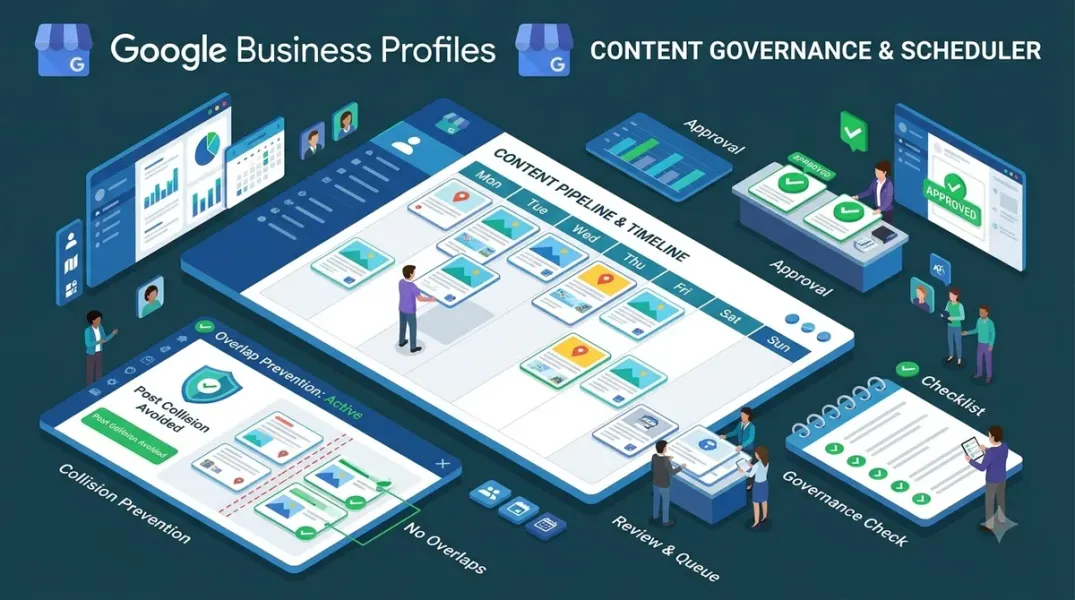
Planning owns the calendar. Someone—typically a marketing lead or campaign manager—maintains a single calendar that shows every planned post by location and date. The calendar is the source of truth for what is supposed to publish and when. If a post is not on the calendar, it does not publish.
Drafting produces the content. Regional teams and local managers draft posts for their locations, working within the calendar’s slots rather than inventing their own. Drafts include the intended publish date, the target locations or location group, the post type (update, offer, event), and any start and end dates.
Approval checks for conflicts and brand fit. Before a post enters the publishing queue, an approver reviews it against three questions: does it duplicate or contradict anything already scheduled for these locations, is it consistent with brand guidelines, and does it comply with Google’s content policies.
Publishing executes. Publishing access is limited to people whose job is to publish, or automated through a scheduling tool. Drafters should not have direct publish access.
The separation matters because it creates a checkpoint between the person who wants to say something and the public feed. It also makes the state of every post visible: drafted, approved, scheduled, published.
Building the Single Calendar
The calendar is the backbone of the workflow. It should be one shared resource, not multiple spreadsheets, and it should be organized by location and date rather than by campaign.
Each calendar entry should record: the location or location group, the publish date and time, the post type, the post copy, the associated image or asset, any start and end dates for offers or events, the drafter, and the approval status.
Two views are essential. The location view shows everything scheduled for a specific location, which is how you catch local conflicts. The date view shows everything scheduled across all locations on a given day, which is how you catch brand-level conflicts and ensure the national campaign and local offers do not collide.
When a new post is proposed, the drafter checks the calendar before drafting. If a slot is already occupied, the drafter either proposes a different date or flags the overlap for the approver to resolve. This single habit prevents most conflicts.
For offers and events with start and end dates, the calendar should show the full active window, not just the publish date. An offer that runs for two weeks occupies those two weeks for conflict purposes, even though it publishes once.
Setting Publishing Rules
Rules should be explicit and written down. A short publishing policy that every team member has read is more effective than any amount of informal coordination.
Define post frequency limits per location. A common rule is no more than one post per location per week, unless a campaign requires otherwise. Frequency limits prevent feeds from becoming crowded and make conflicts obvious—if a location already has a post this week, a second one requires approval.
Define content precedence. When a national campaign and a local offer compete for the same slot, the national campaign generally wins, with the local offer moved to a different date. Write this down so the resolution is not a negotiation each time.
Define post-type rules. Event posts require an end date and a clear start date; offer posts require a start and end date and a promotional code if applicable; update posts have no date constraints. Defining what each type requires prevents incomplete posts from publishing.
Define the approval requirement by risk. Routine updates may be approved by the regional lead. Offers, events, and anything mentioning price or discount should require marketing approval. Define who holds each level.
Using Tooling to Make State Visible
Spreadsheets can work for small teams, but they fail at scale because state is not visible at the point of action. Publishing tools solve this by making the post queue the single place where status is visible.
Most multi-location platforms that manage Google Business Profiles provide a post scheduler with draft, approval, and scheduled states, plus a location-level view. If your platform supports approval workflows, configure them. If it supports location group targeting, use groups rather than individual locations to reduce mis-targeting. If it supports asset libraries, connect the asset library to the post composer so drafts use approved images rather than ad hoc files.
The key capability to look for is a schedule view that shows conflicts. A tool that lets you schedule two posts to the same location on the same day without warning is not solving the problem.
If you do not have a tool with these capabilities, replicate them manually: a shared calendar with a status column, a rule that publishing access belongs to a named publisher, and a weekly review of the upcoming week’s schedule.
The Weekly Review Cadence
Even the best workflow benefits from a short review. A thirty-minute weekly meeting—or an asynchronous review—that looks at the next two weeks of scheduled posts catches conflicts that slipped through.
The review covers four questions. Are there any locations with more than the allowed number of posts in a week? Are there any dates where a national campaign and a local offer overlap? Are there any offers or events whose end dates have passed but whose posts are still scheduled? Are there any posts scheduled to locations where the content is not appropriate?
The review also serves as a feedback loop. Conflicts caught at review are added to the rules so they are prevented next time.
Conclusion
Conflicting posts are a symptom of invisible state and unclear ownership, not of bad content. The fix is a workflow that makes the calendar the source of truth, separates drafting from publishing, defines what a conflict is, and uses tooling that surfaces overlaps before they go live. Teams that build this workflow publish more, not less, because the coordination cost drops and the fear of stepping on each other disappears.
Call to Action
Audit your current posting process this week. Identify who can publish, where the calendar lives, and whether a drafter can see what is already scheduled for the same location. Then fix the weakest link—usually the calendar—and add a weekly review before expanding publishing permissions to more people.
FAQs
How many posts per week should each location publish?There is no universal number. Most businesses publish one to two posts per week per location. The important thing is to set a limit and enforce it consistently.
Who should have publishing access?A small number of named publishers or an automated scheduler. Drafters should submit for approval rather than publish directly.
Can I edit or delete a post after it is published?You can delete posts, but the deletion is not always immediate across every surface, and customers may have already seen the content. Prevention is more effective than correction.
What should happen when a national campaign conflicts with a local offer?Follow a written precedence rule. Typically the national campaign takes the slot and the local offer moves to a different date.
Do I need a paid tool to manage this?Not necessarily. A shared calendar with status tracking and a weekly review can work for smaller teams. Tooling becomes valuable when the number of locations or publishers grows.
Internal and External Links
Internal links:
- How to Build a Google Business Post Approval Process Before Campaign Launch
- How to Create Location-Specific Google Posts Without Losing Brand Consistency
- How to Coordinate Offer Start and End Dates Across Multiple Business Locations
External links:
- Google Business Profile Help: Create and manage posts
- Google Business Profile Help: Posts content policy
- Google Business Profile APIs: Local posts reference
Batch complete: Blogs 64–66. Say “continue” for Blogs 67–69 (Post Approval Process, Coordinating Offer Dates, and Event Posts).
c
The user wants me to continue with blogs 67-69. Let me write them in the same format with full depth.
Continuing with Blogs 67–69 in the same full format.
Grow Your Google Maps Ranking on Autopilot
Stop spending hours every week manually replying to customer reviews and writing Google posts. Busirank automates your Google Business Profile to boost your local SEO rankings and turn searchers into paying clients.

 Busirank Team