 Busirank Team
Introduction
For multi-location brands, the challenge of managing location data is not a matter of if it will become complex, but when. A retail chain with 50 stores might start with a simple spreadsheet. But as that chain grows, the data begins to scatter. One team maintains a franchise management system. Another keeps a spreadsheet for marketing campaigns. Individual store managers update their own Google Business Profiles with whatever formatting they prefer.
The result is predictable. Your “Chicago” location appears as “Chicago, IL” on one platform and “Chicago - Downtown” on another. A phone number change at one store never propagates to the corporate website. Hours of operation conflict between Yelp and Google, creating a poor customer experience.
This fragmentation is not just a minor annoyance. It erodes customer trust, weakens local search rankings, and wastes hours of manual correction work every month. The solution is a master location database—a single, centralized system that stores every piece of location data your business needs, with rules and governance that ensure consistency.
This guide explains what a master location database is, why it matters, and how to build one that scales with your organization.
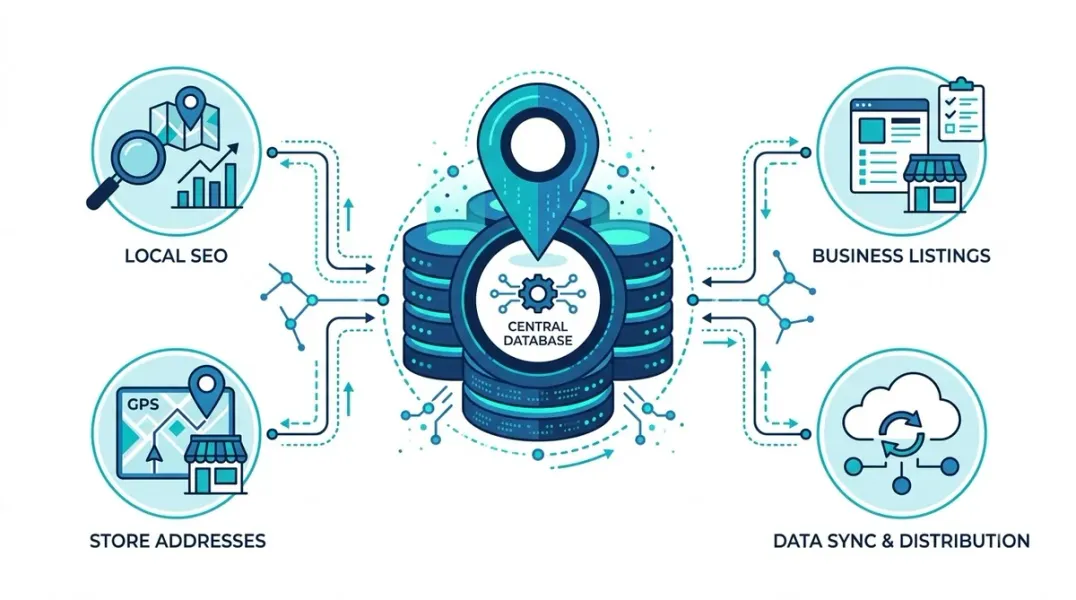
A master location database is a centralized repository that stores all critical information about every physical location your business operates. It serves as the single source of truth for location data, which then feeds into every channel where your business appears—Google Business Profiles, Apple Maps, your website, social media pages, and dozens of online directories.
Unlike a simple spreadsheet, a master location database includes:
- Structured data fields with defined formats and validation rules
- Governance processes that control who can edit what
- Integration capabilities that push updates to external platforms automatically
- Historical tracking so changes are logged and auditable
The core purpose is simple: when a location’s hours change, you update one record in one system. That single change propagates everywhere it needs to go.
Why a Master Location Database Matters
Consistency across channels. When your location data is consistent everywhere it appears, customers trust your information. Inconsistent data—like an old phone number on Yelp or wrong hours on Google—creates frustration and lost business.
Operational efficiency. Without a centralized database, updating location information means logging into dozens of platforms individually. With a master database, one update can sync across all channels automatically.
Local SEO performance. Search engines use location data to determine which businesses to show for local queries. Inconsistent or outdated information weakens your local rankings. A master database ensures every platform has accurate, up-to-date data.
Scalability. Adding a new location becomes a systematic process rather than a manual scramble. The data structure and governance are already in place.
Core Components of a Master Location Database
A well-designed master location database includes these essential components:
- Unique Location Identifier
Every location needs a permanent, unique ID that never changes. This identifier is the anchor that connects records across systems. Examples include “LOC-CHI-001” or a numeric code. When you update a record, the ID stays constant even if the store name, address, or other details change.
- Core Location Fields
These are the fields that appear on every location record and feed into external platforms:
| Field | Description | Example |
|---|---|---|
| Business Name | Official brand name for the location | ”Acme Coffee - Downtown” |
| Street Address | Full physical address | ”123 Main Street” |
| Suite/Unit | Secondary address line | ”Suite 400” |
| City | Municipality | ”Chicago” |
| State/Province | Administrative region | ”IL” |
| Postal Code | ZIP or postal code | ”60601” |
| Country | Country code | ”US” |
| Primary Phone | Main local phone number | ”(312) 555-0100” |
| Website URL | Location-specific page | ”acmecoffee.com/chicago” |
| Hours | Regular operating hours | Mon-Fri 7AM-7PM |
- Extended Attributes
Beyond the core fields, a master location database should capture additional attributes that support local marketing and customer experience:
- Accessibility features (wheelchair access, hearing loops)
- Payment methods accepted
- Services offered (varies by location)
- Languages spoken
- Parking information
- Social media profiles for the location
- Latitude/Longitude coordinates for mapping and targeting
- Geographic Enrichment Data
Adding geographic context makes your database more powerful for analysis and targeting. Consider including:
- County and municipality (useful for regional reporting)
- Designated Market Area (DMA) for media planning
- Census tract or block for demographic analysis
- Metropolitan Statistical Area (MSA) for market analysis
This data allows marketing teams to slice and analyze performance by region, compare locations, and make data-driven decisions about where to invest resources.
Building the Database: A Step-by-Step Approach
Step 1: Audit Your Existing Data Sources
Before building a master database, identify every place your location data currently lives:
- Franchise management systems
- CRM or ERP platforms
- Spreadsheets maintained by regional managers
- Individual store profiles on Google, Yelp, and other directories
- Your website’s store locator
- Marketing automation platforms
Document what data exists, how it is formatted, and who owns each source.
Step 2: Choose Your Platform
The right platform depends on your scale and needs:
- Spreadsheet (Google Sheets, Excel): Suitable for small brands with fewer than 20 locations and limited automation needs.
- Location CMS: Purpose-built tools like SmartMaps Location CMS provide centralized management with publishing to external channels.
- Master Data Management (MDM) Platform: Enterprise solutions like Stibo Systems provide governance, data quality, and integration capabilities for large organizations.
Step 3: Define Your Schema
Your schema is the structure of your database—what fields exist, what format each field uses, and what rules govern them. This should align with your business profile data dictionary, which defines the rules for each field.
Key schema decisions:
- What format for phone numbers? (312) 555-0100 or 312-555-0100?
- How should addresses be parsed? Separate fields for street, city, state, or a single address field?
- Which fields are required versus optional?
Step 4: Import and Clean Your Data
Export data from your existing sources and consolidate it into your new database. This is where the real work happens:
Deduplication: Remove duplicate records where the same location exists multiple times. Use a unique identifier or address matching to identify duplicates.
Standardization: Apply consistent formatting to every field. “Street” becomes “St.”, “Suite” becomes “Ste.”, phone numbers follow one format.
Validation: Check for missing required fields, invalid postal codes, or addresses that don’t geocode properly.
Step 5: Establish Governance
A master location database is only as good as the processes around it. Define:
- Who can create new locations (typically only authorized admins)
- Who can edit existing records (regional managers, central operations, or both?)
- What changes require approval before publishing
- How often data is audited for accuracy
Step 6: Integrate with External Channels
The value of a master database comes from its ability to push data outward. Integrations should include:
- Google Business Profile (bulk upload or API)
- Apple Business Connect
- Bing Places
- Major directories (Yelp, Yellow Pages, etc.)
- Your website’s store locator
Many platforms offer direct API connections or scheduled data exports to keep external channels in sync.
Maintaining Data Freshness
Business information changes constantly. Stores relocate, hours change, phone numbers update, and locations close. A master database that isn’t maintained quickly becomes useless.
Scheduled updates: Establish a regular cadence for reviewing and updating location data. Monthly audits for high-change attributes like hours, quarterly reviews for more stable fields.
Change propagation: When a change is made in the master database, it should automatically push to all connected channels. Manual updates to individual platforms should be discouraged or restricted.
Deprecation, not deletion: When a location closes, don’t delete the record. Flag it as “Do Not Use” or “Permanently Closed” and archive it. Historical data remains available for reporting, and the record prevents accidental reactivation.
Conclusion
A master location database transforms location data from a scattered liability into a strategic asset. By centralizing every field, defining clear rules, and automating propagation to external channels, you ensure that customers always see accurate information and that your local marketing efforts are built on a reliable foundation.
The investment in building this infrastructure pays dividends in operational efficiency, local SEO performance, and customer trust. Start with a clear audit of your existing data, choose a platform that fits your scale, and establish governance processes that keep the database accurate over time.
Call to Action
Ready to centralize your location data? Download our Master Location Database Template to jumpstart your build, or schedule a consultation to discuss the right platform for your organization.
FAQs
Q: How is a master location database different from a simple spreadsheet? A: A spreadsheet stores data. A master location database adds structure, validation rules, governance processes, and integrations that push data to external platforms automatically. It is a system, not just a file.
Q: What is the most important field in a master location database? A: The unique location identifier. Every location needs a permanent ID that never changes, so records can be reliably linked across systems even when other details change.
Q: How often should I update my master location database? A: Core fields like address and phone should be reviewed at least quarterly. High-change fields like hours and temporary closures should be reviewed monthly or as changes occur.
Q: What should I do with closed locations? A: Flag them as “Permanently Closed” or “Do Not Use” rather than deleting the record. This preserves historical data and prevents accidental reactivation.
Q: Can I build a master location database without expensive software? A: For brands with fewer than 20 locations, a well-structured spreadsheet with clear rules can work. Beyond that scale, a purpose-built Location CMS or MDM platform is strongly recommended.
Internal & External Links
Internal Links
- How to Create a Business Profile Data Dictionary for Multi-Location Brands
- How to Build a Business Location Database That Scales With Expansion
- Centralized vs Decentralized Local Marketing: Which Model Fits Your Business?
External Sources
- Google Business Profile Bulk Upload Guidelines https://support.google.com/business/answer/3370250
- Schema.org LocalBusiness Documentation https://schema.org/LocalBusiness
- Apple Business Connect https://businessconnect.apple.com/
Grow Your Google Maps Ranking on Autopilot
Stop spending hours every week manually replying to customer reviews and writing Google posts. Busirank automates your Google Business Profile to boost your local SEO rankings and turn searchers into paying clients.

 Busirank Team
