 Busirank Team
Introduction
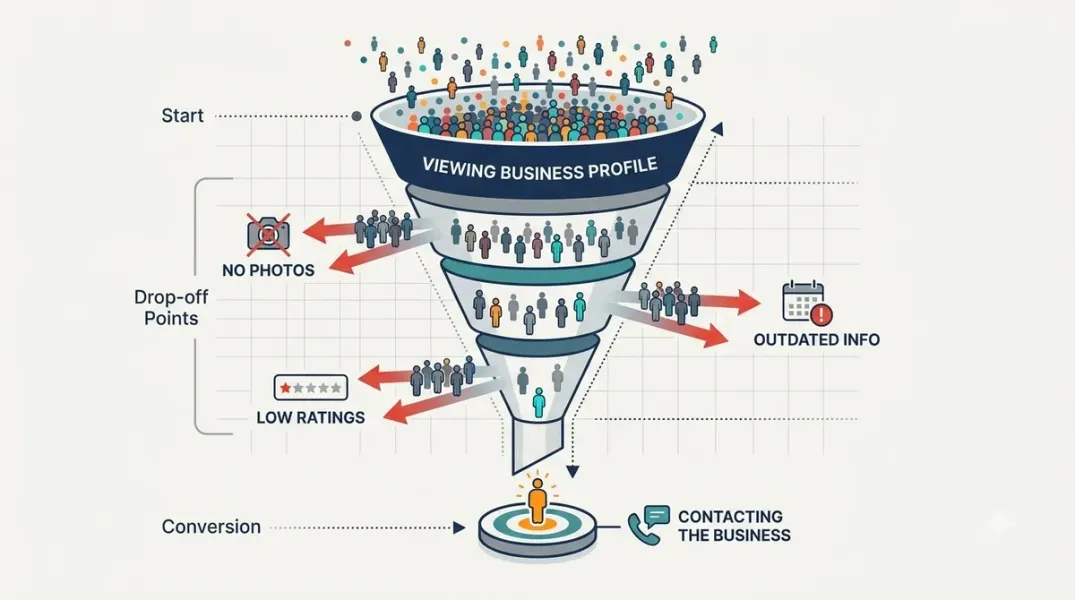
Your business profile is getting views. People are finding you on Google Maps, local search results, and directory listings. But the phone is not ringing, the messages are not coming in, and foot traffic is not increasing. This is one of the most frustrating gaps in local marketing: visibility without conversion.
A visit to your business profile is a signal of interest. When that interest does not turn into a call, direction request, booking, or message, something on the profile is creating doubt or friction. The good news is that most of these problems are fixable.
This guide explains the common reasons customers visit your business profile but never contact you, and how to improve your business profile conversion rate with practical changes to your listings, photos, reviews, and calls to action.
1. Your Profile Looks Incomplete or Outdated
Customers use your profile to confirm that your business is real, active, and relevant. If key information is missing, they may assume you are closed, unreliable, or not worth the risk.
Common completeness problems include:
- Missing or outdated business hours.
- No phone number or an incorrect phone number.
- Missing address or service area.
- No website link or a broken website link.
- Few or no photos.
- No business description or a vague description.
- Missing services, products, or categories.
Fix: Audit your profile against Google Business Profile’s completeness checklist. Update hours, phone, website, services, and photos. Add a clear description that explains what you do and who you serve. An incomplete profile lowers trust and reduces your business profile conversion rate.
2. Your Photos Do Not Build Confidence
Photos are often the first thing customers check. Poor photos—dark, blurry, generic stock images, or no photos at all—can make a business feel less credible.
Customers want to see:
- Your storefront or office exterior.
- Interior photos.
- Team members.
- Products or work examples.
- Photos that reflect your local area.
Fix: Add recent, high-quality photos. Include a mix of exterior, interior, team, and product or service photos. Update them seasonally so the profile looks active. Photos are a trust signal, and trust drives contact.
3. Your Reviews Are Weak, Old, or Unanswered
Reviews are one of the strongest conversion factors for local businesses. If your profile has few reviews, old reviews, or negative reviews without responses, customers may hesitate.
Customers look for:
- Recent reviews.
- A healthy number of reviews.
- Responses from the business.
- Reviews that mention the same service or concern they have.
Fix: Ask satisfied customers for reviews consistently. Respond to every review—positive and negative. A professional response to a negative review can actually increase trust. Do not ignore reviews; they are part of your sales pitch.
4. Your Business Category or Services Are Unclear
If customers cannot quickly tell what you do, they will leave. A vague category or missing services can cause confusion.
For example, a profile listed only as “Contractor” may not convert as well as one that clearly lists “Kitchen Remodeling,” “Bathroom Remodeling,” and “Home Additions.”
Fix: Choose the most specific primary category. Add secondary categories and list your key services. Use the services section to describe what you offer in plain language. Clarity reduces hesitation.
5. Your Profile Has No Clear Next Step
Some profiles provide information but no obvious action. Customers may read the profile and still not know whether they should call, message, book, or visit.
Fix: Make your preferred action obvious:
- Add a click-to-call phone number.
- Enable messaging if you can respond quickly.
- Add a booking link if you take appointments.
- Include a clear website link to a contact or booking page.
- Use posts or updates with a call to action.
Your profile should guide the customer to the next step, not leave them guessing.
6. Your Response Time Is Slow or Unknown
Customers often avoid contacting businesses when they are unsure how long a response will take. If messaging is enabled but you rarely respond, customers may give up.
Fix: If you enable messaging, respond quickly. If you cannot manage messages, disable messaging and make phone or booking the primary action. Set expectations in your profile description, such as “Call us for same-day estimates.”
7. Your Profile Does Not Match Your Website
Customers often check your profile, then visit your website to confirm details. If your website looks outdated, has different hours, or is hard to use on mobile, they may lose confidence.
Fix: Keep your profile and website consistent. Ensure your name, address, phone number, hours, and services match. Make your website mobile-friendly with clear contact options. A mismatch creates doubt and lowers conversion.
8. You Are Not Using Posts or Updates
Profiles that look inactive can feel abandoned. Regular posts, offers, and updates show that your business is active and engaged.
Fix: Post regularly about services, offers, local events, or helpful tips. Use posts to highlight a specific service and include a call to action. Activity signals reliability.
9. Your Competitors Look More Trustworthy
Customers often compare several profiles before contacting one. If your competitors have more reviews, better photos, clearer services, and stronger calls to action, they may win the contact.
Fix: Compare your profile side by side with top local competitors. Identify gaps in reviews, photos, completeness, and response time. Close those gaps. You do not need to be perfect, but you need to be clearly credible.
10. You Are Not Tracking Profile Conversion Actions
If you do not measure calls, direction requests, messages, and website clicks from your profile, you cannot know what is working.
Fix: Use Google Business Profile insights to track calls, messages, direction requests, and website clicks. Review the data monthly. Identify which actions are low and test changes to your photos, description, services, and posts.
Conclusion
A business profile visit is a valuable moment of interest. When customers visit but never contact you, the problem is usually not visibility—it is trust, clarity, or friction. Incomplete information, weak photos, unanswered reviews, unclear services, and missing calls to action all reduce your business profile conversion rate.
By completing your profile, improving photos, managing reviews, clarifying services, and making the next step obvious, you can turn more profile visits into real local customers.
Call to Action
Want more calls and messages from your business profile? Start by auditing your profile for completeness, photos, reviews, and clear calls to action. If you want a structured review, contact us for a free business profile conversion check and find out what is stopping customers from reaching out.
FAQs
Q1: What is business profile conversion rate?A: It is the percentage of profile visitors who take a desired action, such as calling, messaging, requesting directions, or visiting your website.
Q2: Why do customers visit my profile but not call?A: Common reasons include incomplete information, poor photos, weak reviews, unclear services, no obvious call to action, or slow response times.
Q3: How many reviews do I need to convert profile visitors?A: There is no fixed number, but recent, relevant reviews matter more than total count. A steady flow of new reviews and professional responses builds trust.
Q4: Should I enable messaging on my business profile?A: Only if you can respond quickly. Slow responses can hurt trust. If you cannot manage messages, make phone calls or bookings the primary action.
Q5: How often should I update my business profile?A: Update hours and services whenever they change. Add photos monthly and post updates regularly to show the business is active.
Grow Your Google Maps Ranking on Autopilot
Stop spending hours every week manually replying to customer reviews and writing Google posts. Busirank automates your Google Business Profile to boost your local SEO rankings and turn searchers into paying clients.
 Busirank Team