 Busirank Team
Introduction
The market for Google Business Profile automation software is crowded, and most of it is priced monthly and promises to handle your local visibility while you get on with running the business. The problem is that the sales pages do not distinguish between what software can genuinely do and what it cannot touch, no matter what the page claims. That distinction saves more money than any discount code.
The stakes are higher than a wasted subscription. Suspensions follow guideline breaches, and the breaches automation makes more likely are keyword-heavy descriptions, service lists containing things you do not offer, and details that contradict what appears elsewhere online. Recovery takes weeks and is not certain. Evaluating automation software is therefore not a feature comparison. It is a risk assessment disguised as a purchasing decision.
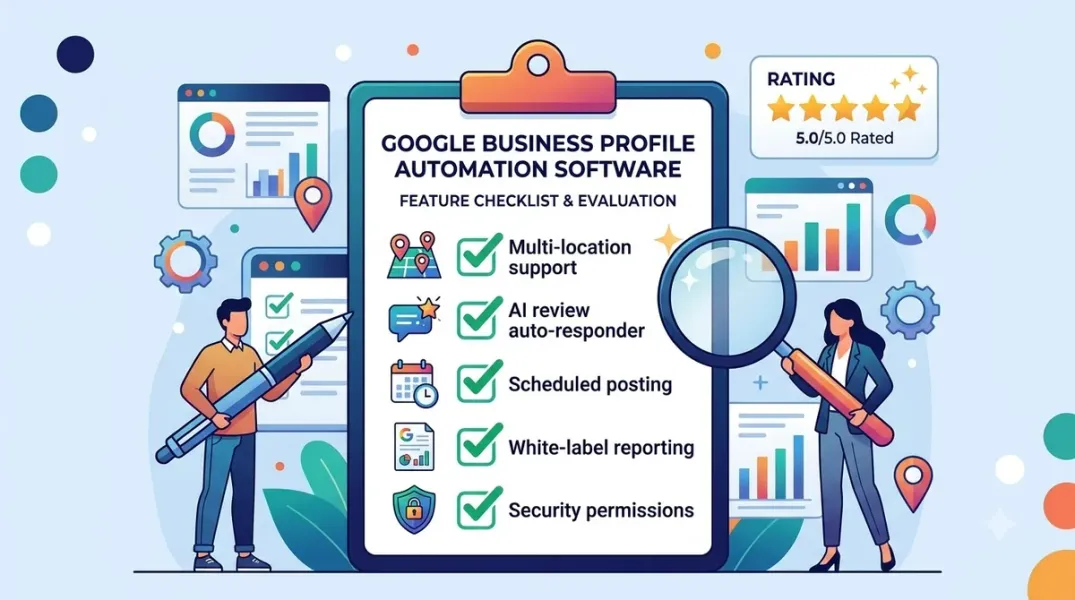
This guide covers the three jobs software can actually do, the five questions that separate a useful tool from an expensive dashboard, the technical criteria that matter (API access, approval gates, data portability), the pricing reality in 2026, and the specific red flags that should end a demo early.
Start With What Software Can Actually Do
The achievable list is shorter than the market implies. Scheduling and drafting posts solves two separate problems—writing the weekly update and remembering to publish it. Monitoring and drafting review replies removes the two reasons owners stop replying, though the draft still needs a human sentence before it publishes. Watching for changes—third-party edits, hours drifting out of date, duplicate profiles appearing—is a real service most owners would never notice manually.
The jobs no tool can do are the ones that move local rankings most. Distance between the premises and the searcher is geography. Whether real customers leave reviews depends on whether somebody asks them; a tool can prompt the request, but it cannot generate the review, and any product implying otherwise should be avoided outright. Choosing the primary category requires knowing how customers describe the work. And reconciling details across the wider web is manual verification.
A tool that claims to influence ranking directly is overstating what it can reach. Local ranking runs on relevance, distance, and prominence; a GBP tool can help prominence and relevance, but it cannot move the pin.
The Five Questions That Separate a Tool From a Dashboard
Amplocal’s evaluation framework is the clearest shortlist in the 2026 market, and it is worth applying to every demo.
-
What does it do that you would otherwise pay somebody to do, or fail to do at all? If the answer is nothing, the subscription is buying reassurance.
-
Does it write anything that publishes without your approval? Automatic publishing of descriptions or replies is the setting most likely to cause a problem.
-
Does it claim to influence ranking directly? If yes, the vendor is overstating what automation can reach.
-
What happens to your data and access if you cancel? Some tools hold the profile connection in a way that is awkward to unwind.
-
Does it touch your service list or categories automatically? Padded service lists are a common cause of guideline trouble.
A sixth question is worth asking about the vendor rather than the product: how long have they supported profiles through a Google guideline change? The rules shift, and a tool that publishes on your behalf needs to keep up without you having to notice.
The Technical Criteria That Actually Matter
The 2026 benchmark framework scores tools across weighted criteria, and the weights are a useful buying guide.
GBP edit path (25% weight). Does the tool edit the profile through the API or an official connection, or does it rely on scraped “updates”? Scraped access is fragile and breaks when Google changes its interface. The API is the only durable path.
NAP match versus the site (20%). The pass condition is a field-level diff—the tool shows you exactly which field differs. The fail condition is a dashboard that shows green while the live page is wrong.
Review workflow (15%). The pass condition is assignment plus an SLA—a named owner and a clock. The fail condition is an inbox dump where every review lands in one queue with no routing.
Public pricing (15%). The pass condition is a dated dollar figure. The fail condition is “per location” with no date, which usually means the price is negotiable and rising.
Listings versus reporting honesty (15%). The pass condition is that the SKU matches the job. The fail condition is a suite sold as a GBP tool—you buy a listings platform expecting profile automation and get neither properly.
Human gate. Does the tool have a documented approval step before anything publishes? This is the single most important criterion for avoiding the failure mode that costs more than the hours saved.
API Access Is Not a Feature—It Is the Foundation
The Google Business Profile API is one of the most heavily quota-limited and approval-gated products in Google’s developer catalog. It is not a public data API. It is a management surface for businesses you already own or officially represent, and Google treats it that way at every turn: low default quotas, mandatory approval forms, strict rate limits, and a use-case review process that filters out anything that smells like third-party scraping.
The numbers matter for due diligence. The standard quota is 300 queries per minute, with a 10-edits-per-minute limit per Business Profile. Accounts have hit 429 quota exceeded errors at scale, and API automations may be delayed or show transient errors due to rate limits, causing counts to look temporarily inconsistent. A tool that does not have approved API access is not automating the profile—it is automating a workaround.
The Pricing Reality in 2026
The spread is wider than most buyers expect, and the per-location model is where the economics live.
Low-cost, flat-rate tools are now genuinely viable. GBPPromote includes 42 tools on every plan at $5.33 per location per month**, flat, with a three-day trial requiring no payment method. GMBMantra starts at **$25 per month flat, with OAuth-based connection, automated review responses, profile auditing, rank tracking, and a multi-location dashboard. GMBapi starts at €4 per month on a volume-based model, with users noting that bulk editing and AI-assisted review replies dramatically reduced response time.
Mid-tier review tools are priced per location. BrightLocal Grow is $65 per month for one location (or $584/year), and the cheaper Track and Manage plans omit Reputation Manager entirely. NiceJob runs $75/month Starter and $125/month Pro, with AI Replies sitting in Pro, so request automation and reply automation have different prices. Localo is displayed at 99/month for one location and $60/location/month for 2–10.
Enterprise suites are quote-driven. Yext, SOCi, and Uberall are the listings-network layer, priced by quote, and they are the right buy when the job is enterprise listing syndication rather than profile automation.
The buying rule is to match the SKU to the job. A $5.33/location tool and a $65/location tool are not competitors; they are solving different problems at different depths.
The Red Flags That Should End a Demo
Scraped access instead of API access. If the tool cannot explain its edit path in one sentence, it is scraping.
Automatic publishing with no approval gate. A tool that writes descriptions or replies without review is the setting most likely to cause a suspension.
Ranking guarantees. Local ranking runs on relevance, distance, and prominence. No automation moves the pin.
No data portability answer. If the vendor cannot explain what happens to your profile connection when you cancel, assume it is awkward to unwind.
Automatic category or service list changes. Padded service lists and keyword-heavy descriptions are the exact breaches that lead to suspensions.
No dated pricing. “Per location” with no date is not a price; it is an opening position.
Conclusion
Evaluating Google Business Profile automation software is not a feature comparison. It is a risk assessment with a price tag attached. The tools that earn the subscription do three jobs well—scheduling and drafting posts, monitoring and drafting review replies, and watching for changes—and they do them through API access, not scraping, with a human gate before anything publishes, and with pricing that is dated and honest about what the SKU covers.
The tools that should not earn the subscription claim to move rankings, publish without approval, pad service lists, or cannot explain what happens to your data when you leave. Those are not minor objections. They are the failure modes that lead to suspended listings, and a suspended listing costs more than any subscription saves.
The market now offers genuine options at every tier—from 65 per location for a reporting-focused platform to quote-based enterprise listings networks. The right choice is the narrowest tool that closes the gap without crossing the automation line. That line is simple: if the task has a predictable correct answer, automate it. If it requires reading context, judging tone, or accepting risk, keep a human on it.
Call to Action
Run the five questions on your current shortlist before you book another demo. For each tool, ask what it does that you would otherwise pay someone for, whether it publishes without approval, whether it claims to influence rankings, what happens to your data on cancellation, and whether it touches your service list or categories automatically. Then check the edit path: API or scraped? Check the review workflow: assignment and SLA, or inbox dump? And check the price: dated dollar figure, or “per location” with no date? If any answer fails the test, cross the tool off. The subscription you avoid is worth more than the feature you were sold.
FAQs
What can Google Business Profile automation software actually do?Three jobs: schedule and draft posts, monitor and draft review replies, and watch for profile changes such as third-party edits, hours drifting out of date, and duplicate profiles appearing. It cannot move your ranking directly, generate reviews, choose your primary category, or reconcile your details across the wider web—those remain human or operational jobs.
Should automation software publish without human approval?No. Automatic publishing of descriptions or replies is the setting most likely to cause a problem, and a tool that does it without an approval gate is a red flag. The safe pattern is draft-first with a human gate before anything goes live.
Why does API access matter for GBP automation?Because the Google Business Profile API is the only durable edit path. Tools that rely on scraped “updates” break when Google changes its interface. The API is quota-limited—300 queries per minute standard, with a 10-edits-per-minute limit per profile—and approval-gated, so a tool without approved access is automating a workaround, not the profile.
How much does GBP automation software cost in 2026?The range is wide. GBPPromote is 25/month flat. GMBapi starts at €4/month on a volume model. BrightLocal Grow is 75–99/month for one location. Enterprise listings networks like Yext, SOCi, and Uberall are quote-driven.
What is the biggest risk of using GBP automation software?A suspended listing. Suspensions follow guideline breaches, and the breaches automation makes more likely are keyword-heavy descriptions, service lists containing things you do not offer, and details that contradict what appears elsewhere online. Recovery takes weeks and is not certain.
What is the “automation line” for GBP tasks?If the task has a predictable correct answer, automate it—post scheduling, review monitoring, draft generation, alerts. If the task requires reading context, judging tone, or accepting risk, keep a human on it—sensitive review replies, category decisions, service list changes, and anything that could contradict the live profile.
What should I check about pricing before buying?Look for a dated dollar figure, not “per location” with no date. Check whether the tier you are buying actually includes the job you need—BrightLocal’s cheaper Track and Manage plans omit Reputation Manager, and NiceJob’s AI Replies sits in Pro. Match the SKU to the job, not the headline price.
Internal & External Links
Internal links (to other posts in this series):
- How to Choose Between Standalone Review Tools and an All-in-One Local SEO Platform (previous post)
- Best Google Business Profile Management Software for Small Businesses in 2026
- How to Schedule a Month of Google Business Posts in One Sitting
- How to Automate Google Review Responses Without Losing Your Brand Voice
- How to Set Up Review Approval Workflows for Your Marketing Team
- How to Manage Google Business Profiles for Multiple Clients Without Account Chaos
- How to Build a Google Review Monitoring Workflow for Busy Teams
External links (sources referenced in this article):
- Amplocal — Google Business Profile AI Tool Options: Which Are Worth It?: https://amplocal.io/google-business-profile-ai-tool/
- US Tech Automations — 7 Best Google Business Profile Tools to Rank 2026: https://ustechautomations.com/resources/blog/best-google-business-profile-tools-2026
- Flento — GBP Automation for Agencies: Manage 100+ Profiles at Scale: https://www.flento.io/blog/gbp-automation-for-agencies
- MapsLeads — Google Business Profile API Quotas and Limits (2026): https://www.mapsleads.co/blog/google-business-profile-api-quotas-limits
- Google for Developers — Business Profile API quotas and limits: https://developers.google.com/my-business
- Search Engine Watch — Google review management tools I’d choose before buying a reputation suite: https://searchenginewatch.com/google-review-management-tools/
- Software Advice — GMBapi.com vs Paige: Which is best for you?: https://www.softwareadvice.com/compare/359780-gmb-reporting-tool/vs/534996-Paige/
- Software Advice — GMBMantra 2026: Benefits, Features & Pricing: https://www.softwareadvice.com/product/537839-GMBMantra/
- TMCnet — GBPPromote Launches All-in-One Local SEO Software for Agencies: https://www.tmcnet.com/usubmit/2026/08/11/10428905.htm
- Search Atlas Help — Troubleshooting Common Social Tool Automation Issues (GBP API rate limits): https://help.searchatlas.com
- Localith — Google Business Profile API limits (Spanish): https://localith.ai
Grow Your Google Maps Ranking on Autopilot
Stop spending hours every week manually replying to customer reviews and writing Google posts. Busirank automates your Google Business Profile to boost your local SEO rankings and turn searchers into paying clients.

 Busirank Team