 Busirank Team
Introduction
You have optimized your Google Business Profile, added booking links, and started appearing in the local Map Pack. But rankings and impressions are not customers. The only question that matters is whether local search traffic is actually turning into booked appointments.
Most local businesses track rankings in isolation, celebrating a #1 position without connecting it to revenue . They see calls and direction requests in their GBP dashboard but never calculate what those actions are worth. This guide covers how to measure appointment conversion rates from local search traffic, from setting up tracking to calculating ROI that justifies your marketing investment.
The stakes are high because local search intent is strong. 88% of local searches still lead to a call or visit . If you are not measuring what happens after someone finds you, you are flying blind on the highest-intent traffic you receive.
Tier 1: Track Google Business Profile Actions Directly Your Google Business Profile reports conversion signals through its performance insights. These are your first, most direct measure of whether local visibility drives customer behavior .
The Core GBP Metrics Track these actions monthly:
- Phone calls: Often your highest-intent leads
- Direction requests: Strong signal for storefront businesses
- Website clicks: People clicking through to your site
- Booking clicks: People using your appointment or booking link
In June 2026, Google added native Google Business Profile integration to Google Analytics, bringing seven metrics directly into GA4: interactions, calls, bookings, directions, website clicks, messages, and menus . This integration makes it possible to see local engagement data alongside website data without manual exports.
Important Limitation on Booking Tracking Google only tracks booking data if you use a full Reserve with Google integration (a supported provider with a “Featured Book Button”). If you use a custom booking link, GBP will not report booking metrics—you will see zeros even when bookings are happening . For custom links, you must track bookings through UTM parameters in Google Analytics or your booking provider’s dashboard.
Tier 2: Track Calls Properly with Call Tracking For most local businesses, phone calls are the primary conversion—and the most under-tracked .
Why Call Tracking Is Essential Without call tracking, you cannot attribute calls to local search versus other channels. Use unique trackable numbers for your GBP listing, website, and major landing pages . This lets you see which channels and even keywords drive calls, and how many calls become customers .
Track Call Outcomes, Not Just Volume Not all calls are equal. Knowing which calls became booked jobs connects rankings to revenue . Filter out wrong numbers, spam, and very short calls so your totals reflect real demand .
Tier 3: Track Website Conversions from Local Traffic For people who click through from your GBP to your website, you need to track what they do next.
UTM Parameters for GBP Links Add UTM parameters to your Google Business Profile website link. Keep a single naming convention so reporting stays clean . This lets you isolate website sessions and conversions that originated from GBP.
Form and Booking Tracking Set up Google Tag Manager events for form submissions, click-to-call, and chat initiations . For businesses with online booking, track completed bookings attributed to local search .
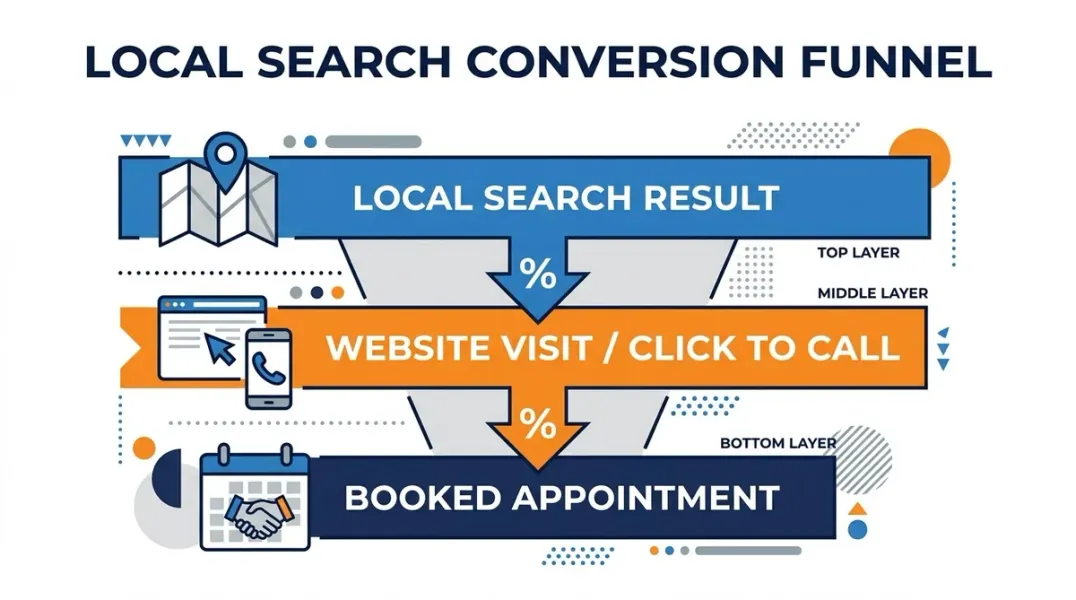
Connect Rankings to Conversions The goal is to link the top of the funnel to the bottom .
Overlay Rankings and Actions Over Time When your rankings improve, do your GBP actions and calls rise? This connection proves your local SEO is working . Track local keyword positions at the city and zip code level alongside your conversion metrics.
Calculate What a Ranking Improvement Is Worth If you know your average customer value and close rate, you can translate GBP actions into estimated revenue. This turns “we rank #2 now” into “our GBP is generating this many more calls per month” .
Calculate Appointment Conversion Rate and ROI The standard conversion rate formula applies: (number of conversions / number of visitors) x 100 . For local search, expand the definition to include GBP actions in both the numerator and denominator .
A Practical ROI Framework Use this formula to connect local search to revenue : Leads × Conversion Rate × Average Customer Value = Attributed Revenue
For example: if your GBP and location pages generate 40 calls and 15 form submissions per month, and your team converts 25% of leads into customers with an average value of $500, your local search program generates approximately $6,875/month in revenue ((55 leads × 25% × $500)). If your investment is $1,500/month, that is a 4.6x ROI .
Report Conversions, Not Just Rankings For agencies especially, reporting conversions changes the conversation. Clients care about customers, not positions. A report showing “your GBP generated more calls and bookings this month” resonates far more than “you moved up two positions” .
The Multi-Location Limitation If you manage multiple locations, the GA4 integration aggregates all GBP data into a single dataset. You cannot segment or filter by individual location within GA4 . Data retention is also capped at six months . For location-level reporting, use the Business Profile dashboard, exports, or the Performance API .
Conclusion
Measuring appointment conversion rates from local search traffic requires tracking actions at every stage of the funnel—from GBP impressions to booked jobs. The tools are available: GBP performance insights, the GA4 integration for aggregated metrics, call tracking for phone conversions, and UTM parameters for website attribution. The businesses that connect rankings to revenue are the ones that can justify continued investment and make smarter decisions about where to focus.
Call to Action
Ready to know exactly what your local search traffic is worth? Set up conversion tracking today using the framework in this guide. If you need help building a measurement system that connects rankings to revenue, contact our local SEO team for a free consultation.
FAQs
1. Why does my Google Business Profile show zero bookings?
GBP only reports booking metrics if you use a full Reserve with Google integration (a supported provider with a Featured Book Button). Custom booking links are not tracked by Google—you will see zeros even when bookings are happening .
2. Can I see GBP metrics in Google Analytics?
Yes, as of June 2026. Google added a native integration that brings seven GBP metrics into GA4: interactions, calls, bookings, directions, website clicks, messages, and menus .
3. How long does GA4 retain GBP data?
GBP metrics are available for a rolling six-month window. Reports will not show anything older, even if your GA4 date range goes back further .
4. Can I segment GBP data by location in GA4?
No. If you link multiple profiles, GA4 aggregates all data into a single dataset. You cannot segment or filter by individual location within GA4 .
5. What is the most important conversion to track for local search?
Phone calls are typically the primary conversion for local businesses and the most under-tracked. Direction requests are strong signals for storefront businesses .
6. How do I calculate ROI from local search?
Use this formula: Leads × Conversion Rate × Average Customer Value = Attributed Revenue. Compare this to your monthly investment to calculate ROI .
Internal & External Links
- Internal Link: [Google Business Profile Booking Links: How to Help Customers Schedule Appointments] (Topic #117)
- Internal Link: [Google Business Profile Booking Integrations: What to Evaluate Before Choosing a Provider] (Topic #131)
- Internal Link: [How to Build a Lead Qualification Process for Customers Coming From Google Maps] (Topic #133)
- External Link: Google Analytics Help: Connect Google Business Profile (official Google documentation)
- External Link: Google Business Profile Help: Performance Metrics (official Google support for GBP insights)
Grow Your Google Maps Ranking on Autopilot
Stop spending hours every week manually replying to customer reviews and writing Google posts. Busirank automates your Google Business Profile to boost your local SEO rankings and turn searchers into paying clients.

 Busirank Team
