 Busirank Team
Introduction
Most agencies do not decide to manage Google Business Profiles. They inherit the job. A web build client asks for opening hours to be fixed. Another wants help with a bad review. Eight months later, the agency is doing unpaid profile work across eleven accounts with no scope, no owner, and no line on the invoice.
Then the chaos compounds. Access lives in personal Gmail accounts. Clients send hours changes by email after the holiday has already passed. Reviews pile up. Q&A gets ignored. Posts happen only when someone remembers. And when the client asks why calls are down, nobody can prove what the profile actually did.
That is not a Google problem. It is an operating system problem—and it is solved by treating Google Business Profile management for agencies as a repeatable service line with onboarding, permissions, optimization rules, content workflows, review handling, and reporting. This guide covers the account architecture, the access rules, the onboarding sequence, the software costs, and the workflow that lets an agency scale to fifty clients without hiring proportionally.
Why Agency GBP Management Breaks (and Why It Is Not a Tool Problem)
The failure points are remarkably consistent across agencies, and they are all process failures rather than platform failures.
Access is unmanaged. Team members use shared passwords, old client logins, or personal accounts. The moment the client turns on two-factor authentication, the shared credential stops working—and the agency is left holding a liability rather than a working relationship.
Requests arrive everywhere. Clients send updates through Slack, email, texts, and voice notes. There is no single intake, so nothing is trackable and everything is urgent.
No one owns response time. Reviews and Q&A sit untouched because they are not assigned to a named person.
Publishing is inconsistent. GBP posts happen outside the main content calendar, so they get skipped in busy weeks.
Reporting is weak. Teams show screenshots instead of proving what actions came from the profile.
The practical rule that separates a service from a risk: if a client update depends on one account manager remembering to log into Google manually, you do not have a service—you have a recurring risk.
The Foundation: An Agency Organisation Account (Not a Personal Gmail)
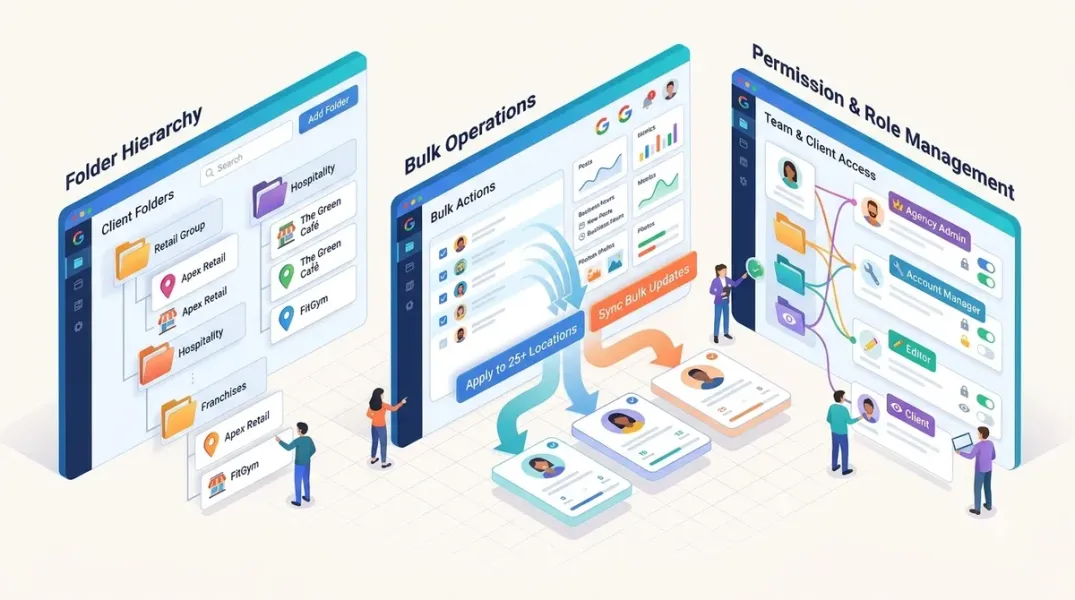
The structural fix is a Google Business Profile agency organisation account—a dedicated account structure that lets the agency manage multiple client listings from a single login, with business groups, role-based access, and bulk management tools, separate from any personal or client-owned Google account.
The setup rule is precise: sign in with a Google account tied to your agency domain, not a personal Gmail. Before creating the organisation, the account you use must not currently own or manage any individual GBP listings—pre-existing profile connections cause setup failures that require Google support to resolve.
Google’s own documentation describes the account types that make this work: organisation accounts (for agencies managing multiple listings), location group accounts (for bulk management), and user group accounts (for scalable permission management across team members). The practical benefit is that bulk actions and permission inheritance live at the location-group level, so you configure access once rather than per listing.
For agencies managing more than ten locations, an organisation account is not optional—it is the difference between a system and a spreadsheet. The setup checklist from practitioner guides: create a dedicated Google account, request organisation level through Business Profile Manager, create location groups by client or region, assign managers with appropriate access levels, document credentials in a secure password manager, and set up a process for onboarding new locations and offboarding closed ones.
Business Groups: How Agencies Stay Organised at Scale
A business group is a named collection of GBP locations inside Business Profile Manager, managed by an organisation or user group, used to separate client portfolios, control permissions, and apply bulk changes across a defined set of profiles.
The operating rule is simple: each client gets their own business group. Multi-location clients with regional divisions get multiple groups—one per state or franchise region, for example. The group name should be unambiguous (e.g., “Apex Dental – Texas Locations”), and permissions are set at the group level, so an account manager responsible for one client only ever sees that client’s group rather than organisation-wide access.
This is the mechanism that prevents the two opposite failures: over-exposure (every team member can see every client) and under-access (the account manager has to ask for permissions every time a new location opens).
Access Rule: Request Manager Access, Not Ownership
The most common and most expensive agency mistake is requesting ownership of a client’s profile. Ownership conflicts create a problem when the engagement ends: returning the profile cleanly is time-consuming, and disputes can leave the client temporarily locked out.
The correct approach is Manager access. A Manager can edit business information, respond to reviews, publish posts, and view insights—everything an agency needs operationally. The client retains Owner status and can remove agency access at any time without escalating to Google.
The process is straightforward: ask the client to log in to the Google account that owns the profile, navigate to the profile in Business Profile Manager, go to Business Profile settings → Managers → Add, and enter the agency’s Google account. Never ask for the client’s password; ask to be added as a Manager from the client’s own account. Shared credentials break the moment two-factor authentication is enabled, and they leave the agency holding a liability.
The Onboarding Sequence That Prevents Month-Four Problems
Almost every problem in month four traces back to something skipped in week one. The sequence that works is the same on every account.
Step 1 — Get Manager access, not the password. If nobody knows who owns the listing, resolve that first—it is often the real reason the client called.
Step 2 — Capture a baseline before you change anything. Export current insights, review count, and average rating on day one. Three months in, someone will ask whether the work is doing anything, and without a baseline you have opinion against opinion.
Step 3 — Audit, then hand over a fix list ordered by impact. Categories and service areas first, then hours and core information, then services and attributes, then media. Mark which items you need from the client. Most onboarding delays are not work delays; they are waiting on a photo or a decision about categories.
Step 4 — Agree the review response voice in writing. Get three replies approved before you write the fortieth: a five-star, a lukewarm three, an angry one. Settling the tone once removes the biggest source of back and forth, and AI-assisted drafting only saves time once somebody has decided what the brand sounds like.
Step 5 — Connect the performance data and set alert routing. Bring in calls, directions, clicks, profile views, and Search Console where the site is connected. Route new reviews to the account manager, negative reviews to a senior contact, and a weekly digest to the client.
The onboarding sequence from Ampli5 Pulse follows the same shape in a five-day window: add the agency as Manager, connect the profile via OAuth, review against competitors to establish a baseline, connect insights and Search Console, set up competitor benchmarking, and configure alert routing.
The Monthly Operating Rhythm
Once the account is onboarded, the work becomes a calendar rather than a series of emergencies. The workflow that agencies actually run:
Days 1–5 — Content planning. Review the content calendar and approve or adjust AI-suggested posts for the month.
Daily — Alert queue (about 10 minutes). Negative reviews, performance drops, and GBP changes get handled immediately rather than accumulating.
Mid-month — Performance review. A 30-minute dashboard review of performance insights to flag concerning trends before the monthly report.
End of month — Report QA and delivery. Review the auto-generated report, personalise the executive summary, and send or schedule automated delivery.
Monthly — Strategy call. Review the report with the client, set next month’s priorities, and address questions.
The critical distinction is that the platform is the process infrastructure, and the SOPs provide the quality standards. When both are in place, new account managers can be onboarded to the same standard as experienced team members within their first week.
What the Service Should Include (and Explicitly Exclude)
A tight monthly retainer usually covers profile maintenance (categories, services, attributes, hours including holiday hours, business information), review response with an agreed window and escalation rules, posting and media with a stated number of posts and photos, Q&A management, and monthly reporting on calls, direction requests, website clicks, and views, plus Search Console where the site is connected.
The exclusions matter as much as the inclusions. Suspension reinstatement, ownership disputes, mass corrections after a rebrand, and photography are real work that should be quoted separately. Fold reinstatement into a standard retainer and you will lose a week to a single client without being able to say no.
The scope tip that prevents arguments: put a number next to every recurring deliverable. “Regular posting” is an argument waiting to happen. “Four Google Posts a month, published Tuesdays” is something you can be measured against and something you can staff for.
The Software Stack and What It Actually Costs in 2026
Agency GBP management software connects to the Google Business Profile API to sync data, schedule posts, and pull performance metrics into a single dashboard, rather than logging into Google separately for every update. The category spans entry-level post scheduling, mid-tier review management and reporting, and enterprise-grade platforms handling hundreds of locations with white-label dashboards and team access controls.
The pricing spread is wide, and the per-location model is where agency margin lives.
Lead Oracle AI runs $99 per location per month at the low end, dropping to $49 at 25+ profiles, with no long-term contracts and a 1,225/month versus $2,475 flat—that difference is agency margin.
Semrush Local is $30/month per location plus a subscription**, with an AI agent for posts, map rank tracking, AI review replies, and a profile optimizer. Local Viking starts from $20/month with post scheduling, geogrid rank tracking, and basic review management. BrightLocal starts from $39/month with post scheduling, review monitoring, Local Search Grid geogrid, and white-label reporting, though it does not push profile optimizations directly to GBP—you see recommendations and implement them manually. Synup starts around **$79/month for 25 client accounts billed annually, or $99 monthly. Localo prices from €35/month for one profile, with a Pro 10 plan at €59/month.
The feature distinction that matters more than price: direct API push, not just scheduling. Posting to GBP is table stakes. The difference is whether the tool can also push profile optimizations—categories, attributes, description—directly to Google, or whether you still have to log into each client’s GBP manually to make profile changes. A tool that shows post performance alongside rank movement also gives you the feedback loop to optimize content over time.
The Proof: What This Looks Like at 150 Locations
The Comunicatio agency case study is the clearest available benchmark. The agency specialises in local SEO for multi-location businesses and grew past 150 managed locations, struggling to keep up with profile updates, review responses, and reporting.
It moved to a multi-client dashboard with a separate workspace per client, role-based access so team members see only the accounts they manage while leadership has full visibility, an AI reply agent that drafts every incoming review for account managers to customise and approve in batches, and one-click monthly reports covering search visibility, review metrics, and profile completeness.
The results: 60% less time spent on monthly reporting, same-day review responses across all client accounts, zero additional hires despite doubling the client count, and higher client retention thanks to faster service and better visibility.
That is the operating model to copy: centralised access, per-client workspaces, AI-assisted drafting with human approval, and automated reporting—so headcount grows slower than the client roster.
The Tools That Fit Each Stage
Agency organisation account (free, native) is the foundation for every agency, regardless of tooling. Business Profile Manager with business groups handles access and permissions. Bulk verification through Google handles the spreadsheet-based verification of 10+ locations at once, skipping the postcard process and saving weeks—provided the brand name is consistent across locations.
For the software layer, the shortlist depends on the job: Lead Oracle AI for volume-tiered per-location economics and a done-for-you resale option; Semrush Local for teams already inside the Semrush ecosystem; BrightLocal for citation tracking alongside GBP management; Local Viking for budget geogrid rank tracking; Synup for agency-scale account counts; and F! Insights for a self-hosted option with one-click GBP push and client billing via Stripe.
The tool decision should be the narrowest platform that removes your bottleneck. A five-client agency does not need an enterprise suite. A fifty-client agency does not need a scheduler with a GBP connection.
Conclusion
Managing Google Business Profiles for multiple clients without account chaos is an architecture and process problem, not a willpower problem. The agencies that scale are not working harder on profiles—they are running a different system.
That system has five parts: an agency organisation account on a domain-tied Google account rather than a personal Gmail; business groups per client with permissions set at the group level; Manager access instead of ownership so the client can revoke access cleanly; an onboarding sequence that captures a baseline, audits by impact, and settles review voice before the first reply; and a monthly operating rhythm with a daily alert queue, mid-month performance review, and an automated report that is personalised rather than exported.
The economics support the effort. Volume-tiered per-location pricing changes agency margin at scale. The Comunicatio case shows 60% less reporting time, same-day responses, zero additional hires while doubling the client count, and higher retention. And the service line is genuinely scalable—recurring monthly revenue, clear deliverables, measurable results, and high client value.
The chaos ends when the profile stops being a side task attached to SEO and becomes a productised service line with a scope, a price, an owner, and a calendar.
Call to Action
Audit your agency’s access model this week. List every client profile your team touches and check whether access is through Manager permissions on an organisation account or through shared passwords and personal Gmails. If it is the latter, fix it before onboarding another client: create a domain-tied Google account, request organisation level in Business Profile Manager, create a business group per client, and ask each client to add you as a Manager from their own account. Then write down the number next to every recurring deliverable—posts per month, review response window, report delivery date—and price the work against a per-location tier rather than a flat retainer. The agencies that scale are not the ones with the most clients; they are the ones whose access, onboarding, and reporting do not depend on anyone remembering to log in manually.
FAQs
What is a Google Business Profile agency organisation account?It is a dedicated account structure that lets an agency manage multiple client GBP listings from a single login, with business groups, role-based access, and bulk management tools—separate from any personal or client-owned Google account. Google’s documentation distinguishes organisation accounts (for agencies managing multiple listings), location group accounts (for bulk management), and user group accounts (for scalable permission management).
Should an agency request ownership or manager access on a client’s Google Business Profile?Manager access, not ownership. A Manager can edit business information, respond to reviews, publish posts, and view insights—everything an agency needs operationally—while the client retains Owner status and can remove agency access at any time without escalating to Google. Requesting ownership creates a clean-up problem when the engagement ends and can leave the client locked out during a dispute.
How do agencies organise multiple client profiles in Google Business Profile Manager?Each client gets their own business group inside Business Profile Manager. Multi-location clients with regional divisions can have multiple groups—one per state or franchise region. Permissions are set at the group level, so an account manager responsible for one client only sees that client’s group rather than organisation-wide access.
What should a GBP management retainer include?Profile maintenance (categories, services, attributes, hours including holiday hours), review response with an agreed window and escalation rules, a stated number of Google Posts and photo uploads per month, Q&A management, and monthly reporting on calls, direction requests, website clicks, and views, plus Search Console where connected. Suspension reinstatement, ownership disputes, mass corrections after a rebrand, and photography should be quoted separately.
How much does GBP management software cost per location in 2026?Pricing ranges from 30/month per location plus subscription (Semrush Local) up to 49 at 25+ profiles (Lead Oracle AI). BrightLocal starts from 79/month for 25 client accounts billed annually, and Localo from €35/month for one profile.
What results can an agency expect from centralising GBP management?The Comunicatio agency case study, covering 150+ managed locations, reports 60% less time spent on monthly reporting, same-day review responses across all client accounts, zero additional hires despite doubling the client count, and higher client retention.
What is the first thing an agency should fix in its GBP workflow?Access. If client profiles are accessed through shared passwords or personal Gmails, fix that before anything else. Move to a domain-tied agency organisation account, create a business group per client, and request Manager access from each client’s own Google account. Shared credentials break the moment two-factor authentication is enabled, and every other process improvement depends on reliable access.
Internal & External Links
Internal links (to other posts in this series):
- How to Create White-Label Local SEO Reports for Your Agency Clients (previous post)
- How to Standardize Local Marketing Tasks Across a Distributed Team (next in series)
- How to Build a Repeatable Google Business Profile Onboarding Process for New Clients
- How to Set Up Team Permissions for Secure Google Business Profile Management
- How to Publish Google Posts Across Multiple Business Locations Efficiently
- How to Report Google Business Profile Calls, Clicks, and Directions to Clients
- Best Google Business Profile Management Software for Small Businesses in 2026
External links (sources referenced in this article):
- PostPlanify — Google Business Profile Management: Agency Playbook (2026): https://postplanify.com/blog/google-business-profile-management
- Ampli5 Pulse — GBP Management for Digital Agencies: How to Scale to 50 Plus Clients in 2026: https://www.ampli5pulse.com/blog/gbp-management-digital-agencies.html
- Ampli5 Pulse — The Agency GBP Management Workflow: From Client Onboarding to Monthly Reports: https://www.ampli5pulse.com/blog/agency-gbp-management-workflow.html
- Authority Stack — How Digital Agencies Manage Google Business Profiles for Multiple Clients: https://authoritystack.ai/gbp/how-digital-agencies-manage-google-business-profiles-for-multiple-clients
- Localith — Comunicatio Agency Case Study: Scaling GBP with Localith: https://localith.ai/success-stories/comunicatio-agency/
- Locafy — Managing Google Business Profiles for Multiple Locations: https://locafy.com/blog/multi-location-gbp-management
- Lead Oracle AI — GBP Management Software: What It Costs Per Location (2026): https://www.leadoracle.ai/blog/google-business-profile-management-software
- Fricking — Best GBP Management Tool for Local SEO Agencies in 2026: https://fricking.website/best-gbp-management-tool/
- Google for Developers — Manage locations at scale: https://developers.google.cn/my-business/content/manage-locations
- Google for Developers — Accounts (Business Profile APIs): https://developers.google.cn/my-business/reference/rest/v4/accounts
- Google Support — How to Sign Up For and Use the Google Business Profile Agency Dashboard: https://support.google.com/business
- Google Support — Manage agency organisations: https://support.google.com/business
- Search Engine Journal / Embedsocial — How to Become a Google Business Profile Agency in 2026: https://embedsocial.com
- Localedge — Agency GBP Control (white-label tool reference): https://lifetimo.com
How to Standardize Local Marketing Tasks Across a Distributed Team
Grow Your Google Maps Ranking on Autopilot
Stop spending hours every week manually replying to customer reviews and writing Google posts. Busirank automates your Google Business Profile to boost your local SEO rankings and turn searchers into paying clients.
 Busirank Team