 Busirank Team
Introduction
Google Maps sends you traffic. It shows your profile to people searching nearby, generates calls, direction requests, and website clicks. But not every person who taps your listing is ready to buy. Some are just browsing. Some are outside your service area. Some are looking for something you do not offer.
Without a qualification process, your team wastes time chasing leads that will never convert while high-intent prospects wait for a response. The businesses that win from Google Maps are not just visible—they have a system for sorting the real opportunities from the noise.
This guide covers how to build a lead qualification process specifically for customers coming from Google Maps, from scoring signals to intake questions and follow-up timing.
Research shows that phone calls to businesses convert to customers 3x more than web clicks . But that statistic assumes the calls are qualified. A call from someone outside your service area or looking for a service you do not offer still counts as a call, but it will never become revenue.
Qualification protects your team’s time and improves your close rate. When you only spend effort on prospects who match your ideal customer profile, you deliver better results for those clients and stop chasing deals that were never going to close .
The Signals Google Maps Already Gives You Before you ask a single question, Google Maps provides qualification signals you can use to prioritize leads.
Review Engagement Businesses with established review profiles attract higher-intent prospects. A prospect who read through your reviews before calling is more qualified than one who dialed the first number they saw. Reviews that mention specific services or experiences signal that the prospect knows what they want.
Profile Completeness as a Filter Your own profile completeness affects who calls you. A business with accurate hours, a clear service list, and an active posting history attracts prospects who are ready to engage. A thin profile attracts more tire-kickers and wrong-number calls.
Direction Requests vs. Calls Someone requesting directions is physically nearby and likely intending to visit. Someone calling from a search might be comparison shopping. Both are valuable, but they signal different levels of intent and warrant different follow-up approaches.
Build a Lead Scoring Framework Not all Google Maps leads deserve the same response. A scoring framework lets your team prioritize instantly .
Score Based on Fit Assign points for signals that indicate a good match:
- Category match: Prospect needs a service you offer (+3)
- Location match: Prospect is within your service area (+3)
- Timeline urgency: Prospect needs service within days, not months (+3)
- Budget indicator: Prospect mentions budget range aligned with your pricing (+2)
- Decision authority: Prospect is the decision-maker (+2)
Score Based on Engagement
- Review engagement: Prospect mentions reading your reviews (+2)
- Profile depth: Prospect asks specific questions about services or pricing (+2)
- Multiple touchpoints: Prospect called after visiting your website or profile (+2)
Set a Threshold Define what score qualifies a lead for immediate follow-up versus nurture. A lead scoring 8+ should get a call back within minutes. A lead scoring 4-7 gets a standard follow-up sequence. A lead scoring below 4 goes into a nurture list or gets disqualified entirely .
Intake Questions That Filter Intent You cannot score what you do not ask. Every inbound Google Maps lead—whether by phone, message, or form—should pass through a short set of qualification questions.
For Service Businesses Start with location and scope. “What area are you in?” filters out prospects outside your service zone immediately. “What service are you looking for?” confirms whether their need matches your offering.
Budget comes next, but ask it carefully. Offering brackets reduces friction: “To suggest the right options, could you share a rough budget range you’re working with?” .
Timeline is the strongest predictor of conversion. “When are you looking to start?” separates urgent prospects from explorers. Someone who says “this month” gets prioritized. Someone who says “just researching” goes into a nurture sequence .
For Appointment-Based Businesses For salons, clinics, and professional services, the qualification questions shift. Ask about the specific service, whether they have been to your business before, and whether they have a preferred time or stylist.
For appointment-only locations, confirm the prospect understands the model. A quick “Just to confirm, we work by appointment only—does that work for you?” prevents the walk-in problem and filters out prospects who expected drop-in service.
Respond Fast or Lose the Lead Qualification only matters if you respond before the lead goes cold. Research consistently shows that response speed is one of the strongest predictors of conversion.
If you respond after 30 minutes, you have likely already lost the lead . Companies that reply within five minutes are dramatically more likely to convert than those that take hours.
For Google Maps leads specifically, speed matters because the prospect is often still in the app, comparing you against two or three other nearby options. If you do not answer, they call the next listing.
Set up a system that ensures every inbound lead gets a response within five minutes during business hours. For after-hours leads, an automated text acknowledging the inquiry and setting expectations for a morning follow-up keeps the lead warm until your team can engage.
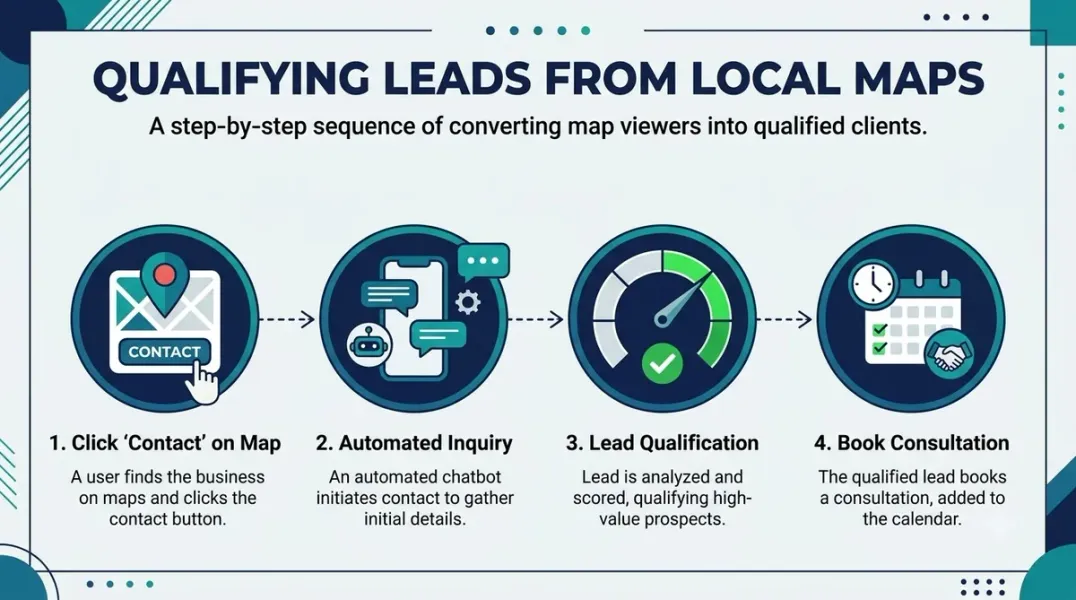
The Qualification-to-Booking Handoff Once a lead qualifies, the handoff to booking should be frictionless. Do not make a qualified prospect wait while you check calendars or call them back later.
For Phone Leads If the prospect qualifies on the call, book the appointment before hanging up. Have your calendar accessible and offer specific times. “I have Tuesday at 10 or Thursday at 2—which works better?” is more effective than “Let me check and call you back.”
For Message and Form Leads If a lead comes through Google Business Profile messaging or a website form and qualifies based on the intake questions, send a booking link immediately. The longer the gap between qualification and booking, the lower the conversion rate.
For After-Hours Leads If a high-scoring lead comes in after hours, send an automated response that confirms you received the inquiry and offers a booking link. This captures the lead while intent is still high, even if your team cannot engage until morning.
Disqualify Ruthlessly The hardest part of lead qualification is saying no. But disqualifying poor-fit leads protects your team’s time and your business’s reputation.
Signals to Disqualify
- Location outside your service area (unless you offer remote services)
- Budget far below your minimum engagement
- Request for services you do not offer
- Timeline that does not match your availability
- Prospect is not the decision-maker and the decision-maker is not engaged
How to Disqualify Gracefully A disqualified lead today might be a qualified lead in six months. Handle rejections with professionalism. “We are not the right fit for what you need right now, but here is a resource that might help” keeps the door open without wasting your team’s time.
Conclusion
Building a lead qualification process for Google Maps customers turns your profile from a visibility tool into a revenue channel. Score leads based on fit and engagement. Ask intake questions that filter intent. Respond within minutes, not hours. And disqualify poor-fit prospects so your team can focus on the leads that will actually convert. Google Maps sends the traffic—your qualification process determines what you do with it.
Call to Action
Ready to stop chasing unqualified leads from your Google Business Profile? Build your qualification process today using the framework in this guide. If you need help setting up lead scoring and intake systems for your local business, contact our local SEO team for a free consultation.
FAQs
1. How do I know if a Google Maps lead is qualified?
A qualified lead matches your service area, needs a service you offer, has budget aligned with your pricing, and has a timeline that matches your availability. Lead scoring frameworks help prioritize these signals .
2. What is the most important qualification question?
Timeline is the single biggest predictor of conversion. A prospect who needs service “this month” is far more valuable than one who is “just exploring” .
3. How fast should I respond to Google Maps leads?
Within five minutes during business hours. If you respond after 30 minutes, you have likely already lost the lead to a competitor .
4. Should I disqualify leads that do not match my criteria?
Yes. Disqualifying poor-fit leads protects your team’s time and keeps your pipeline focused on opportunities that will actually close.
5. How do I handle after-hours leads from Google Maps?
Send an automated response that acknowledges the inquiry and offers a booking link. This captures the lead while intent is high, even if your team cannot engage until morning.
6. What if my business is appointment-only?
Confirm the appointment-only model early in the qualification process. A quick “We work by appointment only—does that work for you?” prevents walk-in problems and filters out prospects expecting drop-in service.
Internal & External Links
- Internal Link: [How to Measure Appointment Conversion Rates From Local Search Traffic] (Topic #132)
- Internal Link: [Google Business Profile Booking Links: How to Help Customers Schedule Appointments] (Topic #117)
- Internal Link: [How to Manage Google Business Profiles for Businesses With Appointment-Only Locations] (Topic #130)
- External Link: Google Business Profile Help: Tips for Improving Your Local Ranking (official Google local search guidance)
- External Link: HoneyBook: How to Qualify Leads (industry resource for service business lead qualification)
Grow Your Google Maps Ranking on Autopilot
Stop spending hours every week manually replying to customer reviews and writing Google posts. Busirank automates your Google Business Profile to boost your local SEO rankings and turn searchers into paying clients.

 Busirank Team
