 Busirank Team
Introduction
Most multi-location brands believe they are responding to reviews. The data says otherwise. Across 11–50 location businesses, the average review response rate sits at 62%, with a median response time of 1.8 days—and 68% of negative reviews go completely unanswered. The gap is not a staffing crisis. It is a measurement crisis. A branch that stopped replying three months ago does not appear on any system-wide dashboard, because the brand-level average absorbs it.
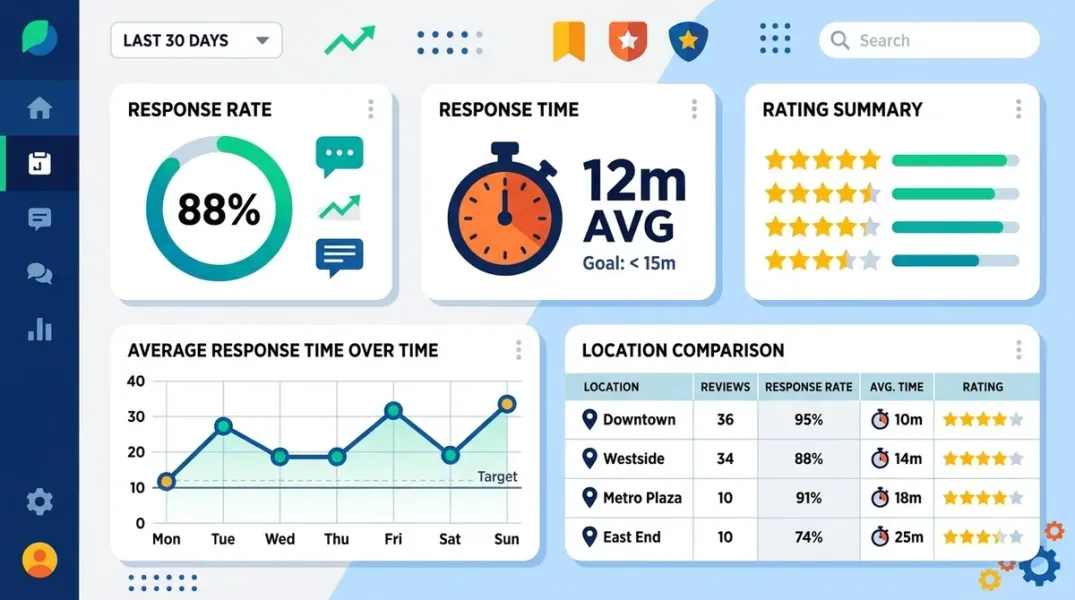
Review response rate tracking closes that gap by making response coverage and response speed visible at the location level, not just in aggregate. The goal is not a prettier report. It is catching the location where replies have stopped—or slowed to a crawl—before the rating moves and the phone stops ringing.
This guide covers the benchmarks worth tracking against, the metrics that actually indicate a problem, the fair-comparison framework, the tooling that automates location-level tracking, and the cadence that turns response data into an operating decision.
The Benchmarks: What “Good” Looks Like in 2026
A tracking program without a target is just a dashboard. The 2026 data provides a defensible set of thresholds.
Response rate. The healthy target is 100% of reviews receiving a reply. The warning signal is below 80%; below that, the location is not running a response process at all. The best-performing operators exceed the multi-location average by a wide margin: a 17-venue hospitality group holds a 97% reply rate with a 15-hour median response, and a 102-location insurance group reached a 92% response rate.
Response time. Under 24 hours is the standard target for first reply. Negative reviews need a tighter clock: under 24 hours is healthy, over 72 hours is a warning signal. Consumer expectation has tightened: 19% now expect a same-day reply (up from 6% in 2025), and 32% expect one by the next day.
Backlog. The number of reviews with no owner reply is the leading indicator that a location has stopped processing. A location with a response rate of 95% can still have a 40-review backlog if volume spiked three weeks ago and nobody noticed.
Negative review response time specifically. The recovery data justifies a separate clock: negative reviews answered within 4 hours are roughly three times more likely to end in an updated rating from the reviewer. A location whose negative-review response time is measured in days is not just slow—it is leaving recoverable rating points on the table.
Why Brand-Level Averages Hide the Failing Location
The arithmetic is simple and the consequence is not. If four locations reply to 90% of reviews and one replies to 20%, the brand average lands around 76%—which looks like a manageable problem rather than one branch with a collapsed process.
The 91-percentage-point gap between the best and worst location in a network is the number that matters, and it is invisible in the roll-up. The fix is to report response rate as a distribution, not a single number: the median across locations, the gap between the top and bottom quartile, and the count of locations below the warning threshold.
The same applies to response time. A brand median of 18 hours can hide one location at 4 hours and another at 6 days. Reporting the per-location median and the 90th percentile surfaces the outliers that the average conceals.
The Fair-Comparison Framework for Response Metrics
Location-level response tracking fails when it compares a flagship with 800 reviews against a new store with 12. The comparison framework needs three adjustments.
Compare rates, not totals. A location with 400 reviews and a 98% reply rate is outperforming a flagship with 4,000 reviews and a 71% rate on the metric that matters. Totals reward size; rates reward discipline.
Compare against the location’s own rolling baseline. The actionable question for a store manager is not “are you beating the flagship?” It is “are you better or worse than your own last 90 days?” A location that improved from 45% to 70% is making progress even if it is still below the network median. A rolling 90-day response rate is the baseline most dashboards already track.
Segment by review volume and rating mix. A location with a high volume of 1–2 star reviews will naturally have a longer median response time if it is doing the work of investigating each complaint before replying. The 17-venue hospitality case study deliberately answers one-star reviews more slowly than five-star reviews—19.5 hours median versus 16.4—because the team waits for the operator to confirm what actually happened before posting a public reply. A fair comparison should account for that intentional design rather than penalize it as slowness.
The Four Metrics That Belong on Every Location Scorecard
The location scorecard should be short enough to read in one glance and specific enough to trigger a decision. Four metrics do the job.
-
90-day response rate. The share of reviews with an owner reply, trailing 90 days. Target: 100%; warning: below 80%.
-
Median first-response time, split by rating tier. Report positive (4–5 star) and negative (1–2 star) separately. Target: under 24 hours overall; negative reviews should have their own tighter clock.
-
Unanswered backlog. The raw count of reviews with no reply. This is the operational metric that tells you whether the location is processing new reviews or merely keeping its head above water.
-
Gap from network median. The difference between the location’s response rate and the median across comparable locations. A gap of more than 15 percentage points is a process problem, not a performance fluctuation.
The Tooling That Automates Location-Level Tracking
Manual tracking is possible in a spreadsheet and it does not scale. At 20 locations, someone is exporting CSVs, matching review IDs to locations, and calculating rates by hand—which is exactly the work that consumed 15–20 hours of management time per week at a 51-location retail network before automation.
The tools now expose location-level response tracking as a native capability. Birdeye’s API includes dedicated report tools for response rate by location, response rate over time, and average response time by location—exactly the three views a location scorecard requires. LocalImpact’s “All Locations” view shows 90-day response rate per site, with trend indicators and a review feed that lets one person handle replies across every location without switching accounts. Localith surfaces response activity—response rate, unanswered reviews, and reply speed—as a standard report section for multi-location teams. Supermetrics connects Google Business Profile to BigQuery or Power BI, so response rates and response times can be calculated in SQL or DAX across hundreds of locations in one query. GMBapi monitors silently rejected replies—a critical tracking layer, because a reply that Google moderates away looks like a response in the tool but never appears publicly.
The automation dividend is measurable. The 51-location retail network moved from a 72-hour average response time to under two minutes at a 97.8% response rate after automating the pipeline—and the hours that returned to management were the part that paid for the system. The 400-location Stellar Service Brands network lifted its response rate from 60% to 87% with no added workload for franchise owners.
The Cadence: Weekly Exceptions, Monthly Scorecard, Quarterly Audit
Tracking only works if it runs on a rhythm that catches failure early.
Weekly — exception check. A 10-minute review of the locations below the response-rate threshold and the locations with a growing backlog. The goal is not to fix every reply; it is to catch the branch whose process has stopped.
Monthly — scorecard. The four metrics above, per location, with the gap from median highlighted. This is the report that goes to regional managers and store owners, with one decision attached to each underperforming location.
Quarterly — process audit. Check whether the low-response locations have an access problem (nobody can log in), an alert problem (reviews are not reaching anyone), or a capacity problem (the person responsible is overwhelmed). The fix differs by cause, and the tracking data is what tells you which one you are dealing with.
Conclusion
Tracking review response rate and response time across locations is not a reporting exercise. It is the early-warning system that catches a branch before the rating drops and the phone stops ringing.
The benchmarks are clear: 100% response rate as the target, 80% as the warning line, under 24 hours for first reply, and a negative-review clock that is measured separately because recovery depends on speed. The comparison framework is equally clear: rates, not totals; each location against its own baseline; segmented by volume and rating mix. And the tooling now supports location-level tracking natively—Birdeye’s by-location reports, LocalImpact’s All Locations view, Supermetrics for warehouse-scale queries, and GMBapi for catching rejected replies that never published.
The data that makes the case is the gap: 62% average response rate across 11–50 location businesses means 38% of reviews get no reply at all. A tracking program is how that number becomes visible at the location level, and visibility is the precondition for fixing it.
Call to Action
Pull your 90-day response rate by location this week. Export the data from your dashboard or, if you are still manual, build a simple sheet with four columns: location, total reviews, replied reviews, unanswered count. Calculate the rate for each location and sort from lowest to highest. The bottom three locations are your first exceptions—check whether the problem is access, alerts, or capacity. Set a target of 100% response rate and under 24 hours for first reply, and put a weekly 10-minute exception check on the calendar. If you manage more than 20 locations, shortlist a tool with native by-location response reporting—Birdeye, LocalImpact, or Localith—and stop calculating rates by hand. The branch that stops replying will not announce itself; the tracking is how you find it first.
FAQs
What is a good review response rate for a multi-location business?The healthy target is 100% of reviews receiving a reply. The warning signal is below 80%. The 2026 average for 11–50 location businesses is 62%, and for 50+ location enterprises it is 71%—so the average is well below the target, which means most networks have at least one location with a collapsed process.
What is the right target response time for Google reviews?Under 24 hours for first reply is the standard target. Over 72 hours is the warning signal. Negative reviews should have a tighter clock: answering them within 4 hours makes them roughly three times more likely to result in an updated rating.
How do I compare response rates fairly across locations of different sizes?Compare rates, not totals. Judge each location against its own rolling 90-day baseline and against the median of a peer group with similar volume and rating mix. A location with 12 reviews and a 100% rate is not the same as a flagship with 4,000 reviews and a 71% rate, and the comparison should not pretend otherwise.
Why does a high average response rate still hide a failing location?Because averages absorb outliers. If four locations reply at 90% and one replies at 20%, the brand average lands around 76%—which looks like a minor gap rather than one branch with no process. Report the distribution (median, top–bottom quartile gap, count below threshold) alongside the average.
What tools track review response rate by location automatically?Birdeye exposes by-location response rate and average response time as native report tools. LocalImpact shows a 90-day response rate per site in an “All Locations” view. Localith includes response rate, unanswered reviews, and reply speed in its report sections. Supermetrics connects Google Business Profile to BigQuery or Power BI for warehouse-scale response tracking. GMBapi adds rejected-reply monitoring, which catches responses that never published.
What is the biggest mistake in tracking review response metrics?Reporting only the brand average. The average hides the location that stopped replying, and that location is the one that will show up in the rating three months later. The second mistake is not separating negative-review response time from overall response time—negative reviews have a different clock and a different recovery mechanism.
How often should I review response rate and response time?Weekly exception checks (locations below threshold or with a growing backlog), monthly scorecards (all four metrics per location), and a quarterly process audit to determine whether the failing locations have an access, alert, or capacity problem. The quarterly audit is where the tracking turns into a fix.
Internal & External Links
Internal links (to other posts in this series):
- How to Report Google Business Profile Calls, Clicks, and Directions to Clients (previous post)
- How to Build a Repeatable Google Business Profile Onboarding Process for New Clients (next in series)
- How to Manage Google Reviews From Multiple Locations in One Dashboard
- How to Build a Google Review Monitoring Workflow for Busy Teams
- How to Compare Local Marketing Performance Across Different Business Branches
- How to Audit Your Team’s Review Responses for Quality and Consistency
- How to Create a Review Escalation Process for Unhappy Customers
- Best Google Business Profile Management Software for Small Businesses in 2026
External links (sources referenced in this article):
- ReplyOnTheFly — 2026 Google Review Response Benchmark: https://www.replyonthefly.com/blog/2026-google-review-response-benchmark
- ReplyOnTheFly — Google Review Response Time Study (2026): https://www.replyonthefly.com/blog/google-review-response-time-study
- 5for5 Consulting — Forward Hospitality: Reputation Management Across 17 Venues: https://www.5for5consulting.com/case-studies/forward-hospitality-multi-location-reputation/
- LocalImpact — Multi-Location Overview and Reporting: https://localimpact.com/blog/multi-location-overview-and-reporting
- Birdeye Developer Portal — Reports (response rate and response time by location): https://docs.birdeye.com
- Localith — Online Review Reporting: 2026 Guide for Multi-Location Teams: https://localith.ai
- Supermetrics — Connect Google Business Profile to Power BI / BigQuery: https://supermetrics.com
- GMBapi — Google Review & Reputation Management: https://gmbapi.com
- Avelle Solutions — What Automating Review Responses Across 50+ Locations Does to Response Time: https://avellesolutions.com/blog/ai-review-response-time-multi-location
- Birdeye — Stellar Service Brands Case Study (400 locations): https://birdeye.com/sg/resources/case-studies/stellar-service-brands/
- Sked Social — Multi-location social media reporting (review response rate per store): https://skedsocial.com/blog/multi-location-social-media-reporting
- Saphek — Multi-Location Google Reviews: The 2026 Guide (KPI targets): https://saphek.com
- ReviewTactic — The Complete Guide to Google Review Management (2026): https://reviewtactic.com
How to Build a Repeatable Google Business Profile Onboarding Process for New Clients
Grow Your Google Maps Ranking on Autopilot
Stop spending hours every week manually replying to customer reviews and writing Google posts. Busirank automates your Google Business Profile to boost your local SEO rankings and turn searchers into paying clients.

 Busirank Team