 Busirank Team
Introduction
Most Google Business Profile problems are not marketing problems. They are access problems that happen to affect marketing. A former employee still has manager access six months after leaving. A client’s personal Gmail is the primary owner, and nobody knows the recovery email. A franchisee was given owner rights because it was faster than explaining the difference, and now removing them requires a formal ownership transfer.
Google Business Profile team permissions exist to prevent exactly this. The native system is simple—owners and managers, plus organisation accounts, location groups, and user groups for scale—but the simplicity is deceptive. The difference between a secure profile and a hijackable one is almost entirely in who holds owner rights, who holds manager rights, and whether anyone reviews the list.
This guide covers the role model, the organization-account architecture for multi-location and agency setups, the least-privilege framework that should govern every assignment, and the audit routine that keeps permissions from drifting into risk.
The Two Native Roles (and the One That Matters Most)
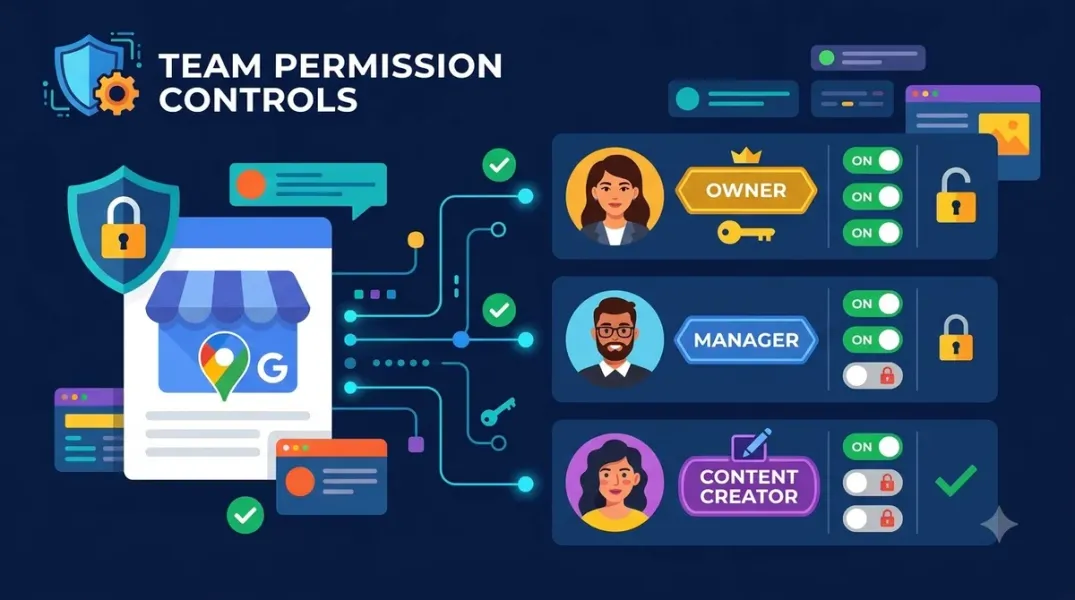
Google Business Profile has two native roles: Owner and Manager. The distinction is narrower than most people assume, and the one capability that separates them is the one that determines your security posture.
Managers — formerly called site managers — have mostly the same access as owners. They can edit business information, update hours and address, add and edit photos, create and publish posts, respond to reviews and Q&A, and download insights. The only exceptions are that managers cannot add or remove users, and cannot remove the profile itself.
Owners have full control. They can add and remove users, change access roles for other owners and managers, edit all URLs, manage Google Ads links, and delete the profile. A profile can have multiple owners but only one primary owner, and ownership can only be transferred if there is at least one other owner or manager on the profile to transfer to.
The practical implication is blunt: the owner role is the profile’s keys. Anyone with owner access can remove everyone else, including the business itself. That is why the single most important permission decision is not “who should be a manager” but “who should be an owner, and is that list short enough?”
Organization Accounts and User Groups: The Architecture for Scale
For a single-location business, the native role model is sufficient. For multi-location businesses and agencies, Google provides organization accounts, location group accounts, and user group accounts that change the permission model from per-profile assignments to inherited, group-based access.
The architecture that works is a hierarchy of access. Google’s own documentation describes the organization account as the container that holds user groups and location groups, where personal accounts are granted access to user groups, and user groups are assigned permissions to location groups or individual locations. The practical benefit is that user groups enable scalable permission management—adding a new regional manager to a user group grants them the right access to every location in that group without touching each profile individually.
The recommended structure for a multi-location business is the one Sked Social documents: head office holds owner rights on every business group, regional leads are managers of their own group, and store managers are managers of their own profile only. That maps the permission level to the span of responsibility: the person accountable for the brand holds ownership; the person accountable for a region holds managerial access to that region; the person accountable for a single store holds access to that store.
For agencies managing client profiles, the same logic applies with a different boundary. The agency should be a manager, not an owner, on each client profile—enough to edit information, respond to reviews, and publish posts, but not enough to remove the client’s listing or lock the client out. The client retains owner status and can revoke agency access at any time without escalating to Google.
The Principle of Least Privilege, Applied
The security framework that should govern every permission assignment is least privilege: give each person the minimum access required to do their job, and no more.
A four-level model maps cleanly onto GBP operations, even though only two levels are native:
Viewer — can see profile information, performance metrics, reviews, and reports, but cannot make changes. Use for executives and regional managers who need visibility without edit capability.
Editor — can update business information, respond to reviews, create posts, and upload photos, but cannot manage users or delete profiles. Use for marketing team members and content managers.
Manager — full access to assigned locations except ownership transfer, including managing users for their locations, advanced settings, and verification. Use for regional managers and franchise owners.
Owner — complete control, including transferring ownership, deleting profiles, and accessing all locations. Use sparingly: business owners, senior leadership, and IT administrators only.
The rule that prevents most incidents: keep owner access limited, and treat it as a governance role rather than an operating one. The people who do the daily work—posting, replying to reviews, updating hours—need manager access, not owner access. The owner role should sit with the account that controls billing or legal responsibility, plus a backup.
The Structural Safeguards That Prevent Hijacking
Permissions alone do not secure a profile. Three structural safeguards do.
Domain-tied accounts, not personal Gmail. The primary owner should be a dedicated Google account tied to the business domain, not an individual’s personal Gmail. Google’s best-practice guidance for merchants is to sign in to all their accounts to avoid duplicates and ownership delays, and the recommended setup is a domain email as the primary owner on all individual listings, with a second domain email as a backup owner. This is the single most effective protection against losing the profile when an employee leaves.
Two-step verification on every account with access. Google’s own security guidance for Business Profiles recommends strong passwords, secure devices, and 2-Step Verification. An account with manager access and no 2FA is the weakest link in the entire permission structure.
No shared credentials. Every user should access the profile through their own Google Account, not a shared password. Shared credentials make audit trails meaningless and create a removal problem the moment someone leaves.
The Audit Routine That Keeps Permissions From Drifting
Permission drift is inevitable in any organization with turnover. The fix is a scheduled access review, not a one-time cleanup.
The audit that takes fifteen minutes and prevents most incidents:
List every user with access — owners and managers, across every profile or business group.
Flag former employees and expired agency relationships — anyone who should no longer have access.
Check for shared accounts — any login that is not tied to an individual identity.
Verify that every owner is an owner for a documented reason — if the reason is “they set it up,” move them to manager and assign ownership to a domain-tied account.
Confirm the primary owner is reachable — the recovery email and phone number should belong to the business, not a former employee.
The cadence that works is quarterly, with an immediate review triggered by any departure or role change. A former employee retaining manager access can still edit hours, respond to reviews, and publish posts—which is exactly the kind of access that causes a public incident months after the person left.
The Mistakes That Cause Most Permission Incidents
The failure patterns are consistent and avoidable.
Assigning owner access because it is faster. Owner and manager can do almost the same operational work. The extra capability owner grants is the capability to remove people and delete the profile—which is precisely the capability that should not be distributed casually.
Using a personal Gmail as the primary owner. When the person leaves, the business may not be able to recover the profile without a formal ownership transfer that requires another owner or manager to still exist.
Adding Google Groups as owners or managers. Google explicitly does not support this—Google Groups cannot be added as managers or owners of profiles. Plan for individual accounts or user groups instead.
Never reviewing the list. Access granted for a project stays granted for years. The audit is the control.
Giving an agency ownership instead of manager access. Manager access covers editing, reviews, posts, and insights—everything an agency needs operationally—while preserving the client’s ability to revoke access cleanly.
Conclusion
Setting up Google Business Profile team permissions securely is not a technical task. It is a governance task with three components: the right role for the right person (owner sparingly, manager for operations, viewer for visibility), the right account architecture (domain-tied primary owner, organization accounts and user groups for scale, no shared credentials), and the right audit routine (quarterly review, immediate review on departure).
The native role model is simple enough to learn in five minutes. The discipline is in applying it consistently: keeping owner access short, giving managers the operational access they need without the deletion capability they do not, and treating the access list as a living document rather than a setup artifact.
A profile that has never had an access review is a profile with unknown risk. The review is the control.
Call to Action
Run a fifteen-minute access audit this week. Open Business Profile settings, go to People and access, and list every owner and manager on every profile you manage. Mark anyone who is no longer active, any shared account, and any owner whose ownership is not documented. Move operational users to manager access, assign the primary owner to a domain-tied account with a backup owner, and turn on two-step verification for every account on the list. Put the next audit on the calendar for 90 days from now, and repeat it immediately whenever someone leaves or an agency engagement ends. The profile is only as secure as the shortest list of people who can delete it.
FAQs
What is the difference between an owner and a manager on Google Business Profile?Managers can do almost everything owners can—edit business information, update hours and address, add photos, publish posts, respond to reviews and Q&A, and download insights. The only exceptions are that managers cannot add or remove users and cannot remove the profile. Owners can add and remove users, change access roles, transfer primary ownership, and delete the profile.
How many owners should a Google Business Profile have?A profile can have multiple owners but only one primary owner. The recommended setup is a domain-tied email as the primary owner and a second domain email as a backup owner, with owner access otherwise kept as limited as possible. Operational staff should be managers, not owners.
Should an agency be an owner or a manager on a client’s profile?Manager, not owner. Manager access covers editing business information, responding to reviews, publishing posts, and viewing insights—everything an agency needs operationally—while the client retains owner status and can revoke access cleanly. Requesting ownership creates an offboarding problem when the engagement ends.
What are user groups in Google Business Profile?User groups are a permission-management structure available through organization accounts. They let you grant access to location groups by assigning a user group to a role, rather than adding people to each profile individually. Google describes user groups as enabling scalable permission management and simplifying team management.
Why can’t I add a Google Group as a manager?Google explicitly does not support it. Google Groups cannot be added as managers or owners of Business Profiles. You need individual Google Accounts or, at scale, user groups within an organization account.
How often should I audit Google Business Profile permissions?Quarterly, with an immediate review whenever an employee leaves or an agency relationship ends. A former employee with manager access can still edit hours, respond to reviews, and publish posts months after leaving, so the departure trigger matters as much as the calendar.
What is the biggest Google Business Profile permission mistake?Giving owner access to people who only need to do operational work. Owner access includes the ability to remove users and delete the profile, and it should be reserved for a small number of domain-tied accounts with a documented reason. The second biggest mistake is using a personal Gmail as the primary owner, which creates a recovery problem when that person leaves.
Internal & External Links
Internal links (to other posts in this series):
- How to Standardize Local Marketing Tasks Across a Distributed Team (previous post)
- How to Audit Your Team’s Review Responses for Quality and Consistency (next in series)
- How to Manage Google Business Profiles for Multiple Clients Without Account Chaos
- How to Create White-Label Local SEO Reports for Your Agency Clients
- How to Set Up Review Approval Workflows for Your Marketing Team
- Best Google Business Profile Management Software for Small Businesses in 2026
External links (sources referenced in this article):
- Google Support — Manage your Business Profile owners and managers: https://support.google.com/business/answer/3403100
- Google for Developers — Accounts (Business Profile APIs, organization and user group accounts): https://developers.google.cn/my-business/reference/rest/v4/accounts
- Google for Developers — Manage locations at scale (user groups and location groups): https://developers.google.cn/my-business/content/manage-locations
- Sked Social — How to manage Google Business Profile for multiple locations in 2026: https://skedsocial.com/blog/manage-google-business-profile-multiple-locations
- Locafy — Managing Google Business Profiles for Multiple Locations: https://locafy.com/blog/multi-location-gbp-management
- GMBMantra — Team Permissions & Access Control: https://gmbmantra.ai/multi-location-business-management/team-permissions
- Google Support — Help protect your Google Business Profile (2-Step Verification guidance): https://support.google.com/business
- LocalBase — GBP owner vs manager roles and hijacking prevention (Japanese): https://local-base.net
How to Audit Your Team’s Review Responses for Quality and Consistency
Grow Your Google Maps Ranking on Autopilot
Stop spending hours every week manually replying to customer reviews and writing Google posts. Busirank automates your Google Business Profile to boost your local SEO rankings and turn searchers into paying clients.
 Busirank Team