 Busirank Team
Introduction
Most local SEO reports fail for a reason that has nothing to do with the optimization work. They lead with keyword rankings and impressions—metrics that measure visibility—while the client is sitting on the other side of the table waiting to hear about the phone. Did it ring? Did anyone walk through the door? Did the marketing produce a customer?
The data on this is unambiguous. 72% of consumers who perform a local search visit a store within five miles, and phone calls from local search convert to customers three times more often than web clicks. A client who cannot see the connection between what the agency does and what their phone does will cancel—not because the work failed, but because the report never proved it didn’t.
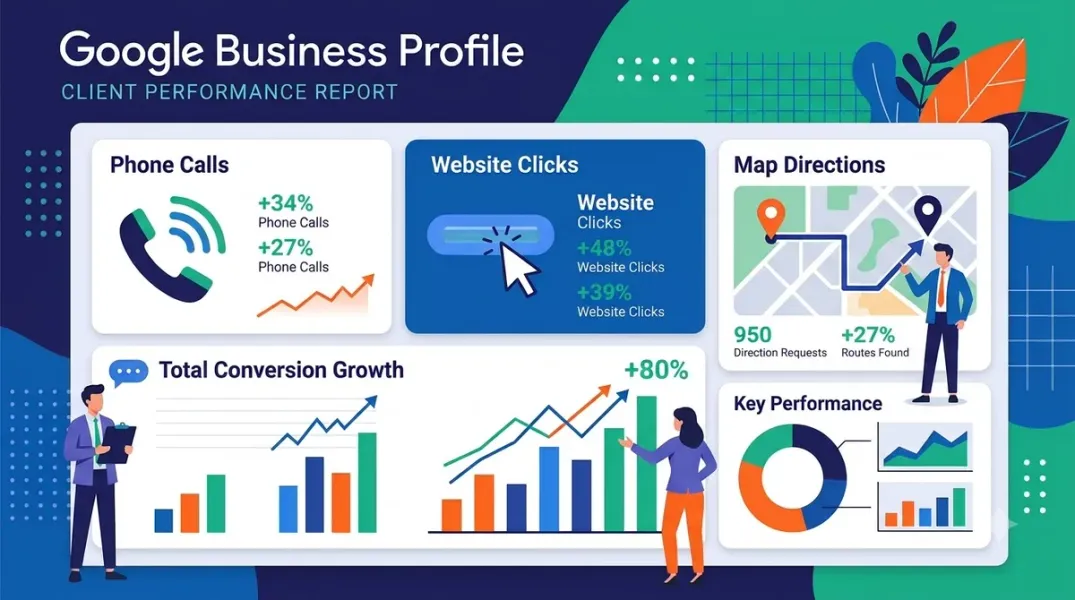
Google Business Profile client reporting is the discipline of translating profile activity—calls, website clicks, direction requests—into a narrative that answers the three questions every local client is silently asking: are we showing up, are people calling, and what did you do for the money. This guide covers the metrics, the 2026 GA4 integration that changes the reporting workflow, the call-tracking gap that standard tools do not close, the report structure that retains clients, and the tools that automate the assembly so the analyst can focus on the commentary.
The Three Metrics That Justify the Retainer (and the One That Does Not)
Google Business Profile Insights, now labeled Performance in the dashboard, surfaces six primary data categories: impressions, search types, actions, calls, direction requests, and website clicks. Most reports over-index on the first two and under-index on the rest.
The metrics that justify the retainer are the actions—the customer behaviors that indicate commercial intent. Direction requests measure high-intent engagement: a user who asks Maps for a route has decided to visit. Phone calls measure direct lead generation from the profile. Website clicks measure traffic driven by the profile to the client’s site.
The metric that does not justify the retainer on its own is impressions. An impression is a profile appearance, not a customer action. A client who sees 40,000 impressions and four calls does not feel reassured. A client who sees 847 additional people searching for their type of business and 34 calls from the profile understands exactly what they are paying for.
The reporting rule that follows is simple: lead with conversion metrics, support with engagement metrics, and use visibility metrics only as context. The three-tier hierarchy is conversion (calls, direction requests, website clicks, bookings), engagement (GBP actions, sessions, review responses), and visibility (map pack position, keyword rankings, impressions). Most reports invert that order. Flip it.
What Each Metric Actually Means (and What It Does Not)
The definitions matter because the misinterpretation is where reporting credibility breaks.
Calls in GBP Insights count clicks on the call button—not answered calls, not qualified calls, not calls that lasted more than ten seconds. Google’s own documentation is explicit: calls are “clicks on the call button”. A call button click on a mobile device is a call attempt; a user who taps it and hangs up before connecting is still counted.
Direction requests capture navigation requests, which indicate that a customer searched for a route to the physical location. A direction request is a strong intent signal, but it is not a store visit. Google itself acknowledges that the integration “helps bridge the gap for measuring in-store intent by providing proxy metrics for physical visits”.
Website clicks count outbound visits from the profile to the business’s external website. This is the cleanest attribution path in the native metrics because the click leaves Google and enters the client’s analytics stack, where behavior can be tracked.
The reporting discipline is to name the proxy honestly. A direction request is not a sale. A call button click is not a booked appointment. The report should present these as high-intent signals and pair them with the client’s own conversion data—booking system, CRM, or point-of-sale—wherever possible.
The 2026 Shift: GA4 Now Pulls GBP Metrics Natively
The reporting workflow changed materially in June 2026. Google added a native link between Google Business Profile and Google Analytics 4, bringing local interaction data—calls, direction requests, bookings, website clicks, messages, and menu views—into the same reporting environment as web and app metrics.
The integration imports seven core metrics: GBP interactions, calls, bookings, directions, website clicks, messages, and menus. The link is created in the Analytics Admin panel under Product links, and it requires no tag changes or custom dimension mapping. A dedicated reporting collection appears in the Reports menu immediately after the link is established.
The constraint worth knowing: GBP metrics are available on a rolling six-month window. If an analyst applies a date range beyond that period, Analytics loads the most recent available data rather than returning an error—which limits year-over-year comparisons inside the same interface.
The practical effect on client reporting is that the analyst no longer has to toggle between two dashboards, export two CSVs, and reconcile two date ranges. The profile actions sit alongside session data, conversion data, and channel performance. The local SEO story and the web analytics story become one story, which is the story the client actually wants to hear.
The Call-Tracking Gap (and Why the Numbers Will Never Match)
The most important reporting conversation an agency will have with a client is the one about why the GBP call number and the call-tracking number do not agree. They never will, and the reason is structural.
GBP Insights only captures calls from mobile devices that begin with a tap on the call button. A customer who sees the number on a desktop and dials it manually is invisible to the native metric. GBP now requires a call duration of at least 30 seconds before counting a call in the dashboard insights, which excludes short connections and misdials. The native call metric captures roughly 30 to 50 percent of actual calls placed to the business from the profile.
The fix is a dedicated tracking number placed in the GBP listing, so every inbound call can be logged, categorized, and attributed to its source. CallRail’s GMB integration inserts a tracking number into the listing as the primary business number and labels GMB-related call traffic in its reporting; UTM parameters automatically track traffic that arrives at the website from the profile as well. Invoca positions itself as the replacement for the call tracking Google removed from Business Profiles in 2023, and documents that most searches are on mobile and mobile searchers are 39% more likely to call a business.
The reporting rule is to use GBP insights for the trend and call tracking for the truth. Do not present them as competing numbers. Present the native metric as the directional signal and the call-tracking number as the operational source of record, and explain the gap in one sentence so the client is not surprised when they compare the two themselves.
Triangulating When the Numbers Do Not Add Up
GBP Insights can be wrong. A Whitespark-reported reporting bug in Q3 2025 caused sudden drops in reported search impressions that were not matched by a visibility loss. The lesson from that incident is the reporting discipline that separates a credible agency from a reactive one.
The triangulation method compares three signals before concluding anything: GBP Performance, GA4 (organic traffic to local landing pages), and Search Console (clicks, impressions, average position, top queries). If impressions fall while actions stay steady, the report should say the drop is likely a reporting artifact, not a business problem. If impressions, actions, and local landing page traffic fall together, the report should say the issue is real and propose a fix.
The rule the client will remember: trust the trend across multiple metrics, not a single number in a single month.
The Report Structure That Retains Clients
A high-retention GBP report is not a data dump. It has four sections in priority order, and it fits on four pages.
-
Executive summary in plain English. Two paragraphs no tool can write. One says what happened this month in business terms: “Your profile appeared in front of 847 additional people searching for your type of business, and 34 of them called you directly from Google.” One says what happens next month and why.
-
Conversion metrics first. Calls, direction requests, website clicks, and bookings—period-over-period, with one sentence of context per metric. If the client has a booking system or CRM, pair the GBP metric with the downstream outcome. The 59 measurable actions per month that the average small business generates from GBP is a useful benchmark context for a single-location client.
-
Engagement and visibility metrics as support. Profile views, search queries, and map pack position explain the conversion trend rather than leading it. A drop in calls is easier to understand when the report shows a corresponding drop in discovery searches, or a map pack position change.
-
Proof of work. The posts published, review responses sent, photos added, hours corrected, and citations fixed. This section answers “what did you do for the money” before the client asks.
The delivery format matters as much as the structure. Reports that arrive in the inbox get read; dashboards behind a password usually do not. A branded email with the four sections is a better retention tool than a login the client never uses.
The Tools and the Automation Layer
The reporting stack splits into GBP-native reporting, call tracking, and agency reporting platforms. The right combination depends on whether the gap is attribution, presentation, or both.
GBP-native reporting is the foundation. Locafy’s guide recommends a monthly report that includes total profile views, total customer actions, top 10 search queries with impression counts, and photo view comparisons—all available from the Performance tab. CiteCue documents the multi-location workflow: select several profiles in Business Profile Manager, choose Insights, and download one report for cross-branch comparison.
Call tracking closes the attribution gap. CallRail labels GMB-related call traffic and traces website calls back to the profile via UTM parameters. Invoca provides a dedicated replacement for the native call tracking Google removed, with source attribution for calls from local listings. Keepers Digital describes the dedicated-number model: a number that appears exclusively on the GBP listing so every inbound call can be logged and attributed.
Agency reporting platforms automate the assembly and the narrative layer. AgencyAnalytics aggregates performance from up to 50 locations into one view, with drill-down to individual store performance and 85+ integrations including Google Business Profile insights, from $25/month. ReportsMate is built email-first, with white-label reports and AI insights, on a 14-day free trial and a two-minute setup. Agency Dashboard is positioned specifically for the GBP reporting workflow, translating impressions, direction requests, call clicks, and review signals into a client narrative.
The automation dividend is the same one that shows up across the local SEO reporting category: hours returned to the analyst that should be reinvested in the two paragraphs that no tool can write. The report that retains a client is the one where a human explains what the numbers mean and what happens next—not the one where a platform exported a PDF.
Conclusion
Reporting Google Business Profile calls, clicks, and directions to clients is not a dashboard configuration task. It is a translation task: turning profile activity into the business language the client uses to decide whether to renew.
The framework that works has four parts. Lead with the actions that indicate commercial intent—calls, direction requests, website clicks—and treat impressions as context. Use the 2026 GA4 integration to put local profile data alongside web analytics, and use call tracking for the operational truth that native insights cannot provide. Triangulate across GBP, GA4, and Search Console before drawing a conclusion from any single number. And deliver a four-section report with an executive summary in plain English, conversion metrics first, visibility as support, and proof of work.
The data is on the side of doing this properly. Local searches drive over 2 billion phone calls, website clicks, and direction requests to US businesses every month, and phone calls from local search convert three times more often than web clicks. A client who can see those outcomes does not need to be convinced that local SEO works. They need a report that shows it.
Call to Action
Rebuild your GBP report around the four sections this month. Open your current template and move calls, direction requests, and website clicks to the first data section, before rankings or impressions. Write one sentence of context for each metric—period-over-period, in plain English. Then check whether your GBP listing has a tracking number and whether your GA4 property is linked to the profile; if either is missing, fix that before the next reporting cycle. Finally, add a triangulation note to the report: one line explaining what you checked in GA4 and Search Console before drawing a conclusion. The report that retains the client is the one that answers “did the phone ring” before the client has to ask.
FAQs
What do “calls” mean in Google Business Profile Insights?Calls in GBP Insights count clicks on the call button, not answered or qualified calls. Google’s documentation is explicit that the metric measures call button taps, and the native metric only captures calls from mobile devices. A dedicated call-tracking number is required to measure actual calls placed to the business.
Why do GBP calls and call tracking numbers never match?GBP Insights only captures mobile calls that begin with a call button tap, and Google now requires a 30-second minimum call duration before counting a call in the dashboard. Manually dialed calls and desktop calls are missing. The native metric captures roughly 30–50% of actual calls, so call tracking is the source of record for the true number.
What is the GA4 integration with Google Business Profile?Google added a native link between GA4 and Google Business Profile in June 2026. It imports seven metrics—GBP interactions, calls, bookings, directions, website clicks, messages, and menus—into a dedicated reporting collection in GA4, with a rolling six-month data window. The link is created in the Analytics Admin panel under Product links and requires no tag changes.
What should a Google Business Profile client report include?Four sections: an executive summary in plain English, conversion metrics first (calls, direction requests, website clicks, bookings, period-over-period with context), engagement and visibility metrics as support (profile views, search queries, map pack position), and proof of work (posts, review responses, photos, hours corrections, citations). Lead with the actions the client cares about, not impressions.
How often should I report GBP performance to clients?Monthly is the standard cadence for local SEO reporting. Weekly is too granular and creates anxiety over normal fluctuations; quarterly is too infrequent, because by the time a problem is spotted, three months of potential performance have been lost. Include month-over-month and year-over-year comparisons where data allows.
What should I do when GBP numbers do not add up?Triangulate before concluding anything. Compare GBP Performance with GA4 (organic traffic to local landing pages) and Search Console (clicks, impressions, average position, top queries). If impressions fall while actions stay steady, the issue is likely a reporting artifact. If impressions, actions, and local landing page traffic fall together, the problem is real and needs a fix.
What tools automate GBP client reporting?AgencyAnalytics aggregates up to 50 locations with GBP insights integration from $25/month. ReportsMate provides white-label email-first reports with AI insights. CallRail and Invoca close the call-attribution gap with dedicated tracking numbers and source labeling. Agency Dashboard is built specifically for translating GBP impressions, calls, and direction requests into a client narrative.
Internal & External Links
Internal links (to other posts in this series):
- How to Compare Local Marketing Performance Across Different Business Branches (previous post)
- How to Track Review Response Rate and Response Time Across Your Locations (next in series)
- How to Create White-Label Local SEO Reports for Your Agency Clients
- How to Manage Google Business Profiles for Multiple Clients Without Account Chaos
- How to Identify Repeated Customer Complaints Across Multiple Store Locations
- Best Google Business Profile Management Software for Small Businesses in 2026
External links (sources referenced in this article):
- ppc.land — Google Analytics links Business Profiles to report local metrics: https://ppc.land/google-analytics-links-business-profiles-to-report-local-metrics/
- Search Engine Journal — Google Analytics Is Adding Google Business Profile Data: https://www.searchenginejournal.com/google-analytics-google-business-profile-data/
- Locafy — Understanding Google Business Profile Insights and Analytics: https://www.locafy.com/blog/gbp-insights-guide
- Locafy — Local SEO Reporting: What to Track and How to Show ROI: https://locafy.com/blog/local-seo-reporting
- Agency Dashboard — Google My Business Reporting: Proving Local SEO Value: https://agencydashboard.io/blog/google-my-business-reporting-agencies
- ReportsMate — Google Business Profile Report Template for Clients: https://www.reportsmate.com/blog/google-business-profile-report-template
- The Local Agency — Why Your GBP Insights Numbers Don’t Add Up — and What to Trust Instead: https://thelocalagency.com/gbp-insights-dont-add-up/
- CallRail — Using CallRail with Google My Business: https://support.callrail.com/hc/en-us/articles/5712674568717
- Invoca — Google Removed Call Tracking from Business Profiles. Here’s What Marketers Can Do: https://www.invoca.com/uk/blog/google-removed-call-tracking-from-business-profiles-heres-what-marketers-can-do
- Keepers Digital — Call Tracking for Google Business Profile: Measuring Local Search Calls: https://keepersdigital.com
- Ottawa SEO — Google Business Profile Call Tracking Changes — April 2026: https://ottawaseo.com
- CiteCue — Track calls, bookings and directions: https://citecue.com
How to Track Review Response Rate and Response Time Across Your Locations
Grow Your Google Maps Ranking on Autopilot
Stop spending hours every week manually replying to customer reviews and writing Google posts. Busirank automates your Google Business Profile to boost your local SEO rankings and turn searchers into paying clients.
 Busirank Team